
1. Uvod
This manual provides detailed instructions for the installation, operation, and maintenance of your GIGABYTE B550M DS3H AC R2 motherboard. This micro-ATX motherboard is designed to support AMD Ryzen 5000, 4000, and 3000 series CPUs on the AM4 socket, offering a robust platform for various computing needs. Please read this manual thoroughly before beginning installation to ensure proper setup and functionality.
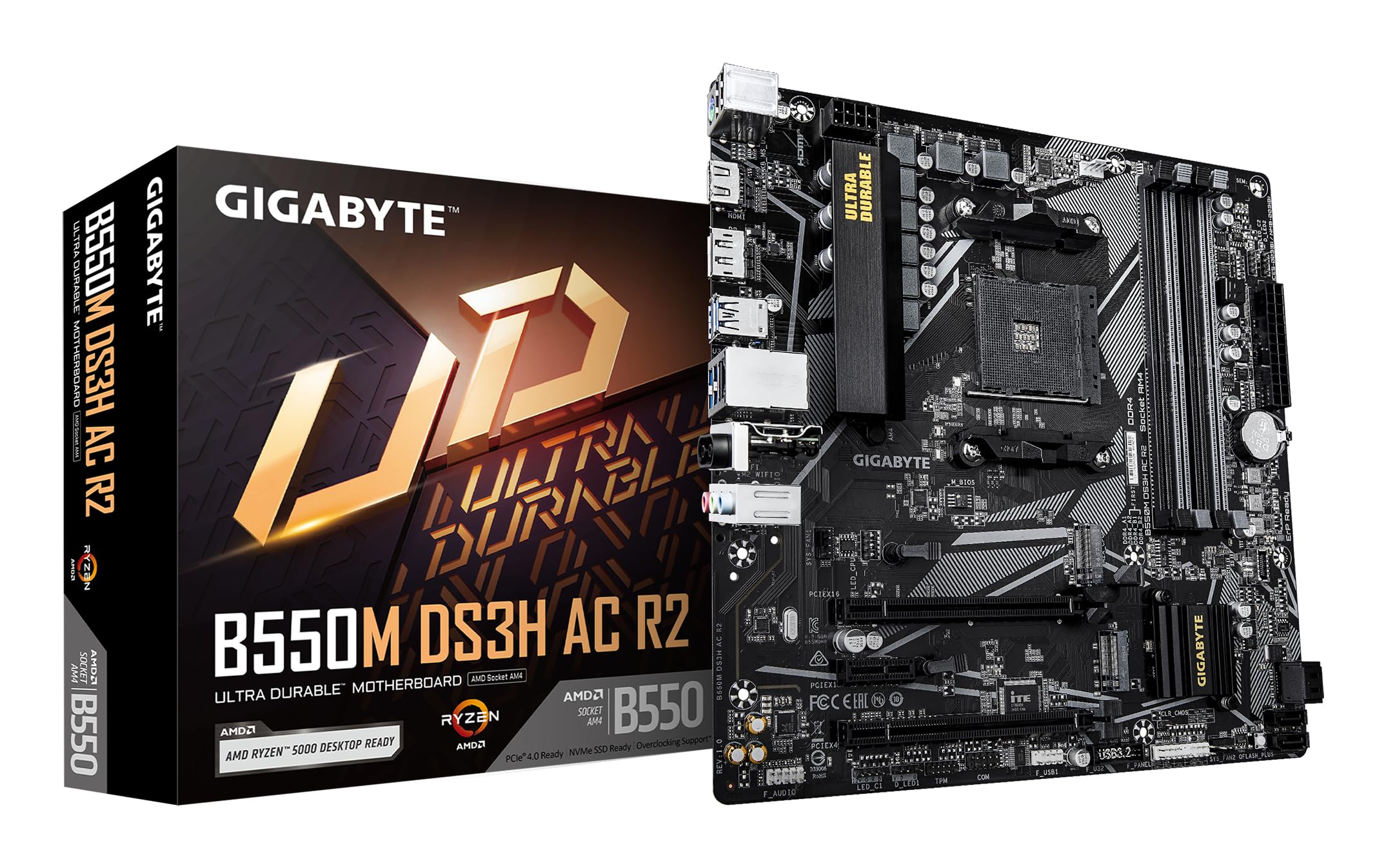
Slika 1.1: Od zgoraj navzdol view of the GIGABYTE B550M DS3H AC R2 Motherboard, showcasing its layout including the CPU socket, DIMM slots, and various connectors.
2. Ključne značilnosti
- Nabor čipov AMD B550: Supports AMD Ryzen 5000, 4000, and 3000 series CPUs with AM4 socket.
- High-Speed DDR4 Memory: Dual-channel support for up to 4733MHz (O.C.) across 4 DIMM slots.
- Advanced Storage Options: Includes one PCIe 4.0 M.2 slot and one PCIe 3.0 M.2 slot, alongside PCIe slots for graphics and expansion.
- Integrirana povezljivost: Features Wi-Fi 5, Bluetooth 5.0, and 1GbE LAN for reliable network connections.
- Flexible Display Outputs: Equipped with HDMI and DisplayPort for multi-monitor configurations.
- Pametni hladilni sistem: Smart Fan 6 with multiple temperature sensors ensures efficient thermal management.
- Q-Flash Plus: Allows BIOS updates without the need for CPU, memory, or graphics card installation.
3. Nastavitev in namestitev
3.1 Namestitev procesorja
- Prepričajte se, da je ročica podnožja procesorja v odprtem položaju.
- Carefully align the triangular mark on the AMD Ryzen CPU with the mark on the AM4 socket.
- Procesor previdno namestite v podnožje, ne da bi ga silili.
- Spustite ročico, da pritrdite CPE na svoje mesto.
- Namestite hladilnik procesorja v skladu z navodili proizvajalca.
3.2 Namestitev pomnilnika (RAM)
- Odprite sponke na obeh koncih rež za DIMM.
- Poravnajte zarezo na pomnilniškem modulu DDR4 s ključem v reži DIMM.
- Insert the memory module firmly until the clips snap into place. For dual-channel operation, refer to the motherboard manual for recommended slot configurations.
3.3 Namestitev pomnilniške naprave
This motherboard supports both M.2 NVMe SSDs and SATA drives.
- M.2 SSD: Locate the M.2 slots (one PCIe 4.0, one PCIe 3.0). Insert the M.2 SSD at an angle and secure it with the provided screw.
- SATA pogoni: Connect SATA data cables from your SSDs/HDDs to the SATA ports on the motherboard. Connect power cables from your power supply to the drives.
3.4 Namestitev razširitvene kartice
Install your graphics card or other PCIe expansion cards into the appropriate PCIe slots. Ensure they are seated firmly and secured with the case screw.
3.5 Napajalni priključki
- Priključite 24-pinski glavni napajalni priključek ATX iz napajalnika na matično ploščo.
- Priključite 8-pinski ATX 12V napajalni priključek za procesor na matično ploščo.
3.6 Zadnja V/I ploščaview

Figure 3.1: The rear I/O panel of the GIGABYTE B550M DS3H AC R2 motherboard, showing various ports including USB, HDMI, DisplayPort, LAN, and audio jacks.
The rear I/O panel provides connectivity for external devices. It includes USB 2.0, USB 3.2 Gen 1, HDMI, DisplayPort, 1GbE LAN, Wi-Fi antenna connectors, and audio jacks. Refer to the detailed diagram in the physical manual for specific port identification.
4. Navodila za uporabo
4.1 Nastavitev BIOS-a
The BIOS (Basic Input/Output System) is firmware that initializes hardware during the booting process. To enter BIOS Setup, press the DEL key during the Power-On Self-Test (POST). Here you can configure system settings, boot order, and monitor hardware status.
4.2 Q-Flash Plus
Q-Flash Plus vam omogoča posodobitev BIOS-a brez namestitve procesorja, pomnilnika ali grafične kartice. Preprosto prenesite najnovejši BIOS. file od GIGABYTE-a website, rename it to GIGABYTE.bin, save it to a USB flash drive, and insert it into the designated Q-Flash Plus USB port. Press the Q-Flash Plus button to initiate the update.
4.3 Namestitev gonilnika
After installing your operating system, install the necessary drivers for the motherboard chipset, audio, LAN, Wi-Fi, and other integrated components. These drivers are typically provided on a support DVD or can be downloaded from the official GIGABYTE webmesto.
5. Vzdrževanje
5.1 Čiščenje
Regularly clean your computer's interior to prevent dust buildup, which can lead to overheating and reduced performance. Use compressed air to remove dust from components, especially heatsinks and fans. Ensure the system is powered off and unplugged before cleaning.
5.2 Posodobitve BIOS-a
Občasno preverite GIGABYTE website for BIOS updates. Updates can improve system stability, add support for new hardware, or fix known issues. Follow the instructions provided by GIGABYTE carefully when performing a BIOS update.
5.3 Smart Fan 6
Utilize the Smart Fan 6 utility in the BIOS or GIGABYTE's software to monitor system temperatures and adjust fan speeds. Proper fan configuration helps maintain optimal operating temperatures and extends component lifespan.
6. Odpravljanje težav
- Sistem se ne zažene: Check all power connections (24-pin ATX, 8-pin CPU), ensure RAM modules are properly seated, and verify the CPU is correctly installed. Try clearing the CMOS.
- Brez izhoda za prikaz: Confirm the graphics card is fully seated in its PCIe slot and connected to power (if required). Ensure your monitor cable is connected to the graphics card, not the motherboard's integrated graphics ports (unless using an APU).
- Težave s perifernimi napravami: If USB devices or other peripherals are not working, ensure drivers are installed and check BIOS settings for port enablement.
- Nestabilnost/zrušitve sistema: This can be caused by outdated drivers, overheating, or faulty hardware. Update drivers, monitor temperatures, and test components individually if possible.
- Napaka pri posodobitvi BIOS-a: If a BIOS update fails, use the Q-Flash Plus feature to recover the BIOS.
7. Specifikacije
| Funkcija | Specifikacija |
|---|---|
| Znamka | GIGABYTE |
| Ime modela | B550M DS3H AC R2 |
| CPU vtičnica | Vtičnica AM4 |
| Združljivi procesorji | AMD Ryzen serija 3000, AMD Ryzen serija 4000, AMD Ryzen serija 5000 |
| Vrsta čipseta | AMD B550 |
| Tehnologija pomnilnika RAM | DDR4 |
| Hitrost ure pomnilnika | Do 4733 MHz (pretaktiranje) |
| Na voljo pomnilniške reže | 4 |
| Največja velikost RAM pomnilnika | 128 GB |
| Vmesnik grafične kartice | PCI Express 4.0 |
| Total PCIe Ports | 1 (PCIe 4.0 x16 for GPU) + other PCIe slots |
| M.2 reže | 1x PCIe 4.0 M.2, 1x PCIe 3.0 M.2 |
| Total SATA Ports | 4 |
| Brezžična povezljivost | Wi-Fi 5, Bluetooth 5.0 |
| LAN | 1 GbE LAN |
| Skupno število vrat USB | 6 (zadnji V/I) + notranji priključki |
| Prikaz izhodov | 1x HDMI, 1x DisplayPort |
| Faktor oblike | Mikro ATX |
| Dimenzije artikla D x Š x V | 24.4 D x 24.4 Š x 3.5 V centimetrov |
| Teža predmeta | 980 gramov |
8. Informacije o garanciji
The GIGABYTE B550M DS3H AC R2 motherboard comes with a 3-YEAR Manufacturer Warranty. Please retain your proof of purchase for warranty claims. For detailed terms and conditions, refer to the official GIGABYTE warranty policy available on their webmesto.
9. Podpora in stik
Za tehnično podporo, prenos gonilnikov, posodobitve BIOS-a in dodatne informacije o izdelku obiščite uradno spletno stran GIGABYTE. website. You can also contact GIGABYTE customer service for assistance.
Kontaktni podatki proizvajalca:
GIGABYTE Technology (India) Pvt. Ltd.
Unit No. 807 & 808, 8th Floor, Naman Midtown B-Wing,
Elphinstone Road, Mumbai – 400013, India
For the most up-to-date contact details and support resources, please refer to the GIGABYTE official webspletno mesto: www.gigabyte.com