
Uvod
Thank you for choosing the GGSTOPWATER XG99PRO Open Ear Headphones. These wireless Bluetooth 5.4 earbuds are designed for comfort and stability, featuring an open-ear design, earhooks, and IPX5 water resistance. This manual provides detailed instructions to help you set up, operate, and maintain your headphones for optimal performance.
The ergonomic design ensures a firm fit, preventing slippage during activities. With multi-point support, the weight is evenly distributed for comfortable long-term wear. Bluetooth 5.4 technology provides a stable and fast connection. The open-ear design helps prevent pressure and irritation to the ear canal and eardrum, promoting extended comfortable use.
Vsebina paketa
- GGSTOPWATER XG99PRO Open Ear Headphones (Left and Right)
- Etui za brezžično polnjenje
- USB polnilni kabel
- Uporabniški priročnik (ta dokument)
Konec izdelkaview
Familiarize yourself with the components of your GGSTOPWATER XG99PRO Open Ear Headphones.
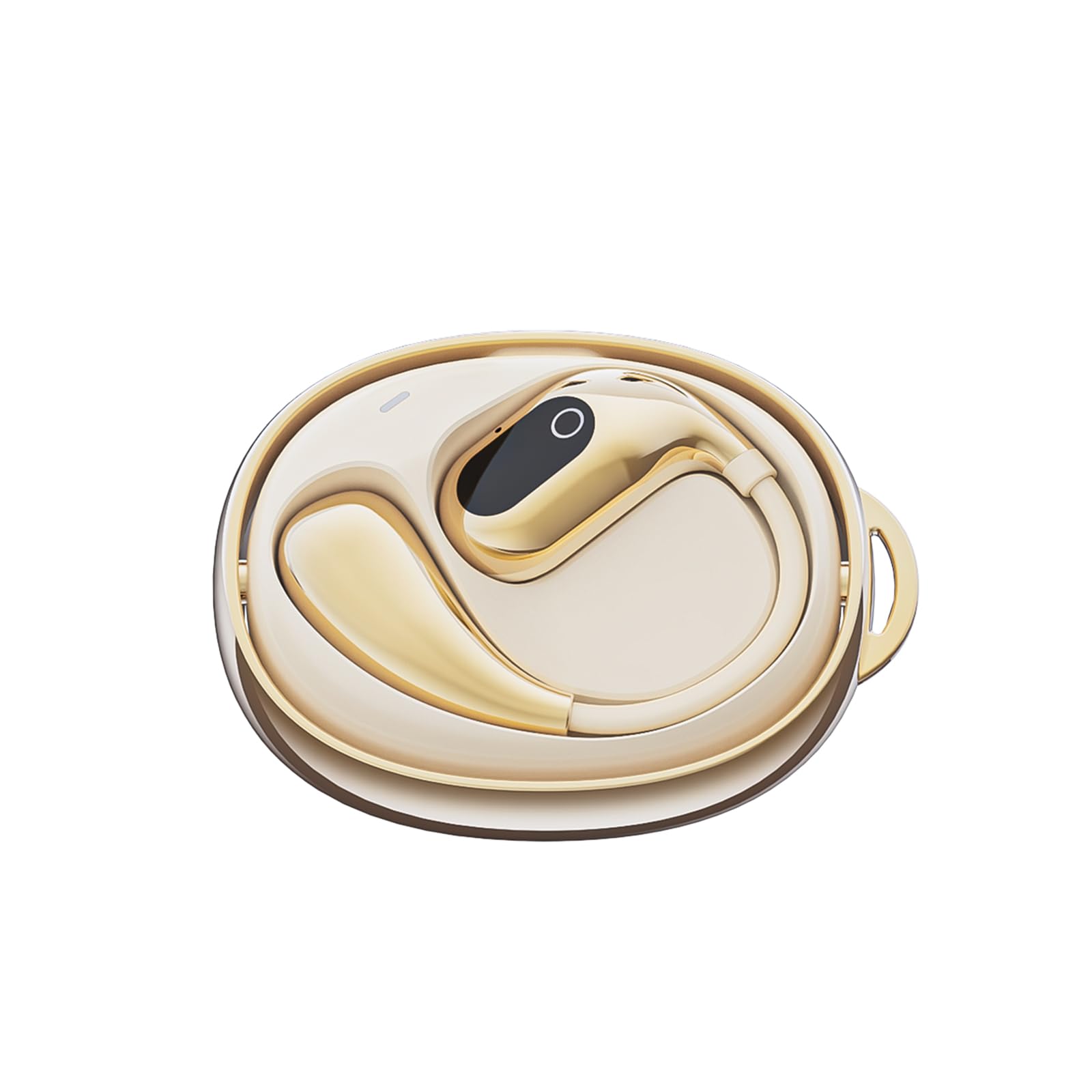
Slika 1: The GGSTOPWATER XG99PRO wireless charging case. This compact case protects and charges your earbuds.

Slika 2: The XG99PRO earbuds securely placed within their charging case. The case ensures the earbuds are charged and ready for use.

Slika 3: An XG99PRO earbud worn on the ear, demonstrating its open-ear design and secure earhook fit. This design allows for situational awareness while listening.
Nastavitev
1. Polnjenje slušalk
- Vstavite obe slušalki v polnilno ohišje. Prepričajte se, da sta pravilno nameščeni.
- Polnilni kabel USB priključite na polnilno vtičnico na ohišju in na vir napajanja (npr. stenski adapter USB, vrata USB računalnika).
- The indicator light on the charging case will show the charging status. A full charge for the case and earbuds typically takes approximately 1.5-2 hours.
- The earbuds provide up to 6 hours of listening time on a single charge, and the charging case extends the total battery life to up to 60 hours.
2. Seznanjanje z napravo Bluetooth
- Prepričajte se, da so slušalke napolnjene.
- Odprite polnilno ohišje. Slušalke bodo samodejno prešle v način seznanjanja, kar bo označila utripajoča LED lučka na slušalkah.
- V napravi (pametnem telefonu, tablici, računalniku) omogočite Bluetooth.
- Iskanje available Bluetooth devices. Select "XG99PRO" s seznama.
- Ko so slušalke povezane, bo LED indikator na njih prenehal utripati in zaslišali boste potrditveni zvok.
- Slušalke se bodo samodejno ponovno povezale z zadnjo seznanjeno napravo, ko jih vzamete iz etuija, če je na napravi omogočen Bluetooth.
Navodila za uporabo
The XG99PRO headphones feature touch controls for easy management of audio and calls.
Vklop/izklop
- Vklop: Open the charging case, and the earbuds will power on automatically. Alternatively, press and hold the touch control area on both earbuds for 3 seconds.
- Ugasniti: Place the earbuds back into the charging case and close the lid. They will power off automatically. Alternatively, press and hold the touch control area on both earbuds for 5 seconds.
Nadzor glasbe
- Predvajanje/pavza: Enkrat se dotaknite območja za upravljanje na dotik na kateri koli slušalki.
- Naslednja skladba: Dvakrat tapnite območje za upravljanje na dotik na desni slušalki.
- Prejšnja skladba: Dvakrat tapnite območje za upravljanje na dotik na levi slušalki.
- Povečaj glasnost: Triple tap the touch control area on the right earbud.
- Znižaj glasnost: Triple tap the touch control area on the left earbud.
Nadzor klicev
- Sprejmi/končaj klic: Enkrat se dotaknite območja za upravljanje na dotik na kateri koli slušalki.
- Zavrni klic: Pritisnite in držite območje za upravljanje na dotik na kateri koli slušalki 2 sekundi.
Glasovni pomočnik
- Aktiviranje glasovnega pomočnika: Pritisnite in držite območje za upravljanje na dotik na kateri koli slušalki 3 sekundi (ko ne kličete).
Vzdrževanje
Pravilno vzdrževanje zagotavlja dolgo življenjsko dobo in optimalno delovanje vaših slušalk.
Čiščenje
- Slušalke in polnilno ohišje nežno obrišite z mehko, suho krpo, ki ne pušča vlaken.
- Ne uporabljajte abrazivnih čistil, topil ali aerosolnih razpršil.
- Avoid getting moisture into any openings. The earbuds are IPX5 water-resistant, meaning they can withstand splashes and sweat, but are not designed for submersion.
Shranjevanje
- Ko slušalk ne uporabljate, jih vedno shranite v polnilno škatlico, da jih zaščitite in ohranite napolnjene.
- Hranite na hladnem in suhem mestu, stran od ekstremnih temperatur in neposredne sončne svetlobe.
Odpravljanje težav
Če naletite na kakršne koli težave, si oglejte naslednje pogoste težave in rešitve:
| Težava | rešitev |
|---|---|
| Slušalke se ne seznanijo z napravo. |
|
| Iz ene ali obeh slušalk ni zvoka. |
|
| Polnilna škatlica se ne polni. |
|
Specifikacije
| Funkcija | Podrobnost |
|---|---|
| Ime modela | XG99PRO |
| Znamka | GGSTOPWATER |
| Tehnologija povezljivosti | Brezžično (Bluetooth 5.4) |
| Namestitev ušesa | On Ear (Open Ear Design) |
| Faktor oblike | Na uho |
| Vodoodpornost | IPX5 |
| Impedanca | 40 Ohmov |
| Teža predmeta | 2 unč |
| Baterije | Potrebna je 2 baterija tipa C (priložena) |
| Vključene komponente | Etui za brezžično polnjenje |
Informacije o garanciji
GGSTOPWATER products are covered by a limited warranty from the date of purchase. Please retain your proof of purchase for warranty claims. This warranty covers manufacturing defects and does not cover damage caused by misuse, accidents, unauthorized modifications, or normal wear and tear. For specific warranty terms and conditions, please refer to the warranty card included with your product or contact customer support.
Podpora uporabnikom
If you have any questions, require technical assistance, or need further support, please contact our customer service team. You can find contact information on our official webspletnem mestu ali prek prodajalca, kjer ste izdelek kupili.
Spletna podpora: Visit the GGSTOPWATER official webspletno mesto za pogosta vprašanja in vire za podporo.
Podpora po e-pošti: [Placeholder for Support Email Address]