

1. Uvod
This manual provides comprehensive instructions for setting up, operating, and maintaining your EPOMAKER X Aula F65 PRO Wireless Mechanical Gaming Keyboard. Designed for peak performance and personalized perfection, the F65 PRO features hot-swappable pre-lubed switches, a sound-dampened Gasket structure, programmable keys, RGB lighting, and versatile tri-mode connectivity.
2. Kaj je v škatli
Upon unboxing your EPOMAKER X Aula F65 PRO keyboard, please ensure all the following items are present:
- Brezžična mehanska igralna tipkovnica EPOMAKER X Aula F65 PRO
- 2-v-1 snemalnik za tipke in stikala
- Kabel USB (Type-A do Type-C)
- 2.4 GHz brezžični sprejemnik
- 3 dodatna stikala
- Uporabniški priročnik (ta dokument)
Video: EPOMAKER X Aula F65 PRO Unboxing & Showing & Typing Video. This video demonstrates the unboxing process and shows the contents of the package, including the keyboard and accessories.
Video: F65 PRO Wireless Mechanical Gaming Keyboard Unboxing Video. This video provides a quick overview of the unboxing experience for the F65 PRO keyboard.
3. Nastavitev
3.1 Načini povezljivosti
The F65 PRO keyboard supports three connectivity modes: Bluetooth (BT), 2.4GHz Wireless, and USB-C Wired.
- Način Bluetooth (BT): Ideal for connecting to multiple devices (up to 3) such as smartphones, tablets, and laptops. Switch the mode selector on the keyboard to 'BT'. Follow your device's Bluetooth pairing instructions.
- 2.4 GHz brezžični način: Provides a stable and low-latency connection for gaming. Insert the 2.4GHz USB receiver into your computer's USB port. Switch the mode selector on the keyboard to '2.4G'.
- Žični način USB-C: For a direct, zero-latency connection and charging. Connect the provided USB-C cable to the keyboard and your computer. Switch the mode selector on the keyboard to 'Wired'.

Image: Tri-Mode Connectivity. This image illustrates the various connectivity options available for the F65 PRO keyboard, highlighting its compatibility with multiple device types.
3.2 Fizična postavitev
Place the keyboard on a stable, flat surface. The keyboard features silicone stage-feet for stability and an ergonomic typing angle.

Image: Ergonomic Typing Angle. This image highlights the comfortable typing angle and stable feet of the F65 PRO keyboard.
4. Navodila za uporabo
4.1 Nadzor osvetlitve ozadja RGB
The F65 PRO features dynamic RGB backlighting with various effects and customization options.
- Vklop/izklop osvetlitve ozadja: Pritisnite FN + vračalka.
- Toggle Backlight Effect: Pritisnite FN + \ |.
- Preklopi barvo osvetlitve ozadja: Pritisnite FN + Enter.
- Prilagodite svetlost osvetlitve ozadja: Pritisnite FN + ↓ (zmanjšanje) oz FN + ↑ (povečanje).
- Adjust Backlight Effect Speed: Pritisnite FN + ← (zmanjšanje) oz FN + → (povečanje).
- Toggle Light Strip Effect: Pritisnite FN + R_SHIFT.
- Adjust Light Strip Brightness: Pritisnite FN + . > (zmanjšanje) oz FN + / ? (povečanje).
- Toggle Light Strip Color: Pritisnite FN + / ? (while holding FN).
Video: EPOMAKER X Aula F65 PRO RGB Setting. This video demonstrates how to adjust the RGB lighting settings on the keyboard.
Video: EPOMAKER X Aula F65 PRO Lighting Effect Check. This video showcases various lighting effects and how to cycle through them.
4.2 Multi-functional Knob
The rotary knob on the F65 PRO provides intuitive control over volume and backlight settings.
- Pritisnite: Vklop/izklop zvoka.
- Zasukaj: Prilagodite glasnost sistema (v smeri urinega kazalca za povečanje, v nasprotni smeri urinega kazalca za zmanjšanje).
- Toggle Knob Function: Pritisnite FN + gumb to switch the knob's default function to the Home key. Press again to revert to volume control.
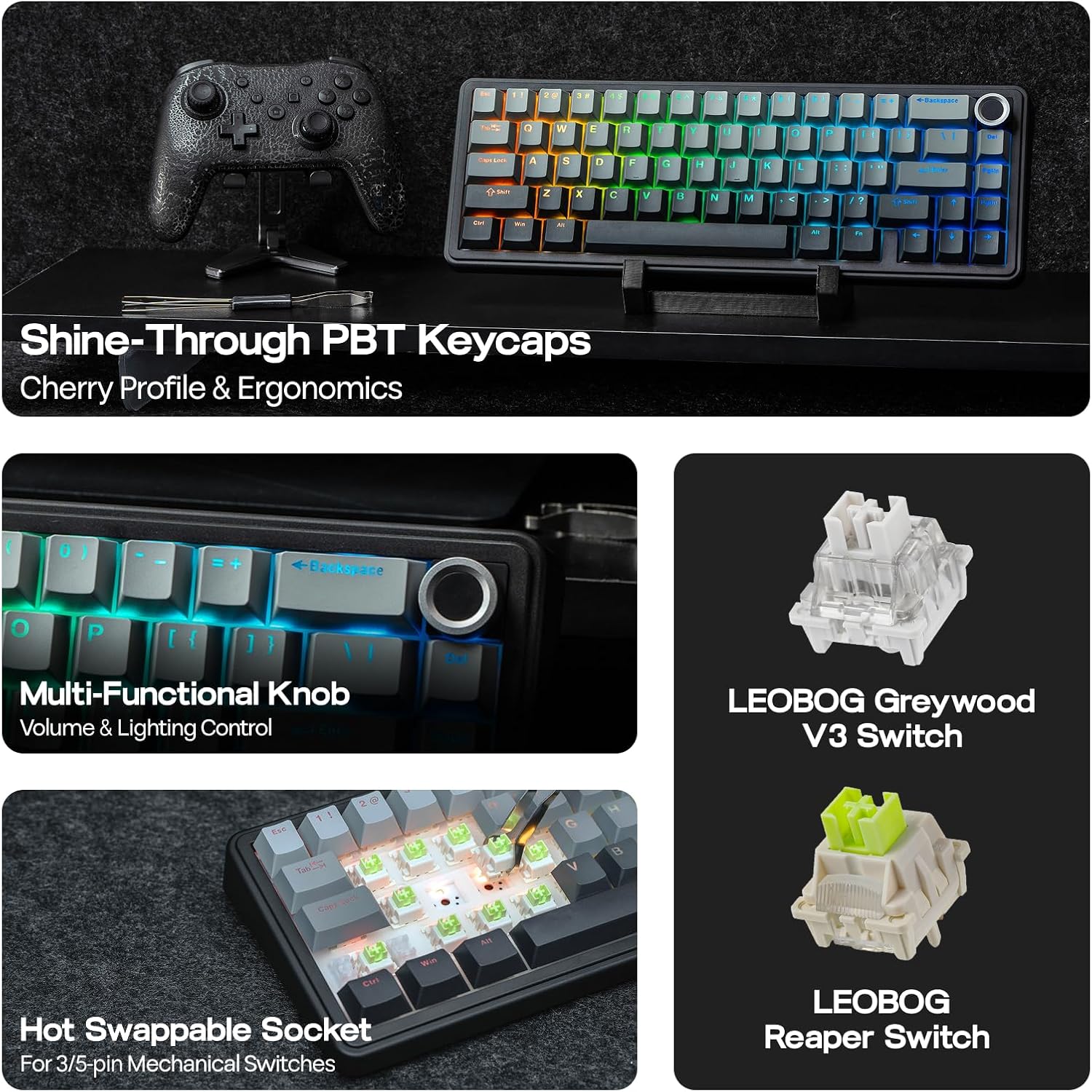
Image: Multi-Functional Knob. This image highlights the rotary knob and its functions for volume and lighting.
4.3 Game Mode and Office Mode
The keyboard can switch between Game Mode and Office Mode for optimized performance.
- Vstopite v igralni način: Press the knob for 3 seconds. The L_Win and Caps keys will flash blue.
- Enter Office Mode: Press the knob for 3 seconds again while in Game Mode. The L_Win and Caps keys will flash green.
4.4 Prilagoditev programske opreme
Customize your keyboard's settings, key assignments, macros, and lighting effects using the dedicated software.
- Sistemska nastavitev: Adjust general keyboard parameters.
- Key Remap: Prerazporedite funkcije posameznim tipkam.
- Macro Record: Create and assign complex macro sequences.
- Nastavitev svetlobe: Fine-tune RGB lighting effects and colors.
- Glasbeni ritem: Synchronize lighting with audio output.
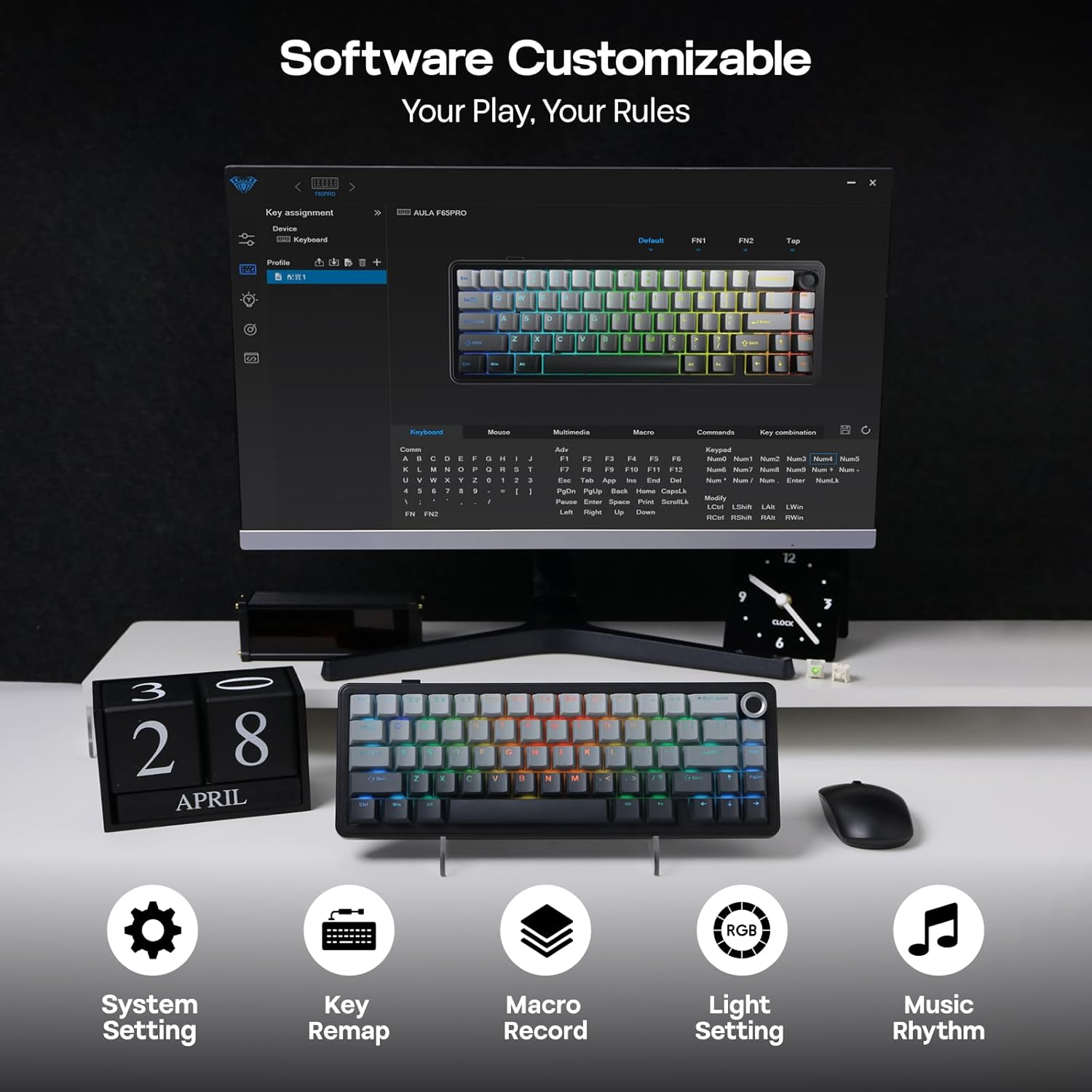
Image: Software Customizable. This image shows the keyboard's software interface for advanced customization.
5. Funkcije nadview
The EPOMAKER X Aula F65 PRO is engineered with several advanced features for an enhanced user experience:
- Stikala z možnostjo vroče menjave: Easily change 3-pin or 5-pin mechanical switches without soldering, allowing for personalized typing feel.
- Creamy Gasket-Mount Structure: Features a 5-layer sound-dampening system for a satisfyingly muted thud and responsive feel with each keystroke.
- Shine-Through PBT Keycaps: Premium PBT keycaps with topographic lines and shine-through legends for durability and vibrant RGB illumination.
- 4000mAh baterija: Offers extended wireless usage, with approximately 20 hours with RGB backlight on and 200 hours with RGB backlight off.
- Zmogljivost z nizko zakasnitvijo: Achieves 1-3ms response time in USB-C wired and 2.4GHz wireless modes, and 8ms in BT 125Hz mode.
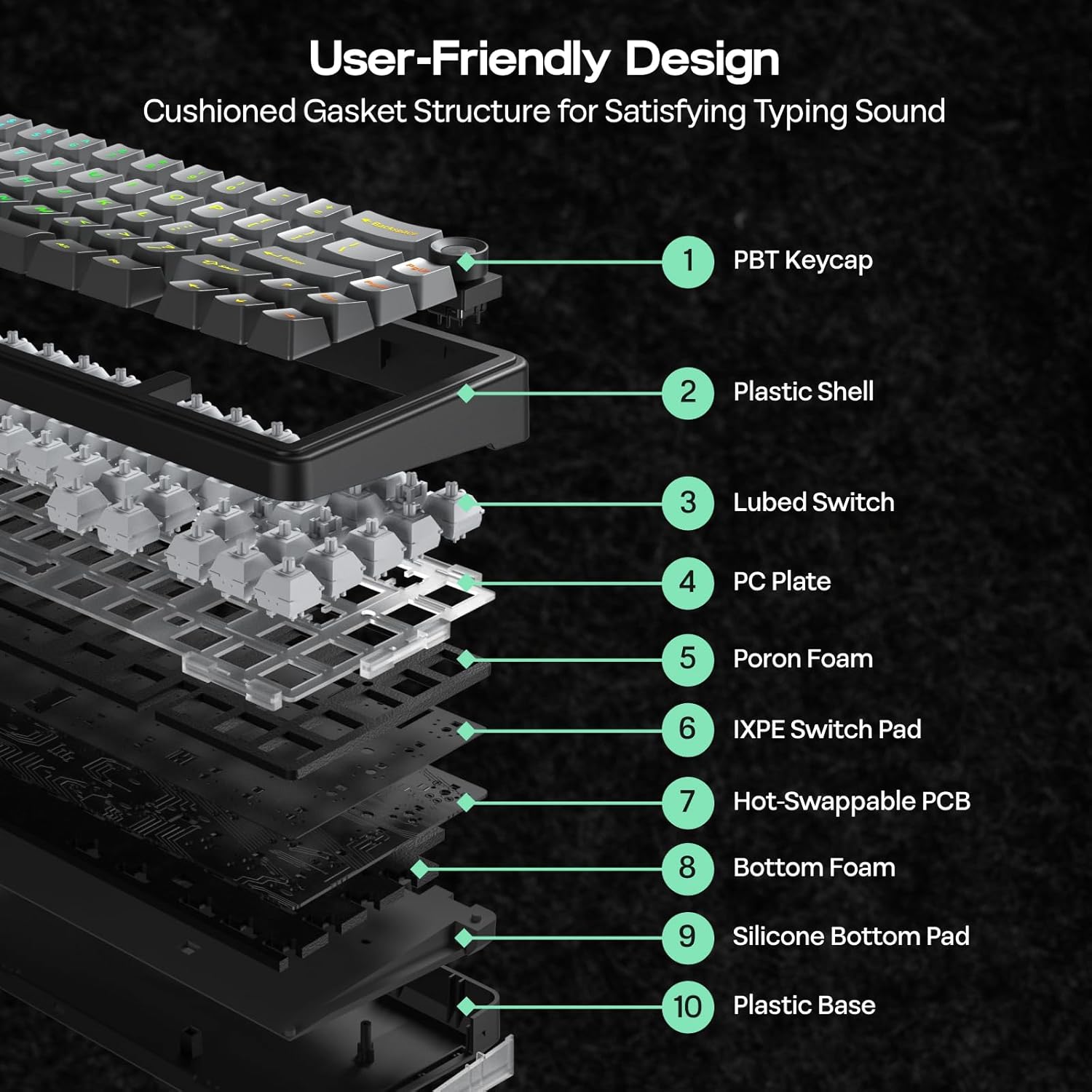
Image: User-Friendly Design (Cushioned Gasket Structure). This diagram illustrates the 5-layer sound-dampening gasket structure of the keyboard.
Image: Hot Swappable Socket. This image demonstrates the hot-swappable nature of the keyboard's switches.
Video: F65 PRO Wireless Mechanical Gaming Keyboard - Typing Sound. This video demonstrates the typing sound profile of the F65 PRO keyboard.
Video: EPOMAKER X Aula F65 PRO Typing ASMR. This video provides an ASMR-style demonstration of the keyboard's typing sound.
Video: EPOMAKER X Aula F65 PRO Typing Video. This video demonstrates the typing experience on the F65 PRO keyboard.
6. Specifikacije
| Funkcija | Podrobnost |
|---|---|
| Znamka | EPOMAKER |
| Številka modela | F65 PRO |
| Tehnologija povezljivosti | 2.4Ghz Wireless, BT, USB A to C Cable |
| Opis tipkovnice | Mehanski |
| Posebne lastnosti | 5-Layer Padding, Backlit, Gasket Structure, Hot-Swappable, Knob |
| barva | Gradientno siva |
| Osvetlitev tipkovnice | RGB |
| Mere izdelka (D x Š x V) | 4.4 cm D x 12.8 cm Š x 1.2 cm V |
| Material | Plastika |
| Vir napajanja | Napajanje na baterije |
| Tip stikala | Linear (Graywood V3 Switch) |
| Razporeditev tipkovnice | QWERTY |
| Število ključev | 66 |
| Združljive naprave | Igralna konzola, prenosnik, računalnik, pametni telefon, tablica |
| Minimum Required OS | Android 14.0, Windows 11 |
7. Vzdrževanje
To ensure the longevity and optimal performance of your EPOMAKER X Aula F65 PRO keyboard, follow these maintenance guidelines:
- Redno čiščenje: Use a soft, dry cloth to wipe down the keycaps and chassis. For deeper cleaning, use a can of compressed air to remove dust and debris from between the keys.
- Odstranitev tipkovnice in stikala: Use the provided 2-in-1 keycap-and-switch puller for safe removal of keycaps and switches. Avoid using excessive force to prevent damage.
- Izogibajte se izpostavljenosti tekočinam: Keep liquids away from the keyboard to prevent internal damage. In case of spills, immediately disconnect the keyboard and allow it to dry completely before reconnecting.
- Vzdrževanje baterije: For optimal battery life, avoid fully discharging the keyboard frequently. Charge it regularly using the provided USB-C cable.
8. Odpravljanje težav
If you encounter any issues with your EPOMAKER X Aula F65 PRO keyboard, please refer to the following common troubleshooting steps:
- Tipkovnica se ne odziva:
- Prepričajte se, da je tipkovnica napolnjena.
- Check the connectivity mode switch (BT, 2.4G, Wired) matches your connection method.
- For 2.4GHz, ensure the USB receiver is properly inserted and recognized by your device.
- For Bluetooth, ensure the keyboard is paired correctly and within range. Try re-pairing if necessary.
- Pri žičnem načinu se prepričajte, da je kabel USB-C varno priključen na tipkovnico in napravo.
- RGB osvetlitev ozadja ne deluje:
- Pritisnite FN + vračalka za vklop/izklop osvetlitve ozadja.
- Prilagodite svetlost z uporabo FN + ↑/↓.
- Ensure the keyboard is not in a low-power state.
- Ključi se ne registrirajo:
- Preverite, ali so pod tipkovnico kakšne fizične ovire.
- If a specific switch is faulty, use the provided switch puller to replace it with one of the extra switches.
- Connectivity Issues (Lag/Disconnections):
- Ensure the keyboard is close to the receiver/device for wireless connections.
- Izogibajte se motnjam zaradi drugih brezžičnih naprav.
- Update keyboard firmware if available through the customization software.
9. Garancija in podpora
The EPOMAKER X Aula F65 PRO Wireless Mechanical Gaming Keyboard comes with a 1 leta garancije od datuma nakupa.
For technical support, warranty claims, or further assistance, please visit the official EPOMAKER store or contact their customer service directly. You can find more information and support resources at the Trgovina EPOMAKER na Amazonu.