
ASECAM 5MP 8CH DVR + 4 5MP Cameras
ASECAM 5MP 8-Channel DVR Security Camera System User Manual
Comprehensive instruction manual for the ASECAM 5MP 8-Channel DVR Security Camera System, covering setup, operation, maintenance, troubleshooting, and specifications.
1. Uvod
This manual provides detailed instructions for the installation, operation, and maintenance of your ASECAM 5MP 8-Channel DVR Security Camera System. This wired system offers stable signal output and is designed for reliable outdoor surveillance with advanced features like facial, human, and vehicle detection.

Slika 1.1: Konecview of the ASECAM 5MP 8-Channel DVR Security Camera System, including the DVR, four 5MP cameras, 1TB HDD, and connection cables.
2. Vsebina paketa
Preverite, ali so v paketu prisotne vse komponente:
- 4x 5MP HD Security Cameras
- 1x 5MP HD 8-Channel DVR with pre-installed 1TB Hard Drive
- 4x 18-meter Copper Core BNC Video Cables
- 1x Ethernet kabel
- 1x USB miška
- 4x Screw Bags for camera mounting
- Napajalniki
- Vodnik za hiter začetek
- Opozorilne nalepke

Image 2.1: Visual representation of all items included in the ASECAM 5MP 8-Channel DVR Security Camera System package.
3. Navodila za nastavitev
3.1 Povezava z DVR-jem
- Povežite kamere: Connect the BNC video cables from each camera to the corresponding BNC input ports on the back of the DVR.
- Priključite napajanje: Connect the power adapters to the cameras and the DVR.
- Povežite monitor: Use an HDMI or VGA cable to connect your monitor to the DVR's video output port.
- Povežite miško: Priključite miško USB v vrata USB na DVR-ju.
- Connect Network (Optional for Remote Access): Connect an Ethernet cable from the DVR to your router for internet access and remote viewing.
- Vklop: Plug in the power adapters for the DVR and cameras. The system will boot up automatically.
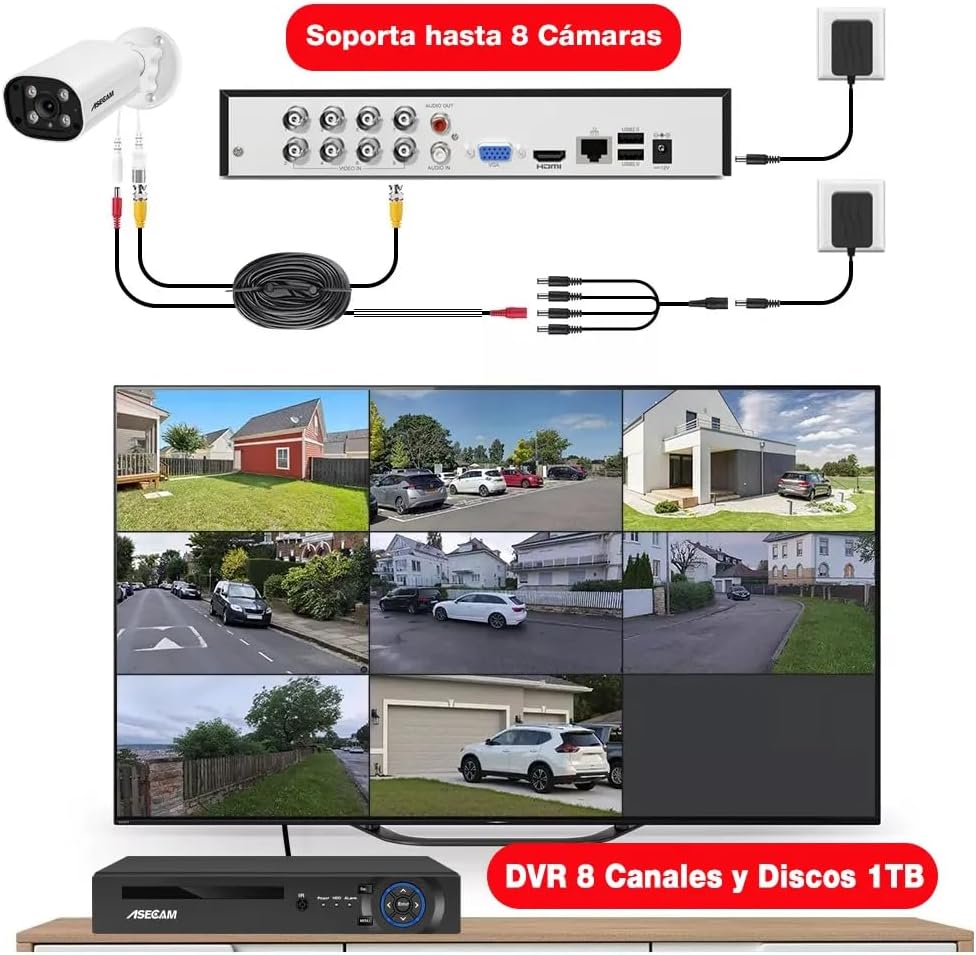
Image 3.1: Illustration of the DVR's rear panel connections, demonstrating how to connect up to 8 cameras, a monitor, and power sources.
3.2 Začetna konfiguracija
Follow the on-screen prompts to complete the initial setup, including setting the date/time, creating a password, and configuring network settings if applicable.
4. Navodila za uporabo
4.1 Snemanje in shranjevanje
The DVR comes with a pre-installed 1TB hard drive, supporting 24/7 loop recording for 30-60 days. The H.265+ encoding technology optimizes storage space, saving up to 80% compared to H.264 systems.
4.2 Funkcije pametnega zaznavanja
- Facial Recognition and Playback: The system can capture faces and allows for intelligent facial playback. This feature assists in quickly locating specific individuals in recorded footage.

Image 4.1: Demonstration of the facial detection and intelligent playback interface, showing how detected faces can be used to search recordings.
- Zaznavanje ljudi in vozil: Receive push notifications on your phone when a person or vehicle enters your property. This AI-based detection accurately identifies relevant events, reducing false alarms.

Slika 4.2: Vizualni primerample of human and vehicle detection in a surveillance area, highlighting how the system identifies and tracks subjects.
- Customizable Motion Detection and Alerts: Define specific areas for motion detection to receive alerts via app push notifications or email. This helps focus on critical zones and minimize unnecessary alerts.
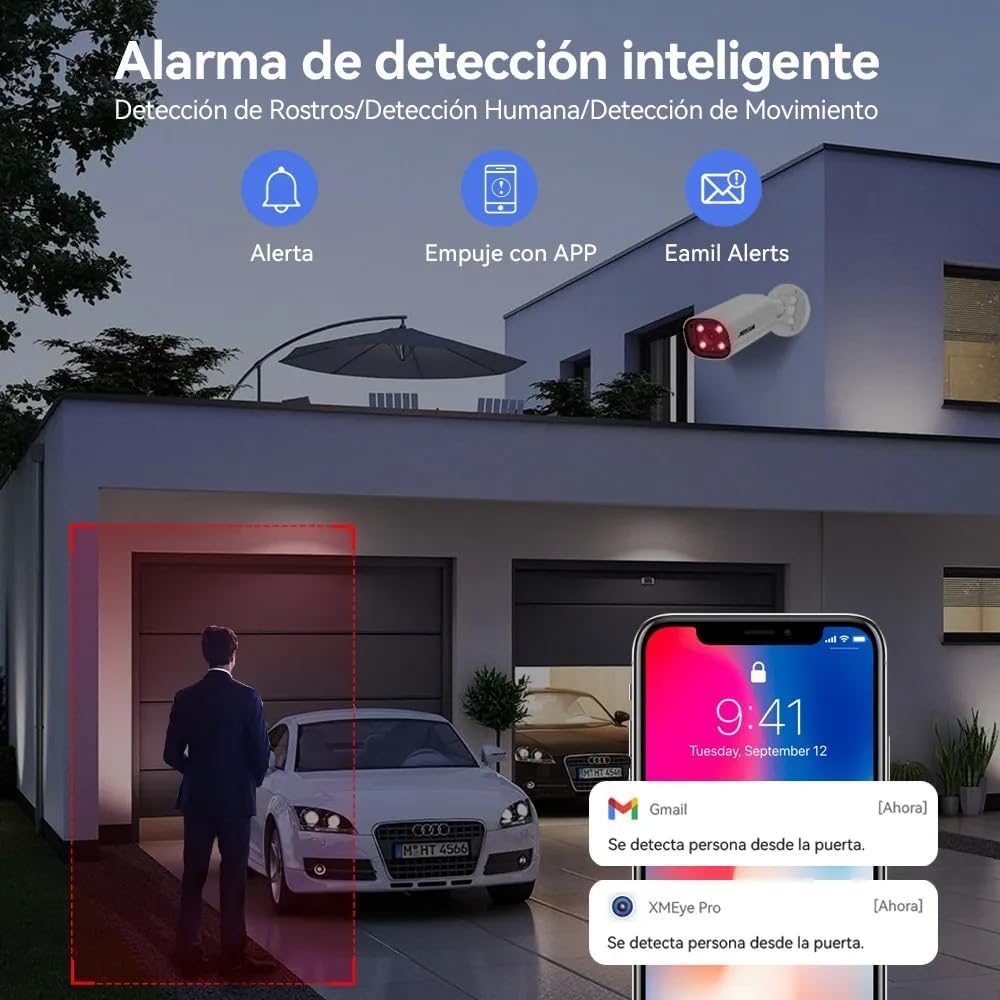
Slika 4.3: Primerample of smart detection alerts, showing notifications for person detection via app and email.
4.3 Zvočna funkcionalnost
The 5MP cameras feature built-in high-quality microphones for one-way audio recording, capturing sound from the surveillance area.

Image 4.4: Illustration of the one-way audio feature, demonstrating sound capture from the camera's location.
4.4 Dnevni in nočni vid
The cameras provide 5MP Super HD clarity during the day and utilize powerful infrared chips for clear night vision up to 50 meters, even in complete darkness.

Image 4.5: Comparison showing the clarity of 5MP Super HD day vision and detailed infrared night vision.
4.5 Oddaljeni dostop
Access your camera feeds remotely from anywhere using the "XMEye Pro" application on your smartphone or by visiting "xmeye.net" on a PC/MAC. The system supports multi-screen viewing and shared access for multiple users.
5. Vzdrževanje
Redno vzdrževanje zagotavlja optimalno delovanje in dolgo življenjsko dobo vašega varnostnega sistema.
- Čiščenje fotoaparata: Leče fotoaparata občasno čistite z mehko krpoamp krpo, da odstranite prah in umazanijo, ki bi lahko ovirala view.
- Preverjanje povezave: Ensure all cables (video, power, network) are securely connected and free from damage.
- Odpornost na vremenske vplive: The cameras are IP67 rated, providing protection against rain and dust. However, avoid directing high-pressure water jets directly at the cameras.

Image 5.1: The IP67 waterproof rating ensures the camera's durability in various outdoor conditions, suitable for homes, offices, and warehouses.
- Prezračevanje DVR-ja: Ensure the DVR is placed in a well-ventilated area to prevent overheating.
- Posodobitve programske opreme: Preverite pri proizvajalcu website or the "XMEye Pro" app for any available firmware updates for the DVR or cameras.
6. Odpravljanje težav
Glejte naslednje pogoste težave in njihove rešitve:
| Težava | Možen vzrok | rešitev |
|---|---|---|
| Na monitorju ni prikaza videa. | Loose video cable, incorrect monitor input, DVR not powered on. | Check BNC and HDMI/VGA connections. Ensure DVR is powered. Select correct input on monitor. |
| Cameras not showing images. | Camera power issue, cable damage, camera malfunction. | Verify camera power supply. Inspect video cables for damage. Test camera with a known working cable/port. |
| "HDD not available for recording" error. | Hard drive connection issue, hard drive failure, incorrect DVR settings. | Check the internal SATA connection of the HDD. Restart the DVR. Access DVR settings to verify HDD status and format if necessary (this will erase data). If the issue persists, the HDD may need replacement. |
| Poor image resolution/color distortion. | Dirty lens, cable interference, camera settings, faulty camera. | Clean camera lens. Ensure cables are not near strong electrical interference. Check camera resolution settings in DVR. If problem persists, camera may be faulty. |
| Oddaljeni dostop ne deluje. | No internet connection, incorrect network settings, app issues. | Verify DVR is connected to the internet. Check network settings on DVR and router. Ensure "XMEye Pro" app is updated and configured correctly. |
7. Specifikacije
| Funkcija | Podrobnost |
|---|---|
| Znamka | ASECAM |
| Model | 5MP 8CH DVR + 4 5MP Cameras |
| Ločljivost zajema videa | 5 MP |
| Tehnologija povezljivosti | Žično |
| Posebne lastnosti | Human Detection, Audio Recording, Automatic Overwrite, Night Vision |
| Število kanalov | 8 |
| Vir napajanja | Električni na kabel |
| Shramba DVR | 1TB trdi disk (prednameščen) |
| Camera Ingress Protection (IP) Rating | IP67 (vodoodporen) |
| Dimenzije (izdelek) | 37 x 30 x 18 cm; 4.4 kg |
8. Garancija in podpora
For product support, please contact ASECAM customer service. Refer to your purchase documentation for specific warranty terms.
- Politika vračila: This product typically includes a 30-day return period from the date of purchase. Please check with your retailer for exact terms.
- Tehnična podpora: For technical assistance, troubleshooting, or questions regarding your ASECAM security system, please visit the official ASECAM webspletnega mesta ali se obrnite na njihove kanale za podporo strankam.
Povezani dokumenti - 5MP 8CH DVR + 4 5MP Cameras
 |
ASECAM HD IP Camera User Manual Comprehensive user manual for ASECAM HD IP Cameras, covering installation, network configuration, smart functions, alarm settings, and troubleshooting. |
 |
ASECAM PoE Security Camera System Quick Guide Comprehensive quick start guide for ASECAM PoE security camera systems, covering installation, network configuration, mobile app setup, PC client installation, and troubleshooting. |
 |
ASECAM HD IP Camera User Manual Comprehensive user manual for ASECAM HD IP Cameras, covering installation, network configuration, alarm settings, mobile app setup, and troubleshooting. |
 |
Lifoarey Security Video DVR System: Instructions Manual & Setup Guide Detailed instructions manual for the Lifoarey Security Video DVR System, including setup, connection diagram, basic operation, surveillance settings, network configuration, and specifications. Learn to install and manage your 8-channel DVR and cameras. |
 |
Navodila za uporabo varnostnega sistema za video DVR EZFIX Celovita navodila za uporabo varnostnega video snemalnika EZFIX, ki zajemajo nastavitev, delovanje, snemanje, varnostno kopiranje, nastavitve alarma, konfiguracijo sistema in specifikacije. Naučite se namestiti in upravljati svoj domači varnostni sistem. |
 |
Uporabniški priročnik za varnostni sistem kamer XmartO HD Wi-Fi – nastavitev, delovanje in funkcije Obsežen uporabniški priročnik za varnostni sistem kamer XmartO HD Wi-Fi (modeli, kot sta WSS30822-1TB, WZ3034), ki zajema nastavitev, NVR in podrobnosti o kameri, prenos v živo view, recording, mobile app usage, PC/Mac client, and light control. Includes safety tips and system overview. |
Ask a question about this manual
Ask about setup, troubleshooting, compatibility, parts, safety, or missing instructions. Manuals+ will review the question and use this page’s manual context to help answer it.