
1. Uvod
The dockteck M.2 NVMe SATA SSD Enclosure Adapter (Model DH0005) provides a convenient and efficient solution for converting your M.2 NVMe or SATA SSD into a portable external storage device. Featuring a tool-free design and high-speed USB 3.2 Gen 2 interface, this enclosure supports data transfer rates up to 10Gbps for NVMe SSDs and 6Gbps for SATA SSDs. It is compatible with various M.2 SSD sizes (2230, 2242, 2260, 2280) and operating systems, making it a versatile accessory for data management and expansion.
2. Vsebina paketa
Prosimo, preverite, ali so v vašem paketu vsi elementi:
- 1 x dockteck M.2 SSD Enclosure Adapter
- 1 x USB-C to C Cable (approx. 9.8 inches / 25 cm)
- 1 x USB-A to C Cable (approx. 9.8 inches / 25 cm)
- 1 x termo blazinica
- 1 x Spare Mounting Pin
- 1 x Uporabniški priročnik (ta dokument)
3. Lastnosti
- Visokohitrostni prenos podatkov: USB 3.2 Gen 2 Type-C interface supports up to 10Gbps for NVMe SSDs and 6Gbps for SATA SSDs.
- UASP/TRIM Protocol Support: Enhances SSD read and write speeds for efficient large file prenosi.
- Namestitev brez orodja: Easy slide-open design for quick SSD insertion and removal without tools.
- Učinkovito odvajanje toplote: Constructed with an aluminum alloy shell and includes a silicone thermal pad to maintain optimal operating temperatures and ensure data stability.
- Široka združljivost: Supports M-Key and B+M Key M.2 NVMe and SATA SSDs of sizes 2230, 2242, 2260, and 2280, up to 4TB capacity.
- Široka podpora za naprave: Compatible with Windows, Mac OS, Linux, and Android systems, connecting to PCs, laptops, tablets, smartphones, game consoles, and smart TVs.
- Samodejni način spanja: Enters sleep mode after 15 minutes of inactivity to protect your SSD and conserve power.
4. Nastavitev in namestitev
Za namestitev pogona M.2 SSD v ohišje sledite tem korakom:
- Odprite ohišje: Press the button on the end of the enclosure and slide the internal tray out.
- Vstavite SSD: Gently insert your M.2 SSD into the slot at a 45-degree angle. Ensure the key type (M-Key or B+M Key) matches the enclosure's slot.
- Zaščitite SSD: Push the SSD down until it is flat, then secure it with the provided rubber mounting pin at the end of the SSD.
- Nanesite termično blazinico: Peel off the protective films from both sides of the thermal pad and place it onto the SSD chip. This helps dissipate heat to the aluminum casing.
- Zaprite ohišje: Slide the internal tray back into the aluminum shell until it clicks into place.

Figure 1: Easy Installation Steps for M.2 SSD
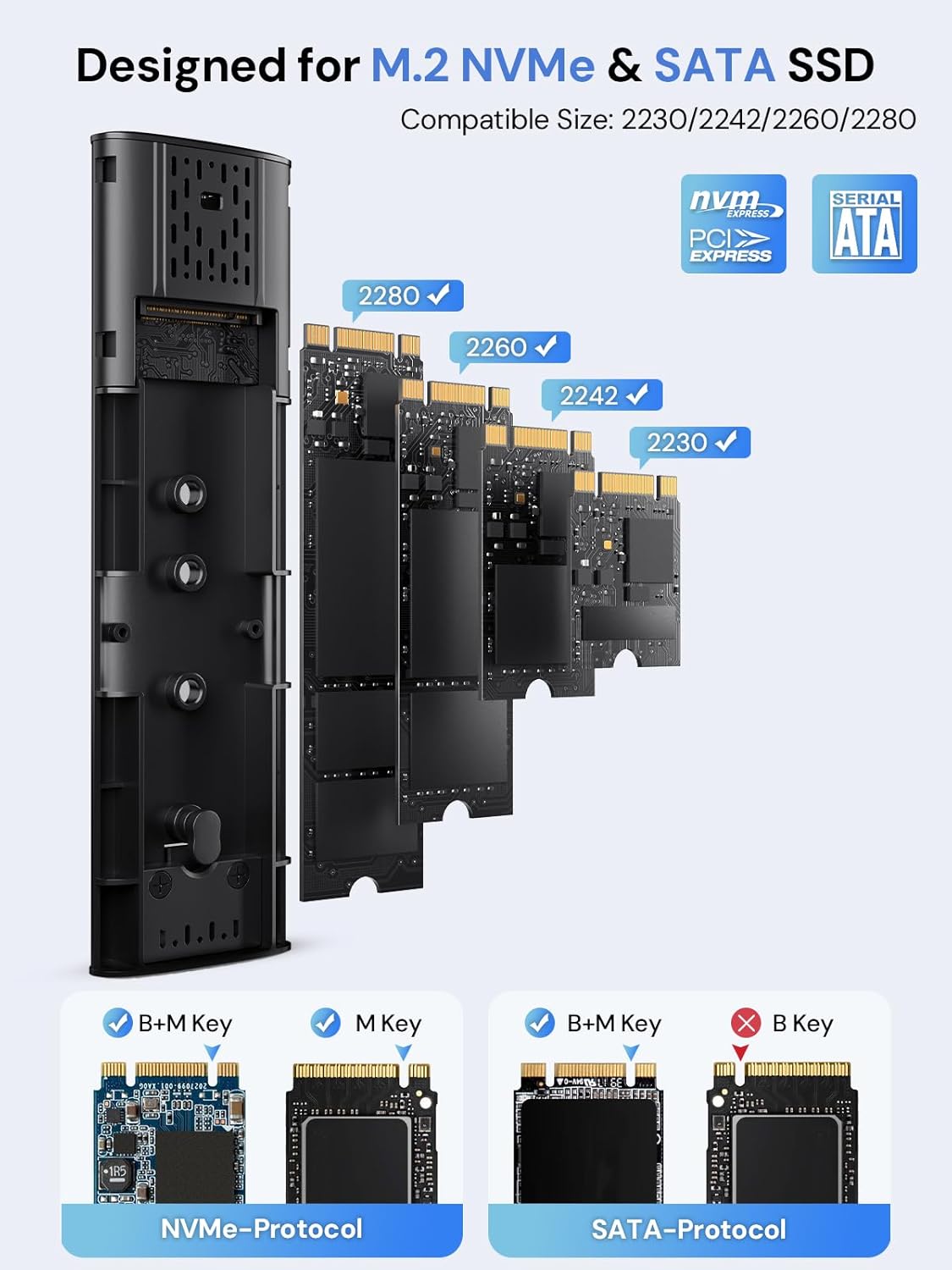
Figure 2: Compatible M.2 SSD Sizes and Key Types
5. Navodila za uporabo
Once your SSD is installed, connect the enclosure to your device using one of the provided USB cables. The enclosure is plug-and-play, requiring no additional drivers for most operating systems.
- Povezava: Use the USB-C to C cable for devices with a USB-C port, or the USB-A to C cable for devices with a standard USB-A port.
- Prenos podatkov: The enclosure will appear as an external drive on your computer or compatible device. You can drag and drop fileali uporabite sistemske file orodja za upravljanje za prenos podatkov.
- LED indikator: A clear LED indicator on the enclosure will show activity during data transfer.
- Samodejno spanje: To protect your SSD and conserve power, the enclosure will automatically enter sleep mode after 15 minutes of no read/write activity.
Video 1: Demonstration of M.2 SSD Enclosure Adapter usage, including tool-free installation, high-speed data transfer, heat dissipation features, and connectivity with various devices like smartphones and laptops.
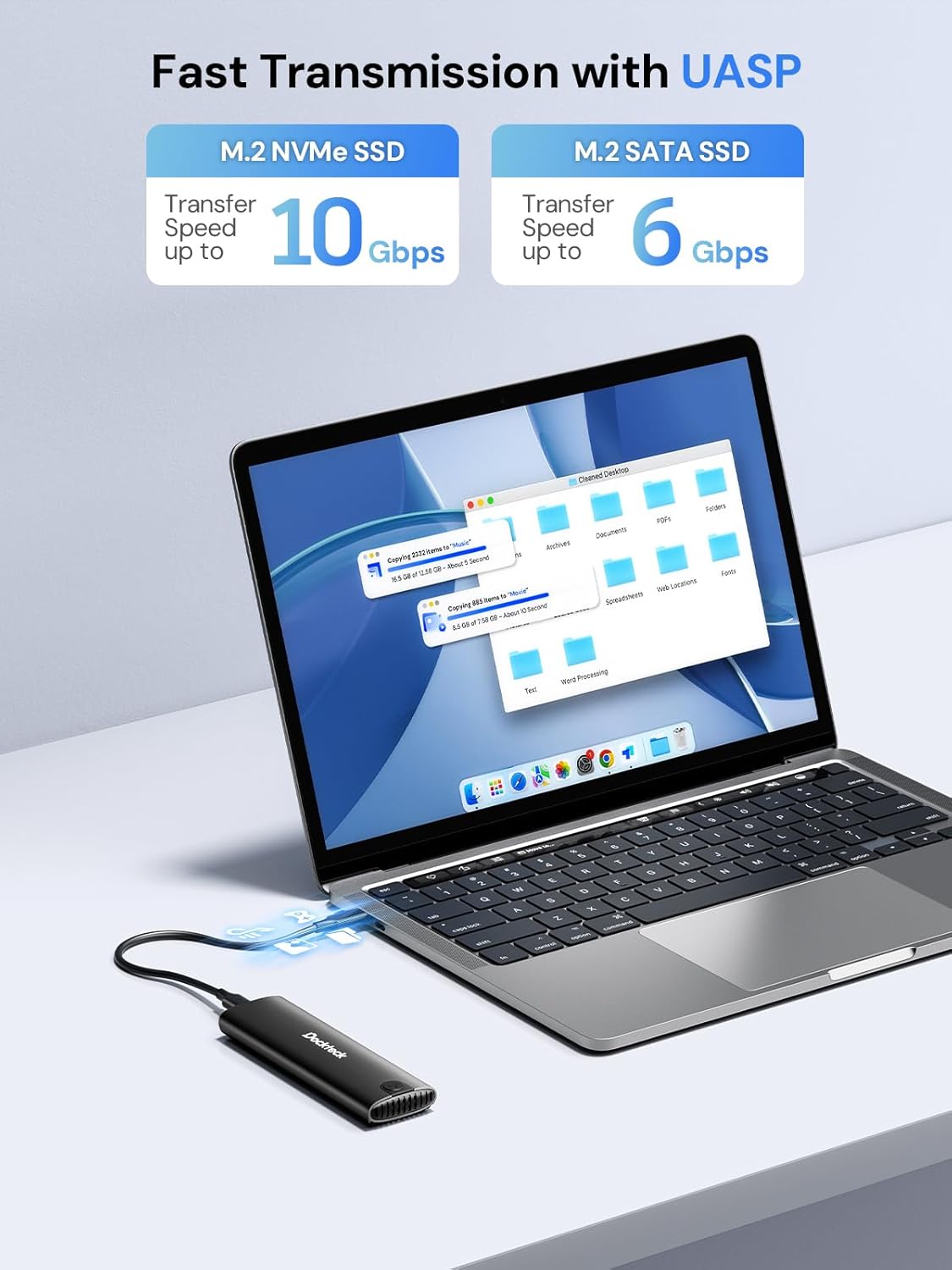
Figure 3: Fast Data Transmission with UASP
6. Odvajanje toplote
The dockteck M.2 SSD Enclosure is designed with effective heat dissipation in mind to ensure stable performance and prolong the life of your SSD.
- Ohišje iz aluminijeve zlitine: Robustni aluminijasti casing acts as a heatsink, drawing heat away from the SSD.
- Silikonska termalna blazinica: The included thermal pad creates efficient contact between the SSD and the aluminum shell, further enhancing heat transfer.
- Luknje za odvajanje toplote: Strategically placed holes on the enclosure facilitate airflow and heat release.

Figure 4: Effective Heat Dissipation Design
7. Združljivost
This enclosure offers broad compatibility with various M.2 SSDs and host devices.
- SSD Protocols: Supports both NVMe (PCIe) and SATA protocols.
- SSD Key Types: Compatible with M-Key and B+M Key M.2 SSDs. (Note: B-Key only SATA SSDs are not supported).
- Velikosti SSD-jev: Supports M.2 SSDs of form factors 2230, 2242, 2260, and 2280.
- Največja zmogljivost: Podpira M.2 SSD diske do 4 TB.
- Operacijski sistemi: Works with Windows, Mac OS, Linux, and Android systems.
- Združljive naprave: Can be connected to PCs, laptops, tablets, smartphones (with USB-C), game consoles, and smart TVs.

Figure 5: Wide Device and System Compatibility
8. Odpravljanje težav
Če naletite na težave, si oglejte naslednje pogoste korake za odpravljanje težav:
- SSD ni zaznan:
- Ensure the M.2 SSD is correctly inserted and secured within the enclosure.
- Verify that your SSD is either NVMe (M-Key or B+M Key) or SATA (B+M Key). B-Key only SATA SSDs are not supported.
- Check if the SSD is initialized and formatted. New SSDs typically need to be initialized and formatted in Disk Management (Windows) or Disk Utility (Mac OS) before use.
- Poskusite ohišje priključiti na druga vrata USB na vaši napravi.
- Preizkusite z drugim kablom USB, če je na voljo.
- Počasne hitrosti prenosa:
- Ensure your device's USB port supports USB 3.2 Gen 2 (10Gbps) for optimal performance. Older USB 2.0 or 3.0 ports will result in lower speeds.
- Preverite, ali so vaš operacijski sistem in gonilniki posodobljeni.
- Confirm that the SSD itself is capable of high speeds (e.g., NVMe SSDs are faster than SATA SSDs).
- Izogibajte se prenosu veliko majhnih filehkrati, saj lahko to zmanjša skupno hitrost prenosa.
- Ohišje se segreje:
- It is normal for the aluminum enclosure to become warm during heavy use, as it is designed to dissipate heat from the SSD.
- Ensure the thermal pad is correctly installed on the SSD to facilitate heat transfer to the enclosure.
- Izogibajte se namestitvi ohišja v zaprte prostore, ki omejujejo pretok zraka.
- Občasne prekinitve povezave:
- Ensure the USB cable is securely connected to both the enclosure and your device.
- Poskusite z drugimi vrati USB ali kablom.
- Check for power management settings on your computer that might be turning off USB ports to save power.
9. Specifikacije
| Funkcija | Podrobnost |
|---|---|
| Številka modela | DH0005 |
| Dimenzije izdelka | 4.9 x 1.5 x 0.6 palcev (12.4 x 3.8 x 1.5 cm) |
| Teža predmeta | 1.92 unč (54.4 g) |
| Vmesnik | USB 3.2 Gen 2 Type-C |
| Hitrost prenosa podatkov | Up to 10Gbps (NVMe), Up to 6Gbps (SATA) |
| Podprti protokoli SSD-ja | NVMe (PCIe) and SATA |
| Supported SSD Key Types | M-Key, B+M Key |
| Podprte velikosti SSD | 2230, 2242, 2260, 2280 |
| Max SSD Capacity | 4 TB |
| Združljivi operacijski sistemi | Windows, Mac OS, Linux, Android |
| Material | Aluminijeva zlitina |
| barva | Črna |
| Proizvajalec | dockteck |
10. Garancija in podpora
dockteck products are designed for reliability and performance. For warranty information, technical support, or any inquiries regarding your M.2 NVMe SATA SSD Enclosure Adapter, please contact dockteck customer service through their official webspletno mesto ali prodajalec, kjer je bil izdelek kupljen.
You can visit the official dockteck store for more information: dockteck Store on Amazon.