
Truman TM-I VISION PRO
Truman TM-I VISION PRO Satellite Receiver User Manual
Model: TM-I VISION PRO | Brand: Truman
1. Uvod
1.1 izdelkov konecview
The Truman TM-I VISION PRO is a Full HD digital satellite receiver designed to provide a comprehensive entertainment experience. It features a powerful Sunplus 1506HV processor, ensuring smooth performance and high-quality video output. With multiple connectivity options including USB, HDMI, and Ethernet, it offers versatility for various home entertainment setups. The device supports Full HD resolution, multi-language interfaces, and includes parental control features for a family-friendly viewing environment. It also comes with a one-year activated IPTV service.

Slika 1.1: Spredaj view of the Truman TM-I VISION PRO Satellite Receiver, showing its compact design and front-facing USB ports.
1.2 Vsebina paketa
Prosimo, preverite, ali so v vašem paketu priloženi vsi spodaj navedeni artikli:
- Truman TM-I VISION PRO Satellite Receiver
- Napajalni adapter
- Standardni daljinski upravljalnik
- Digital LED Lens
- HDMI kabel
- Navodila za uporabo

Figure 1.2: Marketing image highlighting key features such as Wi-Fi, Ultra HD support, ISO 9001 certification, and 5G compatibility.
2. Varnostne informacije
Za zagotovitev varnega delovanja in preprečevanje škode preberite in upoštevajte naslednja varnostna navodila:
- Naprave ne izpostavljajte vodi ali vlagi.
- Avoid placing the receiver in direct sunlight or near heat sources.
- Poskrbite za ustrezno prezračevanje okoli naprave, da preprečite pregrevanje.
- Uporabljajte samo priloženi napajalnik.
- Naprave ne poskušajte odpirati ali popravljati sami. Obrnite se na usposobljeno servisno osebje.
- Napravo in dodatke hranite izven dosega otrok.
- Med nevihtami ali če naprave dalj časa ne uporabljate, izključite napajalni kabel iz električne vtičnice.
3. Nastavitev
3.1 Priključitev sprejemnika
- Connect the Satellite Antenna: Connect your satellite dish cable to the "LNB IN" port on the back of the receiver.
- Priključitev na televizor (HDMI): Use the provided HDMI cable to connect the receiver's HDMI OUT port to an available HDMI IN port on your television.

Figure 3.1: The included HDMI cable for connecting the receiver to your television.
- Priključite napajanje: Connect the power adapter to the DC IN port on the receiver, then plug the adapter into a wall outlet.
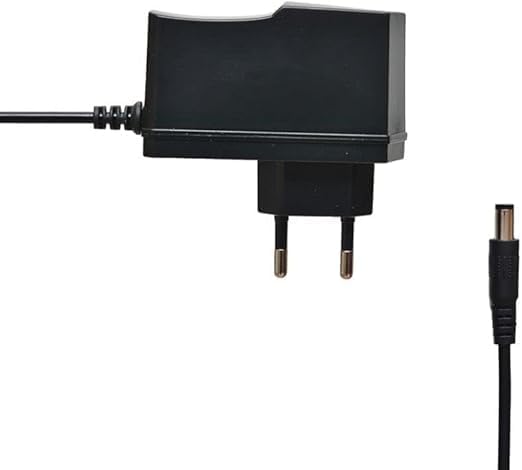
Figure 3.2: The power adapter supplied with the receiver.
- Connect Digital LED Lens: Plug the digital LED lens into its dedicated port on the receiver. This lens displays channel numbers and receives remote control signals.
- Optional: Connect Ethernet/USB: If you plan to use wired internet or external storage, connect an Ethernet cable to the LAN port or a USB drive to one of the USB ports.

Slika 3.3: Zadaj view of the receiver showing the LNB IN, HDMI OUT, USB, Ethernet, and DC IN ports.
3.2 Čarovnik za začetno nastavitev
Upon first power-on, the receiver will guide you through an initial setup wizard:
- Izbira jezika: Izberite želeni jezik za prikaz na zaslonu.
- Nastavitev časovnega pasu: Set the correct time zone for your region.
- Nastavitev antene: Select your satellite (e.g., Nilesat, Hotbird) and configure LNB settings if necessary.
- Skeniranje kanalov: Perform an automatic or manual channel scan to find available TV and radio channels.
- Nastavitev omrežja (neobvezno): Configure Wi-Fi or Ethernet connection for internet-based features like IPTV.
4. Navodila za uporabo
4.1 Osnovne funkcije
- Vklop/izklop: Pritisnite MOČ gumb na daljinskem upravljalniku.
- Krmarjenje po kanalih: Uporabite CH + / CH- buttons to change channels sequentially, or enter the channel number directly using the numeric keypad.
- Nadzor glasnosti: Uporabite VOL + / VOL- gumbe za prilagajanje glasnosti.
- Mute: Pritisnite MUTE gumb za utišanje zvoka.
- Dostop do menija: Pritisnite MENI gumb za dostop do glavnega menija za nastavitve in funkcije.
- Gumb V redu: Confirms selections in menus or displays channel information during viewing.
- Izhod: Pritisnite EXIT button to return to the previous screen or live TV.
4.2 naprednih funkcij
- Starševski nadzor: Access the Parental Control menu to set age restrictions for channels or lock specific programs. A default PIN (usually 0000 or 1234) may be required.
- Večjezična podpora: Change audio languages (if available) or subtitle languages via the audio/subtitle options in the menu.
- IPTV: The receiver includes a pre-activated IPTV service for one year. Access this feature through the main menu. Ensure your receiver is connected to the internet for IPTV functionality.
- Predvajanje medijev USB: Insert a USB drive into one of the USB ports to play media files (videos, music, photos) or record TV programs.
- Posodobitev programske opreme: Regularly check for software updates via USB or network to ensure optimal performance and access to new features. (Refer to Section 5.2 for details).
5. Vzdrževanje
5.1 Čiščenje
To clean the receiver, disconnect it from the power supply. Use a soft, dry cloth to wipe the exterior. Do not use liquid cleaners or abrasive materials.
5.2 Posodobitve programske opreme
Keeping your receiver's software updated is crucial for performance and security. Updates can be performed via USB or over the network (if connected to the internet).
- USB posodobitev: Prenesite najnovejšo vdelano programsko opremo (.bin file) from the official Truman website to a USB flash drive. Insert the USB drive into the receiver and navigate to the "System Update" or "Software Upgrade" option in the menu. Follow the on-screen instructions.
- Omrežna posodobitev: If your receiver is connected to the internet, navigate to the "Network Upgrade" or "Online Update" option in the system settings. The receiver will check for available updates and prompt you to install them.
Pozor: Do not power off the receiver during a software update, as this may cause permanent damage.
6. Odpravljanje težav
If you encounter issues with your Truman TM-I VISION PRO, refer to the following common problems and solutions:
| Težava | Možen vzrok | rešitev |
|---|---|---|
| Brez moči | Napajalnik ni priključen; vtičnica je okvarjena. | Ensure power adapter is securely connected to the receiver and a working power outlet. |
| Ni signala / črn zaslon | Antenna cable loose; Incorrect satellite selected; TV input not set to HDMI. | Check antenna cable connection. Verify satellite settings in menu. Ensure TV input is set to the correct HDMI port. |
| Daljinski upravljalnik ne deluje | Batteries low/dead; Obstruction between remote and receiver's LED lens. | Replace remote control batteries. Ensure clear line of sight to the digital LED lens. |
| Frozen Picture / Lagging | Weak signal; Overheating; Software issue. | Check signal strength in menu. Ensure proper ventilation. Try a software update or factory reset (last resort). |
| IPTV Not Working | No internet connection; IPTV service expired. | Verify internet connection (Ethernet or Wi-Fi). Contact support if service is within the one-year period and still not working. |
7. Specifikacije
| Funkcija | Podrobnost |
|---|---|
| Model | TM-I VISION PRO |
| Procesor | Sunplus 1506HV |
| Vrsta škatle | Full HD Digital |
| Flash pomnilnik | 4 MB (SPI SOP8/SOIC8) |
| Video izhod | HDMI (Full HD Resolution Support) |
| Način avdio izhoda | Stereo (Dolby Digital, DTS, PCM supported) |
| Povezljivost | USB, HDMI, Ethernet |
| Združljive naprave | Televizija, osebni računalnik |
| Posebne lastnosti | User-friendly display, Remote Control, Multi-language support, Parental Control, 1-year IPTV activation. |
| Teža predmeta | 10 gramov |
| Proizvajalec | Truman |
8. Garancija in podpora
For warranty information, please refer to the warranty card included with your product or contact your point of purchase. The receiver includes a 1-year activated IPTV service.
For technical support or further assistance, please contact Truman customer service or visit their official website. Contact details are typically provided in the product packaging or on the manufacturer's webmesto.
Ask a question about this manual
Ask about setup, troubleshooting, compatibility, parts, safety, or missing instructions. Manuals+ will review the question and use this page’s manual context to help answer it.