
1. Uvod
The Ankilo Bluetooth 5.3 2-in-1 Transmitter Receiver is a versatile audio adapter designed to enhance your audio experience. It functions as both a Bluetooth transmitter (TX mode) and a Bluetooth receiver (RX mode), allowing you to connect various audio devices wirelessly. Featuring Bluetooth 5.3 technology, it offers stable connectivity, low latency, and dual-device pairing capabilities. The integrated LCD screen provides real-time information, and the device includes a BASS boost function for enhanced sound quality and dual microphones for clear hands-free calls.

Figure 1: Ankilo Bluetooth 5.3 2-in-1 Transmitter Receiver
2. Vsebina paketa
Prosimo, preverite paket za naslednje artikle:
- Ankilo Bluetooth 5.3 2-in-1 Transmitter Receiver (Model BR08)
- Polnilni kabel USB-C
- 3.5 mm AUX avdio kabel
- Airplane Dual-Plug Audio Converter
- Uporabniški priročnik

Slika 2: Vsebina paketa
3. Izdelek je končanview
Seznanite se s komponentami in krmilnimi elementi naprave:

Figure 3: Device Components
- Zaslon: Shows battery level, volume, and connection status.
- Mikrofon: Za prostoročno klicanje.
- Gumb BASS: One-touch activation for enhanced bass sound.
- TX/RX Button: Slide switch to select Transmitter (TX) or Receiver (RX) mode.
- Gumb za vklop / izklop: Pritisnite in držite za vklop ali izklop.
- Gumb za predvajanje/pavzo: Controls audio playback. Double-click to pair a second device or clear pairing.
- Answer/Hang Up Button: Za upravljanje telefonskih klicev.
- Next Song/Volume + Button: Kratek pritisk za naslednjo skladbo, dolg pritisk za povečanje glasnosti.
- Previous Song/Volume - Button: Kratek pritisk za prejšnjo skladbo, dolg pritisk za zmanjšanje glasnosti.
- Vrata za polnjenje Type-C: Za polnjenje naprave.
- AUX Audio Cable Port: For connecting to audio sources/receivers via 3.5mm jack.
4. Specifikacije
| Funkcija | Podrobnost |
|---|---|
| Različica Bluetooth | 5.3 |
| Razdalja prenosa | Do 10 metrov (brez ovir) |
| Kapaciteta baterije | 400 mAh |
| Čas polnjenja | Približno 2 ur |
| Življenjska doba baterije (način RX) | Do 15 ur |
| Življenjska doba baterije (način oddajanja) | Do 18 ur |
| Dimenzije | 3.86 x 3.66 x 1.02 palcev |
| Teža predmeta | 1.76 unč |
| Posebna funkcija | Low Latency, Dual Mics, HiFi Bass Sound, Smart Display |
5. Navodila za namestitev
Follow these steps to set up your Ankilo Bluetooth adapter:

Figure 4: Convenient Operation Steps
- Vklop: Press and hold the Power On/Off button for approximately 3 seconds until the display screen illuminates.
- Choose the Mode (TX/RX): Slide the TX/RX button on the side of the device to select your desired mode:
- Način oddajnika (TX): For sending audio from non-Bluetooth devices (e.g., TV, PC, MP3 player) to Bluetooth headphones or speakers.
- Način RX (sprejemnik): For receiving audio from Bluetooth-enabled devices (e.g., smartphone, tablet) and playing it through non-Bluetooth audio systems (e.g., car stereo, home speakers).
- Priključite avdio kabel: Plug the 3.5mm AUX audio cable into the device's AUX port and connect the other end to your audio source (in TX mode) or audio receiver (in RX mode).
- Pairing (First Device):
- Ensure your Bluetooth headphones/speakers (TX mode) or smartphone/tablet (RX mode) are in pairing mode.
- The Ankilo adapter will automatically enter pairing mode when powered on in either TX or RX mode. The display will show a blinking Bluetooth icon.
- On your external device, search for "BR08" in the Bluetooth settings and select it to connect. The display will show a steady Bluetooth icon upon successful connection.
- Združevanje dveh naprav: To connect a second device simultaneously (supported in both TX and RX modes):
- After the first device is successfully paired, ensure the second device is in pairing mode.
- Double-click the Play/Pause button on the Ankilo adapter. The device will search for the second device.
- Select "BR08" on your second device's Bluetooth list to connect.
6. Navodila za uporabo
6.1 Osnovne kontrole
- Predvajanje/pavza: Enkrat pritisnite gumb Predvajaj/Premor.
- Naslednja skladba: Short press the 'Next Song/Volume +' button.
- Prejšnja skladba: Short press the 'Previous Song/Volume -' button.
- Povečaj glasnost: Long press the 'Next Song/Volume +' button.
- Znižaj glasnost: Long press the 'Previous Song/Volume -' button.
- Ojačanje nizkih tonov: Press the BASS button once to activate/deactivate the bass enhancement.
6.2 Prostoročno klicanje (samo v načinu RX)
When connected to your smartphone in RX mode:
- Sprejmi klic: Press the Answer/Hang Up button once.
- Končaj klic: Press the Answer/Hang Up button once during a call.
- Zavrni klic: Press and hold the Answer/Hang Up button for 2 seconds.
6.3 Using in TX Mode
Connect the adapter to devices like TVs, PCs, or in-flight entertainment systems to transmit audio wirelessly to your Bluetooth headphones or speakers.
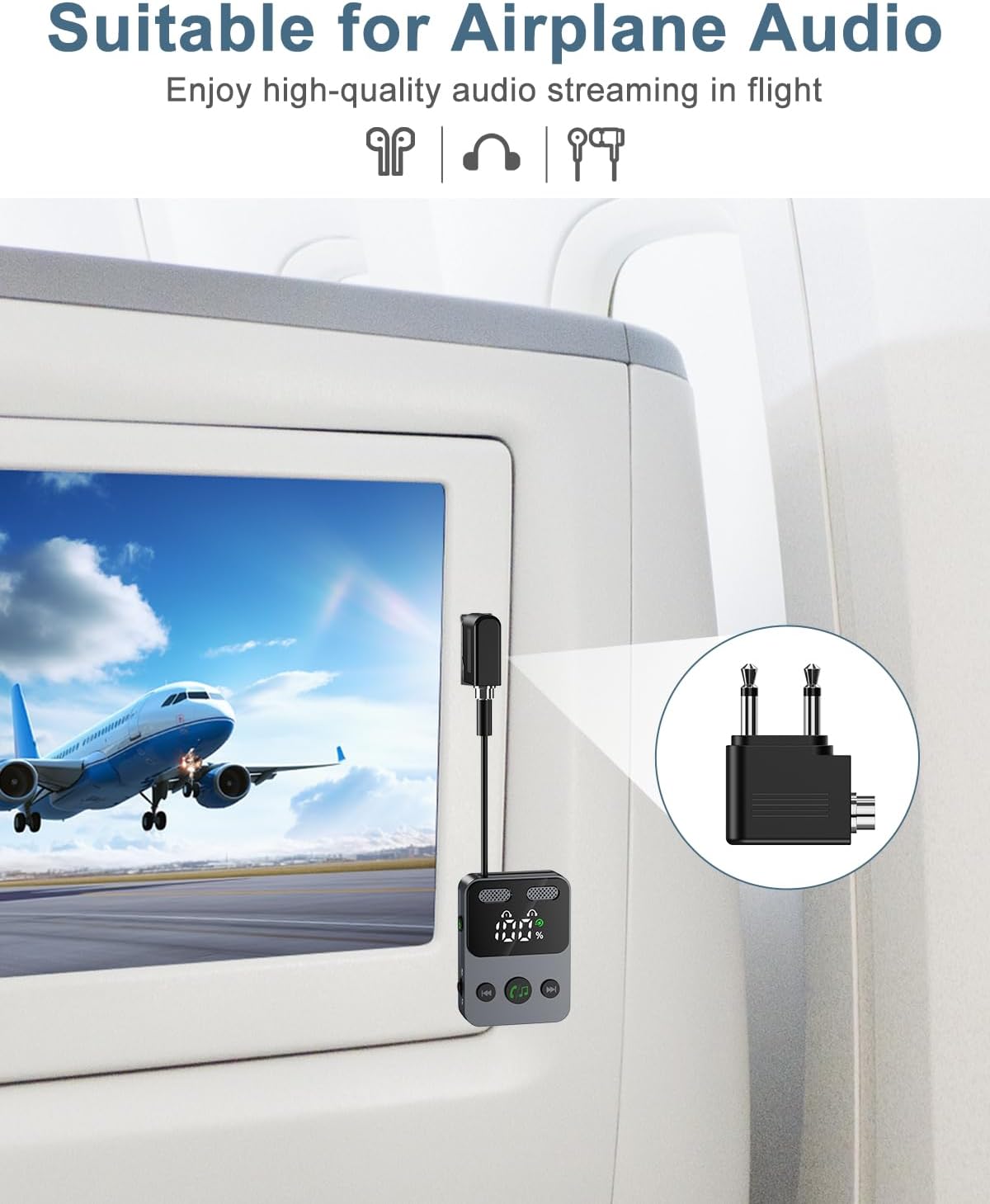
Figure 5: Using the adapter for airplane audio (TX Mode)
6.4 Using in RX Mode
Connect the adapter to your car stereo, home speaker system, or other non-Bluetooth audio input to receive audio wirelessly from your smartphone or tablet.

Figure 6: Wide Compatibility and Mode Usage

Slika 7: Nprample Use Cases (TX and RX Modes)
7. Baterija in polnjenje
The Ankilo adapter features a 400 mAh battery, providing up to 18 hours of use in TX mode and 15 hours in RX mode. To charge the device, connect the included USB-C cable to the Type-C charge port and a standard USB power source. A full charge takes approximately 2 hours. The display screen will show the battery level.
8. Varnostne informacije
Upoštevajte naslednja varnostna navodila:
- Avoid using the device near other wireless devices to prevent potential interference.
- Handle the battery with care. Do not expose the device to extreme temperatures (high or low).
- Do not drop the product, as this may cause surface damage or internal malfunction.
- Do not disassemble the unit without authorization. For any issues, contact customer support.
9. Vzdrževanje
To ensure optimal performance and longevity of your Ankilo Bluetooth adapter:
- Keep the device clean and dry. Avoid exposure to dust and humid environments.
- Ko naprave ne uporabljate, jo hranite na hladnem in suhem mestu.
- Za polnjenje uporabljajte samo priloženi polnilni kabel ali certificiran kabel USB-C.
- The product will automatically shut down after 10 minutes of inactivity (no device connection or key operation). If connected to a device, it will not auto-shutdown; manual shutdown is required.
10. Odpravljanje težav
If you encounter issues with your Ankilo Bluetooth adapter, refer to the following common problems and solutions:
- Naprava se ne vklopi:
- Prepričajte se, da je naprava popolnoma napolnjena. Priključite jo na vir napajanja s kablom USB-C.
- Pritisnite in držite gumb za vklop/izklop vsaj 3 sekund.
- Seznanjanje z napravo ni mogoče:
- Ensure the Ankilo adapter is in the correct TX or RX mode.
- Make sure the external device (headphones, speaker, phone) is in pairing mode and within 10 meters of the adapter.
- Check if the adapter's display shows a blinking Bluetooth icon, indicating it's searching.
- Try restarting both the Ankilo adapter and the external device.
- Double-click the Play/Pause button to clear previous pairings and try again.
- Ni zvoka ali slaba kakovost zvoka:
- Verify that the 3.5mm AUX audio cable is securely connected to both the adapter and the audio source/receiver.
- Check the volume levels on both the Ankilo adapter and the connected audio device.
- Ensure there are no obstructions or excessive distance between the adapter and the paired Bluetooth device.
- Confirm that the correct input/output is selected on your audio source/receiver.
- Volume control issues (e.g., skips track instead of changing volume):
- Remember that a kratek pritisk on the +/- buttons changes tracks, while a dolg pritisk adjusts the volume. Ensure you are performing a long press for volume adjustments.
- Device automatically shuts down:
- This is normal behavior if the device is powered on for 10 minutes without any device connection or other key operation. Re-power on the device to use it.
- If the device is connected to an audio source/receiver, it will not automatically shut down. You must manually power it off.
11. Garancija in podpora
Ankilo is committed to providing high-quality audio experiences. Your Ankilo Bluetooth 5.3 2-in-1 Transmitter Receiver comes with:
- 12-Month Quality Protection: Ensuring your product is free from defects in materials and workmanship under normal use.
- 60 dni brezplačne zamenjave: For any manufacturing defects within the first 60 days of purchase.
- 7*24h Customer Service: Our dedicated support team is available around the clock to assist you with any questions or concerns.
For support, please refer to the contact information provided with your purchase or visit the official Ankilo webmesto.