
Neideso N700Pro128GB
Neideso N700Pro AI Dash Cam User Manual
Model: N700Pro128GB
Uvod
Thank you for choosing the Neideso N700Pro AI Dash Cam. This advanced 4-channel dash camera system provides comprehensive 360° monitoring of your vehicle's surroundings and interior. Equipped with a Smart Driving Monitor System (DMS), 5GHz Wi-Fi, GPS, superior night vision, and 24-hour parking mode, the N700Pro is designed to enhance your driving safety and provide reliable evidence in case of incidents. This manual will guide you through the installation, operation, and maintenance of your new dash cam.
Kaj je v škatli
Preden nadaljujete z namestitvijo, preverite, ali so vse komponente prisotne.
- 1 x Neideso N700 Pro Smart Driving DMS Dash Cam
- 1 x zadnja kamera
- 1 x 3M lepilni nosilec
- 1 x Car Charger with Type C USB Cable
- 1 x Car Wiring Tool
- 1 x uporabniški priročnik
- 1 x Electrostatic Film for 3M Mount
- 1 x 128GB SD Memory Card (pre-inserted)
- 1 x GPS modul
- 1 x CPL Filter
- 1 x 19.6ft kabel zadnje kamere

Image: All components included in the Neideso N700Pro package.
Nastavitev in namestitev
Proper installation is crucial for optimal performance. It is recommended to test the dash cam's functionality before finalizing the installation.
Main Dash Cam Installation
- 1. korak: Priprava površine za montažo. Clean the front windshield area thoroughly where the dash cam will be mounted. Apply the electrostatic film firmly, ensuring no air bubbles. Allow it to adhere for at least 30 minutes before attaching the dash cam. For optimal Driver Monitoring System (DMS) performance, install the AI camera in the center of the windshield.

Image: Step-by-step guide for preparing the windshield and applying the electrostatic film.
- Step 2: Route Front Camera Power Cable. Use the provided trim tool to carefully tuck the power cable along the windshield edge and down the A-pillar. Ensure the cable does not obstruct the driver's view ali motijo delovanje zračnih blazin.
- Step 3: Install Rear Camera. Mount the rear camera on the rear windshield. Conceal the power cord by routing it through gaps, such as from the front windshield to the roof, passenger-side ceiling, or rear seat to the ceiling.
- 4. korak: Priključite napajanje. Insert the power cord into the car's cigarette lighter socket. Ensure the connection is secure.
Navodila za uporabo
Vklop in osnovno delovanje
Kamera na armaturni plošči se bo samodejno vklopila in začela snemati, ko boste vžgali vozilo. Samodejno se bo izklopila, ko boste izklopili vžig.
Načini snemanja
The N700Pro supports comprehensive multi-channel recording. You can select between two primary video recording modes:
- 4-kanalni način: 3K (Front) + 1080P (Left) + 1080P (Right) + 1080P (Rear)
- 3-kanalni način: 4K (Front) + 1080P (Left) + 1080P (Right)
These modes provide full coverage of the front, rear, and interior of your vehicle.

Image: Visual representation of the 4-channel recording capabilities, capturing views from front, rear, and both sides of the vehicle interior.
Pametno glasovno upravljanje
Operate your dash cam hands-free using simple English voice commands. This feature enhances driving safety by allowing you to manage settings without taking your hands off the wheel.
- "Fotografiraj"
- "Video start"
- "Vklopi zvok" / "Izklopi zvok"
- "Vklopi Wi-Fi" / "Izklopi Wi-Fi"
- "Turn on screen" / "Turn off screen"
Note: Only the voice options available in the device's menu are supported.

Image: Illustration of smart voice control functionality, showing a driver interacting with the dash cam using spoken commands.
App Control and 5GHz Wi-Fi
Connect your N700Pro to your mobile device via the dedicated app using its built-in 5GHz Wi-Fi for fast data transfer.
- View posnetki: Dostop v živo view or playback recorded footage directly on your smartphone.
- Prenesite Footage: Easily transfer video files to your device for storage or sharing.
- Share Recordings: Share important moments or evidence directly from the app.
- Prilagoditev nastavitev: Configure dash cam settings conveniently from your phone.
Note: The N700Pro is not a cloud dash cam. Remote viewing beyond 6-7 meters from the vehicle is not supported.
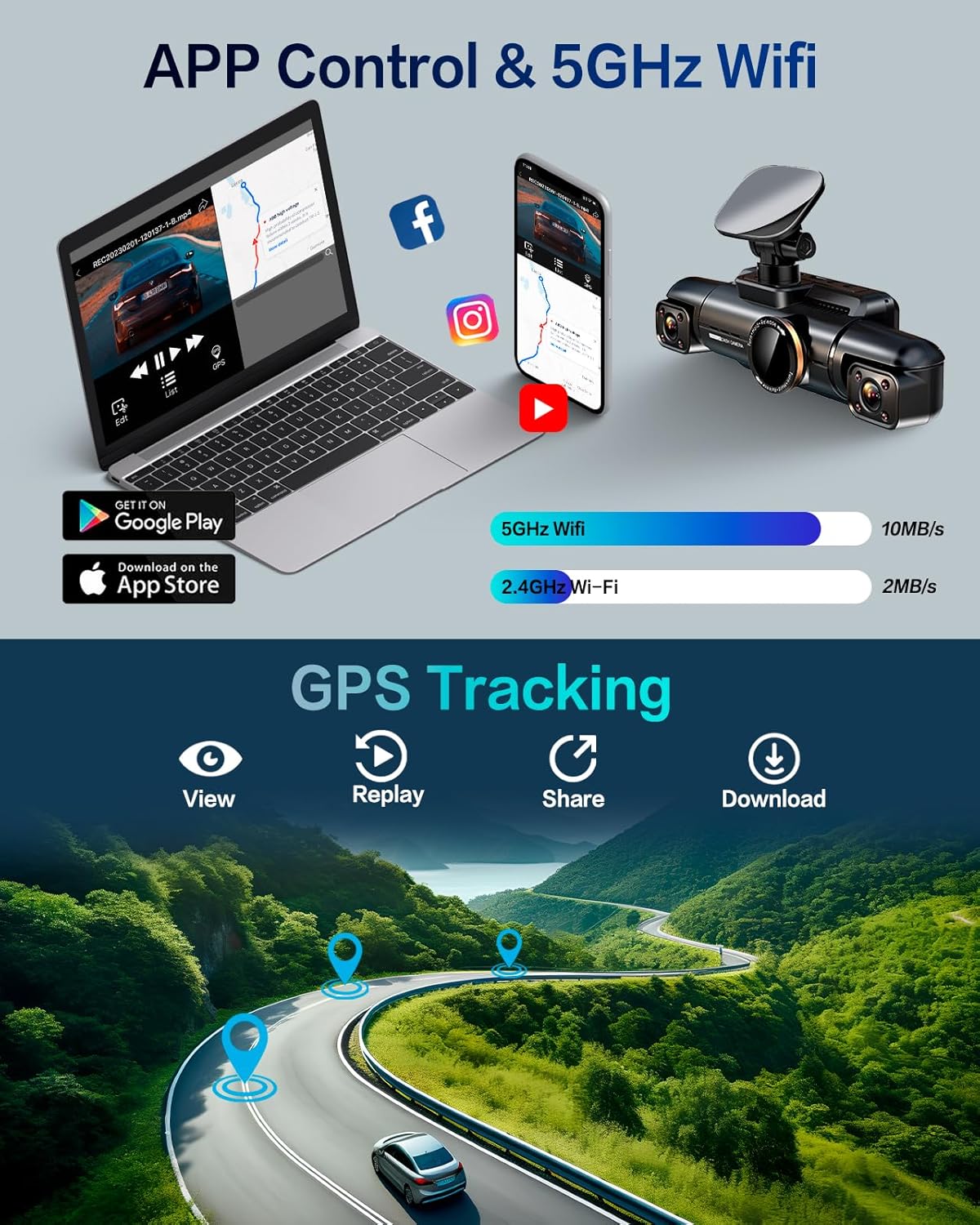
Slika: Konecview of app control and 5GHz Wi-Fi connectivity, showing how to manage recordings and settings via a smartphone.
Driver Fatigue Monitoring System (DMS)
The integrated AI DMS continuously analyzes driver behavior to detect signs of drowsiness, inattention, or phone use. It provides real-time audible and visual alerts to promote safer driving.
- Detects drowsiness
- Identifies inattention
- Provides audible warnings
- Reduces accident risks
- Specific alerts for phone calls, yawns, smoking, eyes closing, distraction, and driver absence.

Image: Detailed explanation of the Driver Fatigue Monitoring System (DMS) and its various detection capabilities.
24-urni način parkiranja
When your vehicle is turned off, the dash cam can activate parking mode to provide continuous surveillance.
- Monitors objects within 3-4 meters in front of the car.
- Automatically records video for one minute upon detection.
- Quick start in 5 seconds for continuous protection.
Note: A separate hardwire kit (ASIN: B0CDWT8BF4) is required to enable this function for continuous 24-hour protection.

Image: Visual guide to the 24-hour parking monitor, highlighting its ability to detect collisions and monitor the surroundings.
G-senzor in snemanje v zanki
The built-in G-sensor automatically detects sudden shakes or collisions. When an event is detected, the relevant footage is locked and protected from being overwritten, even during loop recording. These files are stored in a dedicated 'Event' folder.
Loop recording ensures continuous recording by overwriting the oldest video files when the SD card is full. Videos are typically recorded in 3-minute segments. The system supports up to a 256GB SD card.

Image: Explanation of loop recording and supported SD card capacities, showing how older files so prepisani.

Image: Visual demonstration of the G-sensor's function, showing how it locks footage during impacts for evidence.
Vrhunski nočni vid
Equipped with 8 IR lamps and 6 glass lenses, the N700Pro adapts seamlessly to low-light conditions, ensuring clear and detailed recordings. The CPL filter helps reduce glare, which is crucial for evidence clarity.

Image: Comparison illustrating the superior night vision capabilities of the Neideso dash cam in low-light environments.
GPS sledenje
The external GPS module adds location tracking capabilities to your recordings. GPS data can be viewed on Google Maps through the app or using the GXPlayer application on PC (Windows and Mac).
- Sistem Mac: Iskanje "GXPlayer" in the Apple application market to install.
- Sistem Windows: The memory card will automatically generate the GXPlayer installation file. Locate GXPlayer in the file in ga namestite.

Image: Demonstration of GPS tracking functionality, showing how recorded routes can be viewed on a map with video playback.
Vzdrževanje
- Čiščenje: Za čiščenje leče in ohišja kamere v armaturni plošči uporabite mehko, suho krpo. Izogibajte se uporabi abrazivnih čistil ali topil.
- Upravljanje SD kartice: Regularly format the SD card (at least once a month) to ensure optimal performance and prevent data corruption. Back up important footage pred formatiranjem.
- Temperatura: The N700Pro is designed for durability in extreme temperatures (-22°F to 140°F). However, prolonged exposure to direct sunlight in very hot climates can affect battery life and performance. When parked for extended periods in extreme heat, consider removing the dash cam or parking in shade.

Image: Visual representation of the N700Pro's durable performance across a wide range of temperatures.
Odpravljanje težav
| Težava | Možen vzrok | rešitev |
|---|---|---|
| Kamera na armaturni plošči se ne vklopi. | No power from car charger; loose connection; faulty charger. | Check car charger connection and vehicle's cigarette lighter socket. Try a different power source if available. |
| App connection is unstable or fails. | Interference; distance from device; app issues. | Ensure you are within 6-7 meters of the dash cam. Restart the dash cam and your phone's Wi-Fi. Reinstall the app if necessary. |
| Dash cam feels excessively hot. | Normal operation in high temperatures; prolonged direct sunlight. | The device is designed to operate in high temperatures. If overheating persists or causes malfunction, contact support. Avoid prolonged direct sunlight exposure when parked. |
| Cannot disable sounds or LED lights. | Feature not available or limited. | Refer to the user manual or app settings for available options. Some alerts or indicators may be mandatory for safety. |
| Mount is not secure or falls off. | Improper surface preparation; extreme temperatures; worn adhesive. | Ensure windshield is clean and dry before applying electrostatic film and 3M adhesive. Reapply with new adhesive if necessary. Avoid mounting on curved or textured surfaces. |
| Način parkiranja ne deluje. | Hardwire kit not installed; incorrect settings. | Ensure the optional hardwire kit (ASIN: B0CDWT8BF4) is correctly installed and connected. Check parking mode settings in the app or device menu. |
| SD card full, not recording. | Loop recording not active; too many locked files; faulty SD card. | Ensure loop recording is enabled. Regularly format the SD card. Check for excessive locked files and delete unnecessary ones. Replace the SD card if it's old or corrupted. |
Specifikacije
| Funkcija | Podrobnost |
|---|---|
| Ime modela | Neideso N700Pro AI Dash Cam |
| Dimenzije izdelka | 2.1 x 2.1 x 7.34 palcev |
| Teža predmeta | 7.2 unč |
| Ločljivost zajema videa | Up to 4K (Front), 1080P (Interior/Rear) |
| Tehnologija povezljivosti | 5 GHz Wi-Fi |
| Posebne lastnosti | Built-In WiFi, G-Sensor, Loop Recording, Night Vision, 360° all sides dash camera with Driver Fatigue Monitoring System (DMS), Voice Control, App Control, 4 channel dash cam, Built-In GPS |
| Shranjevanje | 128GB SD Memory Card (included), supports up to 256GB |
| Orientacija | Spredaj, zadaj in znotraj |
| Vrsta namestitve | Nosilec za vetrobransko steklo |
| Delovna temperatura | -22°F do 140°F (-30°C do 60°C) |
Garancija in podpora
The Neideso N700Pro AI Dash Cam comes with a 2-letna garancija od datuma nakupa, ki krije proizvodne napake.
For technical support, warranty claims, or any inquiries regarding your product, please contact Neideso customer service through the contact information provided on the official Neideso webspletno mesto ali vašo nakupovalno platformo.
Please have your model number (N700Pro128GB) and purchase details ready when contacting support.
Ask a question about this manual
Ask about setup, troubleshooting, compatibility, parts, safety, or missing instructions. Manuals+ will review the question and use this page’s manual context to help answer it.