
1. Kaj je v škatli
Preverite, ali so v paketu prisotne vse komponente:
- Brezžična mehanska tipkovnica
- Brezžična miška
- USB sprejemnik
- Podloga za miško
- USB-C Cable (for keyboard charging/wired mode)
- 1 baterija AA (za miško)
2. Izdelek je končanview
The Taiahiro BK6301 set includes a 98-key mechanical keyboard and an ergonomic wireless mouse, designed for versatile use across gaming and professional tasks. The keyboard features blue mechanical switches for tactile and audible feedback, RGB backlighting, and triple-mode connectivity. The mouse offers adjustable DPI and dual-mode wireless connection.
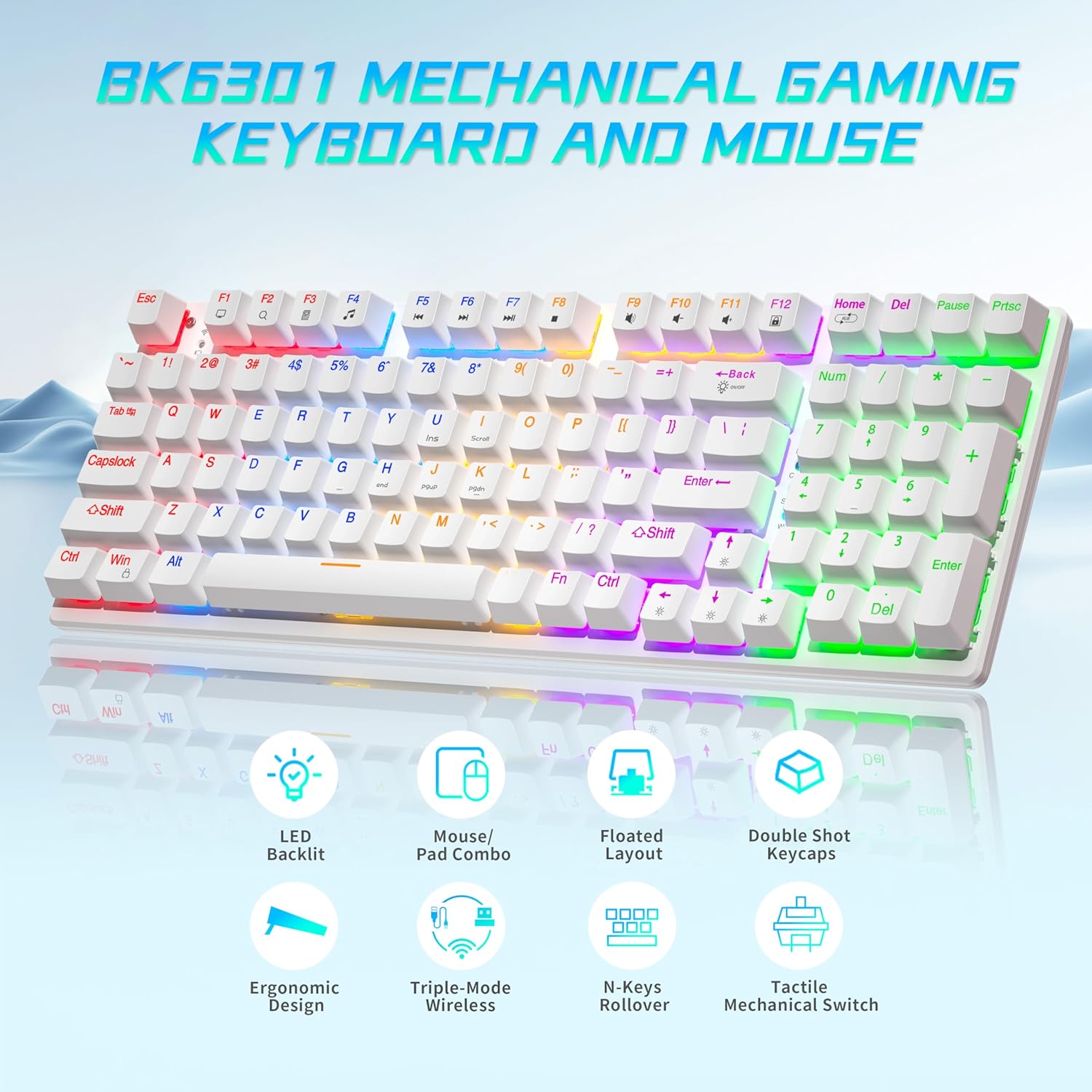
Image: The Taiahiro BK6301 keyboard and mouse combo, showcasing its LED backlit keys, mouse/pad combo, floated layout, double shot keycaps, ergonomic design, triple-mode wireless, N-keys rollover, and tactile mechanical switches.
2.1 Funkcije tipkovnice
- Razporeditev z 98 tipkami: Full-size keyboard including a numeric keypad.
- Modra mehanska stikala: Provides satisfying tactile and audible feedback for typing and gaming.
- Double Shot Injection Keycaps: Ensures key legends remain clear and legible over time.
- Trojna povezljivost: Supports USB-C wired, 2.4G wireless, and Bluetooth 5.0 connections.
- RGB osvetlitev ozadja: 8 different lighting modes with adjustable brightness and breathing speed.
- Anti-ghosting: Ensures accurate registration of multiple simultaneous key presses.

Slika: Bližnji posnetek view illustrating the internal structure of the blue mechanical switches, highlighting their 50,000,000 keystroke life, 60±15g key force, and 2.4±0.2mm stroke travel.
2.2 Funkcije miške
- Dual-Mode Wireless: Connects via 2.4G wireless or Bluetooth.
- Nastavljiv DPI: Four DPI levels (800/1600/2400/3200) for precision control.
- Ergonomska oblika: Contoured shape with textured grip for comfortable use.
- Protizdrsno drsno kolo: For improved control.

Image: The Taiahiro wireless gaming mouse, featuring its 4 adjustable DPI levels (800/1600/2400/3200) and convenient forward/back buttons.
3. Navodila za nastavitev
3.1 Keyboard Setup
The keyboard supports three connection modes: USB-C wired, 2.4G wireless, and Bluetooth.
- Žični način USB-C:
Connect the provided USB-C cable from the keyboard to an available USB port on your computer. The keyboard will be automatically recognized and ready for use. - Brezžični način 2.4G:
Locate the USB receiver, typically stored in the mouse's battery compartment. Plug the USB receiver into an available USB port on your computer. The keyboard should connect automatically. - Način Bluetooth:
Ensure the keyboard is in Bluetooth pairing mode (refer to keyboard specific key combination, usually Fn + a Bluetooth key). On your device (PC, laptop, tablet, phone), go to Bluetooth settings and select the keyboard from the list of available devices to pair.

Image: The Taiahiro keyboard and mouse demonstrating its 3-mode wireless capabilities, connecting to a laptop via USB-C, a monitor via 2.4GHz, and a tablet via Bluetooth.
3.2 Mouse Setup
The mouse supports 2.4G wireless and Bluetooth connections.
- Namestite baterijo: The mouse requires one AA battery. Open the battery compartment on the underside of the mouse and insert the included AA battery, ensuring correct polarity.
- Vklop: Slide the power switch on the bottom of the mouse to the 'ON' position.
- Brezžični način 2.4G:
The USB receiver for the 2.4G connection is stored in the mouse's battery compartment. Remove it and plug it into an available USB port on your computer. The mouse should connect automatically. - Način Bluetooth:
Ensure the mouse is in Bluetooth pairing mode (refer to mouse specific button, usually a button on the underside). On your device, go to Bluetooth settings and select the mouse from the list of available devices to pair.
Video: A brief demonstration of unboxing the keyboard and mouse, showing the initial setup and connection process.
4. Navodila za uporabo
4.1 Keyboard Backlighting Control
The keyboard features 8 RGB backlighting modes. Use the following key combinations to adjust:
- Spremeni način osvetlitve: Pritisnite Fn + Domov to cycle through different lighting effects.
- Prilagodi svetlost: Pritisnite Fn + ↑ (puščica gor) za povečanje svetlosti in Fn + ↓ (puščica navzdol) za zmanjšanje svetlosti.
- Prilagodi hitrost: Pritisnite Fn + ← (puščica levo) to decrease effect speed, and Fn + → (puščica desno) za povečanje hitrosti učinka.
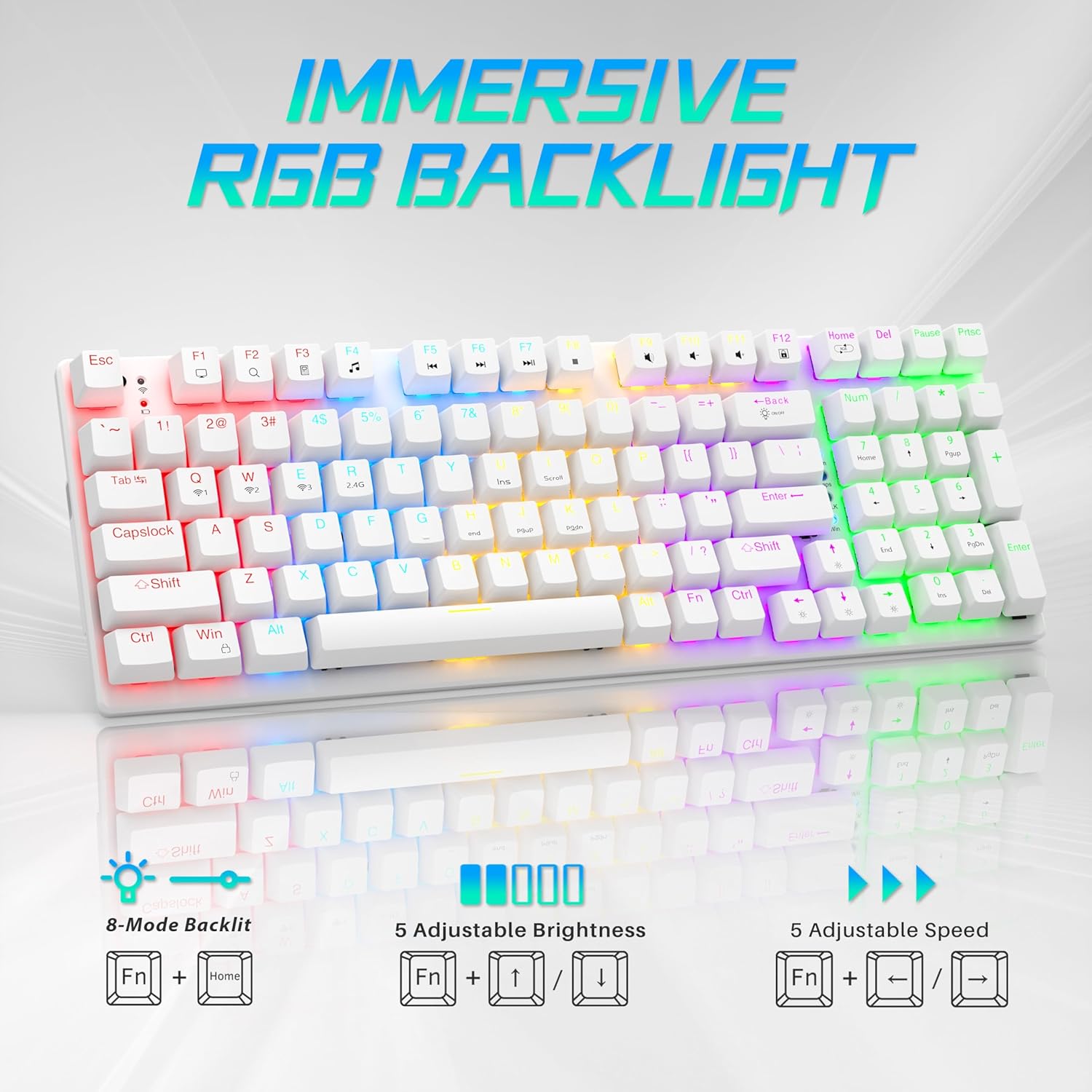
Image: Visual guide to controlling the keyboard's immersive RGB backlight, showing key combinations for 8-mode backlight, 5 adjustable brightness levels, and 5 adjustable speeds.
Video: A demonstration of the keyboard's RGB backlighting in action, highlighting the various lighting effects and colors.
4.2 Prilagoditev DPI miške
The mouse features 4 adjustable DPI levels for varying cursor sensitivity.
- Change DPI: Press the DPI button located on the top of the mouse, below the scroll wheel, to cycle through the 800, 1600, 2400, and 3200 DPI settings.
5. Vzdrževanje
- Čiščenje: Use a soft, dry cloth to clean the surfaces of the keyboard and mouse. For deeper cleaning, a can of compressed air can remove dust and debris from between keycaps.
- Mouse Battery Replacement: When the mouse's performance degrades, replace the AA battery in the compartment on the underside.
- Odstranitev tipkovnice: A keycap puller (often included with mechanical keyboards) can be used to carefully remove keycaps for cleaning or replacement.
Video: Podrobna poročilaview demonstrating the mouse battery installation, USB receiver storage, and the use of a keycap puller for keyboard maintenance.
6. Odpravljanje težav
- Naprava se ne povezuje:
- Ensure the device is powered on and fully charged (keyboard) or has a fresh battery (mouse).
- Za brezžično povezavo 2.4 G se prepričajte, da je sprejemnik USB varno priključen v delujoča vrata USB.
- For Bluetooth, ensure the device is in pairing mode and your computer's Bluetooth is enabled and searching. Try re-pairing the device.
- If using wired mode, ensure the USB-C cable is properly connected.
- Osvetlitev ozadja tipkovnice ne deluje:
- Prepričajte se, da je tipkovnica vklopljena.
- Try adjusting brightness using Fn + ↑.
- Preklapljajte med načini osvetlitve z Fn + Domov.
- Mouse Cursor Jumps or is Unresponsive:
- Zamenjajte miško baterijo.
- Prepričajte se, da je senzor miške čist in brez umazanije.
- Try using the mouse on a different surface or the provided mouse pad.
- Re-pair the mouse with your computer.
7. Specifikacije
| Funkcija | Podrobnost |
|---|---|
| Številka modela | BK6301 |
| Tehnologija povezljivosti | 2.4 GHz brezžično, Bluetooth 5.0, USB-C žično |
| Vrsta tipkovnice | Mehanska igralna tipkovnica |
| Tip stikala | Modra mehanska stikala |
| Ključno življenje | 50 milijonov klikov |
| Osvetlitev ozadja | RGB (8 Modes) |
| Stopnje DPI miške | 800/1600/2400/3200 |
| Baterija za miško | 1 AA baterija (priložena) |
| Združljive naprave | Laptop, PC (Windows, macOS, Android) |
| Dimenzije izdelka (tipkovnica) | Približno 14.7 cm D x 5.2 cm Š x 1.8 cm V |
| Teža predmeta | 2.68 funtov |

Image: The Taiahiro BK6301 keyboard and mouse with key dimensions labeled for reference.
8. Garancija in podpora
For warranty information, technical support, or any product-related inquiries, please refer to the contact details provided in your product packaging or visit the official Taiahiro webmesto. Shranite račun za garancijske zahtevke.


