
1. Uvod
Thank you for choosing the JUNJIEUNVO Q16 Wireless Translation Earbuds. These open-ear design earbuds offer a comfortable listening experience, advanced Bluetooth 5.4 connectivity, IPX5 waterproof rating, and support for real-time language translation across over 100 countries. This manual provides detailed instructions on how to set up, operate, and maintain your earbuds to ensure optimal performance.
2. Vsebina paketa
Prosimo, preverite paket za naslednje artikle:
- JUNJIEUNVO Q16 Wireless Translation Earbuds (Left and Right)
- etui za polnjenje
- Uporabniški priročnik
- Charging Cable (USB-C, not always included, please check packaging)
3. Izdelek je končanview
The Q16 earbuds feature an open-ear design for comfort and situational awareness, housed in a compact charging case. The case includes a digital display for battery status.

Slika 3.1: Q16 Earbuds in their charging case, showing the left (L) and right (R) indicators along with the digital battery display.

Slika 3.2: The open-ear design of the Q16 earbuds, emphasizing comfort and awareness of surroundings.

Slika 3.3: Diagram illustrating the directional sound transmission technology, designed to protect privacy and reduce sound leakage.
4. Nastavitev
4.1 Polnjenje slušalk in etuija
Before first use, fully charge the earbuds and the charging case. The charging case has a 500mAh battery, and each earbud has a 40mAh battery. A full charge takes approximately 1.5 hours.
- Connect the charging cable (typically USB-C) to the charging port on the case and to a USB power source.
- The digital display on the charging case will show the charging progress.
- Place the earbuds into the charging case. Ensure they are correctly seated; the case will indicate if they are charging.
4.2 Bluetooth seznanjanje
The Q16 earbuds use Bluetooth 5.4 for a stable and efficient connection. The pairing process is automatic upon opening the case.
- Ensure your smartphone or device's Bluetooth is turned on.
- Odprite pokrov polnilne torbice. Slušalke bodo samodejno prešle v način seznanjanja.
- On your device, search for Bluetooth devices and select "Q16" from the list.
- Ko je povezava vzpostavljena, boste zaslišali potrditveni zvok in slušalke bodo pripravljene za uporabo.
- For subsequent connections, simply open the charging case, and the earbuds will automatically reconnect to the last paired device.
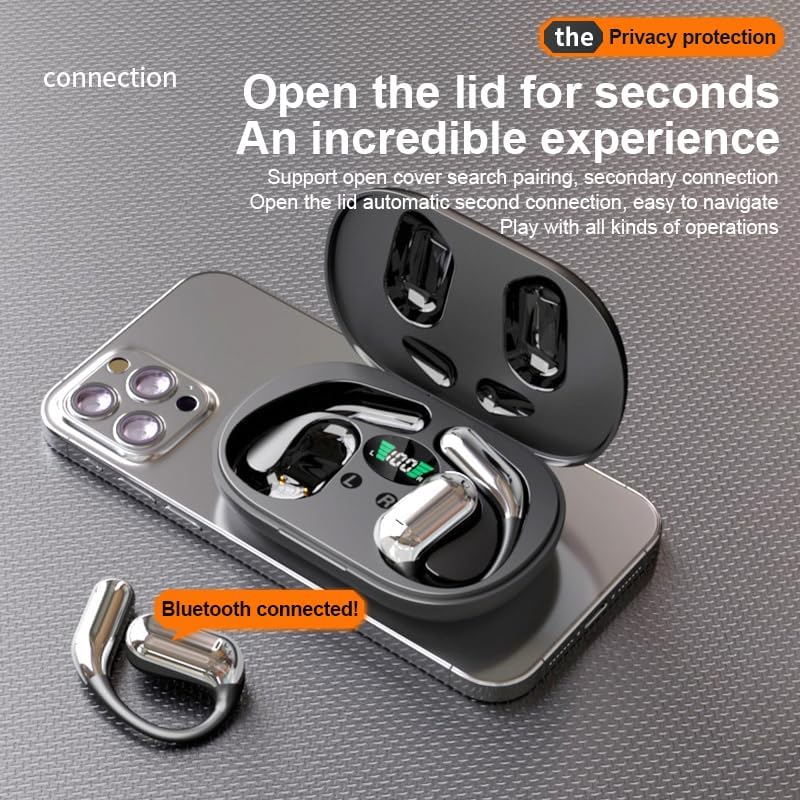
Slika 4.1: The Q16 earbuds connected to a smartphone, indicating successful Bluetooth pairing.
5. Navodila za uporabo
5.1 Vklop/izklop
- Vklop: Odprite pokrov polnilne škatlice in slušalke se bodo samodejno vklopile.
- Ugasniti: Slušalke postavite nazaj v polnilno ohišje in zaprite pokrov. Samodejno se bodo izklopile in začele polniti.
5.2 Predvajanje glasbe
(Specific touch controls are not detailed in the provided product data. The following are common gestures; refer to the manufacturer's official app or website for precise controls.)
- Predvajanje/pavza: Enkrat tapnite eno od slušalk.
- Naslednja skladba: Dvakrat tapnite desno slušalko.
- Prejšnja skladba: Dvakrat se dotaknite leve slušalke.
- Nadzor glasnosti: (Typically a long press or triple tap, specific action not provided. Adjust via your connected device if not available on earbuds.)

Slika 5.1: Illustration of the panoramic stereo surround sound feature, enhancing the audio experience.
5.3 Upravljanje klicev
- Sprejmi/končaj klic: Enkrat tapnite eno od slušalk.
- Zavrni klic: Dolgo pritisnite eno od slušalk za 2 sekundi.
5.4 Language Translation Function
The Q16 earbuds support real-time translation for over 100 languages. This feature typically requires a dedicated translation application on your paired smartphone.
- Download and install the recommended translation app (refer to product packaging or manufacturer's website for app details) on your smartphone.
- Ensure the earbuds are connected to your smartphone via Bluetooth.
- Open the translation app and follow its instructions to initiate real-time translation. The earbuds will act as your audio input/output device for the translation.
5.5 Vodoodpornost IPX5
The earbuds are rated IPX5 waterproof, meaning they are resistant to splashing water from any direction. This makes them suitable for sports and outdoor activities. Note: The charging case is not waterproof. Avoid exposing the charging case to water.
6. Vzdrževanje in nega
- Čiščenje: Slušalke in polnilno ohišje nežno obrišite z mehko, suho krpo, ki ne pušča vlaken. Ne uporabljajte agresivnih kemikalij ali abrazivnih materialov.
- Shranjevanje: Ko slušalk ne uporabljate, jih shranite v polnilno škatlico, da jih zaščitite in ohranite napolnjene. Hranite na hladnem in suhem mestu, stran od ekstremnih temperatur.
- Izogibajte se vodi: While the earbuds are IPX5 waterproof, avoid submerging them in water. The charging case is not waterproof.
- Vzdrževanje baterije: Za podaljšanje življenjske dobe baterije se izogibajte pogostemu popolnemu praznjenju slušalk in polnilnega ohišja. Redno jih polnite, tudi če jih ne uporabljate nenehno.
7. Odpravljanje težav
| Težava | rešitev |
|---|---|
| Slušalke se ne seznanijo z napravo. |
|
| Iz slušalk ni zvoka. |
|
| Slušalke se ne polnijo. |
|
| Translation function not working. |
|
8. Specifikacije
| Funkcija | Podrobnost |
|---|---|
| Ime modela | YYK-Q16 |
| Različica Bluetooth | V5.4+EDR |
| čip | Blue Flood |
| Podprti protokoli | AVRCP V1.6, A2DP V1.3, HFP V1.7 (Simultaneous LE and BR / EDR) |
| Usage/Playback Time | Približno 8 ure (pri 80 % glasnosti) |
| Čas pripravljenosti | 80 uri |
| Čas polnjenja | Približno 1.5 ur |
| Brezžična razdalja | 10 metrov |
| Kapaciteta akumulatorske baterije | 40mAh (vsak) |
| Zmogljivost baterije polnilnega ohišja | 500 mAh |
| Ocena vodotesnosti | IPX5 (samo slušalke) |
| Podpora pri prevajanju | Over 100 languages |
| Namestitev ušesa | On Ear (Open-ear design) |
| Impedanca | 32 Ohmov |
| Neto teža | 84 g (skupaj) |
9. Garancija in podpora
For warranty information and customer support, please refer to the documentation included with your purchase or visit the official JUNJIEUNVO webČe naletite na kakršne koli težave, ki niso zajete v tem priročniku, se za pomoč obrnite na našo skupino za pomoč strankam.
Proizvajalec: UNVO
Znamka: JUNJIEUNVO