
AVMATRIX PKC4000-NDI
Uporabniški priročnik za krmilnik PTZ kamere AVMATRIX PKC4000-NDI
Model: PKC4000-NDI
1. Uvod
Thank you for choosing the AVMATRIX PKC4000-NDI PTZ Camera Controller. This device is designed for professional live streaming, church, and conference applications, offering intuitive control over PTZ cameras. Featuring a 5-inch touch screen and a 4D joystick, it provides precise control over camera functions such as pan, tilt, zoom, focus, and iris. This manual will guide you through the setup, operation, maintenance, and troubleshooting of your controller.
2. Varnostne informacije
Please read and understand all safety instructions before operating the device. Keep this manual for future reference.
- Naprave ne izpostavljajte dežju, vlagi ali ekstremnim temperaturam.
- Poskrbite za ustrezno prezračevanje, da preprečite pregrevanje.
- Use only the provided power adapter or a compatible PoE source.
- Izogibajte se postavljanju težkih predmetov na krmilnik.
- Naprave ne poskušajte razstavljati ali spreminjati. Vsa servisna dela prepustite usposobljenemu osebju.
- Clean the device with a soft, dry cloth. Avoid liquid cleaners.
3. Vsebina paketa
Preverite, ali so v vašem paketu priloženi vsi spodaj navedeni elementi:
- AVMATRIX PKC4000-NDI PTZ Camera Controller x1
- 12V DC napajalnik x1
- Tally Connector x1
- Uporabniški priročnik (ta dokument)
4. Izdelek je končanview
The PKC4000-NDI controller features a robust design with a clear 5-inch touch screen and a precise 4D joystick for comprehensive camera control.
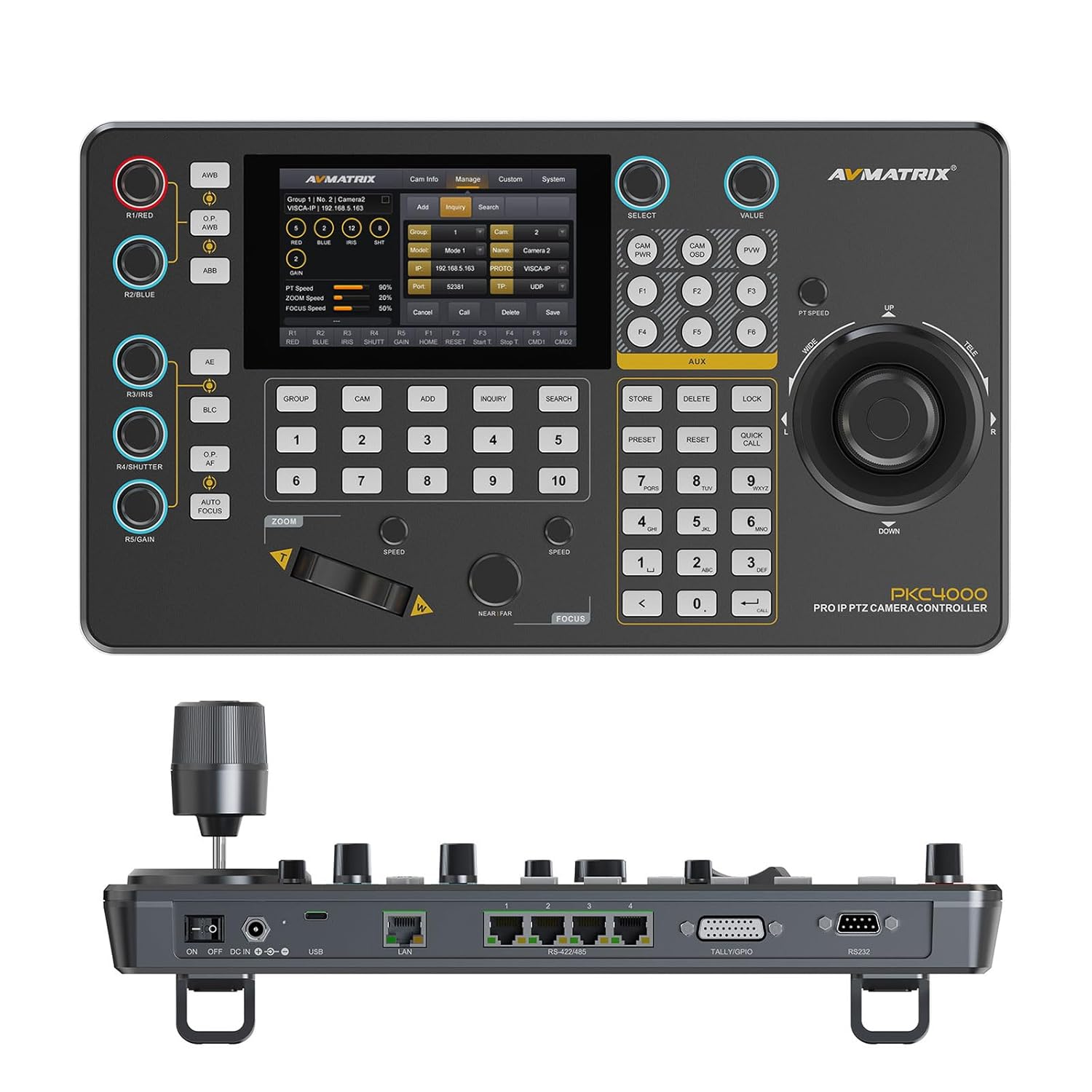
Slika 4.1: Spredaj view of the PKC4000-NDI Controller
Ključne značilnosti:
- Universal Compatibility & Protocol Support: Supports IP and serial control protocols including VISCA, VISCA-IP, ONVIF, PELCO P&D, and NDI (NDI for Optional). Works with AVMATRIX PTZ cameras and most major PTZ brands.
- Fast Setup with Intuitive Touchscreen: Equipped with a 5-inch full-color touchscreen and menu knob for quick setup and operation.
- Smooth, Professional PTZ Control: Precise control over pan, tilt, zoom, focus, iris, shutter, and more. Supports up to 100 camera shortcuts (10 groups x 10 cameras).
- PoE & Flexible Power Options: Supports both Power over Ethernet (PoE) and traditional DC power for simplified cabling.

Figure 4.2: PKC4000-NDI Key Features Overview
5. Nastavitev
5.1 Začetna povezava
Follow these steps to set up your PKC4000-NDI controller:
- Napajalni priključek: Connect the 12V DC power adapter to the 'DC IN' port on the rear of the controller, or connect an Ethernet cable from a PoE-enabled switch to the 'LAN (PoE)' port.
- Omrežna povezava: For IP control, connect an Ethernet cable from your network switch to the 'LAN (PoE)' port.
- Serial Connection (Optional): For RS-232, RS-422, or RS-485 control, connect the appropriate serial cables from your PTZ cameras to the corresponding ports on the controller.
- Tally/GPIO (Optional): Connect Tally lights or GPIO devices to the Tally/GPIO port as needed.
- Vklop: Flip the 'ON/OFF' switch to the 'ON' position. The controller will boot up and display the main interface on the 5-inch touch screen.

Figure 5.1: Rear Panel Control Interfaces
5.2 Konfiguracija kamere
After initial power-up, you will need to configure your PTZ cameras. The controller supports automatic IP address assignment for quick setup.
- Navigate to the 'CAM' or 'System' menu on the touch screen.
- Select 'Add Camera' and follow the on-screen prompts to discover and add your cameras via IP or serial connection.
- Assign each camera to a group and address for easy recall. The controller can manage up to 100 IP cameras (10 groups x 10 cameras).
6. Navodila za uporabo
6.1 Osnovna operacija
The PKC4000-NDI provides intuitive control through its touch screen and physical controls.
- Izbira kamere: Use the numeric keypad or the 'CAM' menu on the touch screen to select the camera you wish to control.
- Krmilna palica: The 4D joystick allows for smooth and precise control of Pan, Tilt, and Zoom. Rotate the joystick for zoom control.
- Exposure Controls: Dedicated knobs and buttons allow quick adjustment of Exposure, Iris, Focus, and Gain.
- Prednastavljeni priklic: Store and recall up to 255 camera presets using the 'PRESET' and numeric buttons.
6.2 Vmesnik zaslona na dotik
The 5-inch touch screen provides access to advanced settings and real-time monitoring.
- Krmarjenje po meniju: Tap on menu icons to access camera settings, network configurations, system preferences, and more.
- Spremljanje v realnem času: The NDI version supports video decoding for real-time monitoring of camera feeds directly on the 5-inch screen. This allows for visual confirmation of camera movements and adjustments.

Figure 6.1: Real-time Video Preview on Touch Screen
6.3 Track Recording and Playback
The controller supports track loop function, allowing you to record camera pan, tilt, and zoom movements and replay them whenever needed without manual control.
- Access the 'Track' function from the touch screen menu.
- Initiate recording of your desired camera movements.
- Save the recorded track for future playback.

Figure 6.2: Track Recording and Playback Feature
7. Vzdrževanje
7.1 Čiščenje in nega
To ensure the longevity and optimal performance of your PKC4000-NDI controller, follow these maintenance guidelines:
- Čiščenje: Use a soft, dry, lint-free cloth to clean the exterior of the controller, including the touch screen. Do not use liquid cleaners, aerosols, or solvents.
- Shranjevanje: Ko krmilnika dlje časa ne uporabljate, ga shranite na hladnem in suhem mestu, stran od neposredne sončne svetlobe in ekstremnih temperatur.
- Ravnanje: Handle the joystick and buttons with care to prevent mechanical damage.
8. Odpravljanje težav
8.1 Pogoste težave in rešitve
If you encounter problems with your controller, refer to the table below for possible solutions.
| Težava | Možen vzrok | rešitev |
|---|---|---|
| Krmilnik se ne vklopi. | No power supply; Power adapter faulty; PoE not active. | Check power adapter connection; Ensure PoE switch is active; Try a different power outlet. |
| Cannot control camera. | Incorrect camera IP/serial settings; Network issue; Camera not powered on. | Verify camera IP address and protocol settings; Check network cables; Ensure camera is powered on and accessible. |
| No video preview na zaslonu. | NDI stream not active; Network congestion; Camera not sending video. | Ensure camera is configured for NDI output; Check network bandwidth; Verify camera video output settings. |
| Joystick/buttons unresponsive. | Firmware issue; Hardware malfunction. | Restart the controller; Check for firmware updates; Contact technical support if problem persists. |
9. Specifikacije
9.1 Tehnične specifikacije
Detailed technical specifications for the AVMATRIX PKC4000-NDI PTZ Camera Controller:
| Kategorija | Parameter | PKC4000-NDI |
|---|---|---|
| Povezave | Vmesniki | IP(RJ45)x1, RS-232x1, RS-485/RS-422x4, TALLYx1, USB2.0 (For upgrade) |
| Protokol IP | ONVIF, VISCA-IP, NDI | |
| Serijski protokol | PELCO-D, PELCO-P, VISCA | |
| Serijska hitrost prenosa | 2400, 4800, 9600, 19200, 38400, 115200 bps | |
| Vrata LAN | 100M×1 (PoE/PoE+: IEEE802.3 af/at) | |
| Uporabniški vmesniki | Zaslon | 5-palčni zaslon na dotik |
| Gumb | Quickly control iris, shutter speed, gain, auto exposure, white balance, etc. | |
| Krmilna palica | Premikanje/Nagib/Povečava | |
| Skupina kamer | 10 (Each group connect up to 10 cameras) | |
| Naslov kamere | Do 100 | |
| Prednastavitev kamere | Do 255 | |
| Moč | Moč | PoE/DC 7~24V |
| Poraba energije | PoE: <8W, DC: <8W | |
| okolje | Delovna temperatura | -20℃~60℃ |
| Temperatura shranjevanja | -20℃~70℃ | |
| Dimenzija | Dimenzija (LWD) | 340mm×195mm×49.5mm/ 340mm×195mm×110mm(With joystick) |
| Teža | Net:1730g, Gross:2360g | |
| Splošno | Številka modela | NW-PKC4000-NDI |
| Proizvajalec | NW-AVMATRIX | |
| Datum izdaje | 1. marec 2025 |

Slika 9.1: Podrobne specifikacije in dimenzije
10. Garancija in podpora
10.1 Informacije o garanciji
The AVMATRIX PKC4000-NDI PTZ Camera Controller is backed by a 1-letna omejena garancija od datuma nakupa. Ta garancija krije napake v materialu in izdelavi pri normalni uporabi. Ne krije škode, ki jo povzroči napačna uporaba, nesreča, nepooblaščena sprememba ali zunanji vzroki.
10.2 Tehnična podpora
For technical assistance, troubleshooting, or warranty claims, please contact AVMATRIX customer support. We offer doživljenjska tehnična podpora za naše izdelke.
Please have your product model number (PKC4000-NDI) and purchase information ready when contacting support.
Ask a question about this manual
Ask about setup, troubleshooting, compatibility, parts, safety, or missing instructions. Manuals+ will review the question and use this page’s manual context to help answer it.