
Oclean X Lite
Uporabniški priročnik za električno zobno ščetko Oclean X Lite
Model: X Lite
Uvod
The Oclean X Lite Electric Toothbrush is designed to provide a superior oral cleaning experience for adults. Featuring a smart screen display, multiple cleaning modes, and long-lasting battery life, it helps ensure comprehensive plaque removal and promotes overall oral health.

Image: The Oclean X Lite Electric Toothbrush, shown both in its retail packaging and as a standalone unit, highlighting its sleek design and smart display.
Vsebina paketa
Pred prvo uporabo preverite, ali so v paketu prisotni vsi elementi:
- Oclean X Lite Electric Toothbrush Handle (x1)
- Brush Head (x1)
- Polnilni kabel USB Type-C (x1)
- Uporabniški priročnik (x1)

Image: A visual representation of the Oclean X Lite package contents, including the toothbrush handle, brush head, USB-C cable, and user manual.
Nastavitev
1. Polnjenje zobne ščetke
The Oclean X Lite features a long-lasting battery, providing up to 30 days of usage on a single charge. For optimal performance, fully charge the toothbrush before first use.
- Locate the USB Type-C charging port at the bottom of the toothbrush handle.
- Odprite zaščitni pokrovček polnilnega priključka.
- Insert the provided USB Type-C cable into the port.
- Drugi konec kabla USB priključite na združljiv napajalnik USB (ni priložen) ali vrata USB računalnika.
- The screen display will indicate the charging status. A full charge typically takes approximately 3 hours.

Slika: Bližnji posnetek view of the Oclean X Lite's USB-C charging port, illustrating how to connect the charging cable for power.
2. Pritrditev glave ščetke
Glavo ščetke poravnajte s kovinskim držalom na ročaju zobne ščetke in jo močno potisnite navzdol, da se zaskoči. Pred uporabo se prepričajte, da je varno pritrjena.
Navodila za uporabo
1. Vklop/izklop in izbira načina
Press the power button to turn the toothbrush on or off. While the toothbrush is on, press the power button repeatedly to cycle through the available cleaning modes. The smart screen will display the selected mode.
2. Načini čiščenja
The Oclean X Lite offers 5 distinct cleaning modes to cater to various oral care needs:
- Dnevno čiščenje: Standardni način za vsakodnevno odstranjevanje zobnih oblog.
- Globinsko čiščenje: Provides a more intense cleaning for thorough plaque removal.
- Občutljiv: Nežno čiščenje za občutljive zobe in dlesni.
- Beljenje: Designed to help remove surface stains for brighter teeth.
- Masaža: Gently massages gums to improve circulation and health.
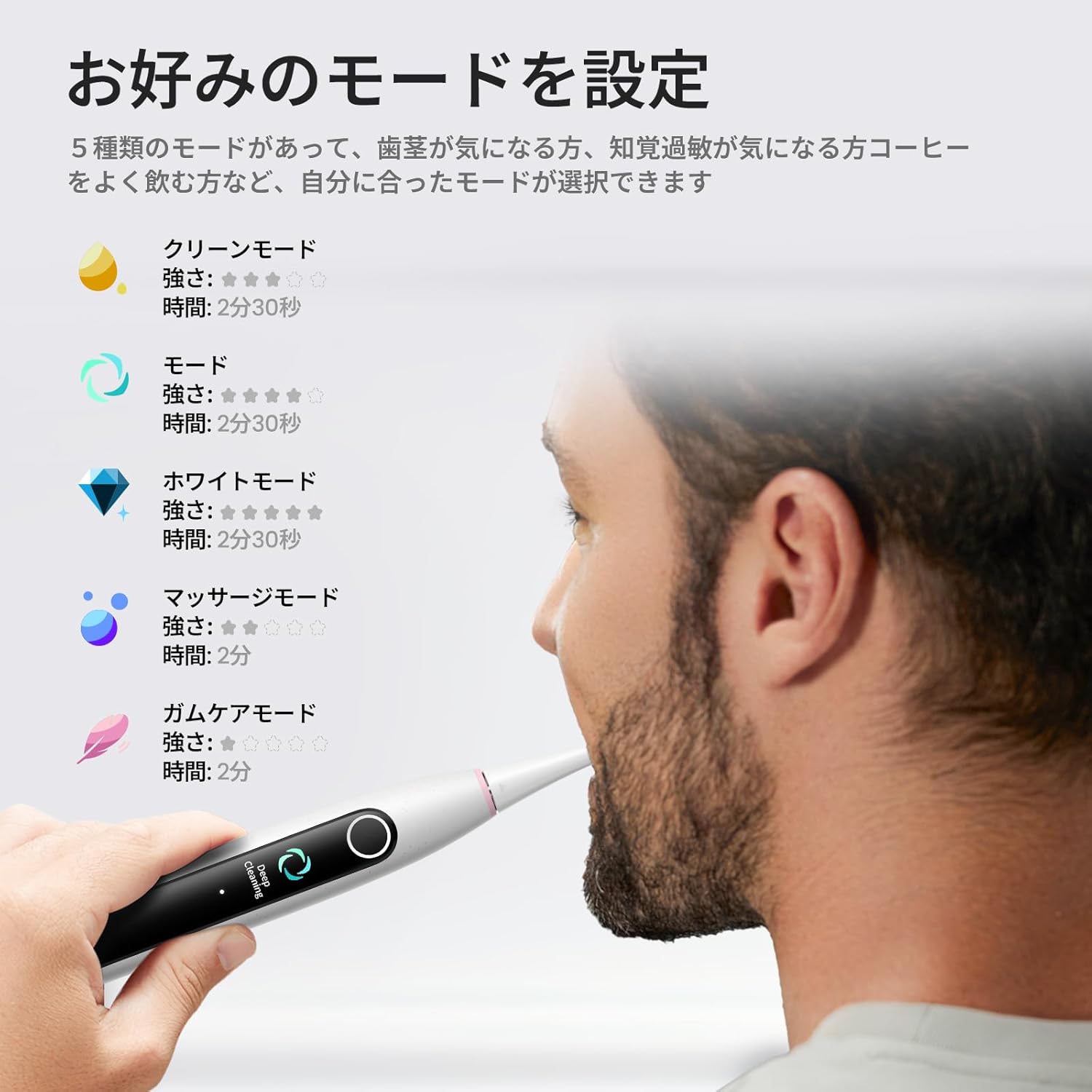
Image: The Oclean X Lite's smart screen displaying the various cleaning modes, illustrating the options available for customized brushing.
3. Brushing Technique and Smart Display
Apply a small amount of toothpaste to the brush head. Place the brush head against your teeth at a slight angle towards the gumline. Move the brush slowly across each tooth, allowing the 40,000 vibrations per minute to clean effectively.
The smart display screen provides real-time feedback on your brushing. It shows brushing zones, helping you ensure no area is missed for a thorough clean. The toothbrush also features a brushing timer and pressure sensor to guide optimal brushing.
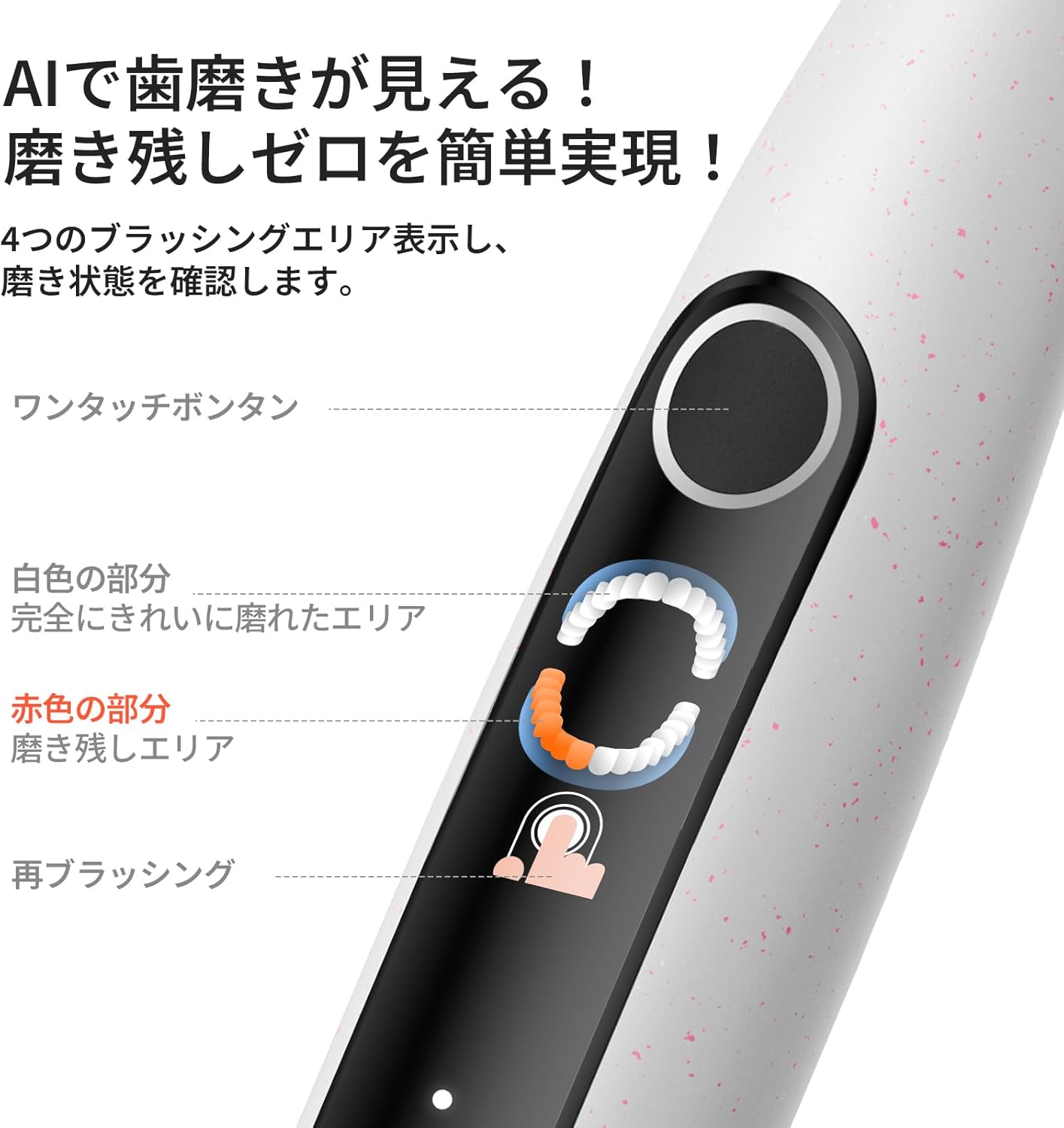
Image: A close-up of the Oclean X Lite's screen showing real-time brushing feedback, indicating areas that have been cleaned and those that require more attention.

Image: An illustration demonstrating the high-frequency sonic vibrations of the Oclean X Lite's bristles, highlighting its powerful cleaning action.
4. Supplementary Brushing Guidance
The Oclean X Lite automatically sets a supplementary brushing guide to target missed areas. After your initial brushing session, the screen may highlight areas that need more attention. With one click, you can activate this guidance to achieve up to 38% more plaque removal for a deeper clean.

Image: A step-by-step visual guide on how the Oclean X Lite provides supplementary brushing guidance to ensure no areas are missed during cleaning.
Vzdrževanje
1. Čiščenje zobne ščetke
After each use, rinse the brush head thoroughly under running water. You can also detach the brush head and rinse both the head and the handle separately. Wipe the handle with a soft, damp cloth. Do not immerse the entire toothbrush handle in water for extended periods, although it is IPX7 waterproof.
2. Zamenjava glave ščetke
Dentists recommend replacing your toothbrush head every 3 months, or sooner if the bristles become frayed. To replace, simply pull the old brush head off the handle and push a new one into place until it clicks.

Slika: Ilustracijska razstavaasing different types of Oclean brush heads, including a professional clean brush head, W-shaped brush head, and tongue cleaner, emphasizing their features.
Odpravljanje težav
| Težava | Možen vzrok | rešitev |
|---|---|---|
| Zobna ščetka se ne vklopi. | Baterija je prazna. | Charge the toothbrush fully using the provided USB-C cable. |
| Vibracije so šibke. | Low battery or brush head not securely attached. | Napolnite zobno ščetko. Prepričajte se, da je glava ščetke trdno pritrjena. |
| Screen display is not working. | Programska napaka ali prazna baterija. | Try restarting the toothbrush. Ensure it is fully charged. If the issue persists, contact customer support. |
| Zobna ščetka se med uporabo ustavi. | Battery depleted or automatic timer activated. | Recharge the toothbrush. The toothbrush has a built-in timer; simply restart if you wish to continue brushing. |
Specifikacije
- Model: X Lite
- Znamka: Oclean
- Vibracije: 40,000 VPM (vibracij na minuto)
- Načini čiščenja: 5 (Daily Clean, Deep Clean, Sensitive, Whitening, Massage)
- Življenjska doba baterije: Up to 30 days (based on typical usage)
- Polnjenje: USB Type-C, approx. 3 hours for full charge
- Posebne lastnosti: Smart Screen Display, Brushing Timer, Pressure Sensor, Supplementary Brushing Guidance
- vir energije: Napajanje na baterije (1 x 12V baterija priložena)
- Opis trdnosti predmeta: Srednje
- Proizvajalec: Shenzhen Yunding Information Technology Co., Ltd.
- ASIN: B0DXZ9PDLC
- Dimenzije paketa: 8.82 x 3.86 x 1.26 palca; 7.05 unč
Garancija in podpora
For warranty information, product support, or to purchase replacement parts and accessories, please visit the official Oclean website or contact their customer service. Refer to the original product packaging or purchase documentation for specific warranty terms and contact details.
Proizvajalec: Shenzhen Yunding Information Technology Co., Ltd.
Trgovina z blagovno znamko: Visit the Oclean Store on Amazon
Ask a question about this manual
Ask about setup, troubleshooting, compatibility, parts, safety, or missing instructions. Manuals+ will review the question and use this page’s manual context to help answer it.