
Uvod
The Five Stars Gaming Desk is designed to enhance your gaming or work setup with its robust construction and integrated features. This manual provides detailed instructions for assembly, operation, and maintenance to ensure optimal use and longevity of your desk. Please read this manual thoroughly before assembly and use.
Varnostne informacije
OPOZORILO: To prevent instability, especially when using multiple monitors or during intense gaming sessions, ensure the desk is securely fastened to the floor if recommended by local safety guidelines or if you experience any wobbling. Always follow the assembly instructions carefully to guarantee a safe and stable setup. Keep all small parts and packaging materials away from children.
Vsebina paketa
Before beginning assembly, please check that all parts listed below are present and undamaged. If any parts are missing or damaged, do not proceed with assembly and contact customer support.
- Desktop Surface (Carbon Look)
- Dvigalnik monitorja
- Desk Legs and Frame Components
- RGB LED Lighting Strip
- Integrated Power Strip (with 2 USB-A ports and 2 EU outlets)
- Držalo za slušalke
- Držalo za skodelico
- Kabelski organizator
- Montažni material (vijaki, matice itd.)
- Assembly Tools (Allen key, screwdriver)
- Navodila za uporabo (ta dokument)

Slika 1: konecview of desk dimensions (100x50x75 cm) and included assembly tools (Allen key, screwdriver). Assembly is estimated to take 30 minutes.
Navodila za postavitev in sestavljanje
Follow these steps carefully to assemble your Five Stars Gaming Desk. It is recommended to have a second person assist with assembly for easier handling of larger components.
- Razpakiraj in organiziraj: Carefully remove all components from the packaging. Lay them out on a clean, soft surface to prevent scratches. Identify each part using the provided parts list (if applicable, or refer to the "Package Contents" section).
- Sestavite okvir mize: Attach the desk legs to the main frame components using the provided screws and the Allen key. Ensure all connections are secure but do not overtighten initially.
- Pritrdite namizje: Carefully place the desktop surface onto the assembled frame. Align the pre-drilled holes on the desktop with the frame. Secure the desktop using the appropriate screws.
- Install the Monitor Riser: Position the monitor riser on the designated area of the desktop. Secure it using the provided fasteners.
- Install RGB LED Lighting: Locate the RGB LED lighting strip. Adhere it to the underside of the monitor riser, ensuring the cable can reach the power source.
-
Attach Integrated Accessories:
- Headphone Holder: Mount the headphone holder to the side of the desk as desired.
- Držalo za skodelico: Attach the cup holder to the opposite side of the desk.
- Organizator kabla: Install the cable organizer to manage cables neatly.
Slika 2: Integrated accessories: headphone holder, cup holder, cable organizer, and the power strip with USB-A ports.
-
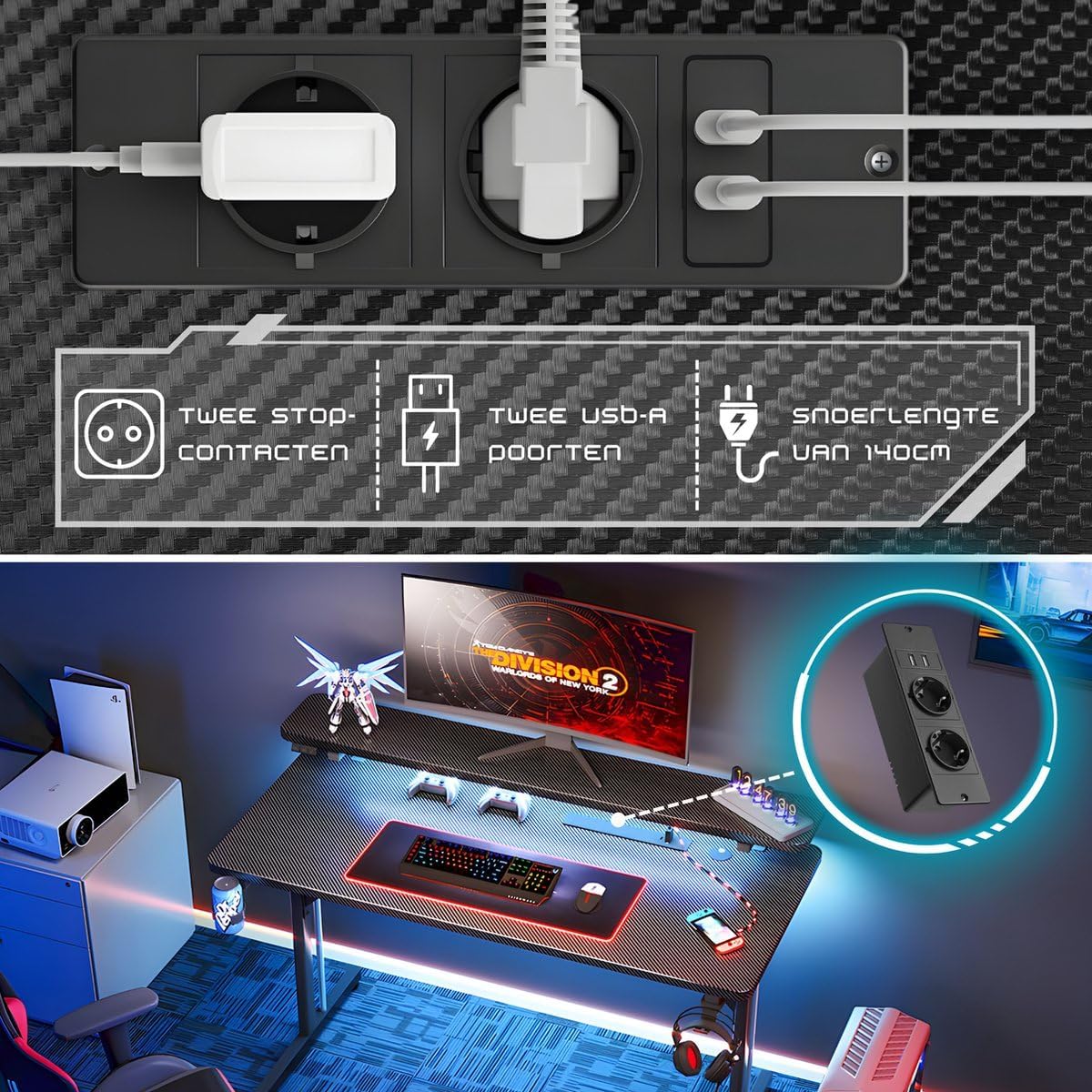
Install the Integrated Power Strip: Secure the power strip into its designated slot on the desk. Ensure it is firmly in place.

Slika 3: The integrated power strip features two power outlets and two USB-A ports, with a 140cm power cord.
-
Adjust Anti-Wobble Feet: Once the desk is fully assembled and in its desired location, adjust the anti-wobble feet at the bottom of the legs to ensure the desk is stable and level on uneven surfaces.

Slika 4: The desk features adjustable anti-wobble feet to ensure stability on various floor types.
- Končno preverjanje: Dvakrat preverite vse vijake in povezave, da se prepričate, da so trdno priviti in varno pritrjeni.
Navodila za uporabo
RGB LED osvetlitev
The RGB LED lighting strip, located under the monitor riser, can be controlled via the included switch. Connect the LED lighting to a USB power source (e.g., one of the desk's USB ports or a wall adapter). Use the switch to cycle through various colors and lighting effects to customize your ambiance.

Slika 5: The monitor stand features integrated RGB LED lights, offering various color options to enhance your gaming experience.
Integrated Power Strip
The desk includes an integrated power strip with two EU standard power outlets and two USB-A charging ports.
- Vtičnice: Plug in your monitors, computer, or other electronic devices directly into the desk's power outlets.
- Vrata USB-A: Use the USB-A ports to charge smartphones, tablets, or power USB-powered accessories like the RGB LED lighting.
Ensure the desk's main power cord is plugged into a wall socket before using the integrated power strip.
Uporaba dodatkov
- Headphone Holder: Hang your gaming headset or headphones on the dedicated holder to keep them organized and easily accessible.
- Držalo za skodelico: Place your beverage in the cup holder to prevent spills on your desk surface.
- Organizator kabla: Route your cables through the integrated cable organizer to maintain a tidy and clutter-free workspace.
Vzdrževanje in nega
To ensure the longevity and appearance of your Five Stars Gaming Desk, follow these maintenance guidelines:
- Čiščenje: The carbon-look laminated surface is scratch-resistant and easy to clean. Use a soft, damp cloth with mild soap and water to wipe down the desk surface and frame. Avoid abrasive cleaners or harsh chemicals that could damage the finish.
- Razlitje: Razlite tekočine takoj obrišite, da preprečite madeže ali poškodbe površine.
- Zategnite pritrdilne elemente: Periodically check all screws and bolts and tighten them if necessary to maintain desk stability.
- Upravljanje kablov: Regularly check and adjust cable routing to prevent strain on cables and connectors.
Odpravljanje težav
If you encounter any issues with your Five Stars Gaming Desk, refer to the following common problems and solutions:
-
Pisalna miza je majava:
- Prepričajte se, da so vsi vijaki za montažo varno priviti.
- Adjust the anti-wobble feet at the bottom of the desk legs to level the desk on uneven floors.
-
RGB LED luči ne delujejo:
- Check that the LED strip is properly connected to a USB power source.
- Ensure the power source (e.g., USB port, wall adapter) is functional.
- Verify the control switch is in the "on" position and try cycling through modes.
-
Integrated Power Strip Not Providing Power:
- Ensure the desk's main power cord is securely plugged into a working wall outlet.
- Preverite, ali stenska vtičnica deluje, tako da vanjo priključite drugo napravo.
- Verify that the power strip's internal circuit breaker (if present) has not tripped.
Specifikacije
| Znamka | Pet zvezdic |
| Številka modela | Five Stars L-vormig Game Bureau |
| Dimenzije (D x Š x V) | 100 x 50 x 75 cm (39.4 x 19.7 x 29.5 palca) |
| Teža | 12.5 kg (27.5 lbs) |
| Material | Metal frame, Carbon-look laminated wood top |
| barva | Črna |
| Posebne lastnosti | RGB LED Lighting, Monitor Riser, Integrated Power Strip (2x EU outlets, 2x USB-A ports), Headphone Holder, Cup Holder, Cable Organizer, Ergonomic Design, Anti-Wobble Feet |
Garancija in podpora
Five Stars offers a 100% satisfaction guarantee on this product. For warranty information, technical support, or assistance with any issues not covered in this manual, please refer to your purchase documentation or contact the retailer directly. Our team is available to assist you via Amazon for any inquiries.