
1. Uvod
The Xhorse VVDI BEE Key Tool Lite is a compact and versatile device designed for locksmiths and automotive professionals using Android smartphones. It offers a range of functions for key generation, transponder cloning, and remote control operations, enhancing efficiency in key programming tasks.
2. Izdelek je končanview
The VVDI BEE Key Tool Lite connects directly to your Android phone via a Type-C interface, providing a user-friendly interface for various key-related functions.
Ključne značilnosti:
- Remote control generation (supports Toyota XM Smart Key, universal smart key, wireless remote, wire remote, super remote).
- Transponder cloning and identification for most common transponders.
- Generation of transponders for over 850 car models from 80 brands worldwide.
- Support for Xhorse XK wire remote, XN wireless remote, XE super remote, and smart remote generation.
- Remote generation for over 6000 vehicle remotes from 200 car brands worldwide.
- Special functions including ignition switch coil signal detection, unlocking Toyota Smartkey, 8E remote upgrade/unlock, Honda cycle key renewal, and VVDI super chip settings.
Komponente naprave:
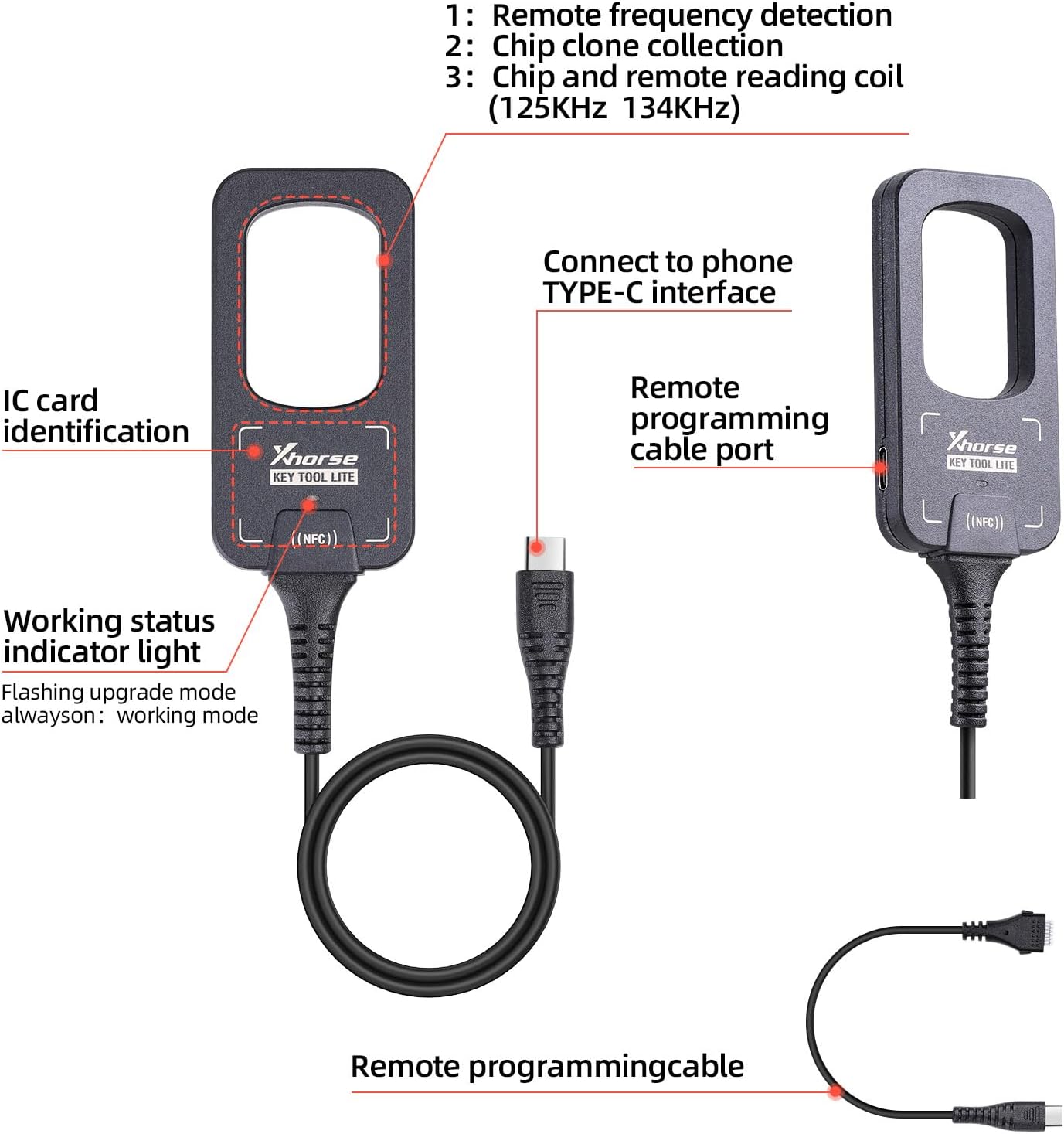
Figure 1: Key Tool Lite device showing remote frequency detection, chip clone collection, chip and remote reading coil (125KHz/134KHz), IC card identification, working status indicator light, Type-C interface, and remote programming cable port.

Figure 2: Dimensions of the Key Tool Lite device, measuring 78.9 mm in length, 40 mm in width, and 10.3 mm in thickness.
3. Kaj je v škatli
- Xhorse VVDI BEE Key Tool Lite Device
- 6 Pcs Xhorse XKB501EN Wire Remotes
- USB Type-C kabel
- Kabel za daljinsko programiranje
- Uporabniški priročnik
4. Nastavitev
4.1 Connecting to an Android Phone
Connect the Xhorse VVDI BEE Key Tool Lite to your Android smartphone using the provided USB Type-C cable. Ensure your phone's USB debugging mode is enabled if required by the app.

Figure 3: The Key Tool Lite connected to an Android phone, displaying the application interface.
4.2 App Installation and Device Activation
Download and install the official Xhorse application from the Google Play Store. Follow the on-screen instructions within the app to activate your device. This typically involves registering an account and linking your Key Tool Lite.

Figure 4: Step-by-step guide for device activation within the Xhorse application, including account login, security code entry, device combination, and successful activation confirmation.
5. Navodila za uporabo
The Xhorse VVDI BEE Key Tool Lite offers a variety of functions accessible through its dedicated Android application. Below are detailed instructions for common operations.
5.1 Remote Control Generation
This function allows you to generate various types of remote controls, including Toyota XM Smart Keys, universal smart keys, wireless remotes, wire remotes, and super remotes. Select the desired remote type from the app menu and follow the prompts to generate the remote.
5.2 kloniranje transponderja
The device supports identification, editing, and cloning of most common transponders. Place the transponder in the designated area on the device and select the transponder cloning option in the app. Follow the instructions to complete the cloning process.
5.3 Vehicle Remote Functions
Generate Xhorse XK wire remotes, XN wireless remotes, XE super remotes, and smart remotes. The application provides extensive support for over 6000 vehicle remotes across 200 car brands. Choose your vehicle make and model within the app to find compatible remote options.
5.4 Posebne funkcije
Access advanced features through the 'Special Function' menu in the app.
- Remote Charge Battery: Use this function to charge rechargeable keys by placing them in the device's slot and initiating the charge via the app.
- Odkrivanje puščanja: Connect the leakage detection cable to the device and the key chip to be tested. The app will display the current leakage value.
- voltage Zaznavanje: Connect the leakage detection cable to the battery. The app will display the current voltage.
- IMMO Programming: The device supports various IMMO programming models. Select 'IMMO Programming' in the app, choose the vehicle brand and model, and follow the specific programming steps.
- Key Making Process Overview:

Figure 5: Diagram illustrating the key making process, including remotes generation, battery installation, installation of remotes, key blade cutting (additional purchase), and final key matching with the vehicle using an OBD device.
6. Vzdrževanje
6.1 Battery Installation/Replacement for Remotes
For remotes that require battery replacement, refer to the following images for guidance on accessing the circuit board and installing the battery.

Figure 6: A typical key remote disassembled, showing the external casing and the internal circuit board.

Slika 7: Podrobno view of a key remote circuit board, highlighting the control chip, buttons, power chip, and battery socket.
6.2 Splošna nega
- Napravo vzdržujte čisto in brez prahu ter vlage.
- Izogibajte se padcem naprave in je ne izpostavljajte močnim udarcem.
- Ko naprave ne uporabljate, jo hranite na hladnem in suhem mestu.
- Ensure the USB Type-C port is free from debris before connecting.
7. Odpravljanje težav
- Device not connecting to phone: Ensure the USB Type-C cable is securely connected and your Android phone's USB debugging (if applicable) is enabled. Check for any loose connections.
- Aplikacija ne prepozna naprave: Restart the app and reconnect the device. Ensure the app is updated to the latest version.
- Function failure: Verify that the selected function is compatible with your specific vehicle make/model and the type of key/transponder being used. Consult the app's help section for specific error codes.
- Težave s posodobitvijo vdelane programske opreme: Ensure a stable internet connection during firmware updates. Do not disconnect the device during the update process.
8. Specifikacije
| Funkcija | Specifikacija |
|---|---|
| Številka modela | HKSK407 |
| Znamka | Xhorse |
| Združljive naprave | Android Systems (Smartphones) |
| Največje število podprtih naprav | 9 |
| barva | Črna |
| Teža predmeta | 12.8 unč |
| Dimenzije paketa | 10 x 7 x 1 palcev |
| Posebna funkcija | Univerzalni |
9. Garancija in podpora
For warranty information, technical support, or service inquiries, please refer to the official Xhorse webspletno mesto ali se obrnite neposredno na njihovo službo za stranke. Za uveljavljanje garancije shranite račun.