
1. Uvod
The MSXTTLY U2C-AIR Pro Wireless CarPlay Adapter converts your vehicle's existing wired CarPlay system into a wireless one. This allows for a seamless and automatic connection between your iPhone and your car's infotainment system, providing convenient access to navigation, music, calls, and messages without the need for cables.
2. Varnostne informacije
- Naprave ne izpostavljajte ekstremnim temperaturam, neposredni sončni svetlobi ali vlagi.
- Izogibajte se razstavljanju ali spreminjanju naprave, saj boste s tem razveljavili garancijo in lahko povzročite škodo.
- Napravo hranite stran od močnih magnetnih polj.
- Ensure the device is securely placed to prevent it from interfering with driving.
3. Vsebina paketa
Preverite, ali so v paketu vsi elementi:
- U2C-AIR Pro CarPlay Adapter (x1)
- USB A to C Cable (x1)
- USB A to A Cable (x1)
- 3M lepilni trak (x1)

Image: What's in the Box. This image displays the U2C-AIR Pro adapter, a USB-A to USB-C cable, a USB-A to USB-A cable, and a user manual.
4. Izdelek je končanview
The U2C-AIR Pro Wireless CarPlay Adapter is designed for convenience and performance. It features a compact design and gold-plated connectors for enhanced durability and conductivity.

Image: MSXTTLY U2C-AIR Pro Wireless CarPlay Adapter. This image shows the compact design of the adapter with its gold-plated USB connector.
Ključne značilnosti:
- Brezžični CarPlay: Converts wired CarPlay to wireless for seamless iPhone integration.
- Fast and Stable Connection: Equipped with a 5G chip, 5.8 GHz WiFi, and Bluetooth 5.3 for low-latency performance.
- Kompaktna zasnova: Small and stylish, minimizing space usage in your car.
- Pozlačeni konektorji: Enhances conductivity, reduces heat buildup, and boosts data speed.
- Več možnosti povezave: Compatible with various car ports using included USB A to C and USB A to A cables.
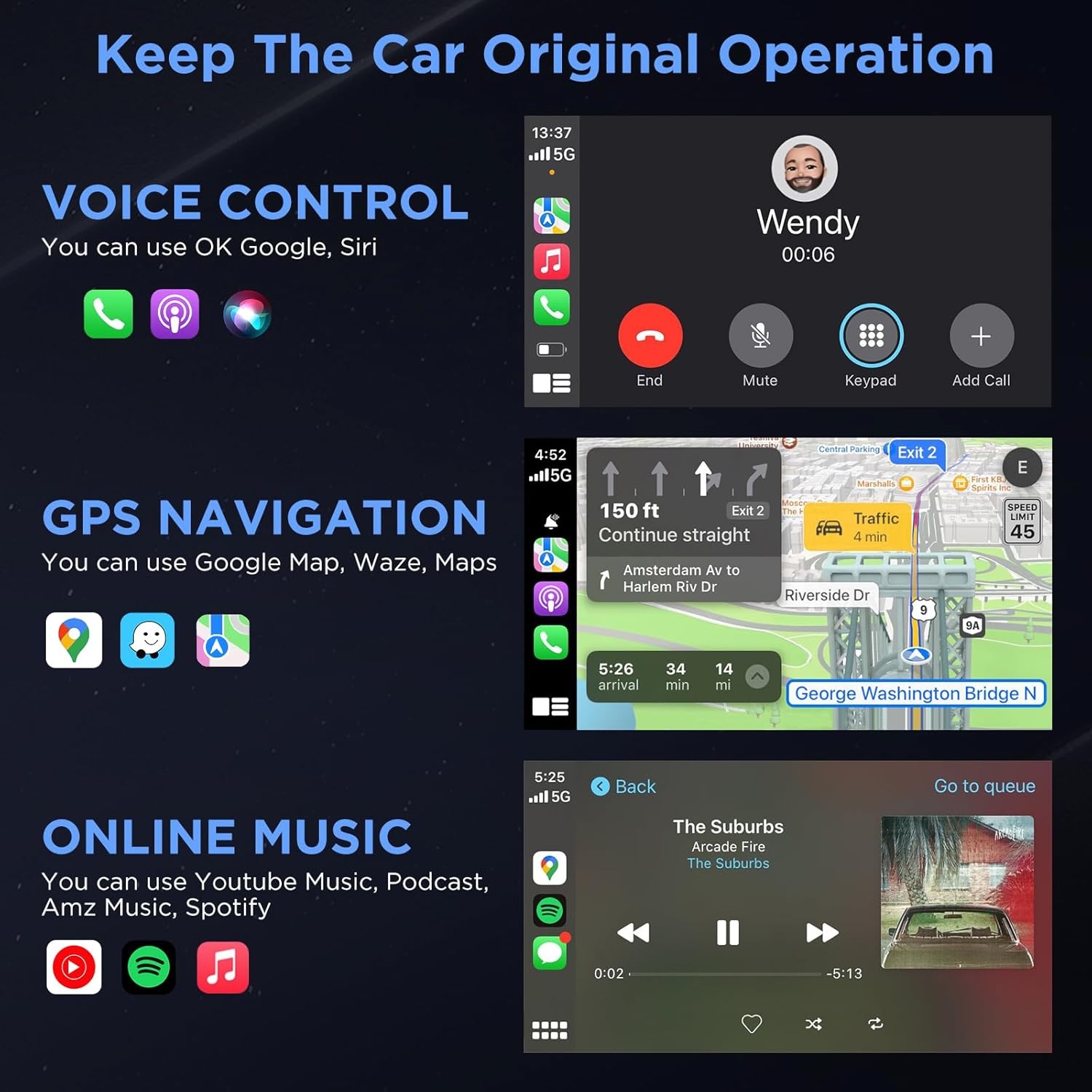
Image: Three Ways to Adapt to Car Various Ports. This image illustrates connecting the adapter via a built-in USB port, a USB-A to USB-C data cable, or a USB-A extension cable.

Image: Why Choose Gold-Plated Enclosure and Pins? This image explains the advantages of gold-plated connectors, including improved conductivity and durability.
5. Navodila za nastavitev
Follow these steps to connect your U2C-AIR Pro Wireless CarPlay Adapter:
- Plug In: Connect the U2C-AIR Pro adapter to your car's USB port that supports wired CarPlay. Use the appropriate cable (USB A to C or USB A to A) if needed.
- Par: On your iPhone, enable Bluetooth and Wi-Fi. Iskanje the adapter's Bluetooth name (e.g., "smartBox-XXXX") and pair with it. Confirm the CarPlay connection prompt on your iPhone.
- Use CarPlay: Once paired, CarPlay will automatically launch on your car's display. The adapter will automatically connect to your iPhone each time you start your car after the initial setup.

Image: Connection Method - Just 3 Steps. This image visually guides users through the plug-and-play setup process.
6. Navodila za uporabo
Once connected, your car's display will show the CarPlay interface, allowing you to access various iPhone features safely while driving.
CarPlay Functions:
- Glasovni nadzor: Use Siri for hands-free commands, such as making calls, sending messages, or getting directions.
- GPS navigacija: Utilize Apple Maps, Google Maps, Waze, or other compatible navigation apps directly on your car's screen.
- Online Music & Podcasts: Stream audio from Spotify, Apple Music, podcasts, and other supported applications.
- Klici in sporočila: Make and receive calls, and send/receive messages through the CarPlay interface.

Image: Keep The Car Original Operation. This image demonstrates the CarPlay interface with voice control, navigation, and music features.
Nadzorne metode:
The adapter supports your car's original control systems:
- Zaslon na dotik: Interact directly with the CarPlay interface via your car's touchscreen.
- Nadzor gumba: Use your car's control knobs for navigation and selection.
- Nadzor na volanu: Utilize steering wheel buttons for audio, calls, and voice commands.

Image: Support Automobile Control System 100%. This image illustrates the various ways to control CarPlay using your car's built-in controls.
7. Združljivost
To ensure proper functionality, please check the following compatibility requirements:
- Kompatibilnost z avtomobilom: Your car's OEM or aftermarket head unit must support žični CarPlay. This adapter is designed for OEM wired car models from 2017 and newer.
- Združljivost telefonov: Requires an iPhone running iOS 11 ali novejši.
- Nezdružljivost: Ta adapter je NI združljivo with BMW or electric vehicles. It does not support video streaming applications.

Image: How to Check if Your Device is Compatible with This Product? This image provides a quick guide to verify car and iPhone compatibility.

Image: Car Compatible. This image provides a comprehensive list of car models and years that are compatible with the adapter.
8. Odpravljanje težav
If you encounter issues with your U2C-AIR Pro adapter, consider the following:
- Težave s povezavo: Ensure your car's USB port supports wired CarPlay. Try disconnecting and reconnecting the adapter. Verify Bluetooth and Wi-Fi are enabled on your iPhone.
- Zamik ali prekinitve povezave: Wireless CarPlay may experience slight latency (0 to 1.5 seconds) depending on signal strength and usage. If disconnections are frequent, ensure no other devices are interfering with the Bluetooth or Wi-Fi signal.
- Posodobitve vdelane programske opreme: The adapter supports online reporting and OTA (Over-The-Air) updates. Regularly check for and install updates to ensure optimal performance and resolve potential bugs.
- Kompatibilnost z avtomobilom: Double-check your vehicle's compatibility with the adapter. Refer to the compatibility section or the detailed list provided.
9. Specifikacije
| Funkcija | Podrobnost |
|---|---|
| Številka modela | RE-CP-US-219 |
| Različica Bluetooth | 5.3 |
| Frekvenca Wi-Fi | 5.8 GHz |
| Čipset | 5G čip |
| Dimenzije paketa | 5.31 x 3.58 x 0.75 palcev |
| Teža predmeta | 2.08 unč |
10. Vzdrževanje
To ensure the longevity and optimal performance of your U2C-AIR Pro adapter:
- Napravo vzdržujte čisto tako, da jo obrišete z mehko, suho krpo.
- Izogibajte se uporabi močnih kemikalij ali abrazivnih čistil.
- Ko naprave ne uporabljate, jo hranite na hladnem in suhem mestu.
- Ensure the USB ports are free from dust and debris.
11. Garancija in podpora
MSXTTLY is committed to providing excellent customer service and product reliability.
- Garancija: The U2C-AIR Pro CarPlay Adapter comes with a 12-month warranty from the date of purchase.
- Tehnična podpora: We offer 24/7 professional technical support to assist you with any questions or issues.
- Doživljenjska tehnična podpora: Enjoy lifetime technical support for your product.
For support, please refer to the contact information provided in your product packaging or visit the official MSXTTLY webmesto.

Image: Peace of Mind Service. This image highlights the warranty and support services offered by MSXTTLY.