
1. Uvod
This manual provides essential instructions for the safe assembly, operation, and maintenance of your isinwheel M10 Electric Bike. Please read this manual thoroughly before your first ride to ensure proper usage and to maximize the lifespan of your e-bike. Retain this manual for future reference.
Varnostno opozorilo: Always wear a helmet and appropriate safety gear when riding. Familiarize yourself with local traffic laws and regulations. Regular maintenance is crucial for safe operation.
2. Vsebina paketa
Upon unpacking, verify that all components listed below are present and undamaged. If any items are missing or damaged, please contact customer support.
- isinwheel M10 Electric Bike Frame (partially assembled)
- Sprednje kolo
- Removable Lithium-Ion Battery (36V 10.4AH)
- 42 V 2 A hitri polnilnik
- Pedala (leva in desna)
- Seat with Seatpost
- Sprednji žaromet
- Zadnji odsevnik
- Toolkit (including Allen wrenches and spanner)
- Črpalka za pnevmatike
- Uporabniški priročnik

Image: All components included in the isinwheel M10 Electric Bike package.
3. Nastavitev in montaža
The isinwheel M10 Electric Bike comes 85% pre-assembled. Follow these steps to complete the assembly:
- Razpakiranje: Carefully remove all components from the packaging. Keep the packaging materials until assembly is complete and you are satisfied with the product.
- Namestitev krmila: Attach the handlebar to the stem using the provided Allen wrenches. Ensure the handlebar is centered and tightened securely.
- Namestitev sprednjega kolesa: Secure the front wheel to the front fork. Ensure the brake rotor aligns correctly with the caliper and the quick-release skewer is properly tightened.
- Namestitev žarometov: Mount the front headlight onto the designated bracket on the front fork or handlebar, and connect its cable.
- Namestitev pedala: Identify the left (L) and right (R) pedals. The left pedal tightens counter-clockwise, and the right pedal tightens clockwise. Use the spanner to secure them firmly.
- Namestitev sedeža: Insert the seatpost into the frame's seat tube. Adjust the height for comfortable riding and secure it with the quick-release lever.
- Rear Reflector Installation: Attach the rear reflector to the seatpost or rear rack (if applicable) for increased visibility.
- Namestitev baterije: Slide the battery into its designated slot on the frame and lock it with the key.
- Upravljanje kablov: Ensure all cables are neatly routed and secured, away from moving parts.

Image: Installing the handlebar.
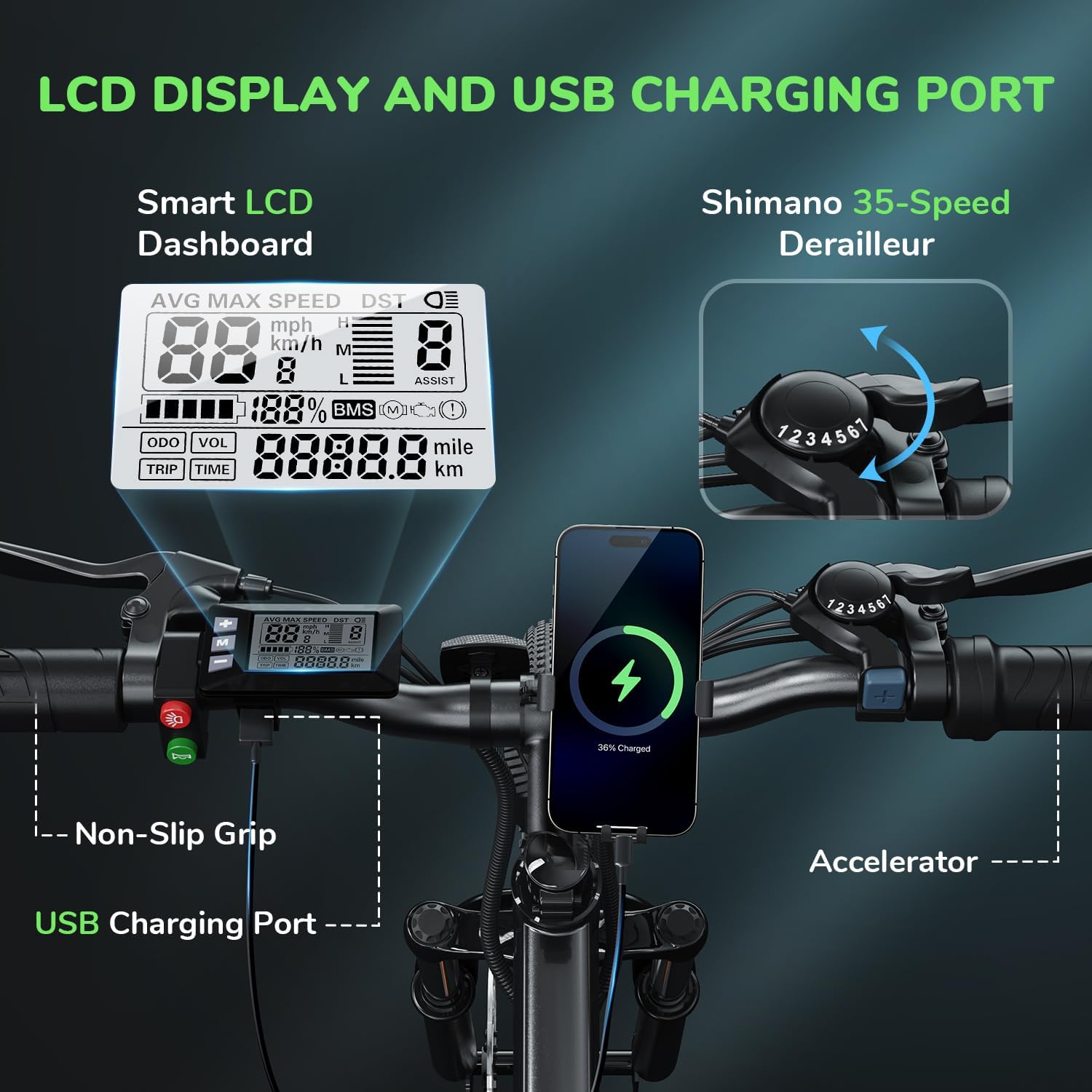
Image: Attaching the front wheel.

Image: Installing the pedals.

Image: Adjusting and securing the seat.

Image: Installing the removable battery.
Video vodnik za montažo
Video: A comprehensive guide demonstrating the assembly process of the isinwheel M10 Electric Bike, including handlebar, wheel, pedal, and battery installation.
4. Navodila za uporabo
4.1 Vklop/izklop
- To power on the bike, press and hold the power button on the LCD display for a few seconds until the screen illuminates.
- Za izklop ponovno pritisnite in držite gumb za vklop, dokler se zaslon ne izklopi.
4.2 Načini vožnje
The M10 Electric Bike offers multiple riding modes:
- Način pomoči pri pedaliranju (PAS): Provides motor assistance as you pedal. Adjust the assist level (1-5) using the '+' and '-' buttons on the control panel. Higher levels provide more assistance.
- Popolnoma električni način (plin): Engage the throttle for motor power without pedaling. This mode is typically used for quick acceleration or when you need a break from pedaling.
- Ročni način: Vozite kolo kot tradicionalno kolo brez pomoči motorja.
4.3 Shimano 7-Speed Gear System
The bike is equipped with a Shimano 7-speed transmission system. Use the gear shifter on the handlebar to change gears according to terrain and desired speed. Lower gears are for uphill climbing, and higher gears are for flat terrain or downhill riding.
4.4 Funkcije LCD zaslona
The smart LCD display provides real-time riding data:
- Hitrost: Current, average, and maximum speed.
- Čas vožnje: Duration of your ride.
- kilometrina: Potovalna razdalja in skupni števec kilometrov.
- Raven baterije: Preostala napolnjenost baterije.
- Raven pomoči: Current pedal assist level (1-5).
Power On Operation Video
Video: Demonstrates how to power on the isinwheel M10 Electric Bike and navigate the LCD display functions.
5. Upravljanje baterije
5.1 Odstranitev in namestitev baterije
The 36V 10.4AH Lithium-Ion battery is removable for convenient charging or storage.
- Odstranitev: Unlock the battery with the provided key, then slide it out from the frame.
- Namestitev: Align the battery with the frame slot and slide it in until it clicks into place. Lock it with the key to secure.
5.2 Navodila za polnjenje
Use only the provided 42V 2A Fast Charger.
- Prepričajte se, da je kolo izklopljeno.
- Poiščite polnilno odprtino na bateriji.
- Polnilnik priključite na polnilni priključek.
- Polnilnik priključite v standardno stensko vtičnico.
- The charger indicator light will show red during charging and turn green when fully charged.
- Polnjenje običajno traja 3-4 ure za popolno napolnjenost.
- Ko je polnjenje končano, odklopite polnilnik.
Battery Removal and Charging Video
Video: Instructions for removing and installing the battery, and connecting the charger to the isinwheel M10 Electric Bike.
6. Vzdrževanje
Redno vzdrževanje zagotavlja dolgo življenjsko dobo in varno delovanje vašega električnega kolesa.
- Čiščenje: Obrišite kolo z oglasomamp krpo. Izogibajte se neposrednemu čiščenju električnih komponent z visokotlačno vodo.
- Tlak v pnevmatikah: Check tire pressure before each ride. Maintain recommended pressure (usually indicated on the tire sidewall) using the included pump.
- Zavore: Regularly inspect brake pads and rotors for wear. Ensure brake levers engage smoothly and provide adequate stopping power. Adjust or replace as needed.
- Veriga: Verigo vzdržujte čisto in naoljeno, da preprečite rjavenje in zagotovite gladko menjavanje prestav.
- Pritrdilni elementi: Periodically check all bolts and nuts for tightness, especially on the handlebars, seatpost, and wheels.
- Vzdrževanje baterije: Store the battery in a cool, dry place. If storing for extended periods, charge it to 50-70% every 2-3 months.
Air Inflation Instructions Video
Video: Demonstrates how to properly inflate the tires of the isinwheel M10 Electric Bike using the provided pump.
7. Odpravljanje težav
If you encounter issues with your isinwheel M10 Electric Bike, refer to the following common problems and solutions:
| Težava | Možen vzrok | rešitev |
|---|---|---|
| Kolo se ne vklopi | Battery not installed correctly or discharged; loose electrical connection. | Ensure battery is fully inserted and locked. Check battery charge level and charge if necessary. Verify all visible electrical connections are secure. |
| Motor ne pomaga | Low battery; assist level set to 0; brake lever engaged; motor cable disconnected. | Charge battery. Increase assist level on the display. Release brake levers. Check motor cable connection. |
| Baterija se ne polni | Charger not connected properly; faulty charger/battery; power outlet issue. | Ensure charger is securely plugged into battery and outlet. Check if the outlet is working. Contact support if issues persist. |
| Zavore so šibke | Obrabljene zavorne ploščice; ohlapna zavorna žica; zrak v hidravličnem sistemu (če je primerno). | Inspect and replace worn brake pads. Adjust brake cable tension. For hydraulic brakes, professional service may be required. |
If you cannot resolve an issue using the troubleshooting guide, please contact isinwheel customer support for assistance.
8. Specifikacije
Key technical specifications for the isinwheel M10 Electric Bike:
| Funkcija | Specifikacija |
|---|---|
| Model | M10 |
| Motor | 500W brezkrtačni motor z največjo močjo |
| Največja hitrost | Do 32 KM/H (20 MPH) |
| Baterija | 36V 10.4AH (375WH) Removable Li-ion, IPX5 waterproof |
| Čas polnjenja | 3-4 hours (with 42V 2A Fast Charger) |
| Range (Full Electric) | 39-43 miles (63-70 KM) |
| Doseg (pomoč pri pedaliranju) | 50-60 miles (80-96 KM) |
| Prenos | Shimano 7-hitrost |
| Material okvirja | Aluminijeva zlitina |
| Teža kolesa | 21.3 KG (47 lbs) |
| Velikost kolesa | 26 palcev |
| Vzmetenje | Vzmetenje sprednjih vilic |
| Zavore | Sprednje in zadnje mehanske kolutne zavore |
| Posebne lastnosti | Digital LCD Display, Height Adjustable Seat, Lightweight & Portable |
| Certifikati | UL 2271 (Li-ion battery), UL 2789 (whole e-bike) |

Image: isinwheel M10 Electric Bike dimensions and rider height guide.
9. Garancija in podpora
The isinwheel M10 Electric Bike comes with a 12-month warranty from the date of purchase. This warranty covers manufacturing defects in materials and workmanship. It does not cover damage caused by misuse, accidents, unauthorized modifications, or normal wear and tear.
For warranty claims, technical support, or any questions regarding your e-bike, please contact isinwheel customer service. Provide your purchase details and a description of the issue for prompt assistance.
Kontaktni podatki: Please refer to your purchase documentation or the official isinwheel webza najnovejše kontaktne podatke za podporo strankam.