
Uvod
This manual provides detailed instructions for the setup, operation, and maintenance of your T'nB KBWERGO Ergonomic Wireless Rechargeable Bluetooth Keyboard. This keyboard features an ergonomic wave design, integrated wrist rest, adjustable feet, and dual connectivity modes (Bluetooth and 2.4 GHz USB-A dongle) for compatibility with both PC and Mac systems. It is designed to enhance comfort and reduce wrist strain during extended use.
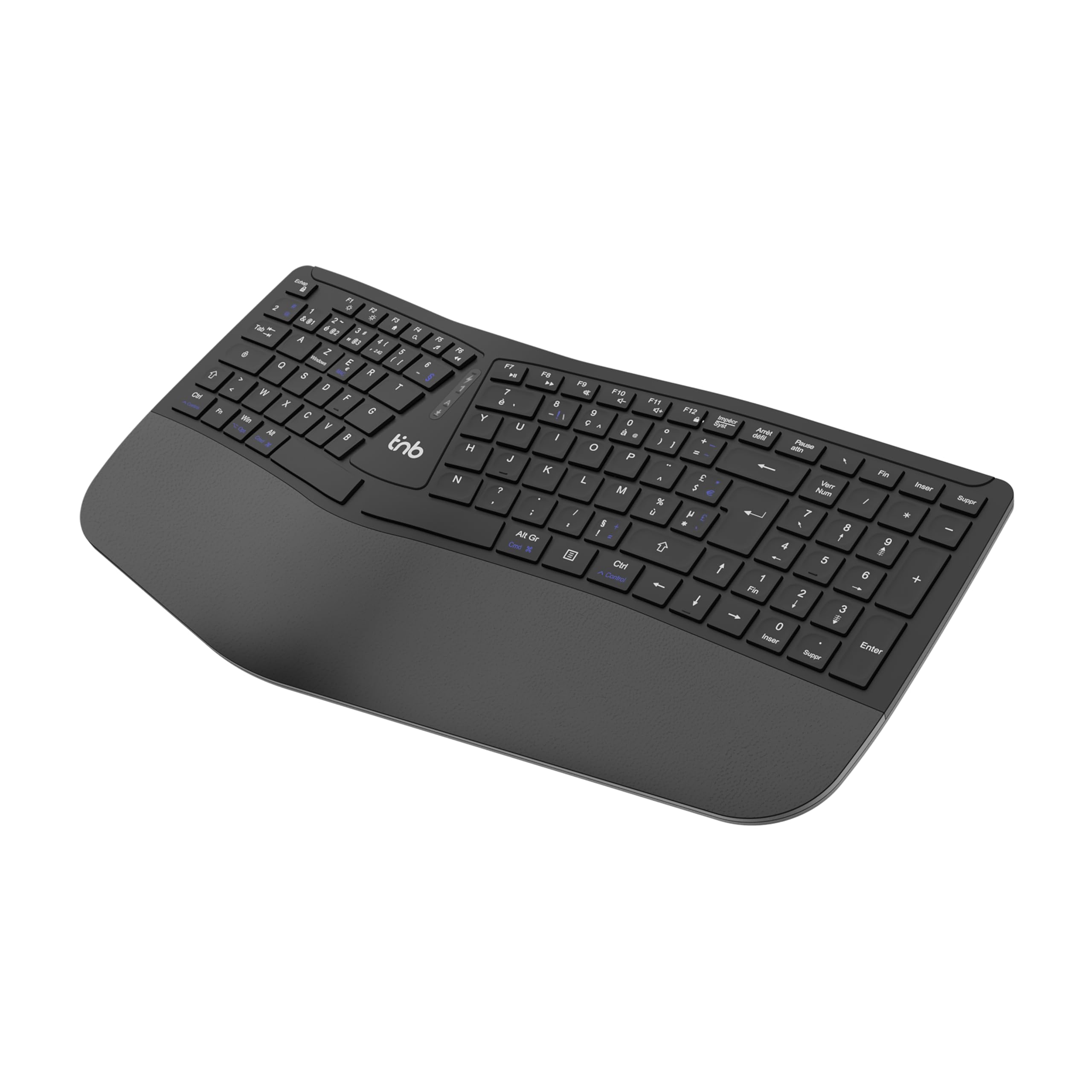
Slika 1: Zgornji del view of the T'nB KBWERGO Ergonomic Wireless Keyboard.
Vsebina paketa
Prosimo, preverite, ali so v paketu prisotni vsi elementi:
- T'nB KBWERGO Ergonomic Wireless Keyboard
- USB-A 2.4 GHz Wireless Dongle (typically stored in the keyboard's battery compartment)
- Polnilni kabel USB-C
- Uporabniški priročnik (ta dokument)
Nastavitev
1. Polnjenje tipkovnice
The keyboard is equipped with a rechargeable Lithium-Ion battery. Before first use, it is recommended to fully charge the keyboard.
- Poiščite polnilni priključek USB-C na tipkovnici.
- Connect one end of the provided USB-C cable to the keyboard's charging port.
- Connect the other end of the USB-C cable to a USB-A power source (e.g., computer USB port, USB wall adapter).
- The charging indicator light will illuminate. Once fully charged, the indicator light may change color or turn off.
2. Priključitev tipkovnice
The keyboard supports dual-mode connectivity: 2.4 GHz wireless via USB-A dongle and Bluetooth (up to 3 profiles).
2.1. 2.4 GHz Wireless Connection (USB-A Dongle)
- Locate the USB-A wireless dongle, usually stored in a compartment on the underside of the keyboard.
- Insert the USB-A dongle into an available USB-A port on your computer.
- Turn on the keyboard using the power switch (location may vary, typically on the back or side).
- The keyboard should automatically connect to your computer. No additional drivers are typically required.
2.2. Povezava Bluetooth (do 3 naprave)
The keyboard can be paired with up to three Bluetooth-enabled devices.
- Prepričajte se, da je tipkovnica vklopljena.
- Pritisnite in držite eno od tipk za seznanjanje Bluetooth (npr. BT1, BT2, BT3, or a dedicated Bluetooth button) for a few seconds until the corresponding indicator light flashes, indicating pairing mode.
- On your device (PC, Mac, tablet, smartphone), go to Bluetooth settings and search for new devices.
- Select "T'nB KBWERGO" or a similar name from the list of available devices.
- Follow any on-screen prompts to complete the pairing process. The indicator light will stop flashing once successfully paired.
- Za preklapljanje med seznanjenimi napravami Bluetooth preprosto pritisnite ustrezno tipko Bluetooth (BT1, BT2, oz BT3).
3. Prilagajanje nagiba tipkovnice
The keyboard features 4 adjustable pads, allowing for two different tilt heights to optimize your typing posture.
- Flip the keyboard over to access the underside.
- Locate the adjustable feet at the front and back of the keyboard.
- Extend the smaller feet for a slight tilt, or extend both the smaller and larger feet for a higher tilt.
- Ensure all four feet are set to the same height for stability.

Slika 2: Spodnja stran view of the keyboard, highlighting the adjustable feet.

Figure 3: Diagram illustrating the ergonomic design and adjustable tilt options.
Upravljanje tipkovnice
Prednosti ergonomske zasnove
The T'nB KBWERGO keyboard features a wave-shaped ergonomic design and an integrated synthetic leather wrist rest. This design aims to:
- Minimize wrist movement and effort to reach all keys.
- Alleviate wrist strain during prolonged typing sessions.
- Provide a natural and comfortable hand position.
- Reduce muscle tension in the arms and shoulders.

Slika 4: stran view illustrating the ergonomic wave design.
Funkcijske tipke in bližnjice
The keyboard includes 12 direct access keys (function keys) for common tasks. These keys are typically located along the top row of the keyboard (F1-F12) and may require pressing the Fn key simultaneously for their secondary functions. Refer to the keycap legends for specific functions such as media control, volume adjustment, and application shortcuts.
The keyboard also features a full numeric keypad for efficient data entry.
Združljivost
The T'nB KBWERGO keyboard is compatible with both PC (Windows operating systems) and Mac (macOS) systems, offering versatile use across different computing environments.
Vzdrževanje
Čiščenje
Za ohranitev videza in funkcionalnosti tipkovnice:
- Pred čiščenjem se prepričajte, da je tipkovnica izklopljena.
- Uporabite mehko krpo, ki ne pušča vlaken, dampočistite z vodo ali blago čistilno raztopino.
- Avoid harsh chemicals, abrasive cleaners, or spraying liquids directly onto the keyboard.
- Za prah in umazanijo med tipkami uporabite stisnjen zrak.
- Wipe the synthetic leather wrist rest gently.
Skrb za baterijo
The integrated Lithium-Ion battery requires proper care for longevity:
- Izogibajte se pogostemu popolnemu praznjenju baterije.
- Charge the keyboard regularly, especially if it will be stored for an extended period.
- Tipkovnice ne izpostavljajte ekstremnim temperaturam.
- Za polnjenje uporabljajte samo priloženi kabel USB-C ali certificiran ekvivalent.
Odpravljanje težav
Tipkovnica se ne odziva
- Preverite moč: Prepričajte se, da je tipkovnica vklopljena in da je baterija dovolj napolnjena. Po potrebi jo napolnite.
- 2.4 GHz povezava:
- Verify the USB-A dongle is securely plugged into a working USB port on your computer.
- Poskusite priključiti ključek v drug USB vhod.
- Povezava Bluetooth:
- Prepričajte se, da je Bluetooth v vaši napravi omogočen.
- Confirm the keyboard is selected as the active Bluetooth device (e.g., by pressing the correct BT1/BT2/BT3 key).
- If connection issues persist, try unpairing and re-pairing the keyboard with your device.
- Motnje: Tipkovnico premaknite bližje napravi in stran od drugih brezžičnih naprav, ki bi lahko povzročale motnje.
- Ponovni zagon: Znova zaženite računalnik in tipkovnico.
Težave s polnjenjem
- Preverjanje kabla: Ensure the USB-C charging cable is securely connected to both the keyboard and the power source.
- vir energije: Poskusite z drugim virom napajanja USB ali stenskim adapterjem.
- Poškodba kabla: Inspect the charging cable for any signs of damage. Use a different USB-C cable if available.
Specifikacije
| Funkcija | Podrobnost |
|---|---|
| Ime modela | KBWERGO |
| Znamka | T'nB |
| Tehnologija povezljivosti | Bluetooth, 2.4 GHz USB-A |
| Number of Bluetooth Profiles | 3 |
| Vir napajanja | Polnilna litij-ionska baterija |
| Vrata za polnjenje | USB-C |
| Razporeditev tipkovnice | QWERTY (Spanish layout implied by source, but general QWERTY for instructions) |
| Število ključev | 104 |
| Posebna funkcija | Ergonomic design, Integrated Wrist Rest, Adjustable Tilt |
| Združljive naprave | Osebni računalnik, prenosnik |
| Združljivi operacijski sistemi | Windows, macOS |
| Dimenzije (D x Š x V) | 43 x 21 x 2 cm (16.9 x 8.3 x 0.8 palca) |
| Teža | 1.16 kg (2.56 lbs) |
| Material | Plastika |
| barva | Črna |
Garancija in podpora
For warranty information or technical support, please refer to the documentation included with your purchase or contact T'nB customer service through their official webspletno mesto ali prodajalec, kjer je bil izdelek kupljen. Dokazilo o nakupu shranite za uveljavljanje garancije.
A safety information PDF is available: Varnostne informacije (PDF)