
Uvod
Thank you for choosing the Jauarta Industrial Endoscope. This manual provides essential information for the safe and efficient operation, setup, maintenance, and troubleshooting of your device. Please read this manual thoroughly before use and retain it for future reference.
Konec izdelkaview
The Jauarta Industrial Endoscope is designed for detailed visual inspection in hard-to-reach areas. It features a high-definition camera, a large display screen, and robust construction for various industrial and home inspection tasks.

Slika 1: Na splošno view of the Jauarta Industrial Endoscope, showing the main display unit and the coiled inspection camera cable.
Ključne značilnosti:
- Stable Data Transmission: Utilizes AV analog technology for reliable data transmission, even over long distances.
- Kamera visoke ločljivosti: Equipped with a 2MP camera lens, providing clear and detailed images for inspection.
- Large IPS Screen: Features a 4.3-inch IPS display with a 178-degree wide viewing angle for an optimal viewizkušnje.
- Uporabniku prijazno delovanje: Designed for immediate use upon startup with clearly labeled function buttons.
- Vodotesna ocena IP67: The camera probe is rated IP67, making it suitable for use in wet and harsh environments.
- Nastavljiva LED osvetlitev: Includes 8 brightness-adjustable LEDs for illuminating dark inspection areas.
Vsebina paketa
Ob prejemu preverite vsebino paketa, da se prepričate, da so vsi predmeti prisotni in nepoškodovani.

Slika 2: Contents of the Jauarta Industrial Endoscope package, including the main unit, cable, and accessories.
- 1 x Industrial Endoscope (Display Unit with Lens Line)
- 1 x Data Cable (USB charging cable)
- 1 x Fixing Device
- 1 x Magnetni nastavek
- 1 x Pritrdilni kavelj
- 1 x Side Lens attachment
- 1 x Uporabniški priročnik (ta dokument)
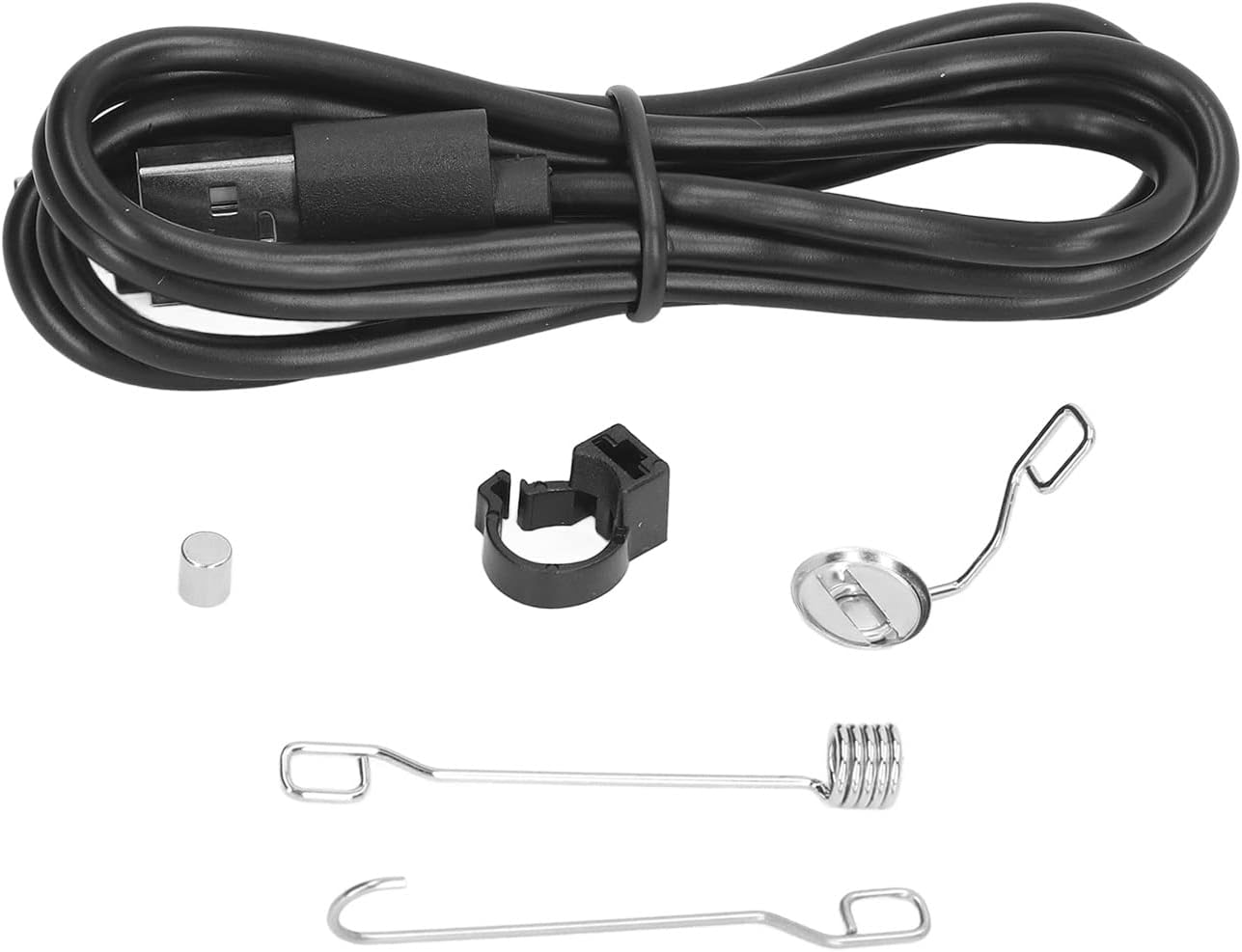
Slika 3: Od blizu view of the included accessories: USB charging cable, fixing device, magnet, hook, and side lens attachments.
Nastavitev
- Napolnite napravo: Before first use, fully charge the industrial endoscope using the provided USB data cable. Connect the cable to the device's charging port and a standard USB power adapter (not included). The built-in lithium battery has a capacity of 550mAh.
- Connect the Camera Probe: The camera probe (lens line) is permanently attached to the display unit. Ensure it is securely connected.
- Pritrditev dodatne opreme (neobvezno): If needed, attach the magnet, hook, or side lens to the camera head. The fixing device may be used to secure these attachments.
Navodila za uporabo
Follow these steps to operate your industrial endoscope:

Slika 4: Control buttons on the endoscope display unit, including power, brightness, and zoom controls.
- Vklop/izklop: Press and hold the power button (usually marked with a circle and a vertical line) to turn the device on or off. The 4.3-inch IPS screen will illuminate.
- Prilagodi svetlost LED-diode: Use the dedicated brightness control button (often marked with a sun icon) to cycle through the 8 adjustable LED brightness levels. This helps illuminate dark inspection areas.
- Postavite kamero: Carefully insert the 8.0mm diameter camera probe into the area you wish to inspect. The 10m line length provides extensive reach.
- View the Image: Observe the live feed on the 4.3-inch IPS display. The 2MP high-definition camera provides clear visuals, and the 178-degree wide viewing angle ensures a broad perspective. The focus range is approximately 20-100mm (0.8-3.9 inches).
- Navigate Controls: Utilize other function buttons (e.g., zoom, mode selection if available) as needed for your inspection task.
- Okoljska uporaba: The camera probe has an IP67 waterproof rating, allowing it to be used in wet or submerged conditions. The operating temperature range is -14℉ to 113℉, and the camera temperature range is -14℉ to 176℉.
Vzdrževanje
- Čiščenje: After each use, gently wipe the camera lens and probe with a soft, damp cloth. For stubborn dirt, use a mild cleaning solution. Ensure the device is powered off before cleaning. Do not use abrasive cleaners or solvents.
- Shranjevanje: Store the endoscope in a cool, dry place, away from direct sunlight and extreme temperatures. Coil the camera line neatly to prevent kinks or damage.
- Vzdrževanje baterije: Da podaljšate življenjsko dobo baterije, se izogibajte pogostemu popolnemu praznjenju baterije. Napravo redno polnite, tudi če je dalj časa ne uporabljate.
- Pregled: Periodically inspect the camera cable for any signs of wear, cuts, or damage. Do not use the device if the cable is damaged.
Odpravljanje težav
| Težava | Možen vzrok | rešitev |
|---|---|---|
| Naprava se ne vklopi. | Nizka baterija. | Napravo popolnoma napolnite s priloženim kablom USB. |
| Na zaslonu ni slike. | Camera probe not properly connected (though it's fixed, check for internal issues). Napaka v programski opremi. |
Ensure the device is powered on. If the issue persists, try restarting the device. If still no image, contact support. |
| Slika je zamegljena ali nejasna. | Objektiv kamere je umazan. Object is outside the focus range. |
Clean the camera lens carefully. Adjust the distance between the camera and the object to be within the 20-100mm focus range. |
| LED lights are not working or dim. | Nastavitev svetlosti je prenizka. Faulty LEDs. |
Press the brightness control button to increase LED intensity. If lights still do not work, contact support. |
Specifikacije
| Vrsta predmeta | Industrijski endoskop |
| Številka modela | Jauartas2de4bgfrq |
| Material | ABS |
| Velikost zaslona | 4.3-palčni zaslon IPS |
| Ločljivost kamere | 2 MP (1080 P) |
| Vizualni kot | 70° |
| Obseg ostrenja | Approx. 20-100mm / 0.8-3.9in |
| Pomožna razsvetljava | 8 LED nastavljivih svetlosti |
| Premer kamere | Približno 8.0 mm / 0.3 palca |
| Camera Grade (Waterproof) | IP67 |
| Vrsta baterije | Vgrajena litijeva baterija |
| Kapaciteta baterije | 550 mAh |
| Dolžina vrstice | 10m |
| Delovna temperatura | -14 ℉ do 113 ℉ (-25 ℃ do 45 ℃) |
| Temperatura kamere | -14 ℉ do 176 ℉ (-25 ℃ do 80 ℃) |
| Teža predmeta | 1.35 funtov |
| Dimenzije paketa | 7.87 x 5.12 x 3.15 palcev |
Garancija in podpora
For warranty information, technical support, or service inquiries, please contact Jauarta customer service through the retailer where the product was purchased or refer to the contact information provided on the product packaging or official website. Please have your model number (Jauartas2de4bgfrq) and purchase details ready when contacting support.