
1. Uvod
This manual provides detailed instructions for the installation, operation, and maintenance of your DATOUBOSS 11KW 48V Hybrid Pure Sine Wave Inverter. Please read this manual thoroughly before installation and use to ensure proper function and safety. Keep this manual for future reference.

Figure 1: DATOUBOSS 11KW Hybrid Pure Sine Wave Inverter units.
2. Ključne značilnosti
- Visoka izhodna moč: 11KW 48V DC to 230V AC pure sine wave hybrid inverter.
- Integrated MPPT: Features two built-in 160A MPPT charge controllers.
- Prilagodljiva povezljivost: Supports parallel operation of up to 9 units and grid connection.
- Napredni zaslon: Equipped with an LCD display for real-time system data and operational status.
- Nastavljive nastavitve: Vhodna voltage range and AC/solar charger priority can be configured via LCD settings.
- Power Statistics: View power statistics and analysis, with data storage for extended periods, even without Wi-Fi connection.
- Multiple Priority Modes: Three selectable priority modes: grid priority, solar priority, and battery priority, ensuring continuous power supply.
- Čisti sinusni izhod: Provides stable, high-quality AC power for sensitive electronics.
- Celovita zaščita: Includes short circuit, overcurrent, overvoltage, podzvtage, overtemperature, overload, and fuse reverse connection protection.
- Upravljanje baterije: Supports lithium battery activation function and regular charging/discharging to extend battery life.
- Dvojna izhodna vrata: Connects to two sockets, one for common output and the other for backup.
- Široka uporaba: Suitable for RVs, camping boats, home emergencies, and various appliances like stoves, rice cookers, lamps, TVs, and fans.
3. Vsebina paketa
Upon opening the package, verify that all items listed below are present and undamaged. If any items are missing or damaged, please contact your dealer immediately.
- DATOUBOSS 11KW Hybrid Inverter Unit
- Montažni vijaki in dodatki
- Communication Cables (USB, RS232, RS485)
- Uporabniški priročnik
Video 1: Unboxing the DATOUBOSS 11KW Hybrid Inverter, showing the unit and included accessories.
4. Izdelek je končanview in komponente
Familiarize yourself with the inverter's physical layout and connection points.

Slika 2: Zadnja plošča view of the DATOUBOSS Inverter, highlighting various input and output ports.
Sprednja plošča:
- LCD zaslon: Shows system data and operational status.
- Kazalniki stanja: AC/INV (AC/Inverter), CHG (Charging), FAULT (Error).
- Funkcijske tipke: ESC, UP, DOWN, ENTER for navigation and settings adjustment.
Priključki na zadnji plošči:
- PV1 & PV2 Inputs: For connecting solar panel arrays.
- AC vhod: For connecting to the utility grid or generator.
- Glavni izhod: Primary AC output for loads.
- Second Output: Secondary AC output for loads.
- RS232 & RS485 Ports: For communication and monitoring.
- Parallel Connection Port: Za vzporedno priključitev več razsmernikov.
- Suhi stik: Za zunanje krmiljenje ali signalizacijo.
- DC vhod: Za priklop na baterijski sklop.
- Stikalo za vklop/izklop: Za vklop ali izklop enote.

Slika 3: Podrobno view of the inverter's rear panel, showing all connection points and their labels.
5. Specifikacije
The following table outlines the technical specifications for the DATOUBOSS DT4811B Hybrid Inverter:
| Parameter | Vrednost |
|---|---|
| Model | DT4811B |
| Zmogljivost | 11000VA/11000W |
| Območje delovne temperature | -10~50°C |
| Stopnja zaščite | IP21 |
| DC vhod (baterija) | 48VDC, 254.6A |
| AC izhod | 230 V AC, 50/60 Hz, 47.8 A, 1 Φ |
| AC polnilec | 54VDC, 150A |
| AC Input (Grid/Generator) | 230 V AC, 50/60 Hz, 60 A, 1 Φ |
| Moč sončne celice | 2x5500W |
| Max Charging Current (Solar) | 150A |
| Solar Voltage obseg (Vmp) | 90-500VDC |
| Best Voltage obseg (Vmp) | 300-400VDC |
| Max Solar Voltage | 500 VDC |
| Teža | 19.2 kilogramov |
| Dimenzije | 70.8 x 57 x 24.1 cm |
| Serijska številka (npr.ample) | 20241020 0476 |

Figure 4: Product label displaying detailed technical parameters and serial number.
6. Nastavitev in namestitev
Safety Warning: During any installation or maintenance operation, please ensure the power supply is completely turned off to prevent electric shock or damage to the equipment.
6.1 Priključitev baterije
- Remove the side panel of the inverter to access the battery terminals.
- Connect the positive (red) battery cable to the inverter's positive (+) DC input terminal.
- Connect the negative (black) battery cable to the inverter's negative (-) DC input terminal.
- Ensure correct polarity before tightening the connections. Verify that all wiring is secure.
6.2 Vhodni in izhodni priključki za izmenični tok
- Connect the AC input wires (Live, Neutral, Ground) to the designated AC Input terminals on the inverter.
- Connect the main AC output wires (Live, Neutral, Ground) to the Main Output terminals.
- If using, connect the second AC output wires to the Second Output terminals.
- It is recommended to install an appropriate fuse or circuit breaker for both AC input and output lines for protection.
6.3 Priključitev sončnih kolektorjev
Connect your solar panel arrays to the PV1 and PV2 inputs. Ensure the total voltage and current from your solar panels do not exceed the inverter's maximum ratings (Max Solar Voltage: 500VDC, Max Charging Current: 150A).
Video 2: Demonstrates battery and AC wiring connections, emphasizing safety and correct polarity.
7. Navodila za uporabo
After all connections are securely made, you can power on the inverter and configure its settings using the LCD display and function keys.
7.1 Vklop/izklop
- Prepričajte se, da je vsa napeljava pravilna in varna.
- Turn on the DC input breaker (if installed) for the battery.
- Flip the Power ON/OFF switch on the inverter to the 'ON' position.
- The LCD display will light up, and the inverter will initiate its startup sequence.
7.2 LCD-zaslon in navigacija
The LCD display provides real-time information and allows for system configuration. Use the function keys (ESC, UP, DOWN, ENTER) to navigate through menus and adjust settings.
- ESC: Exits the current menu or setting.
- GOR, DOL: Omogoča navigacijo po možnostih menija ali prilagajanje vrednosti.
- VNESI: Izbere možnost ali potrdi nastavitev.
Refer to the detailed user manual for specific menu structures and parameter settings, including output voltage range, charger priority (AC/solar), and battery type configuration.
8. Vzporedno delovanje
The DATOUBOSS 11KW Hybrid Inverter supports parallel operation of up to 9 units to increase overall power capacity. This feature allows for scalable power solutions tailored to specific energy demands.
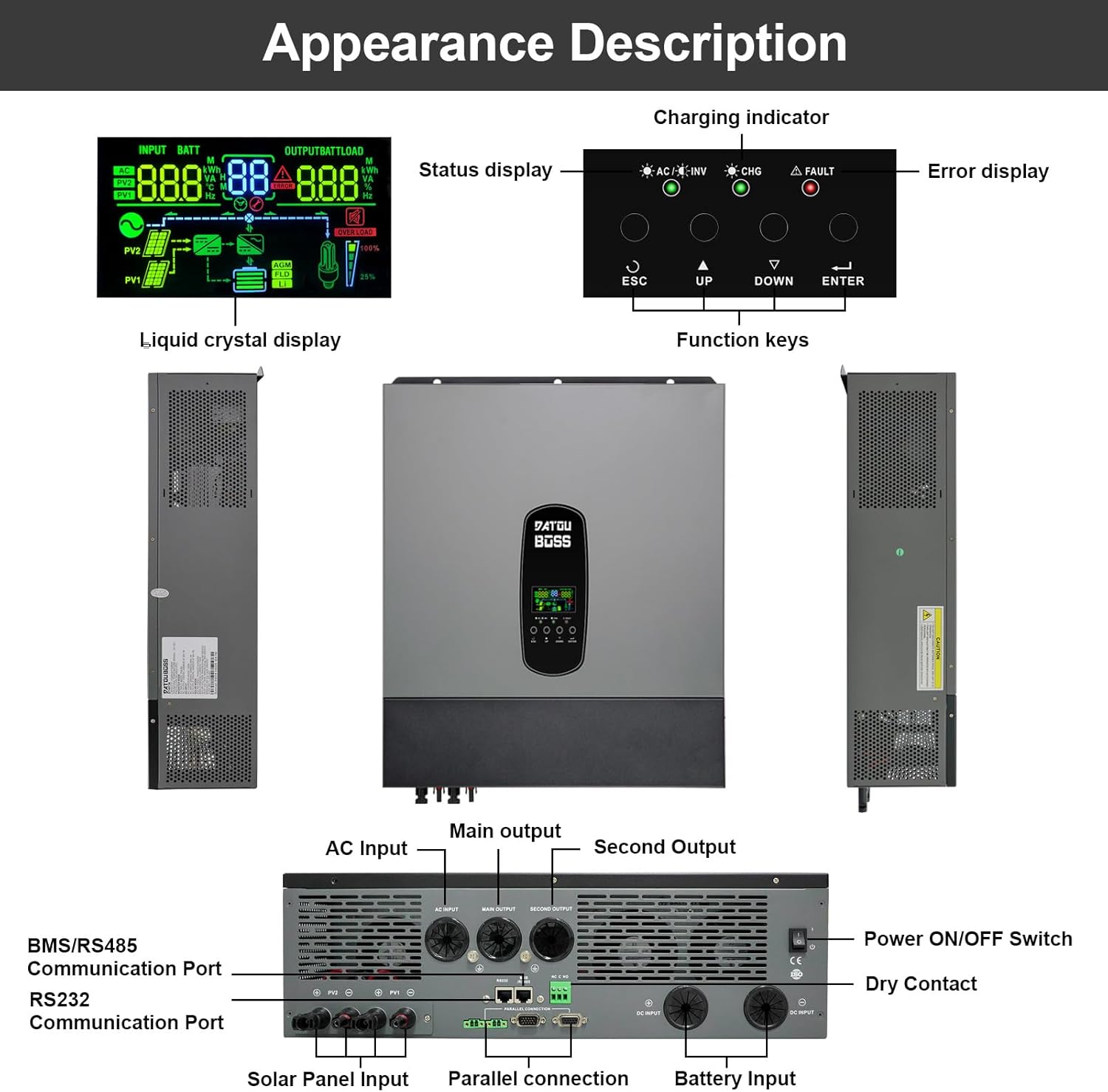
Figure 5: Diagrams illustrating the wiring for two and three inverters in parallel, including communication connections.
For detailed instructions on parallel connection, including wiring diagrams and configuration steps, please consult the comprehensive user manual provided with your inverter. Proper communication cabling and settings are crucial for stable parallel operation.
9. Battery-Free Operation
This hybrid inverter supports battery-free operation, allowing it to be powered directly from photovoltaic (PV) modules to supply alternating current for homes or other loads without the need for batteries. This feature offers greater flexibility in system design and can reduce initial investment or battery usage.
9.1 How Battery-Free Operation Works:
- Direct PV Power: The inverter directly converts DC power from the PV modules into AC power for connected loads.
- Grid-Assisted Supply: If PV generation is insufficient to meet load demand, the system can draw energy from the grid to ensure continuous power supply.
9.2 Napredtages:
- Znižani začetni stroški: Operate the system without batteries initially, adding them later if needed.
- Improved System Flexibility: Direct use of solar power during peak generation, reducing grid dependence.
- Reduced Battery Loss: Extends battery life by skipping battery usage when solar power is abundant.
9.3 Limitations and Precautions:
- No Power Supply at Night: In battery-free mode, there is no power supply from the inverter at night or on cloudy days if there is no grid access.
- PV Generation Fluctuations: Load power supply may be affected by unstable solar generation (e.g., cloudy weather).
9.4 Applicable Scenarios:
- Daytime peak electricity users.
- Industrial and agricultural pumping stations in areas with sufficient sunlight.

Figure 6: Visual explanation of battery-free operation, its benefits, and how it functions.

Figure 7: Summary of advantages, limitations, and applicable scenarios for battery-free operation.
10. Zaščitne funkcije
The DATOUBOSS 11KW Hybrid Inverter is equipped with multiple protection functions to ensure safe and reliable operation of your system and connected appliances.

Slika 8: Konecview of the inverter's comprehensive 360-degree protection features.
- Zaščita pred kratkim stikom: Prevents damage from short circuits in the output.
- Zaščita pred preobremenitvijo: Shuts down the inverter if the connected load exceeds its capacity.
- Zaščita pred pretokom: Zaščita pred prekomernim pretokom toka.
- Zaščita pred zasipanjem: Prevents reverse current flow.
- Preko Voltage Zaščita: Protects against excessively high voltage ravni.
- Zaščita pred previsoko temperaturo: Shuts down the unit if internal temperatures become too high.
- Pod Voltage Zaščita: Prevents damage from excessively low voltage ravni.
- Zaščita pred prenapolnjenostjo: Protects batteries from overcharging.
11. Vzdrževanje
Redno vzdrževanje zagotavlja dolgo življenjsko dobo in optimalno delovanje vašega pretvornika.
- Čiščenje: Periodically clean the inverter's exterior and ventilation openings to prevent dust accumulation, which can hinder cooling. Use a dry, soft cloth.
- Preverjanje povezave: Regularly inspect all electrical connections (battery, AC, solar) for tightness and signs of corrosion. Tighten any loose connections.
- Okoljski pogoji: Ensure the inverter is operated within its specified temperature range (-10~50°C) and in a well-ventilated area.
- Posodobitve vdelane programske opreme: Preverite pri proizvajalcu webZa zagotovitev optimalne zmogljivosti in dostopa do novih funkcij obiščite spletno mesto za morebitne posodobitve vdelane programske opreme.
12. Odpravljanje težav
V tem razdelku so navedeni osnovni koraki za odpravljanje pogostih težav. Za bolj zapletene težave se obrnite na podporo strankam.
Pogoste težave in rešitve:
- Inverter se ne vklopi:
- Check battery connections for proper polarity and tightness.
- Preverite voltage je v območju delovanja.
- Ensure the Power ON/OFF switch is in the 'ON' position.
- Brez izhoda AC:
- Preverite izhodno ožičenje izmeničnega toka in odklopnike.
- Verify that the inverter is not in fault mode (FAULT indicator).
- Check for overload conditions; reduce connected loads.
- Težave s polnjenjem:
- For solar charging, check solar panel connections and ensure sufficient sunlight.
- For AC charging, verify AC input connection and grid power availability.
- Check charging settings on the LCD display.
- Kode napak na LCD-zaslonu:
- Refer to the detailed user manual for a list of error codes and their corresponding solutions.
13. Garancija in podpora
DATOUBOSS is committed to product quality and customer satisfaction.
- Garancija: Ta izdelek ima 5-letno garancijo.
- Storitev za stranke: We provide 24-hour professional customer service.
- Kontakt: If you have any product-related questions or require technical assistance, please do not hesitate to contact us through the Amazon reserved area. We have a specialized technical service team available to assist you.

Figure 9: Icons representing 10 years lifespan, 5 years guarantee, 24 hours response, and local warehouses.