
iflytek AINOTE Air 2
AINOTE Air 2 AI Note-Taking Tablet User Manual
Model: AINOTE Air 2 | Brand: iflytek
Uvod
This manual provides detailed instructions for the setup, operation, and maintenance of your AINOTE Air 2 AI Note-Taking Tablet. Please read this manual thoroughly to ensure proper use and to maximize the device's capabilities.

Figure 1: AINOTE Air 2 AI Note-Taking Tablet with its accompanying stylus pen.
1. Nastavitev
1.1 Kaj je v škatli
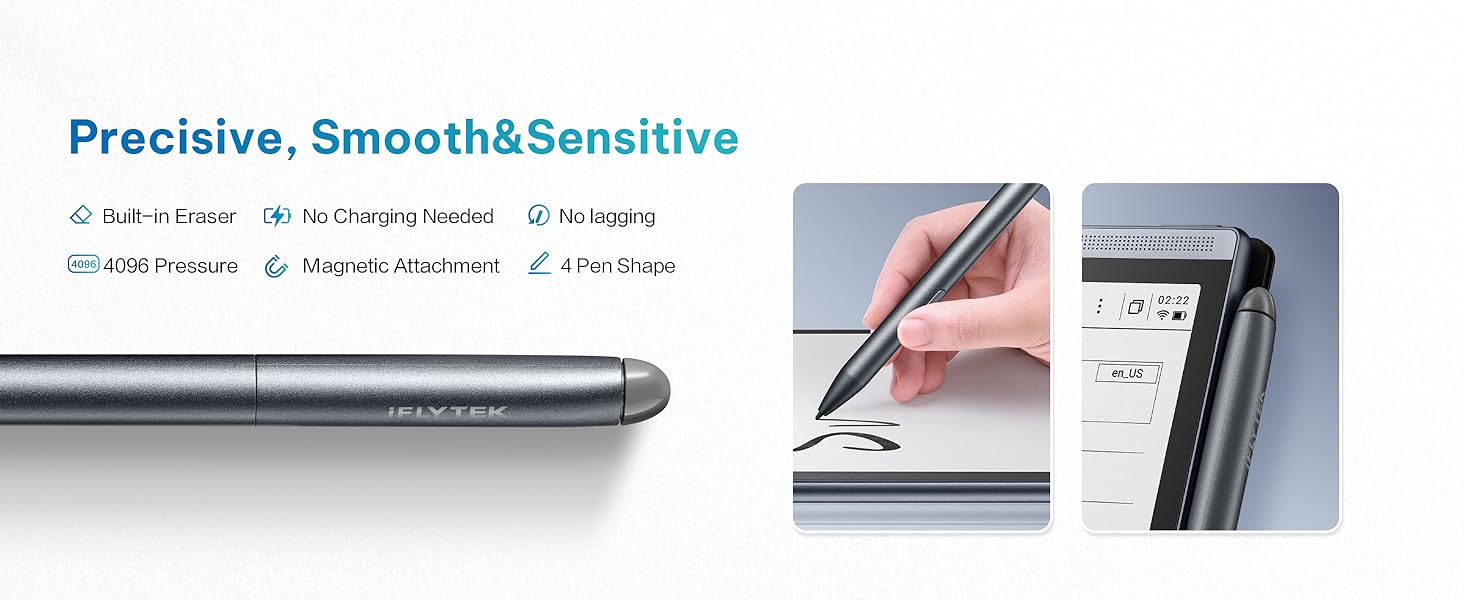
Figure 2: Contents of the AINOTE Air 2 package.
Your AINOTE Air 2 package should contain the following items:
- AINOTE Air 2 Note Taking Tablet (8.2-inch)
- Pisalo
- Polnilni kabel (USB-C)
- Uporabniški priročnik (ta dokument)
- Paketna škatla
1.2 Začetno polnjenje
Before first use, fully charge your AINOTE Air 2 tablet. Connect the provided USB-C charging cable to the tablet's charging port and plug the other end into a compatible USB power adapter (not included). The battery indicator on the screen will show charging progress. A full charge typically provides continuous performance for an extended period.
1.3 Vklop/izklop
- Za vklop: Pritisnite in držite gumb za vklop, ki se nahaja na strani naprave, dokler se zaslon ne prižge.
- Za izklop: Press and hold the power button until a power-off menu appears on the screen. Select 'Power Off' to shut down the device.
1.4 Stylus Pen Setup
The AINOTE Air 2 comes with a Wacom pen that requires no charging. It attaches magnetically to the side of the tablet for convenient storage and access. The pen features a built-in eraser and supports four different pen styles for varied writing experiences.

Figure 3: The Wacom stylus pen, designed for natural writing and magnetic attachment.
1.5 Začetna konfiguracija
Upon first power-on, follow the on-screen prompts to configure basic settings such as language, Wi-Fi connection, and account synchronization. The device supports secure cloud sync with OneDrive and integrates with Google Play for app access.
2. Operating the AINOTE Air 2
2.1 Splošna navigacija
The AINOTE Air 2 features an intuitive E-Ink touchscreen display. Navigate through menus and applications by tapping, swiping, and using the stylus for precise input. The interface is designed for ease of use, allowing quick access to notes and other functions.
2.2 Note-Taking Features
The AINOTE Air 2 excels in note-taking, offering a paper-like writing experience and advanced AI capabilities.
- Handwritten Notes to Text: Effortlessly convert handwritten notes to text in 83 languages. This feature allows for easy keyword searchability and secure cloud synchronization of your notes.
- Wacom Pen: Enjoy a seamless, natural writing experience. The pen includes a built-in eraser and supports four distinct pen styles. No charging is required for the stylus.
- AI-Powered Recording & Transcription: Record and transcribe in real-time across 15 languages (EN/ES/CN/FR/SA/VN/KR/RU/DE/JP/HK/TH/ID/MY/HU). The device features ChatGPT-powered instant playback and summaries. You can record up to 280 minutes per session, ideal for meetings and lectures.
- Upravljanje urnika: Organize meetings, to-dos, and weekly reports in one centralized location, enhancing productivity.

Figure 4: The Schedule Assistant helps organize tasks and notes.
2.3 Bralna izkušnja
The AINOTE Air 2 provides an immersive and eye-friendly reading experience.
- E-Ink Display: The 8.2-inch E-Ink screen features a dual-color reading light with 24 adjustable brightness levels, offering a strain-free viewing experience suitable for various lighting conditions.
- Audiobook Narration: Enjoy human-like audiobook narration in four languages without the need to download separate voice packages.
- Document Support: Import and annotate books across various formats, including PDF, EPUB, and TXT.

Figure 5: Reading on the AINOTE Air 2 offers a comfortable, paper-like experience.
2.4 Funkcije in povezljivost umetne inteligence
Leverage the advanced AI features to enhance your productivity and creativity.
- ChatGPT Compatibility: The device is powered by advanced AI features like ChatGPT compatibility, providing smart suggestions and instant information retrieval.
- AI Search & Highlight: Quickly find information within your notes and documents.
- AI-generated Summaries: Generate concise summaries of your recorded meetings or notes with a single tap.
- Sinhronizacija v oblaku: Features secure cloud sync with OneDrive and integration with Google Play, enabling access across multiple devices and safe storage of historical notes.

Figure 6: AI integration and app support on the AINOTE Air 2.
2.5 Uradni videoposnetek izdelka
For a visual guide on the key features and benefits of the AINOTE Air 2, please watch the official product video below.
Video 1: Why Choose iFLYTEK AINOTE Air 2. This video provides an overview of the tablet's main functionalities and advantages.
3. Vzdrževanje
3.1 Čiščenje naprave
To maintain the longevity and appearance of your AINOTE Air 2, follow these cleaning guidelines:
- Zaslon in ohišje naprave nežno obrišite z mehko krpo, ki ne pušča vlaken.
- Za trdovratne madeže rahlo dampkrpo sperite z vodo. Izogibajte se uporabi agresivnih kemikalij, abrazivnih čistil ali aerosolnih razpršil.
- Pred čiščenjem se prepričajte, da je naprava izklopljena in izklopljena.
3.2 Skrb za baterije
The AINOTE Air 2 is powered by a 2600mAh battery designed for continuous performance. To optimize battery life:
- Izogibajte se izpostavljanju naprave ekstremnim temperaturam.
- Napravo redno polnite, vendar je ne puščajte popolnoma izpraznjene dlje časa.
- Če napravo shranjujete dlje časa, jo pred shranjevanjem napolnite na približno 50 %.
3.3 Shranjevanje
The device comes with 32GB of internal storage and offers unlimited cloud backup for your notes. Regularly synchronize your notes to the cloud to ensure your work is safely stored and accessible across multiple devices.
3.4 Posodobitve programske opreme
Periodically check for software updates to ensure your device has the latest features and performance improvements. Updates can typically be found in the device's settings menu under 'System Update' or similar. Ensure a stable Wi-Fi connection and sufficient battery charge before initiating an update.
4. Odpravljanje težav
This section addresses common issues you might encounter with your AINOTE Air 2.
4.1 Pogoste težave in rešitve
- Naprava se ne vklopi: Prepričajte se, da je naprava popolnoma napolnjena. Če je baterija popolnoma prazna, lahko traja nekaj minut, preden se lahko vklopi.
- Pisalo se ne odziva: The Wacom pen does not require charging. Ensure the pen tip is clean and free from debris. If the issue persists, try restarting the tablet.
- Težave s povezavo Wi-Fi: Check your Wi-Fi router and ensure it is functioning correctly. Try forgetting the network on your tablet and reconnecting.
- Slow AI Features/Performance: Ensure your device has a stable internet connection for optimal AI performance. Close any unnecessary background applications.
- Handwritten Text Conversion Inaccuracy: Ensure your handwriting is clear and legible. The device supports 83 languages for conversion; verify the correct language setting is selected.
4.2 Ponastavitev na tovarniške nastavitve
Če imate vztrajne težave, jih lahko odpravite s ponastavitvijo na tovarniške nastavitve. Opozorilo: A factory reset will erase all data on your device. Ensure you have backed up all important notes and files to the cloud before proceeding. Consult the device's settings menu for the factory reset option.
5. Specifikacije
Below are the technical specifications for the AINOTE Air 2 AI Note-Taking Tablet:
| Funkcija | Specifikacija |
|---|---|
| Velikost stoječega zaslona | 8.2 palcev |
| Ločljivost zaslona | 1920 x 1440 pixels (293 PPI) |
| Procesor | 1.8 GHz ARM |
| Operacijski sistem | Android |
| Teža predmeta | 8 unč |
| Dimenzije izdelka | 7 x 0.1 x 5 palcev |
| barva | siva |
| Velikost bliskovnega pomnilnika | 32 GB |
| Baterija | 2600mAh (1 AA battery included, likely referring to internal battery) |
| Brezžična vrsta | 802.11ac |
| Tehnologija povezljivosti | USB |
| Posebna funkcija | Prenosni |
6. Garancija in podpora
6.1 Garancija izdelka
The manufacturer provides warranty support for the AINOTE Air 2. For specific details regarding warranty coverage, duration, and terms, please refer to the warranty card included in your product packaging or visit the official iflytek webmesto.
6.2 Podpora strankam
For technical assistance, troubleshooting beyond this manual, or inquiries about your device, please contact iflytek customer support through their official channels. You may find contact information on the product packaging, the official iflytek webspletnem mestu ali prek vašega nakupovalnega mesta.
6.3 Spletni viri
Additional resources, including FAQs, updated manuals, and software downloads, may be available on the official iflytek support website. Regularly checking these resources can provide solutions to new issues or offer further guidance on using your device.
Ask a question about this manual
Ask about setup, troubleshooting, compatibility, parts, safety, or missing instructions. Manuals+ will review the question and use this page’s manual context to help answer it.