
Bonacell B0DT8G5RST
Bonacell Wireless Controller Instruction Manual
Model: B0DT8G5RST
Uvod
Thank you for choosing the Bonacell Wireless Controller. This manual provides detailed instructions for setting up, operating, and maintaining your controller. Please read this manual carefully before use to ensure optimal performance and longevity of your device.

Image: The Bonacell Wireless Controller, black with blue illuminated buttons, shown alongside its white USB receiver adapter.
Lastnosti izdelka
- Široka združljivost: Supports PS4, PS5, PC (Windows), Android, and iOS devices.
- Vibracije dvojnega motorja: Enhances gaming immersion with realistic haptic feedback.
- 6-Axis Gyroscope Sensor: Provides precise motion control for supported games.
- Turbo funkcija: Enables continuous rapid input for specific buttons.
- 3.5 mm avdio priključek: Allows connection of headphones for in-game audio.
- Sledilna ploščica: Integrated touchpad for additional control options.
- RGB Multi-color Buttons: Customizable lighting effects for personalized aesthetics.
- Dolga življenjska doba baterije: Vgrajena baterija s kapaciteto 1000 mAh zagotavlja daljšo uporabo.

Slika: Bližnji posnetek views highlighting the controller's 360-degree joysticks, 3.5mm headphone jack, and 6-axis gyroscope sensor.
Nastavitev in povezava
1. Polnjenje krmilnika
The controller is equipped with a 1000mAh battery. Before first use, or when the battery is low, charge the controller using the provided Type-C cable or a compatible charging base.
- Čas polnjenja: Približno 2.5 ur.
- Čas uporabe: Do 16 ur pri polni napolnjenosti.

Image: Visual representation of the controller's battery specifications, including its 1000mAh capacity, working time, and charging duration.
2. Connecting to PS5 (Wireless Receiver)
To play PS5 games, the controller must be connected via the wireless receiver. Direct Type-C cable connection does not support PS5 games.
- 1. korak: Plug the wireless receiver adapter into a USB port on your PS5 console. Briefly press the pairing button on the adapter.
- 2. korak: On the Bonacell Wireless Controller, press and hold the DELI in nato pridržite P button simultaneously for 5 seconds to enter pairing mode.
- 3. korak: Once successfully paired, the lights on both the controller and the adapter will remain illuminated.
Note: For the first connection, it is recommended to activate the device with a USB cable before attempting wireless pairing.
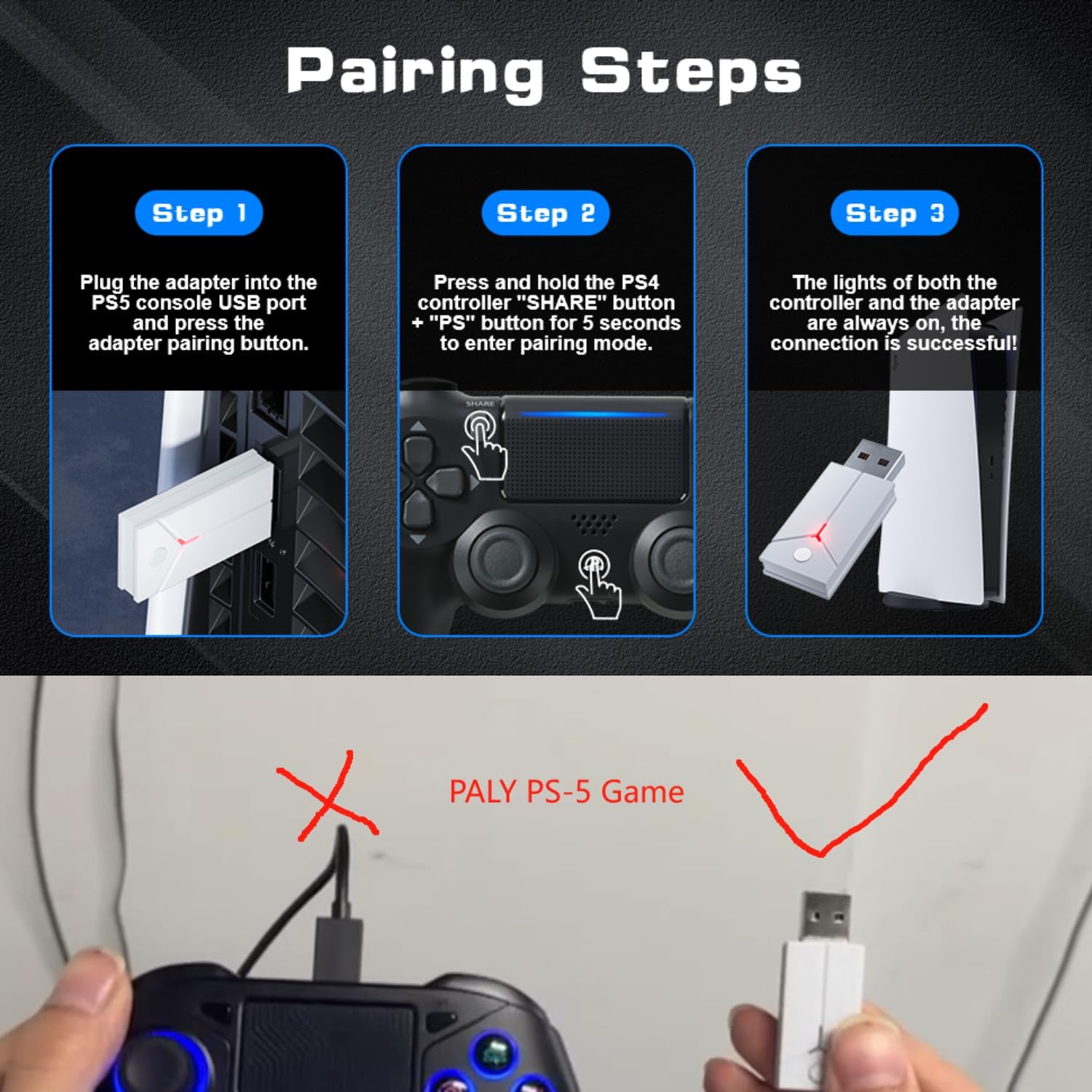
Image: A three-step visual guide demonstrating how to pair the controller with a PS5 console using the USB adapter.
3. Povezava z računalnikom (žično)
Connect the controller to your PC directly using the Type-C data cable.
4. Connecting to PC (Bluetooth)
- 1. korak: Ensure your PC's Bluetooth function is enabled.
- 2. korak: On the Bonacell Wireless Controller, press and hold the DELI gumb in P button simultaneously for 3 seconds to enter pairing mode.
- 3. korak: On your PC, search for and select the controller from the list of available Bluetooth devices to complete the pairing.
5. Connecting to Android and iOS (Bluetooth)
Supports iOS 13+ devices.
- 1. korak: Activate the Bluetooth function on your mobile phone or tablet.
- 2. korak: On the Bonacell Wireless Controller, press and hold the DELI gumb in P button simultaneously for 3 seconds to enter pairing mode.
- 3. korak: On your mobile device, search for and select the controller from the list of available Bluetooth devices to complete the pairing.

Image: An illustration showing the Bonacell Wireless Controller's compatibility with various platforms such as PS5, PS4, PC, Android, and iOS.
Navodila za uporabo
1. RGB Multi-color Button Customization
- To change the light color: Press and hold the L3 gumb in R3 button simultaneously for 3 seconds. The controller will vibrate for 1 second, indicating that the light color can now be changed.
- To switch light effect modes: Press and hold the NASTAVI gumb in R3 button simultaneously. Cycle through modes: Colorful → Monochrome → Colorful Transformation → Monochrome Breathing.
2. Funkcija Turbo
The Turbo function allows for continuous rapid input of a button press. This can be useful in games requiring fast, repeated actions.
Specific instructions for activating and deactivating the Turbo function are typically found in the game's control settings or may involve a combination of the Turbo button (if present) and another action button. Refer to the controller's quick start guide or product packaging for exact button combinations if not detailed here.

Image: An illustration highlighting the dual vibration motors and the Turbo function capability of the controller.
Vzdrževanje
- Čiščenje: Za čiščenje krmilnika uporabite mehko, suho krpo. Izogibajte se uporabi agresivnih kemikalij ali abrazivnih materialov.
- Shranjevanje: Krmilnik shranjujte na hladnem in suhem mestu, stran od neposredne sončne svetlobe in ekstremnih temperatur.
- Vzdrževanje baterije: Da podaljšate življenjsko dobo baterije, se izogibajte pogostemu popolnemu praznjenju krmilnika. Redno ga polnite, tudi če ga dalj časa ne uporabljate.
Odpravljanje težav
- Krmilnik se ne povezuje:
- Prepričajte se, da je krmilnik napolnjen.
- Verify the correct pairing procedure for your device (PS5, PC, Android/iOS).
- For PS5, ensure you are using the wireless receiver.
- For Bluetooth connections, ensure Bluetooth is enabled on your host device and the controller is in pairing mode.
- Poskusite znova zagnati tako krmilnik kot gostiteljsko napravo.
- Gumbi ali igralne palice se ne odzivajo:
- Prepričajte se, da je krmilnik pravilno priključen.
- Preverite, ali so okoli gumbov/kontrolnih ročic kakšne fizične ovire ali ostanki.
- If connected via PC, ensure drivers are up to date.
- Vibracija ne deluje:
- Prepričajte se, da igra podpira vibracijske povratne informacije.
- Preverite nastavitve v igri, da se prepričate, da je vibracija omogočena.
Specifikacije
| Funkcija | Podrobnost |
|---|---|
| Ime izdelka | Brezžični krmilnik |
| Številka modela | B0DT8G5RST |
| Dimenzije | 165 x 105 x 45 mm |
| Teža | 0.26 kg (Item Package Weight: 300 g) |
| Kapaciteta baterije | 1000 mAh litij-ionski |
| Čas uporabe | Do 16 ur |
| Čas polnjenja | Približno 2.5 ur |
| Način polnjenja | Base or Type-C charging |
| Povezljivost | 2.4GHz USB Receiver, Bluetooth, USB-C (wired) |
| Združljivost | PS4, PS5, PC (Windows), Android (iOS 13+) |
| Ključne značilnosti | Dual Shock Motor, Six-Axis Gyroscope, Touchpad, 3.5mm Audio Jack, Turbo Function, RGB Buttons |
| Material | ABS |
Garancija in podpora
For warranty information or technical support, please refer to the product packaging or contact Bonacell customer service through the retailer's platform where the product was purchased.
Ask a question about this manual
Ask about setup, troubleshooting, compatibility, parts, safety, or missing instructions. Manuals+ will review the question and use this page’s manual context to help answer it.