
1. Uvod
This manual provides detailed instructions for the setup, operation, maintenance, and troubleshooting of your Transformers TF-Crystal 85 Keys Mechanical Keyboard. Please read this manual thoroughly before using the product to ensure proper functionality and longevity.
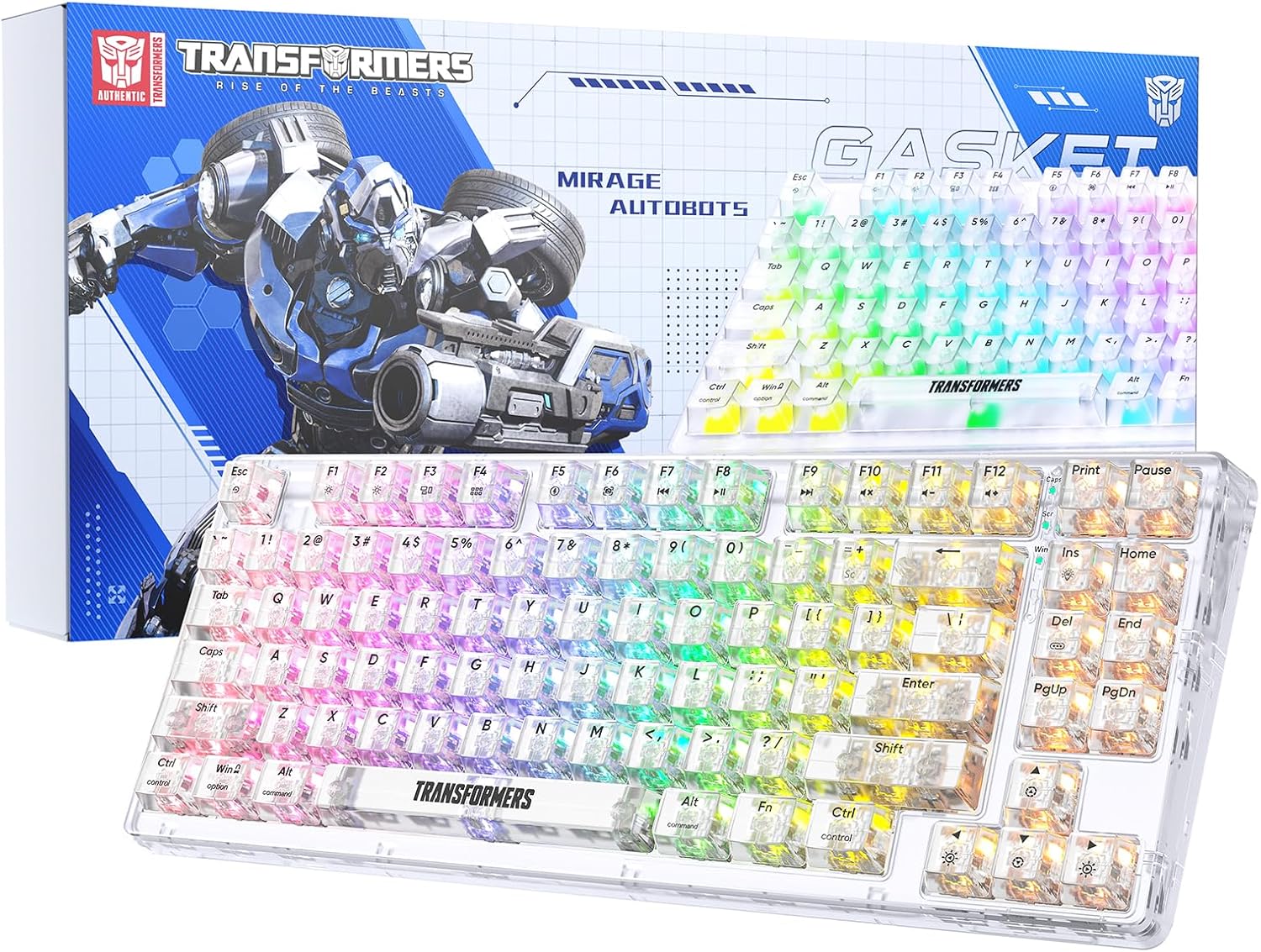
Image 1.1: Transformers TF-Crystal 85 Keys Mechanical Keyboard with its packaging, showcasing the transparent design and RGB lighting.
2. Izdelek je končanview
2.1 Ključne lastnosti
- Razporeditev z 85 tipkami: Compact 75% design retaining essential functions, arrow, and navigation keys.
- Tri-modalna povezljivost: Podpira Bluetooth 5.0, brezžično povezavo 2.4 GHz in žične povezave USB-C.
- Tiskana plošča z možnostjo vroče menjave: Compatible with most 3-pin and 5-pin mechanical switches, allowing for easy customization and replacement.
- Linear Switches: Pre-lubricated switches with a 50 million keystroke lifespan for durability and smooth operation.
- Struktura tesnila: Incorporates high-quality gasket materials and a silicone pad to absorb vibrations and reduce typing noise.
- Customizable RGB Backlight: Features 20 built-in backlight modes, 16.8 million color options, and dynamic music rhythm effects.
- Programmable Driver: Enables macro customization, key function remapping, and advanced lighting control.
- Dolga življenjska doba baterije: Equipped with a 4000mAh battery, providing up to 240 hours of continuous use in 2.4GHz mode without backlighting.
- Široka združljivost: Supports Mac, Windows, iOS, Android, PC, Laptop, Smartphone, Tablet, Switch, Xbox, and PlayStation.
- Transparentna zasnova: Features transparent keycaps and base for enhanced aesthetic appeal.
3. Nastavitev
3.1 Polnjenje tipkovnice
Before initial use, fully charge the keyboard. Connect the provided USB-C cable to the keyboard's USB-C port and the other end to a powered USB port (e.g., computer, wall adapter). The charging indicator will show the charging status.
3.2 Povezovanje prek brezžičnega načina 2.4 GHz
- Poiščite 2.4 GHz USB sprejemnik, ki je običajno shranjen v predalu na tipkovnici.
- USB-sprejemnik priključite v razpoložljiva vrata USB na vašem računalniku.
- Toggle the mode switch on the keyboard to the 2.4G položaj.
- The keyboard will automatically connect to your device.
3.3 Connecting via Bluetooth 5.0 Mode
- Toggle the mode switch on the keyboard to the BT položaj.
- Pritisnite in držite fn+1 (oz fn+2, fn+3) for 3-5 seconds until the indicator light flashes rapidly, indicating pairing mode.
- V napravi (računalniku, tablici, pametnem telefonu) omogočite Bluetooth in poiščite nove naprave.
- Select "TF-Crystal 85" from the list of available devices to pair.
- Once paired, the indicator light will stop flashing and remain solid. You can pair up to three Bluetooth devices using fn+1, fn+2, in fn+3.
3.4 Connecting via USB-C Wired Mode
- Priloženi kabel USB-C priključite na vrata USB-C na tipkovnici.
- Drugi konec kabla USB-C priključite na prosta vrata USB na računalniku.
- The keyboard will automatically switch to wired mode and function without battery power.

Image 3.1: Diagram illustrating the three connection modes: Bluetooth 5.0, 2.4GHz wireless, and USB-C wired, compatible with various devices.
4. Navodila za uporabo
4.1 Preklapljanje med načini
Use the physical switch located on the keyboard to select between BT (Bluetooth), 2.4G (2.4GHz wireless), and USB-C (wired) modes.
4.2 Nadzor osvetlitve ozadja RGB
The keyboard features customizable RGB backlighting. Use the following key combinations to adjust:
- Fn + Ins: Cycle through 20 different backlight effects.
- Fn + Del: Switch backlight colors within certain modes.
- Fn + ↑ / ↓: Prilagodite svetlost osvetlitve ozadja (5 stopenj).
- Fn + ← / →: Adjust backlight effect speed (5 levels).
- Fn + Esc (hold for 3s): Reset backlight settings to default.

Image 4.1: Visual guide for controlling RGB backlight effects, brightness, and speed using Fn key combinations.
4.3 Programmable Driver Usage
The keyboard includes a programmable driver for advanced customization. This driver allows you to:
- Urejanje makrov: Record and edit complex key sequences.
- Key Redefinition: Customize the function of individual keys.
- RGB Effect Customization: Fine-tune lighting modes, colors, and speeds, including music rhythm lighting effects.
Refer to the software's dedicated user interface for detailed instructions on using these features.

Image 4.2: Screenshot of the programmable driver interface, showing options for macro editing, RGB effects, and key redefinition.
4.4 Stikala za vročo zamenjavo
The TF-Crystal 85 keyboard features a hot-swappable PCB, allowing you to change mechanical switches without soldering. This supports most 3-pin and 5-pin mechanical switches.
- Izklopite tipkovnico ali jo odklopite iz naprave.
- S priloženim snemalnikom za tipke previdno odstranite želeno tipkovnico.
- Use the provided switch puller to gently grip the switch from its top and bottom clips, then pull it straight up to remove it.
- Poravnajte nožice novega stikala z luknjami na tiskanem vezju. Prepričajte se, da so nožice ravne.
- Gently press the new switch into place until it clicks securely. Do not force it.
- Zamenjajte pokrovček tipke.

Image 4.3: Illustration of the hot-swappable feature, showing how to remove and insert 3-pin/5-pin switches and the linear switch specifications.
5. Vzdrževanje
5.1 Čiščenje tipkovnice
- Pred čiščenjem tipkovnico izključite iz vseh virov napajanja.
- Uporabite mehko krpo, ki ne pušča vlaken, dampz vodo ali blago čistilno raztopino obrišite tipke in ohišje.
- Za prah in umazanijo med tipkami uporabite stisnjen zrak ali majhno krtačo.
- Avoid using harsh chemicals or abrasive materials that could damage the keyboard's surface.
5.2 Skrb za baterije
- Izogibajte se pogostemu popolnemu praznjenju baterije.
- Tipkovnico shranite na hladnem in suhem mestu, ko je dalj časa ne uporabljate.
- If the keyboard will not be used for a long time, charge it to about 50% before storage.
6. Odpravljanje težav
| Težava | Možen vzrok | rešitev |
|---|---|---|
| Tipkovnica se ne odziva v brezžičnem načinu. | Low battery, incorrect mode selected, receiver not connected, Bluetooth not paired. | Charge the keyboard. Ensure the mode switch is set correctly (2.4G or BT). Re-insert the 2.4G receiver. Re-pair Bluetooth. |
| Tipke se ne registrirajo ali pa se tipkajo dvakrat. | Okvarjeno stikalo, umazanija pod tipkovnico, težava s programsko opremo. | Clean under the keycap. Try hot-swapping the switch with a known working one. Restart your computer. |
| RGB backlight not working or incorrect. | Backlight turned off, incorrect settings, software conflict. | Prilagodite svetlost z uporabo Fn + ↑. Cycle modes with Fn + Ins. Reset backlight with Fn + Esc (hold 3s). Check programmable driver settings. |
| Keyboard not charging. | Faulty USB-C cable, power source issue, keyboard port damage. | Try a different USB-C cable. Use a different USB port or power adapter. Ensure the cable is fully inserted. |
7. Specifikacije
| Funkcija | Podrobnost |
|---|---|
| Številka modela | TF-Crystal 85 |
| Postavitev tipk | 85 tipk (75 % kompaktnost) |
| Povezljivost | Bluetooth 5.0, 2.4 GHz brezžično, USB-C žično |
| Tip stikala | Pre-lubricated Linear Mechanical Switches |
| Preklopite življenjsko dobo | 50 milijonov pritiskov tipk |
| Hot-swappable | Da (združljivo s 3-pinskim/5-pinskim priključkom) |
| Osvetlitev ozadja | RGB (20 modes, 16.8 million colors) |
| Kapaciteta baterije | 4000 mAh |
| Battery Life (2.4G, no light) | Do 240 ur |
| Battery Life (Backlit ON) | Približno 22 ur |
| Dimenzije (D x Š x V) | 34.7 cm x 14 cm x 4.5 cm |
| Združljivost | Mac, Windows, iOS, Android, PC, Laptop, Smartphone, Tablet, Switch, Xbox, PlayStation |

Image 7.1: Visual representation of the keyboard's battery life: 240 hours with backlight off, 22 hours with backlight on, powered by a 4000mAh battery.
8. Garancija in podpora
Transformers is committed to providing exceptional customer service. If you encounter any problems with your TF-Crystal 85 Keys Mechanical Keyboard, our after-sales support team is available to assist you. This includes technical support, exchanges, or installation guidance.
Please contact our customer service for assistance. We guarantee a hassle-free service experience.