
Konec izdelkaview
The Valerion VisionMaster Pro2 is a state-of-the-art triple laser projector designed to deliver an unparalleled cinematic and gaming experience. Featuring 4K UHD resolution, a 15,000:1 ultra-high contrast ratio with Enhanced Black Level (EBL) technology, and 3000 ISO Lumens brightness, it ensures vivid, lifelike colors and deep blacks. Equipped with an OpticFlex Lens System for flexible placement, AI Super Resolution, HDR10+ with Dynamic Tone Mapping, and a powerful Al-SoC MT9618 chipset, the VisionMaster Pro2 offers seamless 4K streaming and lag-free gaming with 4ms input lag and 240Hz refresh rate. Its ultimate smart integration supports Google TV, AirPlay 2, Miracast, Chromecast, and voice control via Alexa, Google Home, or Apple HomeKit.
Kaj je v škatli
- VisionMaster Pro2 Projector
- Uporabniški priročnik
- Daljinski upravljalnik (2 bateriji AA priloženi)
Vodnik za namestitev
Razpakiranje in začetna namestitev
Carefully remove the VisionMaster Pro2 from its packaging. The projector weighs approximately 15.4 pounds and has dimensions of 7.48 x 8.27 x 10.24 inches. Place the projector on a stable, flat surface. Ensure adequate ventilation around the unit.
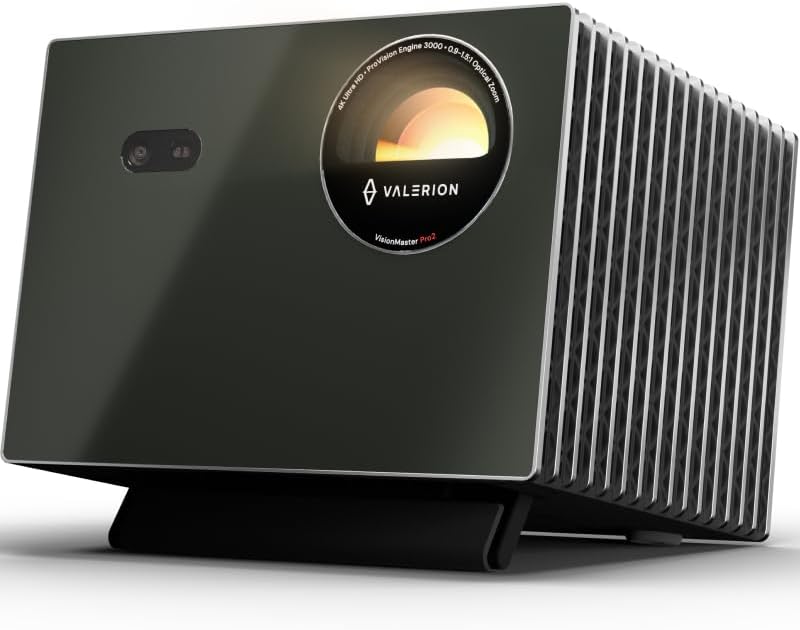
Slika: spredaj view of the Valerion VisionMaster Pro2 projector.
Vklop
Connect the power adapter to the DC 36V port on the projector and plug it into a power outlet. Press the power button on the projector or the remote control to turn on the device. The projector will initiate its startup sequence, including automatic focus and keystone correction.
Povezljivost
The VisionMaster Pro2 offers a variety of ports for connecting external devices:
| Vrsta pristanišča | Opis |
|---|---|
| DC 36V | Vhodna moč |
| S/PDIF | Digitalni avdio izhod |
| USB 3.0 | High-speed data transfer for external drives |
| USB 2.0 | Standard data transfer |
| HDMI 1, HDMI 2 | Standard HDMI inputs |
| HDMI 3 (eARC) | HDMI input with Enhanced Audio Return Channel support |
| Priključek za slušalke | 3.5mm zvočni izhod |
| LAN | Ethernet vrata za žično omrežno povezavo |
For wireless connectivity, the projector supports Wi-Fi 6 and Bluetooth 5.2.
Samodejne prilagoditve
The VisionMaster Pro2 features OpticFlex Lens System (0.9-1.5 throw ratio) and auto-adjusting capabilities for focus, keystone correction, obstacle avoidance, and screen alignment. These features ensure a clear and perfectly shaped image in various room configurations without manual intervention.

Image: Diagram illustrating the optical zoom capabilities of the VisionMaster Pro2, allowing screen size adjustment without moving the projector.
Video: Prekoračitevview of the VisionMaster Pro2's features, highlighting its versatility and ease of use in various home settings.
Operating Your VisionMaster Pro2
Picture Quality and Color Mastery
Experience true 4K UHD clarity with a 15,000:1 contrast ratio and Enhanced Black Level (EBL) technology for deep blacks. The projector supports 110% Rec.2020 wide color gamut and ISF-certified calibration for industry-leading color accuracy. AI Super Resolution enhances details, while HDR10+ with Dynamic Tone Mapping optimizes brightness and contrast in real-time.

Image: Visual comparison demonstrating the 15,000:1 contrast ratio of the VisionMaster Pro2 with Enhanced Black Level (EBL) technology, showing superior detail in dark scenes compared to a 1000:1 market average.

Image: Illustration of the projector's RGB Laser technology, 4K UHD resolution, 110% Rec.2020 color gamut, and ISF certification for director-approved color accuracy.
Video: A demonstration of the projector's AI features, including AI Scene, Dark Detail, and Super Resolution, which automatically optimize picture quality in real-time.
Igralna izkušnja
For gamers, the VisionMaster Pro2 offers an ultra-smooth 4ms input lag and a 240Hz refresh rate, providing a competitive edge. Customize your gameplay with dedicated modes like RPG, FPS, and RCG, and utilize enhanced FPS crosshairs and night vision for improved visibility in dark scenes.

Image: Infographic detailing the projector's gaming capabilities, including 4GB RAM, 4ms lag, 240Hz refresh rate, HDMI 2.1, USB 3.0, and Wi-Fi 6e.
Pametne funkcije in pretakanje
The built-in Google TV+ provides instant access to popular streaming platforms like Netflix, YouTube, Amazon Prime Video, and Disney+. Share content effortlessly using AirPlay 2, Miracast, and Chromecast. Control your entertainment hands-free with voice commands via Alexa, Google Home, or Apple HomeKit.

Image: A living room scene showing the projector displaying streaming content, with logos for Google TV, Apple AirPlay 2, Chromecast, and Miracast.

Image: A couple interacting with the projector using voice commands, with logos for Google Home, Apple HomeKit, Apple AirPlay, and Alexa, emphasizing smart home integration.
Video: Kratka video predstavitevasing the VisionMaster Pro2's performance in an outdoor setting, highlighting its brightness and ease of setup for outdoor viewizkušnje.
Vzdrževanje in nega
The VisionMaster Pro2 features a dust-proof design to minimize internal dust accumulation. To maintain optimal performance and longevity, regularly clean the exterior of the projector with a soft, dry cloth. Avoid using abrasive cleaners or solvents. Ensure the projector's vents are clear of obstructions to prevent overheating.
Odpravljanje pogostih težav
| Težava | Možna rešitev |
|---|---|
| Ni projicirane slike | Ensure power cable is securely connected and power button is pressed. Check input source selection. |
| Zamegljena slika | Allow auto-focus to complete. If issue persists, try manual focus adjustment. Ensure projection surface is flat. |
| Image is not rectangular | Allow auto-keystone correction to complete. If needed, use manual keystone correction in settings. |
| Brez zvoka | Check volume levels on projector and connected device. Ensure audio cables are correctly connected if using external speakers. |
| Težave s povezljivostjo Wi-Fi/Bluetooth | Ensure projector is within range of your router/device. Restart projector and router. Check network settings. |
Tehnične specifikacije
| Funkcija | Podrobnost |
|---|---|
| Blagovna znamka | Valerion |
| Številka modela artikla | VisionMaster Pro2 |
| Ločljivost zaslona | 3840 x 2160 (4K UHD) |
| Svetlost | 3000 ISO lumnov |
| Kontrastno razmerje | 15000:1 |
| Optični zoom | 0.9-1.5 throw ratio |
| Vnosni zamik | 4 ms (pri 1080p/240Hz) |
| Hitrost osveževanja | Do 240Hz |
| RAM/ROM | 4 GB RAM / 128 GB ROM |
| Tehnologija povezljivosti | Wi-Fi 6, Bluetooth 5.2 |
| Pametne funkcije | Google TV, AirPlay 2, Miracast, Chromecast, Google Home, Apple HomeKit, Alexa |
| Posebne lastnosti | IMAX Enhanced, HDR10+, Dynamic Tone Mapping, EBL, Filmmaker Mode, 3D-Ready, Dolby Vision & Atmos, Auto Focus, Auto Obstacle Avoidance, Auto Screen Alignment, Dust-Proof |
| Teža predmeta | 15.4 funtov |
| Dimenzije izdelka | 7.48 x 8.27 x 10.24 palcev |
Garancija in podpora
Valerion offers a 30-day price protection guarantee. If the price drops within 30 days of your purchase on Amazon, you can contact Valerion customer support for a refund of the difference. For any product inquiries, technical assistance, or warranty claims, please contact Valerion Customer Support:
- E-pošta: support@valerion.com
- Klepet v živo: Mon-Fri | 9 AM – 6 PM (EST) on their official webmesto
- Call or WhatsApp: +1 (888) 891-8839 | Mon-Fri | 9 AM – 6 PM (EST)