
Kalobee SK38
Kalobee Watch 4 PRO+ Smart Watch User Manual
Model: SK38
Brand: Kalobee
Uvod
Welcome to the user manual for your new Kalobee Watch 4 PRO+ Smart Watch. This guide provides essential information on setting up, operating, maintaining, and troubleshooting your device. Please read this manual thoroughly to ensure optimal performance and longevity of your smartwatch.
The Kalobee Watch 4 PRO+ features a vibrant AMOLED display, versatile interchangeable straps, and convenient wireless charging, designed to seamlessly integrate into your daily life.
Vsebina paketa
Upon opening your Kalobee Watch 4 PRO+ package, please verify that all the following items are included:
- Kalobee Watch 4 PRO+ Smart Watch (Model SK38)
- Three (3) Interchangeable Straps (e.g., leather, silicone, metal)
- Brezžična polnilna postaja
- Uporabniški priročnik (ta dokument)

Image: The Kalobee Watch 4 PRO+ packaging, displaying the smartwatch alongside its three distinct interchangeable straps, highlighting the complete package contents.
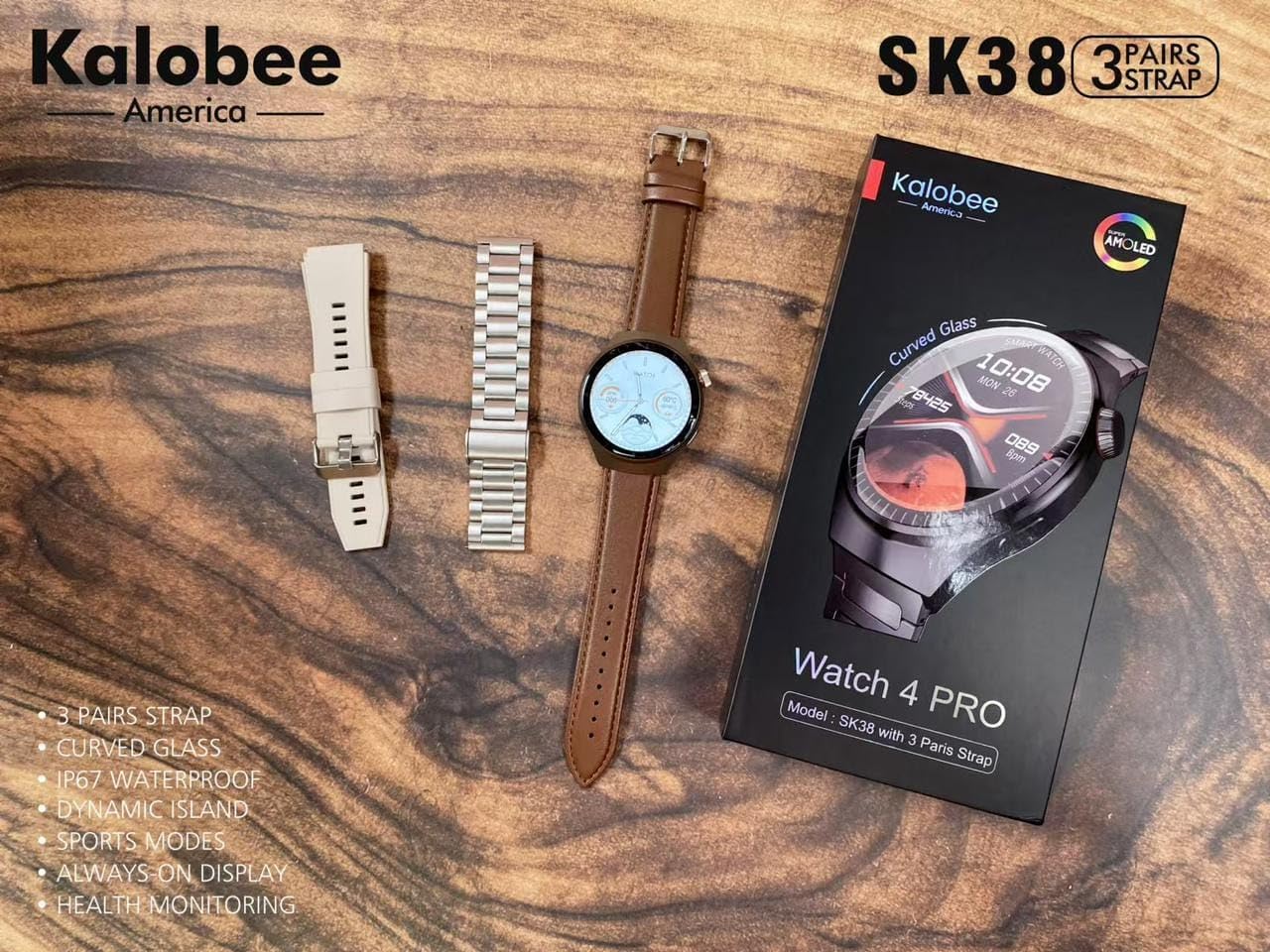
Image: A flat lay of the Kalobee Watch 4 PRO+ components, including the smartwatch, its retail box, and the three different strap options (leather, silicone, and metal), ready for assembly.
Nastavitev
1. Začetno polnjenje
Before first use, fully charge your Kalobee Watch 4 PRO+. This ensures optimal battery calibration and performance.
- Connect the wireless charging dock to a USB power adapter (not included) and plug it into a power outlet.
- Place your Kalobee Watch 4 PRO+ onto the charging dock. Ensure the watch is properly aligned for charging to begin.
- The watch display will indicate charging status. A full charge typically takes approximately 2-3 hours.
2. Namestitev traku
The Kalobee Watch 4 PRO+ comes with interchangeable straps, allowing you to customize its appearance. To install or change a strap:
- Poiščite zatiče za hitro sprostitev na hrbtni strani vsakega traku.
- Slide the pin inwards to detach or attach the strap to the watch lugs.
- Ensure the pin clicks securely into place, indicating the strap is properly fastened.

Slika: Stran view of the Kalobee Watch 4 PRO+ featuring a sleek metal strap, demonstrating one of the interchangeable strap options.
3. Seznanjanje z vašo napravo (Bluetooth)
To unlock the full smart features of your watch, pair it with your smartphone via Bluetooth.
- Download the official Kalobee companion app from your smartphone's app store (iOS App Store or Google Play Store).
- Prepričajte se, da je Bluetooth na vašem pametnem telefonu omogočen.
- Open the Kalobee app and follow the on-screen instructions to add a new device.
- On your watch, navigate to the Bluetooth settings (refer to "Basic Navigation" section if needed).
- Select your watch from the list of available devices in the app. Confirm the pairing request on both your phone and watch.
- Ko je ura združena, bo sinhronizirala podatke in obvestila z vašim pametnim telefonom.
Navodila za uporabo
1. Osnovna navigacija
The Kalobee Watch 4 PRO+ features an intuitive touch screen and physical buttons for navigation.
- Zaslon na dotik: Swipe left/right, up/down to navigate through menus and widgets. Tap to select an item.
- Gumb za krono: Typically used to return to the home screen, scroll through lists, or zoom in/out. Press and hold for power options.
- Stranski gumb: Often customizable, it can be set to quickly access a specific app or feature.

Image: The Kalobee Watch 4 PRO+ displaying its main watch face, showing time, date, steps, and calories, illustrating the primary user interface.
2. Prilagajanje številčnic ure
Personalize your watch by changing the watch face:
- From the home screen, press and hold the watch face.
- Za brskanje po razpoložljivih številčnicah ure podrsajte levo ali desno.
- Tap on a watch face to select it. Some watch faces may offer further customization options (e.g., complications, colors) which can be adjusted by tapping the "Customize" option.
- Additional watch faces can be downloaded and managed via the Kalobee companion app.
3 Funkcije spremljanja zdravja
Your Kalobee Watch 4 PRO+ is equipped with various health monitoring capabilities:
- Spremljanje srčnega utripa: Access the heart rate app on your watch to measure your current heart rate. Continuous monitoring can be enabled in the app settings.
- Sledenje dejavnosti: Spremlja korake, razdaljo in porabljene kalorije čez dan. View daily summaries on the watch or in the companion app.
- Sledenje spanju: Wears the watch to bed to monitor sleep patterns, including deep sleep, light sleep, and awake times. Data is available in the app.
- Športni načini: Izberite med različnimi športnimi načini (npr. tek, kolesarjenje) za sledenje določenim podatkom vadbe.
4. Obvestila
Receive notifications from your paired smartphone directly on your watch:
- Ensure notifications are enabled in the Kalobee companion app for desired applications.
- When a notification arrives, the watch will vibrate and display the content.
- Povlecite navzdol z vrha številčnice ure, da view vaša zgodovina obvestil.
Vzdrževanje
1. Čiščenje ure
Redno čiščenje pomaga ohranjati videz in funkcionalnost vaše ure.
- Telo ure: Wipe the watch body with a soft, lint-free cloth. If necessary, slightly dampkrpo sperite z vodo. Izogibajte se uporabi agresivnih kemikalij ali abrazivnih materialov.
- Trakovi: Clean silicone straps with mild soap and water. Leather straps should be wiped with a dry or slightly damp cloth and allowed to air dry. Metal straps can be cleaned with a soft brush and mild soapy water, then rinsed and dried thoroughly.
- Pred polnjenjem ali nošenjem se prepričajte, da je ura popolnoma suha.
2. Skrb za baterijo
Za podaljšanje življenjske dobe baterije:
- Izogibajte se pogostemu popolnemu praznjenju baterije.
- Charge the watch regularly, ideally before the battery level drops below 20%.
- Do not expose the watch to extreme temperatures (hot or cold) for extended periods.
3. Shranjevanje
When not in use for an extended period, store your watch in a cool, dry place. It is recommended to charge the watch to about 50% before long-term storage.
Odpravljanje težav
If you encounter issues with your Kalobee Watch 4 PRO+, refer to the following common solutions:
| Težava | Možna rešitev |
|---|---|
| Ura se ne vklopi | Ensure the watch is fully charged. Connect it to the charging dock for at least 30 minutes. If still unresponsive, perform a forced restart (refer to "Basic Navigation" for button functions). |
| Ni mogoče združiti s pametnim telefonom | Ensure Bluetooth is enabled on both devices. Make sure the watch is in pairing mode. Restart both the watch and smartphone. Clear previous Bluetooth connections on your phone if necessary. |
| Netočni zdravstveni podatki | Ensure the watch is worn snugly on your wrist, not too loose or too tight. Clean the sensors on the back of the watch. Update the watch firmware via the companion app. |
| Obvestila se ne prikažejo | Check notification settings in the Kalobee companion app and your smartphone's system settings. Ensure the watch is connected via Bluetooth. |
| Kratka življenjska doba baterije | Reduce screen brightness, disable always-on display, limit background app refresh, and turn off unnecessary features like continuous heart rate monitoring if not needed. |
Specifikacije
- Model: SK38
- Zaslon: AMOLED zaslon
- Operacijski sistem: AsteroidOS
- Povezljivost: Bluetooth
- Kapaciteta baterije: 449 Amp ure
- Polnjenje: Brezžično polnjenje
- Vključene komponente: Watch Band (3 pairs), Wireless Charging Dock
- Proizvajalec: HUAYING COMMUNICATION CO.,LTD
- Država izvora: Kitajska
Garancija in podpora
Information regarding product warranty and customer support is not available in this manual. Please refer to the product packaging or the official Kalobee website for details on warranty coverage and how to contact customer support for service or inquiries.
Povezani dokumenti - SK38
 |
Kalobee SK50 Pro Smartwatch User Manual User guide for the Kalobee SK50 Pro smartwatch, detailing setup, operation, connectivity via Bluetooth, charging instructions, and important information on WEEE recycling and disposal. |
 |
Kalobee SK42 Smartwatch User Manual - Features, Setup, and Troubleshooting Comprehensive user manual for the Kalobee SK42 smartwatch. Learn about its features, how to connect it to your phone, health monitoring functions, troubleshooting tips, and warranty information. |
 |
Ръководство за потребителя на смарт часовник Kalobee SK50 Подробно ръководство за смарт часовник Kalobee SK50, обхващащо инсталация, функции, здравен мониторинг, свързване с приложението DaFit, отстраняване на неизправности и гаранционни условия. |
 |
Kalobee Q8 Handheld Camera User Manual Comprehensive user manual for the Kalobee Q8 handheld camera, covering setup, operation, and troubleshooting. |
 |
Ръководство за потребителя на Kalobee SK4 Pro Max Смарт Часовник Пълно ръководство за потребителя на смарт часовника Kalobee SK4 Pro Max, включващо инструкции за свързване, употреба на здравни функции и информация за гаранцията. |
 |
Kalobee SK12 PLUS Smart Watch - Product Overview Discover the Kalobee SK12 PLUS Smart Watch, designed for a superior user experience with innovative features and excellent quality. Includes smart watch, band, charging cable, and user manual. Not a medical device. |
Ask a question about this manual
Ask about setup, troubleshooting, compatibility, parts, safety, or missing instructions. Manuals+ will review the question and use this page’s manual context to help answer it.