
Tuni Tuni G1 Conical Burr Coffee Grinder and Tuni Mini Coffee Scale with Timer (ASIN: B0DRNH34W9)
Tuni Silver Conical Burr Coffee Grinder and White Mini Coffee Scale with Timer User Manual
Model: Tuni G1 Grinder & Tuni Mini Scale
Uvod
This manual provides detailed instructions for the safe and efficient operation, maintenance, and troubleshooting of your Tuni Silver Conical Burr Coffee Grinder and Tuni Mini Coffee Scale. Please read this manual thoroughly before using the products to ensure optimal performance and longevity.
The Tuni Silver Conical Burr Coffee Grinder features 48 adjustable grind settings and a patented anti-static 40mm conical burr for precise and consistent grinding. The Tuni Mini Coffee Scale is equipped with a high-precision sensor, offering multiple measurement units and modes for accurate coffee preparation.
Pomembna varnostna navodila
- Pred uporabo preberite vsa navodila.
- Do not immerse the grinder or scale in water or other liquids.
- Keep hands and utensils out of the bean hopper and ground coffee container during operation.
- Unplug the grinder from the outlet when not in use, before putting on or taking off parts, and before cleaning.
- Naprave ne uporabljajte s poškodovanim kablom ali vtičem, ali potem, ko naprava ne deluje pravilno, je padla ali kakor koli poškodovana.
- Uporabljajte samo nastavke, ki jih priporoča ali prodaja proizvajalec.
- Ta naprava je samo za uporabo v gospodinjstvu.
Sestavine izdelka
Tuni G1 Conical Burr Coffee Grinder

- Bean Hopper (250g/8.8oz capacity)
- Grind Adjustment Collar
- Conical Burrs (Upper and Lower)
- Grinder Body with Control Panel (LED display, Start/Stop button, Grind Time/Cup Size adjustment)
- Ground Coffee Container (75g/2.6oz capacity)
- Držalo za portafilter
- Krtača za čiščenje
Tuni Mini Coffee Scale
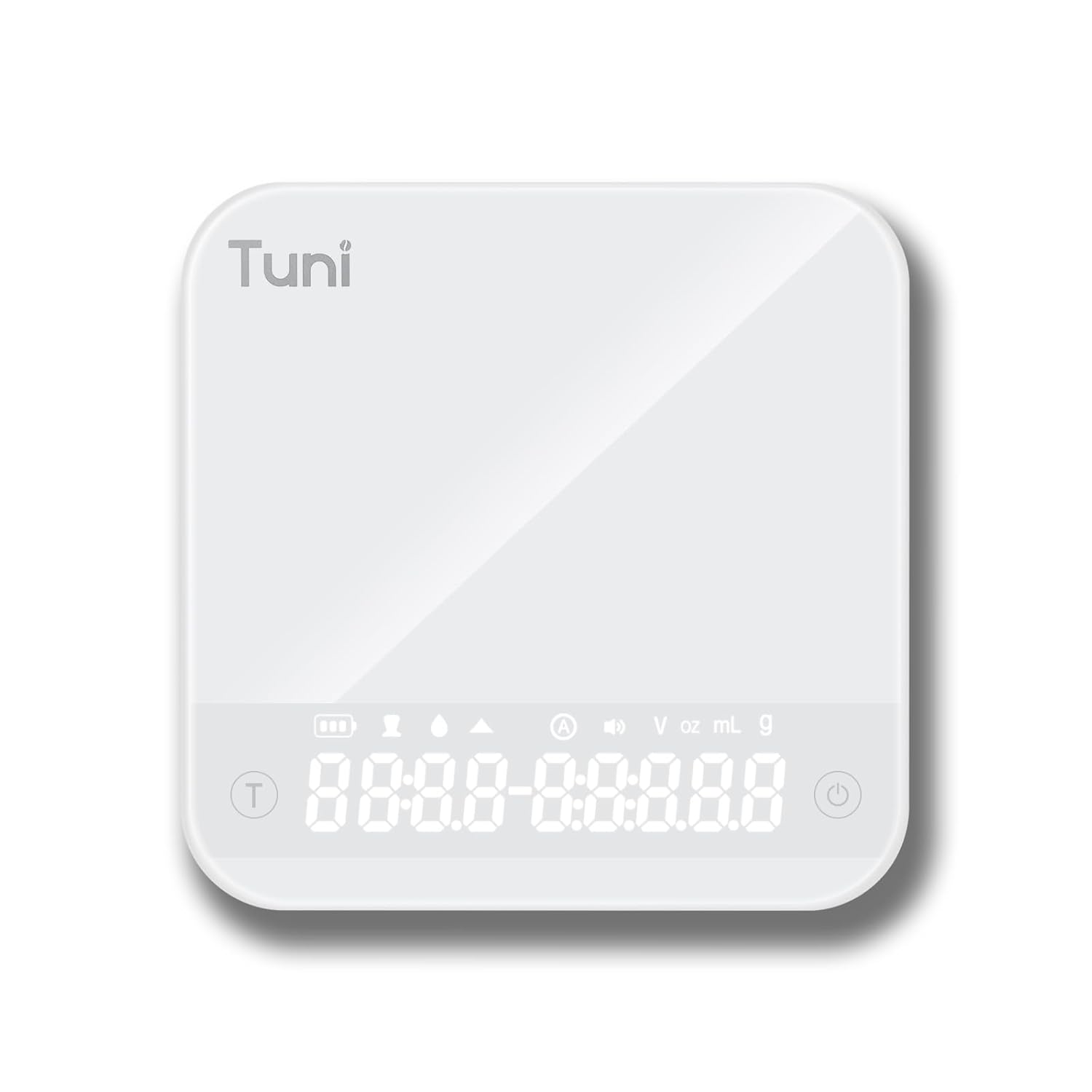
- Tempered Glass Weighing Platform
- Hidden LED Display
- Gumb za vklop/izklop
- Gumb časovnika
- Unit Conversion Button (g, ml, oz)
Nastavitev
Nastavitev mlinčka
- Razpakiranje: Previdno odstranite vse komponente iz embalaže. Embalažo shranite za kasnejše shranjevanje ali transport.
- Čiščenje: Pred prvo uporabo obrišite zunanjost mlinčka zamp cloth. Wash the bean hopper and ground coffee container with warm, soapy water, rinse thoroughly, and dry completely.
- Sestavite lijak: Place the bean hopper onto the grinder body, ensuring it is securely locked in place.
- Napajalni priključek: Plug the grinder into a grounded electrical outlet.
Nastavitev lestvice
- Razpakiranje: Odstranite tehtnico iz embalaže.
- Polnjenje: If necessary, charge the scale using the provided USB cable until fully charged.
- Umestitev: Place the scale on a flat, stable, and level surface to ensure accurate readings.
Navodila za uporabo
Using the Tuni G1 Coffee Grinder

- Dodajte fižol: Fill the bean hopper with whole roasted coffee beans. The hopper has a capacity of 250g (8.8oz).
- Izberite nastavitev mletja: Rotate the grind adjustment collar to select your desired grind size. The grinder offers 48 settings, suitable for:
- Espresso: Settings 0-16 (very fine)
- Drip/Pour Over: Settings 16-32 (medium)
- Francoski tisk: Settings 32-48 (coarse)

Slika: Podrobna view of the Tuni G1 Coffee Grinder's control panel and grind adjustment collar, emphasizing the 48 precision settings. - Choose Output Method: Place either the ground coffee container or your portafilter (using the included holder) under the dispensing chute.
- Set Grind Time/Cups: Use the control panel to adjust the grind time in 0.5-second increments (up to 40 seconds) or select the desired number of cups (2 to 12 cups).
- Začetek brušenja: Press the Start/Stop button to begin grinding. The grinder will automatically stop once the set time or quantity is reached. You can also manually stop grinding by pressing the button again.
- Prazna posoda: Once grinding is complete, remove the ground coffee container or portafilter.
Using the Tuni Mini Coffee Scale

- Vklop: Press the Power button to turn on the scale. The hidden LED display will illuminate.
- Izberite enoto: Press the Unit Conversion button to cycle through available units: grams (g), milliliters (ml), and ounces (oz).
- Funkcija tare: Place an empty container on the weighing platform. Press the Power/Tare button to zero out the weight of the container.
- Tehtanje: Add your ingredients (e.g., coffee beans, water) to the container. The display will show the precise weight.
- Funkcija časovnika:
- Ročno merjenje časa: Press the Timer button to start the timer. Press again to pause, and a third time to reset.
- Samodejni način: The scale features an automatic mode that can detect changes in weight and start the timer automatically, ideal for pour-over brewing. Refer to the scale's specific instructions for activating this mode.
- Način razmerja med prahom in vodo: This mode assists in maintaining specific brewing ratios.
- Način pretoka: Displays the flow rate of liquid, useful for precise pour-over techniques.
- Ugasniti: Press and hold the Power button to turn off the scale. The scale will also auto-shutoff after a period of inactivity to conserve battery.
Vzdrževanje in čiščenje
Čiščenje mlinčka
- Odklopite: Pred čiščenjem vedno izklopite brusilnik.
- Prazen lijak: Odstranite preostala kavna zrna iz vsebnika.
- Odstranite zareze: Carefully remove the upper burr. Use the provided cleaning brush to brush away any coffee grounds from both the upper and lower burrs.
- Clean Chute: Use the brush to clean the dispensing chute.
- Obrišite zunanjost: Wipe the exterior of the grinder body with a soft, damp cloth. Do not use abrasive cleaners or immerse the grinder in water.
- Ponovno sestavite: Reassemble the burrs and hopper once all parts are dry.
Čiščenje vodnega kamna

- Površino kaljenega stekla obrišite z mehko,amp krpo.
- Ne uporabljajte močnih kemikalij ali abrazivnih materialov.
- The scale is water-resistant, but do not immerse it in water.
Odpravljanje težav
Grinder Issues
| Težava | Možen vzrok | rešitev |
|---|---|---|
| Mlinček se ne zažene. | Ni priključeno; napajanje izklopljenotage; hopper not correctly seated; motor overheated. | Ensure plug is securely in outlet; check power supply; ensure hopper is locked in place; allow grinder to cool down for 30 minutes. |
| Nedosledno mletje. | Žarnice so umazane ali zamašene; napačna nastavitev mletja za vrsto kavnih zrn. | Clean burrs thoroughly; adjust grind setting to a finer or coarser level as needed. |
| Grinder is loud or struggling. | Beans are too oily/hard; burrs are clogged. | Clean burrs; try different beans; do not overfill hopper. |
Scale Issues
| Težava | Možen vzrok | rešitev |
|---|---|---|
| Netočni odčitki. | Scale not on a flat surface; battery low; overloaded; external vibrations. | Place on a stable, level surface; recharge battery; do not exceed 2000g capacity; avoid vibrations during use. |
| Zaslon se ne vklopi. | Baterija je izpraznjena. | Tehtnico napolnite s priloženim USB-kablom. |
Specifikacije
Tuni G1 Conical Burr Coffee Grinder
- Nastavitve mletja: 48 precision settings
- Vrsta burra: 40 mm stožčasti rezkar iz nerjavečega jekla
- Hitrost brušenja: 450 vrtljajev na minuto (RPM)
- Kapaciteta posode za fižol: 250 g (8.8 oz)
- Grounds Container Capacity: 75 g (2.6 oz)
- Grind Time Adjustment: 1-40 seconds (0.5s increments)
- Izbira skodelice: 2-12 skodelic
- Dimenzije: 7.08 cm x 4.52 cm x 14.0 cm
- Material telesa: Nerjaveče jeklo
Tuni Mini Coffee Scale
- Merilno območje: 0.3g - 2000g (0.01oz - 70.5oz)
- Natančnost: 0.1 g
- Enote: g, ml, oz
- Časovnik: Max 99 minutes 59 seconds
- Načini: Manual Timing, Automatic Mode, Powder/Water Ratio Mode, Flow Rate Mode
- Zaslon: Hidden LED Tempered Glass Display
- moč: Polnilna (USB)
- Dimenzije: Približno 4.1 cm x 4.1 cm x 0.8 cm
- Teža izdelka: 0.33 lb
Garancija in podpora
Tuni products are manufactured with high-quality materials and craftsmanship. For warranty information and customer support, please refer to the warranty card included with your product or visit the official Tuni webspletno mesto. Pri stiku s podporo imejte pri roki številko modela izdelka in datum nakupa.
Official Tuni Store: Visit the Tuni Store on Amazon
Ask a question about this manual
Ask about setup, troubleshooting, compatibility, parts, safety, or missing instructions. Manuals+ will review the question and use this page’s manual context to help answer it.