
1. Uvod
Thank you for choosing the Relaxweex Mini Digital Camera Keychain. This compact and portable camera is designed for capturing moments in 1080p resolution, featuring a built-in flash and a user-friendly interface. This manual provides essential information for setting up, operating, and maintaining your device to ensure optimal performance.
2. Izdelek je končanview
2.1 Vsebina paketa
- 1 x Mini Digital Camera Keychain
- 1 x polnilna osnova
- 1 x 16 GB TF kartica (prednameščena ali ločena)
- 1 x USB polnilni kabel
- 1 x Keychain Accessory
- 1 x zapestnica
2.2 Komponente kamere
Seznanite se s fizičnimi komponentami fotoaparata:

Image: The Relaxweex Mini Digital Camera Keychain shown with its charging base, USB cable, 16GB TF card, keychain accessory, and wristband.
- Objektiv: Main camera lens for capturing images and videos.
- Flash Light: Zagotavlja osvetlitev v slabih svetlobnih pogojih.
- Zaslon: 1.44-inch color screen for live view, predvajanje in krmarjenje po meniju.
- Gumb za vklop: Vklopi/izklopi kamero.
- Gumb za način: Preklaplja med načinoma fotografiranja in snemanja videoposnetkov.
- Gumb za zaklop/snemanje: Začne s fotografiranjem ali snemanjem videa.
- Navigacijski gumbi (+/-): Used for menu navigation, zooming, and filter selection.
- Reža za pomnilniško kartico: For inserting the TF (MicroSD) card.
- Vrata USB-C: Za polnjenje in prenos podatkov.
- Keychain/Lanyard Loop: Attachment point for accessories.

Slika: Podrobna view of the camera's side, highlighting the action buttons for mode switching and filter selection, and the 1.44-inch screen.
3. Nastavitev
3.1 Vstavljanje pomnilniške kartice
The camera requires a TF (MicroSD) card for storing photos and videos. A 16GB card is included.
- Poiščite režo za pomnilniško kartico ob strani fotoaparata.
- Insert the TF card with the printed side facing up, gently pushing until it clicks into place. Ensure it is fully seated.
- To eject, gently press the card inward until it springs out.

Image: A close-up showing a 16GB memory card being inserted into the camera's designated slot, with an arrow indicating the correct direction.
3.2 Polnjenje baterije
Before first use, fully charge the camera's built-in battery.
- Connect the charging base to the camera's USB-C port.
- Connect the USB charging cable to the charging base and a power source (e.g., computer USB port, USB wall adapter).
- The charging indicator light will show the charging status. A full charge provides approximately 600 minutes of operation.

Image: The camera is shown connected to its charging base, which is then connected via a USB cable to a power source, illustrating the charging process.
3.3 Pritrjevanje dodatkov
Attach the keychain or wristband for convenient carrying and to prevent loss.
- Thread the keychain or wristband loop through the designated attachment point on the camera.
- Secure the accessory as needed.

Image: A hand is shown attaching a keychain accessory to the camera's loop, demonstrating how to secure it for portability.
4. Navodila za uporabo
4.1 Vklop/izklop
- Za vklop pritisnite in držite Gumb za vklop until the screen illuminates.
- Za izklop pritisnite in držite tipko Gumb za vklop znova, dokler se zaslon ne izklopi.
4.2 Foto način
- Prepričajte se, da je kamera vklopljena.
- Pritisnite Gumb za način to switch to photo mode (indicated by a camera icon on the screen).
- Kadrirajte posnetek s pomočjo zaslona.
- Pritisnite Sprožilec fotografirati.
- To apply filters, use the Navigation Buttons (+/-) to cycle through available options (e.g., Cool Color, Warm Color, Black & White, Retro, Fresh).
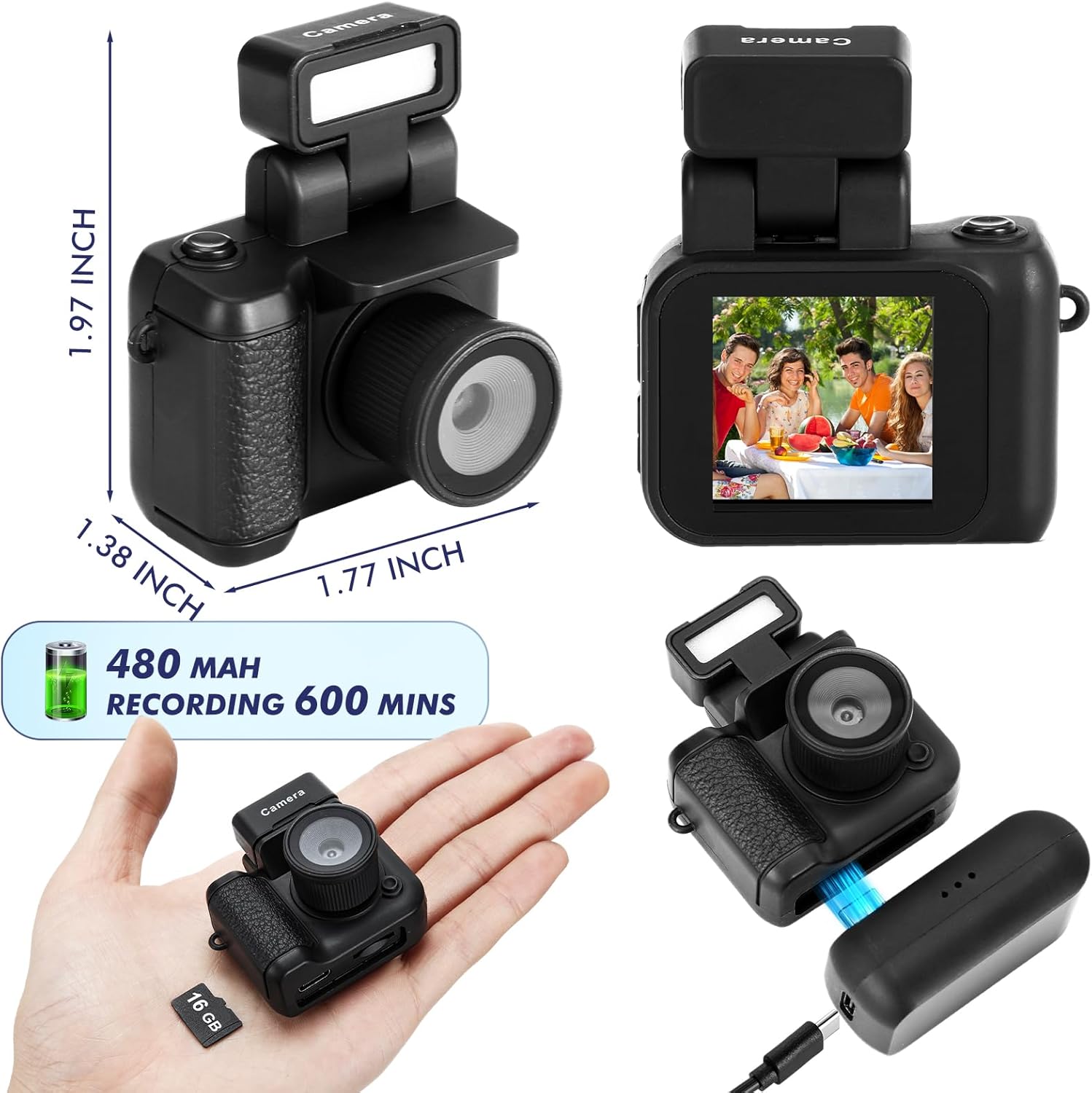
Image: The camera's screen displays different photo filters such as Original Image, Cool Color, Warm Color, Black & White, Retro, and Fresh, demonstrating the creative options available.
4.3 Video način
- Prepričajte se, da je kamera vklopljena.
- Pritisnite Gumb za način to switch to video mode (indicated by a video camera icon on the screen).
- Pritisnite Gumb za snemanje to start recording. A red indicator or timer will appear on the screen.
- Pritisnite Gumb za snemanje znova, da ustavite snemanje.
Video: This video demonstrates the various features and usage scenarios of the Relaxweex Mini Digital Camera, including switching between photo and video modes, applying filters, and attaching accessories.
4.4 Flash Function
The camera features a built-in flash for improved visibility in dark environments.
- The flash component can be installed or removed as needed.
- When installed, the flash can be activated to provide continuous light or to flash during photo capture. Refer to the on-screen menu for flash settings (On/Fill).
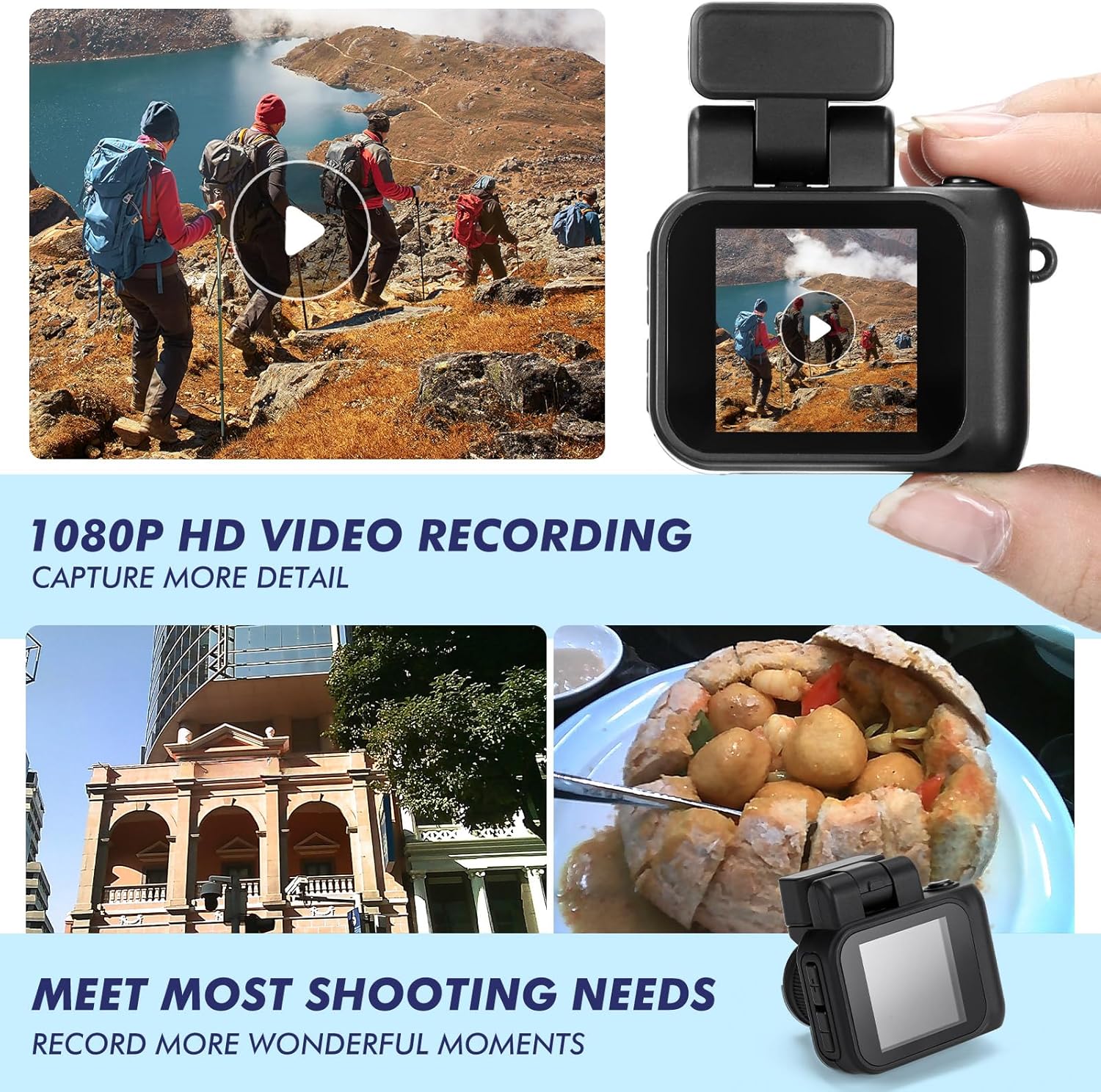
Image: Two images show a person on a bicycle, one with the flash off (Close Flash Effect) and one with the flash on (Open Flash Effect), illustrating the illumination provided by the camera's flash.
4.5 Viewsnemanje fotografij in videoposnetkov
Lahko ponovnoview your captured content directly on the camera's screen.
- In either photo or video mode, use the Navigation Buttons (+/-) to scroll through your saved files.
- Pritisnite Gumb Sprožilec/Snemanje to play a video or view fotografija v celozaslonskem načinu.
5. Upravljanje pomnilniških kartic
5.1 Prenos Files v računalnik
To access your photos and videos, connect the camera to a computer:
- Izklopite fotoaparat.
- Povežite fotoaparat z računalnikom s priloženim kablom USB.
- Kamera se bo v računalniku prikazala kot izmenljivi disk.
- Open the drive to access and copy your files.
5.2 Formatiranje pomnilniške kartice
Formatting the memory card will erase all data. Back up important files, preden nadaljujete.
- Navigate to the camera's settings menu (usually accessible by holding the Mode button or a specific combination).
- Select the 'Format Card' option.
- Confirm your selection to format the card.
6. Vzdrževanje
- Čiščenje: Za čiščenje ohišja fotoaparata uporabite mehko, suho krpo. Za objektiv in zaslon uporabite posebno krpo za čiščenje objektivov. Izogibajte se abrazivnim materialom ali močnim kemikalijam.
- Shranjevanje: Fotoaparat shranjujte na hladnem in suhem mestu, stran od neposredne sončne svetlobe in ekstremnih temperatur.
- Vzdrževanje baterije: For long-term storage, charge the battery to about 50% to prolong its lifespan.
7. Odpravljanje težav
| Težava | Možen vzrok | rešitev |
|---|---|---|
| Kamera se ne vklopi. | Nizka baterija. | Charge the camera fully using the provided USB cable and charging base. |
| Napaka pomnilniške kartice. | Kartica ni pravilno vstavljena ali je poškodovana. | Reinsert the TF card. If the issue persists, try formatting the card (after backing up data) or using a different TF card. |
| Slaba kakovost slike/videoposnetka. | Low light, dirty lens, or incorrect settings. | Ensure adequate lighting. Clean the lens. Check if flash is enabled in low light. |
| Charging base feels loose. | Manjša odstopanja pri izdelavi. | Ensure the camera is securely seated in the charging base and the USB cable is firmly connected. Handle with care during charging. |
| TF card difficult to insert/remove. | Misalignment or tight slot. | Ensure correct orientation. Apply gentle, even pressure. Do not force the card. If it's consistently difficult, contact support. |
8. Specifikacije
| Funkcija | Podrobnost |
|---|---|
| Ime modela | HAT0879 |
| Video ločljivost | 1080p |
| Ločljivost foto senzorja | 2.1 MP |
| Velikost zaslona | 1.44 inches (approx. 1 Centimeter) |
| Vrsta baterije | Vgrajena litij-ionska baterija |
| Povprečna življenjska doba baterije | Up to 600 minutes (recording) |
| Zmogljivost pomnilnika | 16 GB (vključena TF kartica) |
| Podprto File Oblika | JPEG (photos), MP4 (videos) |
| Tehnologija povezljivosti | USB |
| Posebne lastnosti | Flash Function, Long Life Battery, Color Screen |
| Mere (pribl.) | 1.97 x 1.77 x 1.38 palcev |
9. Garancija in podpora
For warranty information or technical support, please refer to the product packaging or contact Relaxweex customer service through the retailer where the product was purchased. Keep your purchase receipt for warranty claims.