
1. Uvod
Welcome to the user manual for your Nothing Phone (3a). This guide provides detailed instructions on setting up, operating, maintaining, and troubleshooting your device to ensure optimal performance and user experience.

Figure 1.1: The Nothing Phone (3a) showcasing its unique transparent back design and Glyph Interface.
2. Nastavitev
2.1. Razpakiranje in prvi pregled
Upon receiving your Nothing Phone (3a), carefully open the packaging and inspect the contents. Ensure all items listed in the "What's in the Box" section are present and undamaged.
- Nothing Phone (3a) device
- USB-C kabel
- Izmetalo pladnja SIM
- Predhodno nanesena zaščitna folija za zaslon
2.2. Vstavljanje SIM kartice
- Poiščite pladenj za kartico SIM na strani telefona.
- Vstavite orodje za izmet pladnja za SIM kartico v majhno luknjo poleg pladnja in močno pritisnite, dokler pladenj ne izskoči.
- Vstavite kartico(-e) Nano-SIM v reži z zlatimi kontakti obrnjenimi navzdol.
- Previdno vstavite pladenj za SIM kartico nazaj v telefon, dokler se ne zaskoči.
2.3. Čarovnik za začetni vklop in nastavitev
Press and hold the power button on the right side of the phone until the Nothing logo appears. Follow the on-screen instructions to complete the initial setup, including language selection, Wi-Fi connection, Google account sign-in, and data transfer.
3. Upravljanje telefona Nothing (3a)
3.1. Nothing OS 3.1 Overview
The Nothing Phone (3a) runs on Nothing OS 3.1, an intuitive and customizable Android-based operating system. It features functional adaptations for an optimized user experience.

Figure 3.1: Visual representation of Nothing OS 3.1's customizable interface.
3.2. Sistem kamer
The Nothing Phone (3a) is equipped with an advanced camera system designed to capture high-quality photos and videos.
- Glavna kamera: 50-MP OIS (Optical Image Stabilization) main camera for detailed and stable shots.
- Teleobjektivna kamera: 50-MP telephoto lens with up to 30x Ultra Zoom for capturing distant subjects.
- Ultra široka kamera: 8-MP ultra-wide-angle lens for expansive landscape and group shots.
- Sprednja kamera: 32-MP front camera for sharp selfies and video calls.

Figure 3.2: Detailed breakdown of the Phone (3a)'s Elite Camera System components.

Figure 3.3: Illustration of the telephoto zoom lens technology and its capability to capture distant scenes.
3.3. Essential Key and Essential Space
The Essential Key is a new physical button on the side of your device. A short press captures screen content, while a long press allows you to record voice notes, ideas, and inspirations. The Essential Space organizes your captures and provides personalized suggestions.

Figure 3.4: The Essential Key and its integration with the Essential Space for content organization.
3.4. Vmesnik glifa
The Glyph Interface on the back of the phone provides unique LED light and sound notifications for calls, messages, and other alerts, offering a distinct visual and auditory experience.

Figure 3.5: The Glyph Interface on the rear of the Nothing Phone (3a), demonstrating its illuminated patterns.
4. Vzdrževanje
4.1. Upravljanje baterije
The Nothing Phone (3a) features a 5,000 mAh battery with 50W fast charging. To maximize battery lifespan:
- Izogibajte se ekstremnim temperaturam.
- Za polnjenje uporabite priloženi kabel USB-C.
- Izogibajte se pogostemu popolnemu praznjenju baterije.

Figure 4.1: Visual representation of the 5,000 mAh battery capacity.
4.2. Čiščenje naprave
Use a soft, lint-free cloth to clean the screen and back of your phone. For stubborn smudges, slightly dampkrpo sperite z vodo. Izogibajte se uporabi agresivnih kemikalij ali abrazivnih materialov.
4.3. Posodobitve programske opreme
Redno preverjajte in nameščajte posodobitve programske opreme, da zagotovite, da ima vaša naprava najnovejše funkcije, varnostne popravke in izboljšave delovanja. Pomaknite se do Nastavitve > Sistem > Posodobitev programske opreme za preverjanje posodobitev.
5. Odpravljanje težav
5.1. Pogoste težave in rešitve
| Izdaja | Možen vzrok | rešitev |
|---|---|---|
| Telefon se ne vklopi | Prazna baterija, zrušitev programske opreme | Charge the phone for at least 30 minutes. Perform a forced restart by holding the power button for 10-15 seconds. |
| Aplikacije se sesuvajo ali zamrzujejo | App bug, insufficient RAM, outdated software | Clear app cache/data. Close background apps. Update the app or phone software. |
| Slaba življenjska doba baterije | High screen brightness, background apps, network issues | Adjust screen brightness. Close unused apps. Disable unnecessary features like GPS/Bluetooth. |
5.2. Tovarniška ponastavitev
If issues persist, a factory reset may be necessary. This will erase all data on your phone, so ensure you have backed up important information. Navigate to Nastavitve > Sistem > Možnosti ponastavitve > Izbriši vse podatke (ponastavitev na tovarniške nastavitve).
6. Specifikacije
Key technical specifications for the Nothing Phone (3a) (Model: A059).
| Funkcija | Podrobnost |
|---|---|
| Ime modela | Nič Telefon (3a) |
| Številka modela | A059 |
| Operacijski sistem | Android 15, nič OS 3.1 |
| Zaslon | 6.77-inch Flexible FHD+ AMOLED, 120 Hz, 1.07 billion colors |
| Procesor | Snapdragon 7s Gen 3 (2.5 GHz, 8-core) |
| RAM | 12 GB (up to 20GB RAM Boost) |
| Shranjevanje | 256 GB |
| Glavna kamera | 50-MP OIS |
| Telefoto kamera | 50-MP (30x Ultra Zoom) |
| Ultra širokokotna kamera | 8 MP |
| Sprednja kamera | 32 MP |
| Baterija | 5,000 mAh (hitro polnjenje 50 W) |
| Dimenzije | 7.75 x 0.83 x 16.35 cm |
| Teža | 201 gramov |
| Odpornost na vodo/prah | IP64 |
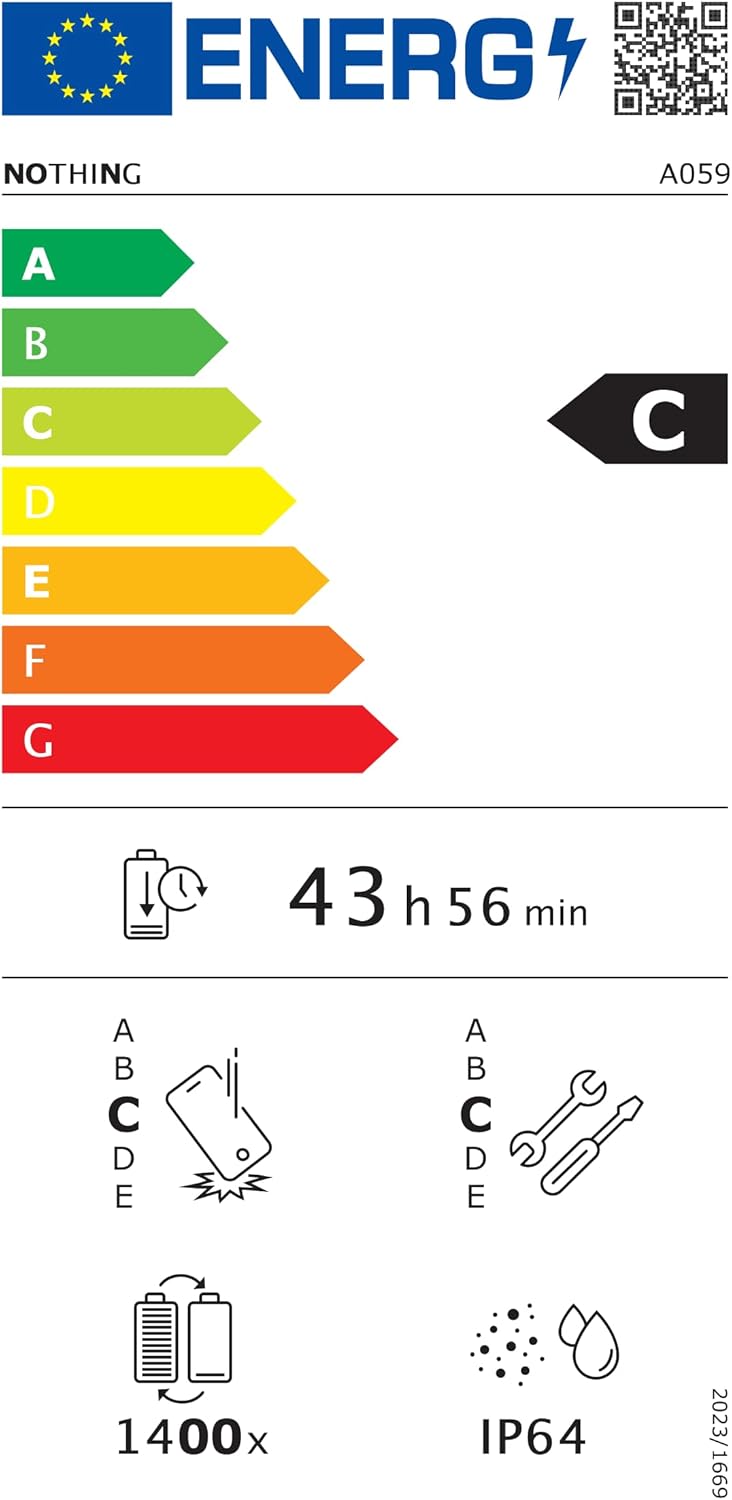
Figure 6.1: EU Energy Label for Nothing Phone (3a), indicating energy efficiency and IP64 rating. More details available at eprel.ec.europa.eu/qr/2179652.
7. Garancija in podpora
Your Nothing Phone (3a) comes with a manufacturer's warranty. Please refer to the warranty card included in your product packaging for specific terms and conditions.
For further assistance, technical support, or warranty claims, please visit the official Nothing support webspletnem mestu ali se obrnite na njihovo službo za stranke. Več informacij najdete na Nič Trgovina na Amazonu.