
1. Pomembne varnostne informacije
Please read this entire manual before installation and assembly. If you have any questions regarding any of the instructions or warnings, please contact your local distributor for assistance.
- We accept no responsibility for incorrect or faulty installation.
- Follow the enclosed installation instructions carefully.
- Check the condition and completeness of all items before beginning.
- The fastening materials supplied for wall mounting are intended exclusively for fastening to solid masonry or concrete. For other wall types, such as hollow bricks, plasterboard, or lightweight construction, please contact a specialist retailer for information on suitable fastening elements.
- Under no circumstances should you exceed the limit values specified for the product.
2. Vsebina paketa
Verify that all components are present and undamaged before installation. If any parts are missing or damaged, do not attempt to install. Contact customer support for replacement parts.

Figure 2.1: XTRARM TiTon Double TV Wall Mount and included hardware components, including various screws, anchors, washers, and a drilling template.
Paket običajno vključuje:
- Stenski nosilec za dvojni TV XTRARM TiTon
- Standard mounting hardware for TV and wall (various screws, anchors, washers)
- Šablona za vrtanje
- Small spirit level
- Multiple hook-and-loop straps for cable management
3. Specifikacije
| Funkcija | Specifikacija |
|---|---|
| Vrsta namestitve | Stenski nosilec |
| Vrsta gibanja | Articulated, Swivel, Tilt, Rotate |
| Material | Kovina |
| barva | Črna |
| Razdalja do stene | 12.9 cm (retracted) to 120 cm (extended) |
| Vrtenje | Up to 90° (portrait/landscape) |
| Vrtljiva | Do 180° (90° levo/desno) |
| Nagib | -5° do +12° |
| Priporočena velikost televizorja | Approximately 52 – 110 inches |
| Zmogljivost teže | Največ 80 kg |
| Združljivost VESA | 100x100mm, 100x200mm, 200x100mm, 200x200mm, 200x300mm, 300x200mm, 300x300mm, 400x200mm, 400x300mm, 400x400mm, 500x300mm, 600x200mm, 600x400mm |

Figure 3.1: VESA compatibility and maximum weight capacity.

Figure 3.2: Key dimensions and movement capabilities of the mount.
Figure 3.3: Comprehensive technical drawing with detailed dimensions and adjustment ranges.
4. Nastavitev in namestitev
Proper installation is crucial for the safety and stability of your TV. Ensure you have the necessary tools and assistance before proceeding.
4.1 Potrebno orodje (ni vključeno)
- Vrtalnik
- Stud finder (if mounting to wood studs)
- Svinčnik
- Merilni trak
- Vtični ključ ali nastavljivi ključ
- Phillips izvijač za glavo
4.2 Izbira mesta namestitve
Select a wall location that can safely support the weight of the mount and your TV. For solid concrete or masonry walls, use the provided anchors. For wood stud walls, ensure the mount is centered on a stud. Avoid mounting to drywall alone.
4.3 Attaching the Wall Plate
- Position the drilling template at the desired height on the wall and mark the drill holes with a pencil. Use the included spirit level to ensure it is perfectly horizontal.
- Na označenih mestih izvrtajte pilotne luknje. Velikost svedra bo odvisna od vrste stene in izbranih sider/vijakov.
- Insert wall anchors (if required for your wall type) into the pilot holes.
- Align the wall plate with the drilled holes and secure it to the wall using the appropriate screws and washers. Ensure it is firmly attached.
4.4 Pritrditev nosilcev televizorja na televizor
- Televizor previdno položite z zaslonom navzdol na mehko, čisto površino, da preprečite poškodbe zaslona.
- Prepoznajte pritrdilne luknje VESA na zadnji strani televizorja.
- Select the correct size screws and spacers (if needed) from the provided hardware that fit your TV's VESA pattern.
- Attach the two vertical TV brackets to the back of your TV, ensuring they are level and securely fastened. Do not overtighten.
4.5 Montaža televizorja na stensko ploščo
- With assistance, carefully lift the TV and hook the attached TV brackets onto the wall plate.
- Prepričajte se, da je televizor varno pritrjen na stensko ploščo.
- Vklopite vse varnostne mehanizme za zaklepanje na nosilcih, da preprečite nenamerno premikanje.

Slika 4.1: Nprample of the XTRARM TiTon Double TV Wall Mount installed with a television.
5. Navodila za uporabo
The XTRARM TiTon Double mount offers full motion capabilities for optimal viewing kotov.
5.1 Adjusting Wall Distance
Gently pull or push the TV to extend or retract the mount. The mount allows for a wall distance ranging from 12.9 cm to 120 cm.

Figure 5.1: Adjustable wall distance of the mount.
5.2 Nastavitev vrtenja
The mount can swivel up to 180 degrees (90 degrees left or right) to direct the screen towards different viewobmočjih.

Figure 5.2: Swivel capability of the mount.
5.3 Nastavitev nagiba
Adjust the vertical tilt of your TV from -5 degrees to +12 degrees to reduce glare and optimize viewing comfort. Loosen the tilt adjustment knobs, set the desired angle, and then retighten the knobs.
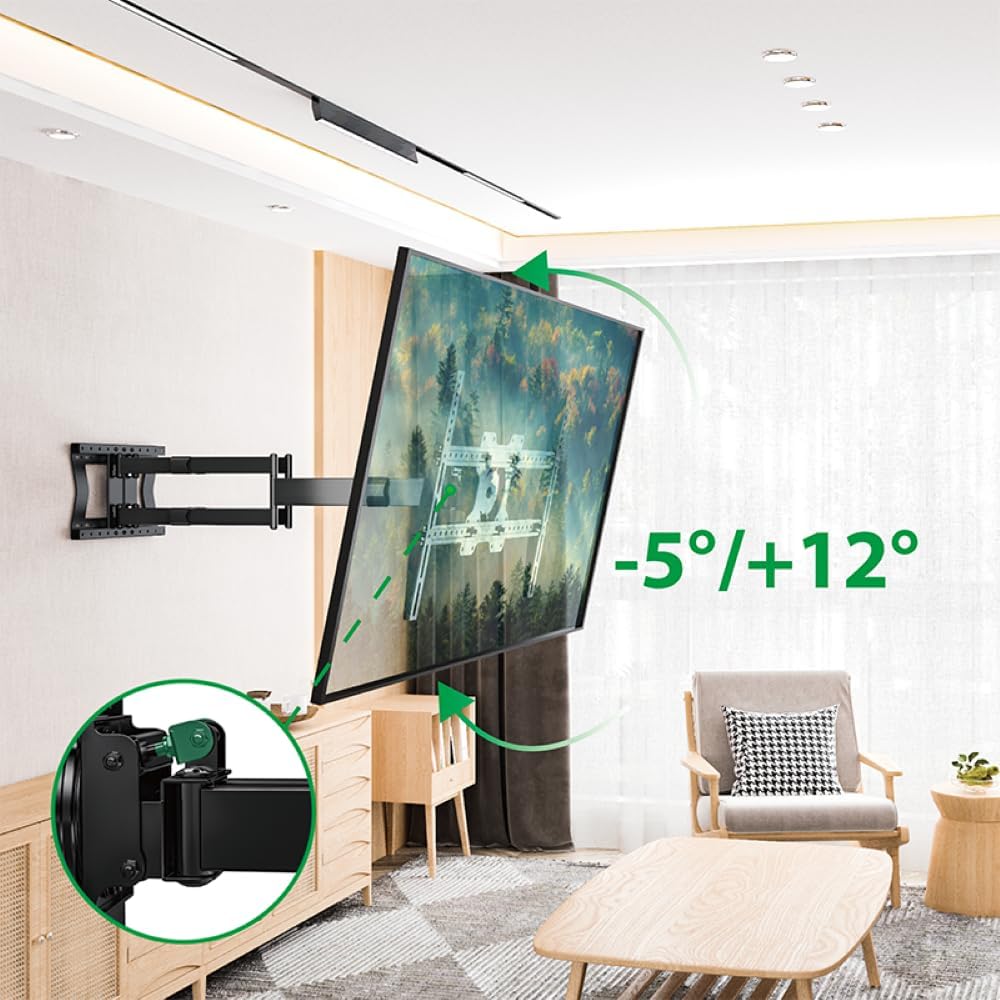
Figure 5.3: Tilt adjustment range and mechanism.
5.4 Nastavitev vrtenja
The mount allows for a 90-degree rotation, enabling you to switch between landscape and portrait orientation for your TV.

Figure 5.4: 90-degree rotation capability.
5.5 Upravljanje kablov
Use the provided hook-and-loop straps to bundle and organize cables along the mount arms for a tidy appearance and to prevent snagging during adjustments.
6. Vzdrževanje
Redno vzdrževanje zagotavlja dolgo življenjsko dobo in varno delovanje vašega stenskega nosilca za televizor.
- Čiščenje: Nosilec obrišite z mehko, suho krpo. Izogibajte se abrazivnim čistilom ali topilom, ki bi lahko poškodovala površino.
- Preverite povezave: Občasno preverite vse vijake in matico, da se prepričate, da so trdno priviti. Po potrebi jih privijte, vendar ne premočno.
- Pregled obrabe: Redno pregledujte nosilec glede morebitnih znakov obrabe, poškodb ali korozije. Če odkrijete kakršne koli težave, prenehajte z uporabo in se obrnite na podporo strankam.
7. Odpravljanje težav
If you encounter any issues with your XTRARM TiTon Double TV Wall Mount, refer to the following common problems and solutions:
| Težava | Možen vzrok | rešitev |
|---|---|---|
| Televizor ni poravnan | Wall plate or TV brackets not level during installation. | Carefully remove the TV, adjust the wall plate or TV brackets using a spirit level, and re-mount. |
| Difficulty moving the mount | Joints may be too tight or require lubrication. | Check for any overtightened bolts. Apply a small amount of silicone-based lubricant to moving joints if necessary. |
| Nosilec se zdi nestabilen | Loose wall plate, incorrect anchors, or exceeding weight capacity. | Immediately remove the TV. Re-check all wall plate fasteners. Ensure correct anchors were used for your wall type. Verify TV weight does not exceed 80 kg. If issues persist, consult a professional installer. |
8. Garancija in podpora
For information regarding warranty coverage, technical support, or replacement parts, please refer to the documentation provided at the time of purchase or visit the official XTRARM webspletno mesto. Shranite račun kot dokazilo o nakupu.