
1. Uvod
The Audizio Avola is a comprehensive audio system designed to provide a wide range of listening options. It integrates Internet Radio, DAB+, FM radio, a CD player, and Bluetooth connectivity into a single, elegant unit. This manual will guide you through the setup, operation, and maintenance of your Avola system, ensuring you can fully utilize its features for an optimal audio experience.
2. Varnostna navodila
- Napajanje: Uporabljajte samo priloženi napajalnik. Prepričajte se, da je glasnosttage ustreza zahtevam vaše regije.
- Voda in vlaga: Do not expose the unit to rain, moisture, or liquids. Avoid placing objects filled with liquids, such as vases, on the unit.
- Prezračevanje: Zagotovite zadostno prezračevanje okoli enote. Ne blokirajte prezračevalnih odprtin.
- Viri toplote: Napravo hranite stran od virov toplote, kot so radiatorji, grelniki, štedilniki ali druge naprave, ki proizvajajo toploto.
- Čiščenje: Disconnect the unit from the power supply before cleaning. Use a soft, dry cloth. Do not use liquid cleaners or aerosol cleaners.
- Servisiranje: Ne poskušajte servisirati enote sami. Vsa servisna dela prepustite usposobljenemu serviserju.
- CD predvajalnik: Do not insert foreign objects into the CD tray. Handle CDs by their edges to avoid scratches.
3. Vsebina paketa
Preverite, ali so v embalaži vsi elementi:
- 1x Audizio Avola Internet Radio
- 1x daljinski upravljalnik
- 1x napajalnik
- 1x Uporabniški priročnik (Hitri vodnik)

Image: Audizio Avola unit shown with its remote control and power adapter.
4. Izdelek je končanview
4.1 Sprednja plošča

Slika: spredaj view of the Audizio Avola with the CD tray closed.
The front panel features the main display, control buttons, a CD tray, and input ports.
- Zaslon: Color display for navigation and information.
- Gumbi za upravljanje: MENU, INFO, REC/DEL, PRESET/REPEAT, STANDBY, I/R, Play/Pause, Stop, Skip/Fast Forward/Rewind.
- Pladenj za CD: Za vstavljanje avdio CD-jev.
- TUNE/SELECT Knob: Rotate to navigate menus, press to select.
- Gumb VOLUME: Prilagodi izhodni nivo zvoka.
- Vrata USB: Za priklop USB-naprav za shranjevanje podatkov.
- Reža za kartico SD: Za vstavljanje pomnilniških kartic SD.
- AUX vhod: 3.5 mm priključek za zunanje avdio vire.
- Priključek za slušalke: 3.5 mm priključek za zasebno poslušanje.

Image: Close-up of the Audizio Avola front panel showing USB, SD, AUX, and headphone ports.
4.2 Zadnja plošča
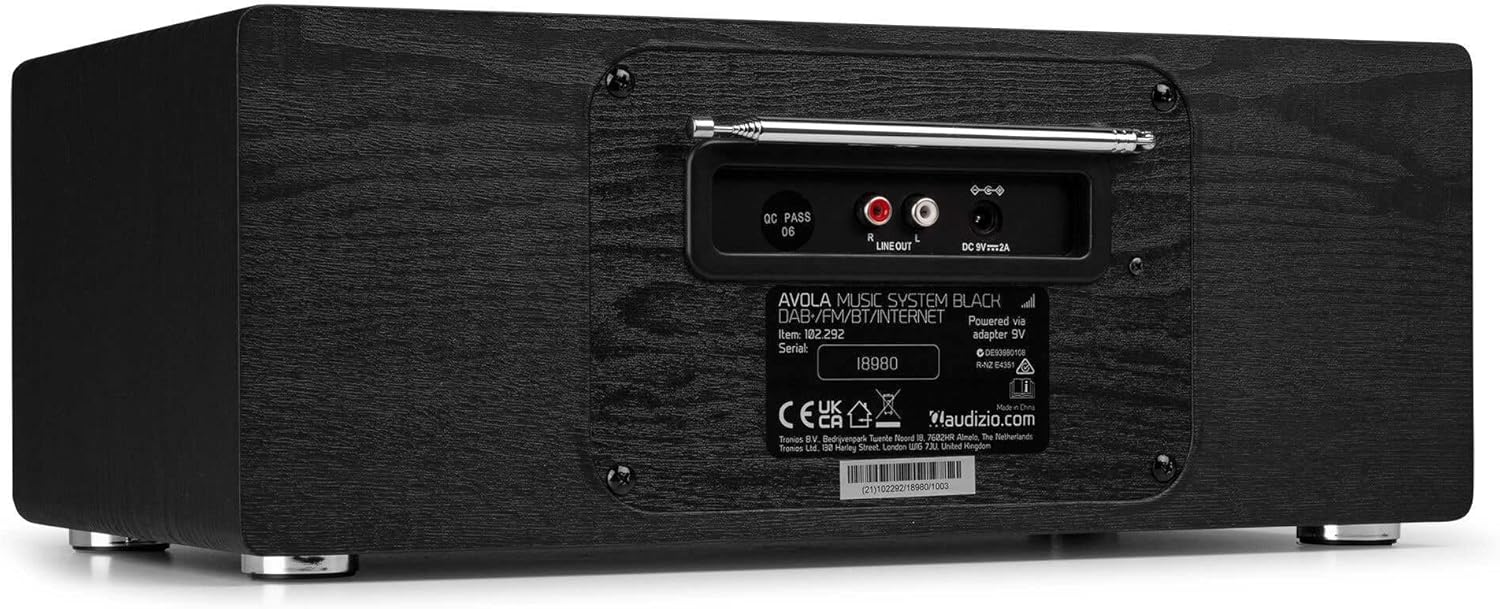
Slika: Zadaj view of the Audizio Avola, highlighting the antenna and connection ports.
The rear panel houses essential connections:
- Teleskopska antena: For DAB+ and FM radio reception. Extend fully for best signal.
- LINE OUT (RCA): Za povezavo z zunanjimi amplifiers ali zvočniki.
- DC 9V 2A Power Input: Za priključitev napajalnika.
5. Nastavitev
5.1 Napajalni priključek
- Connect the power adapter to the DC 9V 2A input on the rear of the Avola unit.
- Priključite napajalnik v ustrezno stensko vtičnico.
- The unit will enter standby mode. Press the STANDBY button on the unit or remote control to power on.
5.2 Nastavitev antene
For optimal DAB+ and FM radio reception, fully extend the telescopic antenna located on the rear panel. Adjust its position for the best signal quality.
5.3 Initial Setup (WLAN Connection)
To access Internet Radio features, the Avola must be connected to a Wi-Fi network.
- Upon first power-on, the unit may prompt you to set up the network connection. If not, press MENU, navigate to 'System Settings' and then 'Network'.
- Select 'Wi-Fi Network' and choose 'Scan' to find available networks.
- Na seznamu izberite omrežje Wi-Fi.
- Enter your Wi-Fi password using the TUNE/SELECT knob to navigate characters and press to confirm each character.
- Once connected, the display will show a Wi-Fi icon.
6. Načini delovanja
6.1 Internetni radio
Access thousands of radio stations worldwide via your Wi-Fi connection.
- Press the MENU button and select 'Internet Radio'.
- Postaje lahko brskate po lokaciji, žanru ali iščete določene postaje.
- Use the TUNE/SELECT knob to navigate and select.
- To save a station as a preset, press and hold the PRESET/REPEAT button until the preset menu appears, then select a preset number.

Image: The Audizio Avola display showing the Internet Radio interface.
6.2 DAB+ radio
Digital Audio Broadcasting Plus offers high-quality digital radio.
- Press the MENU button and select 'DAB Radio'.
- The unit will automatically scan for available DAB+ stations.
- Use the TUNE/SELECT knob to browse and select stations.
- Save presets as described for Internet Radio.
6.3 FM radio
Listen to traditional analog FM radio broadcasts.
- Press the MENU button and select 'FM Radio'.
- Use the TUNE/SELECT knob to manually tune or press and hold to auto-scan for stations.
- Save presets as described for Internet Radio.
6.4 CD predvajalnik
Play your favorite audio CDs.
- Press the MENU button and select 'CD Player'.
- Press the 'Open' button next to the CD tray to open it.
- Carefully place an audio CD onto the tray with the label side facing up.
- Press the 'Open' button again to close the tray. The unit will begin playing the CD automatically.
- Use the Play/Pause, Stop, and Skip buttons for playback control.
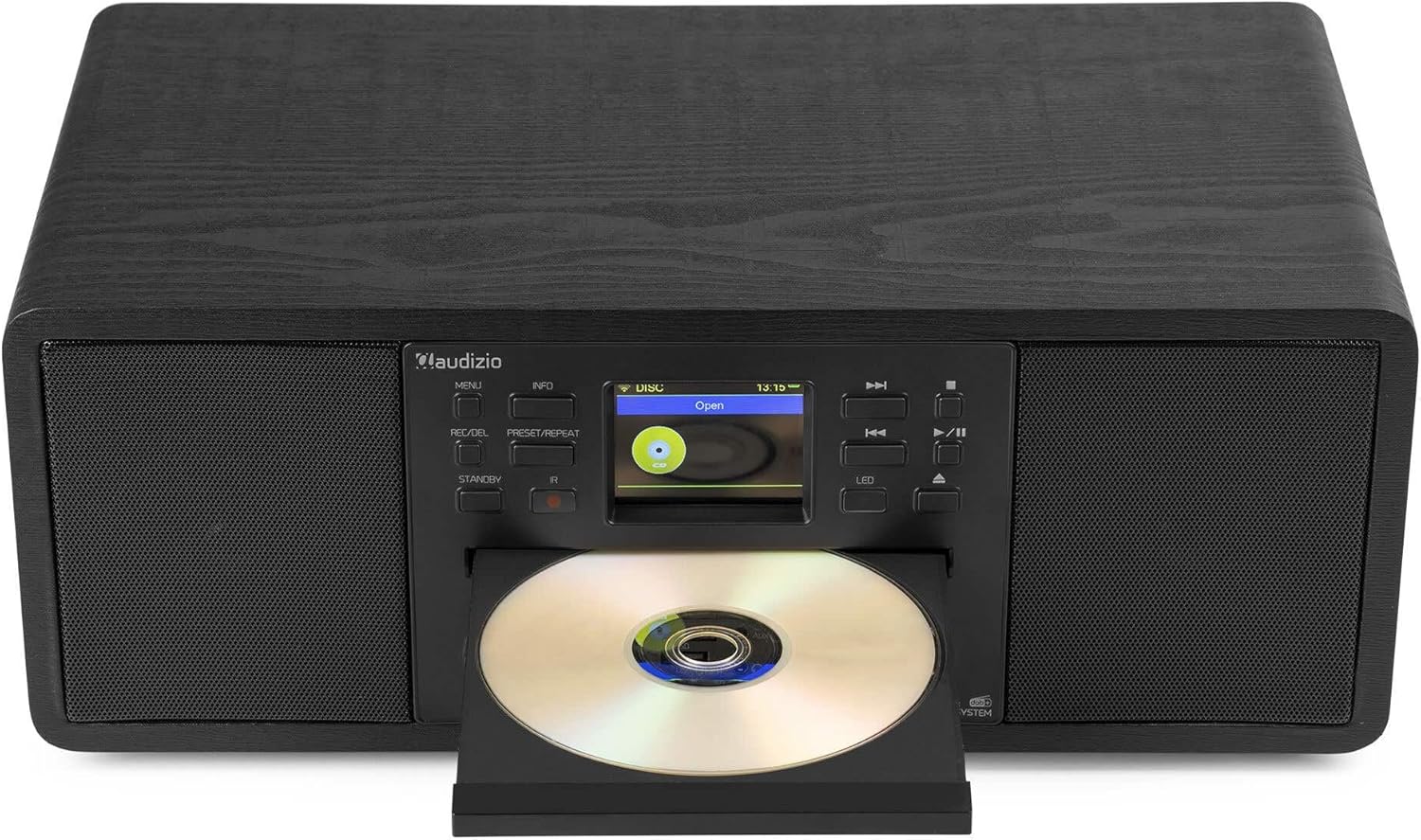
Image: The Audizio Avola with its CD tray open, ready for disc insertion.
6.5 Povezljivost Bluetooth
Brezžično pretakajte zvok iz pametnega telefona, tabličnega računalnika ali drugih naprav, ki podpirajo Bluetooth.
- Press the MENU button and select 'Bluetooth'.
- The Avola will enter pairing mode and become discoverable.
- On your Bluetooth device, search for 'Audizio Avola' in the Bluetooth settings and select it to pair.
- Once connected, the display will show 'BT Connected'. You can now play audio from your device through the Avola.

Image: The Audizio Avola display indicating a successful Bluetooth connection.
6.6 Predvajanje z USB-ja/SD-kartice
Predvajaj zvok filez USB-ključkov ali SD-kartic.
- Insert a USB drive into the USB port or an SD card into the SD card slot on the front panel.
- Press the MENU button and select 'USB' or 'SD' (the unit may automatically switch to the correct mode).
- Krmarite po svojem files and folders using the TUNE/SELECT knob.
- Press the TUNE/SELECT knob to play a selected track.
7. Vzdrževanje
- Čiščenje enote: Use a soft, dry, lint-free cloth to clean the exterior of the unit. Do not use abrasive cleaners, waxes, or solvents.
- Čiščenje leč CD-jev: If CD playback becomes erratic, use a commercially available CD lens cleaner disc to clean the laser lens.
- Shranjevanje: Če enoto shranjujete dalj časa, jo izključite iz električnega omrežja in jo shranite na hladnem in suhem mestu.
8. Odpravljanje težav
| Težava | Možen vzrok | rešitev |
|---|---|---|
| Brez moči | Napajalnik ni priključen ali pa je vtičnica pokvarjena. | Preverite napajalne priključke. Poskusite z drugo vtičnico. |
| Brez zvoka | Glasnost je prenizka, vklopljen je zvok utišanja ali pa je izbran napačen vir. | Increase volume. Check if mute is active. Ensure correct input source is selected. |
| Internetni radio se ne povezuje | Incorrect Wi-Fi password, weak signal, or network issue. | Re-enter Wi-Fi password. Move unit closer to router. Check router status. |
| DAB+/FM reception poor | Antena ni iztegnjena ali pa je signal slab. | Popolnoma izvlecite in prilagodite teleskopsko anteno. Poskusite premakniti enoto. |
| CD se ne predvaja | CD inserted incorrectly, dirty/scratched CD, or unsupported format. | Ensure CD is inserted label-side up. Clean or replace CD. Verify CD format (supports CD-DA, MP3). |
| Bluetooth se ne seznani | Device not in pairing mode, or Avola not discoverable. | Ensure both devices are in pairing mode. Check Bluetooth settings on your device. |
9. Specifikacije
| Funkcija | Specifikacija |
|---|---|
| Ime modela | Avola |
| Številka artikla | 102.292 |
| Dimenzije (DxŠxV) | 45.8 x 25.8 x 19.7 cm |
| Teža | 4 kg |
| Vhodna moč | 220 Volt (via power adapter) |
| Speaker Output Power (Max) | 60 vatov |
| Način avdio izhoda | Stereo |
| Podprti zvočni formati | CD-DA, MP3 |
| Tehnologija povezljivosti | WLAN, Bluetooth, AUX, RCA |
| Združljive naprave | MP3 Player, PC, Smartphone, Tablet |
| barva | Črna |
10. Garancija in podpora
Audizio products are designed and manufactured to the highest standards. In the unlikely event of a problem with your product, please contact your retailer for assistance. Keep your proof of purchase for warranty claims. For further support or inquiries, please refer to the official Audizio webspletno mesto ali se obrnite na njihovo službo za stranke.