1. Uvod
Thank you for choosing the Lubluelu SL60 Pro Robot Vacuum Cleaner and Mop. This manual provides essential information for the safe operation, maintenance, and troubleshooting of your device. Please read it thoroughly before use and retain it for future reference.
2. Pomembna varnostna navodila
To reduce the risk of injury or damage, read these safety instructions carefully and keep them accessible during product use.
- To napravo lahko uporabljajo otroci, stari 8 let in več, ter osebe z zmanjšanimi fizičnimi, senzoričnimi ali duševnimi sposobnostmi ali s pomanjkanjem izkušenj in znanja, če so pod nadzorom ali so jim poučeni o varni uporabi naprave in razumejo nevarnosti, ki so povezane s tem. .
- Otroke je treba nadzorovati, da se zagotovi, da se ne igrajo z napravo.
- Čiščenja in uporabniškega vzdrževanja ne smejo izvajati otroci brez nadzora.
- Uporabljajte samo napajalnik, ki ga je dobavil proizvajalec.
- Naprave ne uporabljajte v prostorih z odprtim ognjem ali lomljivimi predmeti.
- Pred čiščenjem ali vzdrževanjem se prepričajte, da je robot izklopljen in izklopljen iz električnega omrežja.
- Robota ali polnilne postaje ne potapljajte v vodo.
- Lase, ohlapna oblačila, prste in vse dele telesa ne približujte odprtinam in premikajočim se delom.
3. Vsebina paketa
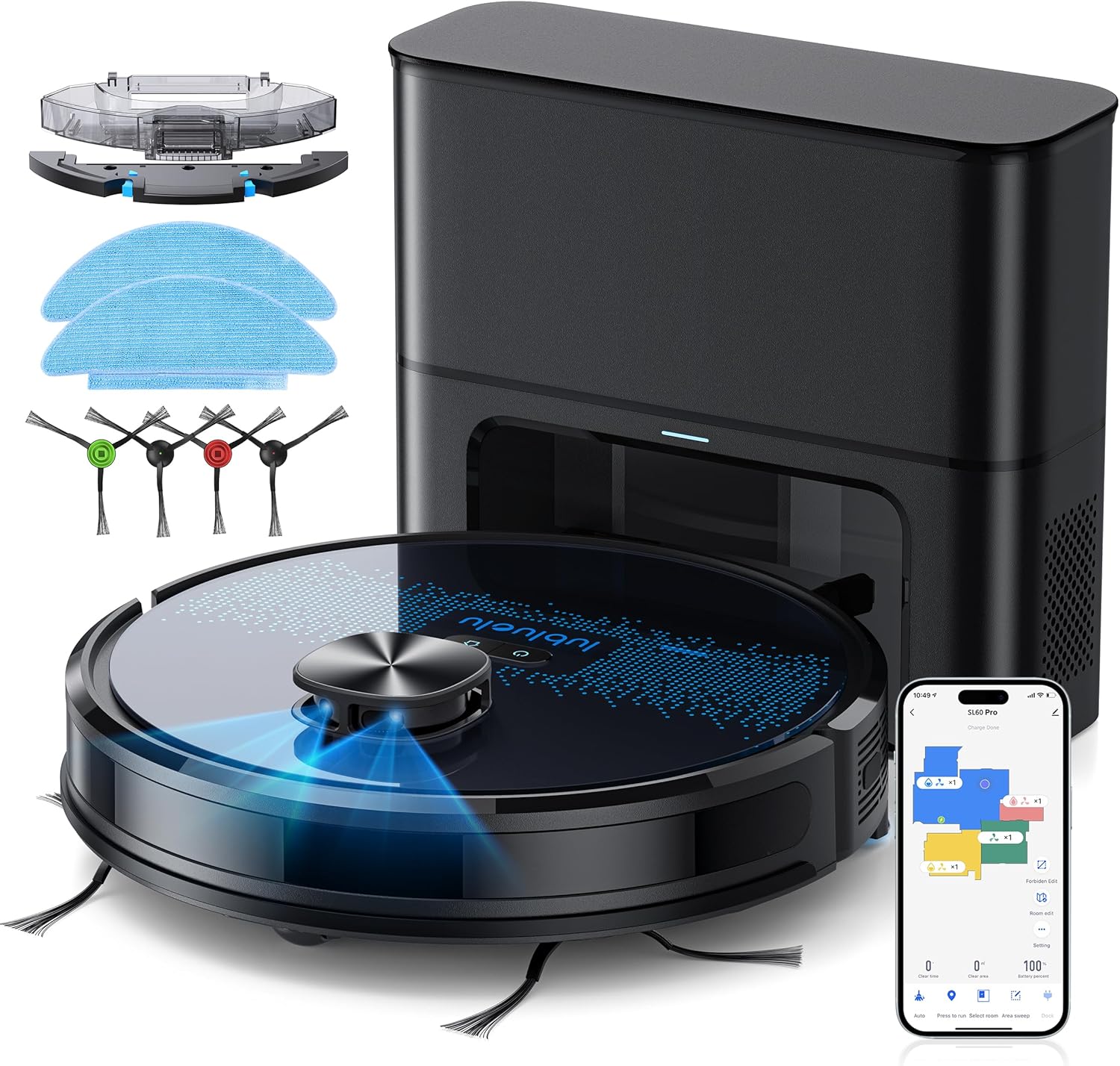
Po razpakiranju preverite, ali so vse komponente prisotne in v dobrem stanju. Če kateri koli del manjka ali je poškodovan, se obrnite na podporo strankam.
- Lubluelu SL60D Robot Vacuum Cleaner
- D3 Self-Emptying Station
- Extra Dust Bag (2.5L capacity)
- Krpa za brisanje (2 kosi)
- Orodje za čiščenje
- Stranske krtače (2 para)
- Dodatni HEPA filter
- Uporabniški priročnik
4. Izdelek je končanview
The Lubluelu SL60 Pro is an advanced robot vacuum and mop designed for efficient home cleaning. It features LIDAR navigation, 4000Pa suction power, a 2.5L self-emptying dust station, and smart app control.
4.1 Ključne lastnosti
- Navigacija z LIDAR-jem: Equipped with 8-meter laser range and SLAM algorithm for accurate mapping and efficient route planning.
- Samopraznilna postaja: Automatically empties the robot's dustbin into a 2.5L disposable bag, requiring manual emptying only every 60 days.
- Sesalna moč 4000 Pa: Powerful brushless motor with three adjustable suction levels for effective cleaning on various surfaces, including carpets.
- Čiščenje 3 v 1: Sweeps, vacuums, and mops simultaneously with electronic water control and Y-shaped mopping patterns.
- Večetažno kartiranje: Stores up to 5 maps for multi-level homes, allowing for customized cleaning plans.
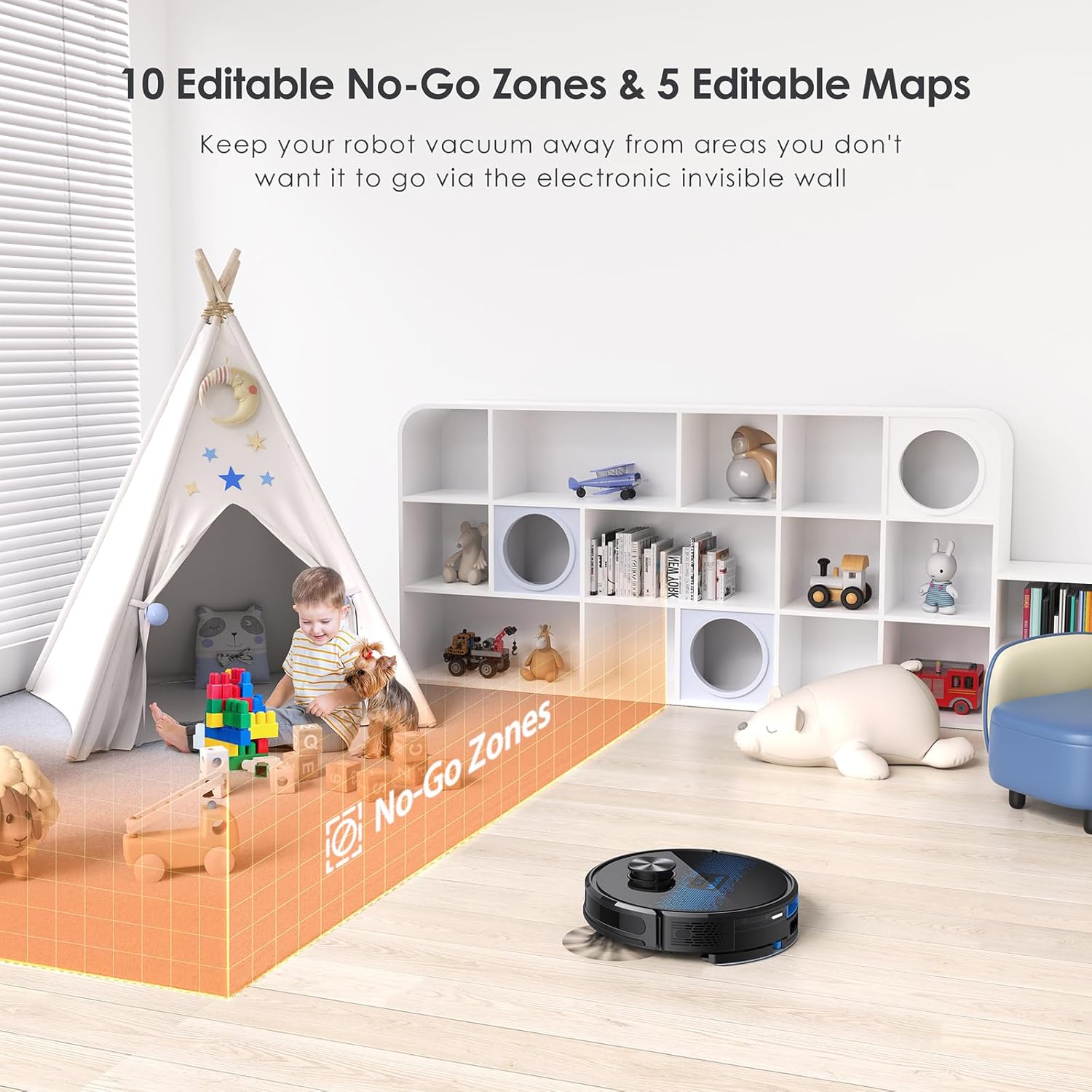
- Prilagodljivo čiščenje: Set no-go zones, virtual walls, spot cleaning, edge cleaning, and scheduled cleaning via the app.
- Samodejno polnjenje: Returns to the charging base when battery is low (below 15%) and resumes cleaning from where it left off once charged to 80%.
- Nizka raven hrupa: Deluje pri približno 55 dB.

5. Nastavitev
5.1 Polnjenje robota
Before first use, fully charge the robot. Place the self-emptying station against a wall with at least 0.5 meters of clear space on either side and 1.5 meters in front. Ensure the power cable is securely connected.

5.2 Namestitev stranskih krtač
Attach the side brushes by pressing them onto the square posts at the bottom of the robot until they click into place.
5.3 Installing the Dust Bin/Water Tank
The robot comes with a combined dust bin and water tank. Fill the water tank with clean water (do not use cleaning solutions that may clog the system). Attach the mop pad to the bottom of the tank. Insert the assembly into the robot until it locks.
5.4 Povezovanje z omrežjem Wi-Fi in aplikacijo
To unlock all smart features, connect your robot to the Lubluelu app (Smartlife app). Ensure your Wi-Fi network is 2.4GHz.
- Download the 'Smartlife' app from your mobile app store.
- Registrirajte se ali se prijavite v svoj račun.
- Press and hold the power button on the robot for 3-5 seconds until the Wi-Fi indicator light blinks rapidly.
- In the app, tap 'Add Device' and select 'Robot Vacuum (Wi-Fi)' under 'Small Home Appliances'.
- Follow the in-app instructions to connect the robot to your 2.4GHz Wi-Fi network.
6. Delovanje
6.1 Zagon/začasna ustavitev čiščenja
- Začetek: Press the power button on the robot or tap 'Start' in the app.
- Premor: Press the power button again or tap 'Pause' in the app.
- Vrnitev v bazo: Press the home button on the robot or tap 'Recharge' in the app.
6.2 Načini čiščenja
The robot offers various cleaning modes accessible via the Smartlife app:
- Samodejno čiščenje: The robot intelligently maps and cleans your home using its LIDAR navigation.
- Čiščenje na mestu: Usmerja robota k intenzivnemu čiščenju določenega majhnega območja.
- Čiščenje območja: Na zemljevidu določite specifična območja, ki jih bo robot čistil.
- Čiščenje robov: Robot čisti ob stenah in robovih pohištva.
- Čiščenje po urniku: Nastavite določene čase, ko bo robot samodejno čistil.

6.3 Uporaba funkcije brisanja
Ensure the water tank is filled and the mop pad is attached. The app allows you to adjust water flow levels for different floor types.
6.4 Managing Maps and No-Go Zones
The SL60 Pro can store up to 5 different maps, useful for multi-level homes. You can also define up to 10 no-go zones or virtual walls to restrict the robot from certain areas.
6.5 Glasovni nadzor
The robot is compatible with Amazon Alexa and Google Assistant. Follow the instructions in the Smartlife app to link your device for voice commands.
7. Vzdrževanje
Redno vzdrževanje zagotavlja optimalno delovanje in podaljšuje življenjsko dobo vašega robotskega sesalnika.
7.1 Praznjenje posode za prah
The self-emptying station automatically handles dust collection. The 2.5L dust bag in the station should be replaced approximately every 60 days, depending on usage.

7.2 Čiščenje glavne krtače
Periodically remove the main brush and clean it using the provided cleaning tool to remove tangled hair and debris.
7.3 Čiščenje stranskih krtač
Preverite stranske krtače glede obrabe. Odstranite morebitne zapletene lase ali umazanijo. Zamenjajte jih, če so poškodovane.
7.4 Čiščenje filtra
Tap the filter to remove loose dirt. Rinse the filter with water if necessary, ensuring it is completely dry before reinstallation.
7.5 Čiščenje rezervoarja za vodo in krpe za brisanje
After each mopping session, empty any remaining water from the tank and clean the mop pad. The mop pad can be hand-washed or machine-washed.
7.6 Čiščenje senzorjev in polnilnih kontaktov
Wipe all sensors and charging contacts on both the robot and the charging station with a clean, dry cloth to ensure proper function.
8. Odpravljanje težav
If you encounter issues with your Lubluelu SL60 Pro, refer to the following common problems and solutions:
| Težava | Možen vzrok | rešitev |
|---|---|---|
| Robot se ne vklopi. | Prazna baterija ali izklopljeno napajanje. | Ensure the power switch is on and charge the robot. |
| Robot se ne more povezati z Wi-Fi. | Incorrect Wi-Fi band (not 2.4GHz), wrong password, or router too far. | Ensure 2.4GHz Wi-Fi, verify password, move robot closer to router, or reset Wi-Fi on robot. |
| Robot se pogosto zatika. | Obstacles, tangled cables, or uneven surfaces. | Clear the cleaning area of obstacles, cables, and small items. Use no-go zones for problematic areas. |
| Slaba učinkovitost čiščenja. | Full dustbin, dirty brushes/filter, or low suction setting. | Empty dustbin, clean brushes and filter, increase suction power via the app. |
| Funkcija brisanja ne deluje. | Empty water tank, dry mop pad, or clogged water nozzle. | Fill water tank, moisten mop pad, clean water nozzle. |
For further assistance, please contact Lubluelu customer support.
9. Specifikacije
| Funkcija | Podrobnost |
|---|---|
| Znamka | Lubluelu |
| Ime modela | SL60 Pro |
| barva | Modra Črna |
| Dimenzije izdelka (robot) | 32 x 32 x 10 cm |
| Teža predmeta | 4.4 kilogramov |
| Sesalna moč | Do 4000 Pa |
| Prostornina vrečke za prah (postaja) | 2.5 litra |
| Kapaciteta rezervoarja za vodo | 250 mililitrov |
| voltage | 14.4 volta |
| Nivo hrupa | 55 decibelov |
| Runtime | Do 2 ur 30 minut |
| Vrsta navigacije | LIDAR |
| Združljive naprave | Smartphone (Wi-Fi 2.4GHz), Amazon Alexa, Google Assistant |
| Posebne lastnosti | LIDAR Navigation, Smart Mapping, Obstacle Avoidance, Edge Cleaning, Wet/Dry Mopping, App Control, No-Go Zones, Continuous Breakpoint Cleaning, Multi-Stage Mapping |
10. Garancija in podpora
Lubluelu is committed to customer satisfaction. For any issues with your robot vacuum, please contact our customer service team. We provide lifetime technical support.
- Garancija: Za podrobnosti o garanciji glejte dokumentacijo o nakupu.
- Obrnite se na podporo: For technical assistance or service inquiries, please email us or visit our official webmesto.