
1. Uvod
This manual provides detailed instructions for the proper use, setup, and maintenance of your Caliber Scientific Calculator, Model 297208. Designed for students, engineers, and professionals, this calculator offers 240 functions for a wide range of mathematical and scientific calculations.
Please read this manual thoroughly before using the calculator to ensure optimal performance and longevity.
2. Varnostne informacije
- Keep the calculator away from extreme temperatures, direct sunlight, and high humidity.
- Kalkulatorja ne izpostavljajte močnim udarcem ali padcem.
- Do not attempt to disassemble or modify the calculator. This will void the warranty.
- Use only the specified battery type. Incorrect battery usage may cause leakage or explosion.
- Opozorilo o bateriji: Baterije hranite izven dosega otrok in hišnih ljubljenčkov. Baterije so lahko škodljive, če jih zaužijete. Če otrok ali žival pogoltne baterijo, takoj poiščite zdravniško pomoč.
3. Vsebina paketa
Upon opening your Caliber Scientific Calculator package, please verify that all items are present and in good condition:
- Caliber Scientific Calculator (Model 297208)
- Protective Hard Sliding Cover
- One AG10 Button Cell Battery (pre-installed or included separately)
- Uporabniški priročnik (ta dokument)

Image 1: Caliber Scientific Calculator in retail packaging, showing key features.
4. Nastavitev
4.1. Vir napajanja
The Caliber Scientific Calculator operates on dual power sources: solar power and battery power. The solar panel provides power in well-lit environments, while the battery ensures operation in low-light conditions.
4.2. Namestitev/zamenjava baterije
Your calculator includes one AG10 button cell battery. If battery replacement is needed:
- Prepričajte se, da je kalkulator izklopljen.
- Poiščite predal za baterije na zadnji strani kalkulatorja.
- Z majhnim izvijačem previdno odprite pokrov predalčka za baterije.
- Remove the old battery and insert a new AG10 button cell battery, ensuring the correct polarity (+/-).
- Ponovno namestite pokrov prostora za baterije in ga pritrdite z vijakom.
Note: Some models may require a AAA battery. Refer to the specific markings on your calculator's battery compartment if different from AG10.
5. Ključne funkcijeview
The calculator features a 10-digit LCD display and 240 functions. Familiarize yourself with the key layout:
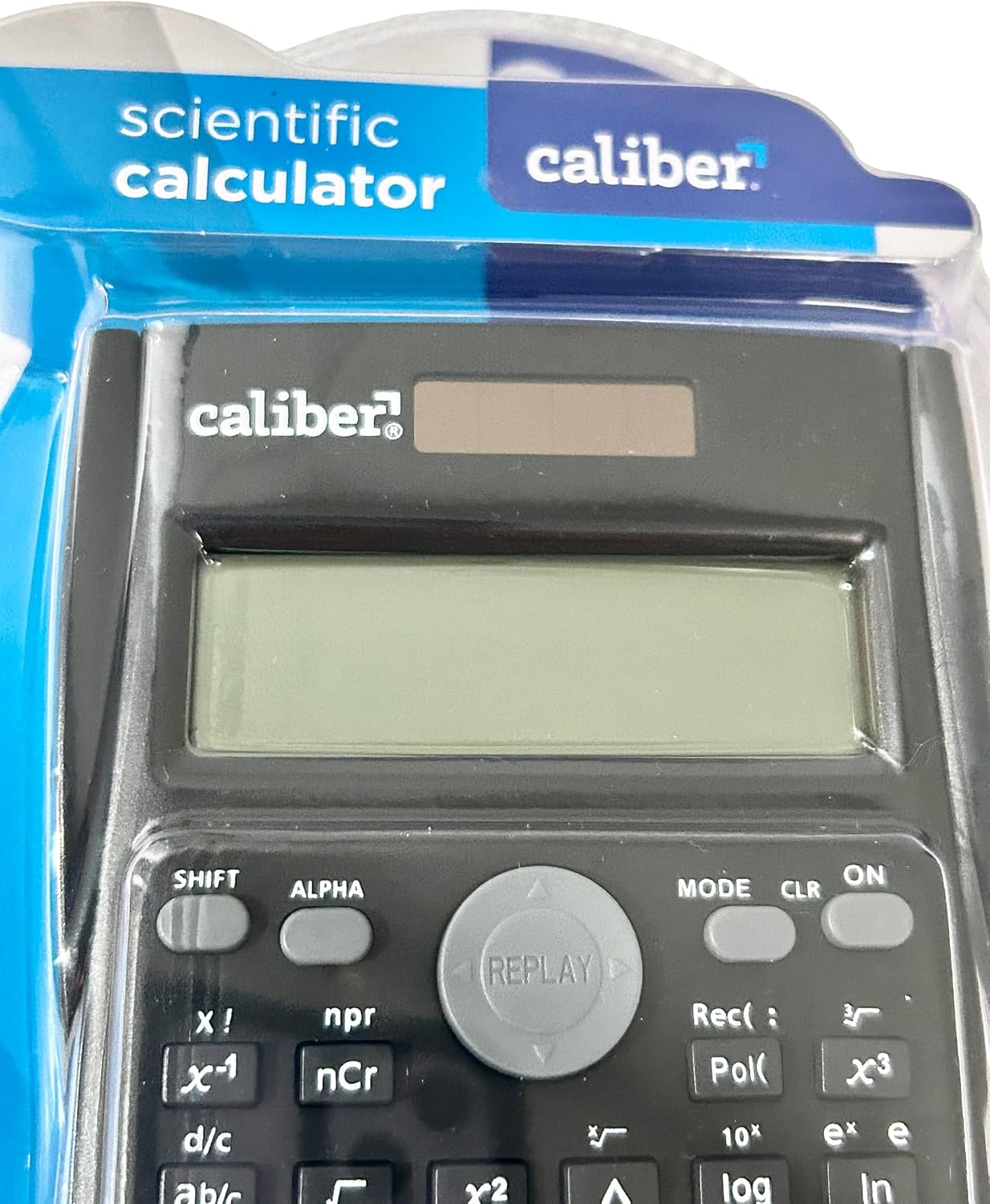
Image 2: Close-up of the calculator's display and key layout.
- Zaslon: 10-digit LCD for clear viewvnosa in rezultatov.
- VKLOP/IZKLOP: Power on/off the calculator.
- SHIFT: Accesses secondary functions printed above the keys (typically in yellow or orange).
- ALFA: Accesses alpha characters and variables (typically in red or green).
- NAVODILA: Changes calculation modes (e.g., COMP, STAT, EQN).
- CLR: Clears memory or settings.
- OD: Deletes the last entered digit.
- AC: Clears all entries and resets the calculation.
- Smerne tipke: Navigate through entries and results.
- = (Enako): Executes the calculation.
6. Navodila za uporabo
6.1 Osnovni izračuni
Za izvajanje osnovnih aritmetičnih operacij:
- Pritisnite ON key to turn on the calculator.
- Vnesite prvo številko.
- Pritisnite želeno tipko za upravljanje (+, -, ×, ÷).
- Vnesite drugo številko.
- Pritisnite = tipko za prikaz rezultata.
6.2. Napredne funkcije
The calculator supports 240 functions, including trigonometric, logarithmic, statistical, and more. To access secondary functions (printed above keys), press the SHIFT tipko pred želeno funkcijsko tipko.
- Trigonometrične funkcije: greh, cos, porjavelost in njihove inverzne funkcije (SHIFT + greh⁻¹itd.).
- Logaritemske funkcije: dnevnik (base 10), ln (naravni logaritem).
- Funkcije za potenciranje in korenjenje: x², √, xʸ.
- Pomnilniške funkcije: Uporaba STO (Trgovina) in RCL (Recall) to save and retrieve values.
- Statistični izračuni: Vnesite NAČIN and select STAT mode for statistical computations.
For detailed instructions on specific functions, refer to the comprehensive instructions enclosed with your product (if applicable) or consult online resources for scientific calculator usage.
7. Vzdrževanje
7.1. Čiščenje
To clean your calculator:
- Obrišite zunanjost z mehko, suho krpo.
- Za trdovratno umazanijo rahlo dampKrpo sperite z vodo in blagim milom, nato pa jo takoj obrišite do suhega.
- Ne uporabljajte abrazivnih čistil, topil ali alkohola, saj lahko poškodujejo casing ali zaslon.
7.2. Shranjevanje
When not in use, store the calculator in a cool, dry place, away from direct sunlight and extreme temperatures. Always use the protective hard sliding cover to prevent damage to the keys and display.

Image 3: Packaging detail showing features including the hard sliding cover and dual power.
8. Odpravljanje težav
| Težava | Možen vzrok | rešitev |
|---|---|---|
| Kalkulator se ne vklopi. | Insufficient light for solar power, or dead battery. | Move to a brighter area or replace the AG10 button cell battery. |
| Display shows "ERROR". | Mathematical error (e.g., division by zero, invalid input). | Pritisnite AC to clear the error and re-enter the calculation correctly. |
| Napačni rezultati izračuna. | Incorrect mode selected, or input error. | Check the current mode (NAČIN key) and ensure correct data entry. Clear all memory (SHIFT + CLR) če je potrebno. |
9. Specifikacije
| Številka modela | 297208 |
| Znamka | Kaliber |
| Vrsta zaslona | 10-mestni LCD |
| Število funkcij | 240 |
| Vrsta kalkulatorja | Inženiring/Znanstvo |
| Vir napajanja | Dual Power (Solar & Battery) |
| Vrsta baterije | 1 x AG10 Button Cell (included) or 1 x AAA (may vary by model) |
| Velikost zaslona | 3 palcev |
| Dimenzije (D x Š) | 6 cm x 3 cm |
| Material ohišja | Plastika |
| UPC | 050428205495 |
10. Garancija in podpora
10.1. Informacije o garanciji
This product is subject to a return policy. For details regarding returns, exchanges, or warranty claims, please refer to the retailer's return policy where the product was purchased.
10.2. Podpora strankam
For further assistance, technical support, or inquiries not covered in this manual, please contact Caliber customer service through their official webspletno mesto ali prodajalec, pri katerem ste izdelek kupili.