
Primevolve TM-520
Navodila za uporabo ventilatorja Primevolve na baterije
Model: TM-520 | Brand: Primevolve
Konec izdelkaview
The Primevolve Battery Operated Fan is a versatile and portable cooling solution designed for various environments, including bedrooms, camping trips, and travel. Its unique foldable and telescopic design allows it to function as a desk fan, floor fan, or pedestal fan, adapting to your needs. Equipped with a large-capacity rechargeable battery and multiple speed settings, it provides efficient and quiet airflow wherever you go.

Image: The Primevolve fan showcasing its ability to be used as a tall pedestal fan or folded into a compact desk fan, highlighting its versatility.
Vsebina paketa
- Primevolve Battery Operated Fan (Model TM-520)
- Polnilni kabel USB-C
- Daljinski upravljalnik
- Uporabniški priročnik

Image: The fan's USB-C charging port and various compatible power sources, including a power adapter, power bank, and laptop, demonstrating its flexible charging options.
Postavitev in montaža
Unfolding and Adjusting Height
- Podstavek ventilatorja postavite na stabilno, ravno površino.
- Gently pull the fan head upwards from the base to extend the telescopic pole.
- Adjust the pole to your desired height, ranging from 3.54 inches (90 mm) to 39.37 inches (1000 mm). Ensure the pole is securely locked in place at the chosen height.
- Adjust the fan head's tilt angle up to 180 degrees to direct airflow as needed.
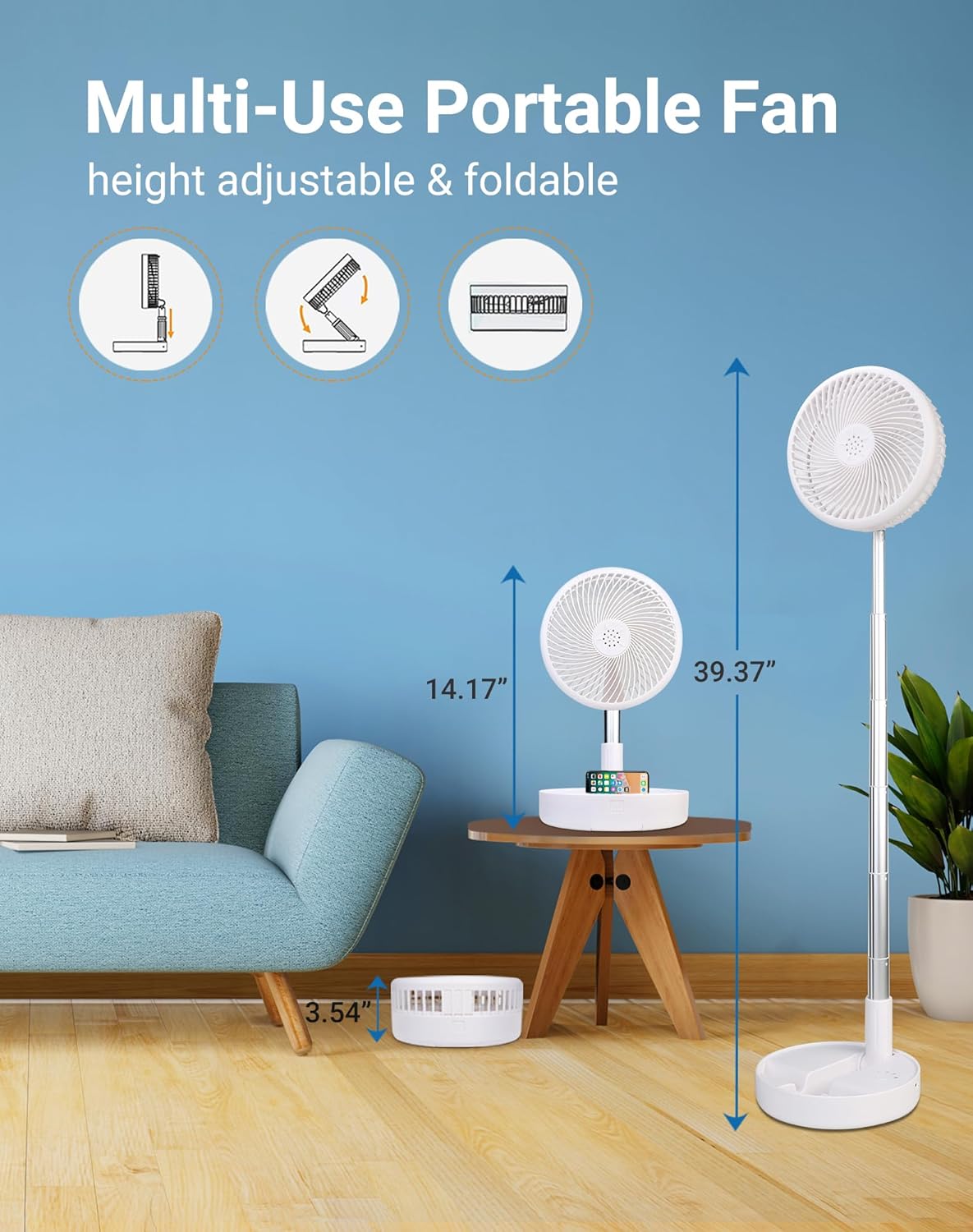
Image: The fan demonstrating its adjustable height capabilities, transitioning from a compact desk fan to a full-height pedestal fan, with measurements for each configuration.
Polnjenje ventilatorja
Before first use, fully charge the fan. The fan is powered by USB (5V/2A) and compatible with various USB-enabled power sources.
- Connect the USB-C charging cable to the fan's charging port.
- Connect the other end of the cable to a compatible USB power source (e.g., PC/laptop, power bank, AC adapter, car charger).
- A full charge takes approximately 5 hours. The battery indicator lights on the base will show charging status.
A fully charged 7200mAh battery provides 6-21 hours of operation, depending on the speed setting.
Navodila za uporabo
Vklop/izklop in nastavitve hitrosti
The fan features 4 speed settings, providing a range of airflow from a gentle breeze to a strong wind (2.3m/s-4m/s).
- Gumb za vklop: Press the power button on the base or the remote control to turn the fan on or off.
- Prilagoditev hitrosti: Press the speed adjustment button on the base or the remote control to cycle through the 4 speed settings.

Image: The fan in an outdoor setting, demonstrating its four speed levels (Low, Mid, High, Natural) and their respective battery life durations, emphasizing its long-lasting performance.
Head Rotation and Stability
- The fan head can be manually tilted up to 180 degrees to direct airflow.
- The base is equipped with anti-slip silicone pads for enhanced stability on various surfaces.
- Ensure the fan is placed on a stable surface to prevent tipping, especially when fully extended.

Image: Close-up of the fan's base highlighting its anti-slip silicone pads and the 180-degree adjustable head, along with a visual cue for locking the fan's position.
Vzdrževanje
Čiščenje ventilatorja
To maintain optimal performance and hygiene, regular cleaning of the fan blades and grille is recommended.
- Pred čiščenjem se prepričajte, da je ventilator izklopljen in izključen.
- To detach the front fan hood, turn it counterclockwise.
- Carefully remove the front hood and clean the fan blades and inside of the hood with a soft, damp cloth. Do not use abrasive cleaners or immerse the fan in water.
- Once clean and dry, reattach the front hood by aligning it and turning clockwise until secure.

Image: A visual guide demonstrating how to detach the fan's front hood by turning it counterclockwise, allowing for easy cleaning of the blades and grille.
Odpravljanje težav
- Ventilator se ne vklopi: Ensure the fan is charged. Connect it to a power source using the USB-C cable.
- Šibek pretok zraka: Check the speed setting and increase it if necessary. Ensure the fan blades and grille are clean and free of dust.
- Nenavaden hrup: Turn off the fan and check for any obstructions in the fan blades. Ensure the fan head is securely attached.
- Daljinski upravljalnik ne deluje: Check the battery in the remote control. Ensure there are no obstructions between the remote and the fan's sensor.
Specifikacije
| Funkcija | Podrobnost |
|---|---|
| Znamka | Primevolve |
| Številka modela | TM-520 |
| barva | Bela |
| Vir napajanja | Napajanje z baterijo (7200 mAh) |
| voltage | 5 voltov (DC) |
| Čas polnjenja | Pribl. 5 ur |
| Delovni čas | 6–21 ur (odvisno od hitrosti) |
| Nastavljiva višina | 3.54" to 39.37" (90-1000 mm) |
| Zložene dimenzije | 7.72 cm x 7.72 cm x 3.54 cm |
| Head Tilt Angle | 180 stopinj |
| Nastavitve hitrosti | 4 stopenj |
| Nivo hrupa | 30-40 dB |
| Nadzorna metoda | Daljinski upravljalnik, na dotik |
| Material rezila | Aluminijeva zlitina & ABS plastika |
| Teža predmeta | 2.59 funtov |
| Notranja/zunanja uporaba | Notranji, zunanji |

Image: The fan in a home setting, illustrating its quiet operation (30-40 dB) and multiple wind modes, suitable for various activities like applying makeup.
Garancija in podpora
For warranty information, technical support, or any product-related inquiries, please refer to the contact details provided on the product packaging or visit the official Primevolve webmesto.
Račun shranite kot dokazilo o nakupu za uveljavljanje garancije.
Ask a question about this manual
Ask about setup, troubleshooting, compatibility, parts, safety, or missing instructions. Manuals+ will review the question and use this page’s manual context to help answer it.