
1. Uvod
Hvala za nakupasing the MLWSHR Digital LED Alarm Clock Model 8808. This device combines a digital alarm clock with a thermo-hygrometer, offering dual alarms, snooze function, date and year display, 12/24 hour switch, weekday settings, Daylight Saving Time (DST) functionality, auto-dimmable display with three brightness levels, and a convenient 5V1A USB output for charging other devices. Please read this manual carefully to ensure proper use and maintenance of your new alarm clock.
2. Varnostne informacije
- Napravo hranite stran od vode in okolij z visoko vlažnostjo.
- Naprave ne izpostavljajte ekstremnim temperaturam ali neposredni sončni svetlobi dlje časa.
- Use only the provided USB Type-C cable for power.
- Naprave ne poskušajte razstavljati ali popravljati sami. V primeru težav se obrnite na podporo strankam.
- Ensure proper ventilation when using the USB output to charge other devices.
3. Vsebina paketa
- MLWSHR Digital LED Alarm Clock Model 8808
- Napajalni kabel USB Type-C
- Uporabniški priročnik
4. Izdelek je končanview
Familiarize yourself with the main components and controls of your alarm clock.
This image displays the front of the MLWSHR Digital LED Alarm Clock, highlighting the time display, weekday indicators, temperature in Celsius, humidity percentage, and dual alarm icons. It also points to the Daylight Saving Time (DST) indicator.

This image illustrates the side and back of the alarm clock, detailing the USB Type-C input for primary power, the battery compartment for 3x AAA backup batteries (not included), and the USB-A output (5V1A) for charging other devices. It also shows the control buttons located on the top edge.
Kontrole:
- Gumb SET: Vstopi v način nastavljanja časa, datuma in alarmov.
- UP (+) Button: Increases values during setting, adjusts brightness.
- DOWN (-) Button: Decreases values during setting, adjusts brightness.
- Gumb DREMEST/LUČKA: Activates snooze, adjusts display brightness.
- Gumb ALARM 1: Activates/deactivates Alarm 1, enters Alarm 1 setting.
- Gumb ALARM 2: Activates/deactivates Alarm 2, enters Alarm 2 setting.
- 12/24HR Button: Preklaplja med 12-urnim in 24-urnim formatom časa.
- Gumb °C/°F: Switches between Celsius and Fahrenheit temperature display.
5. Nastavitev
5.1 Napajalnik
The MLWSHR Digital LED Alarm Clock can be powered in two ways:
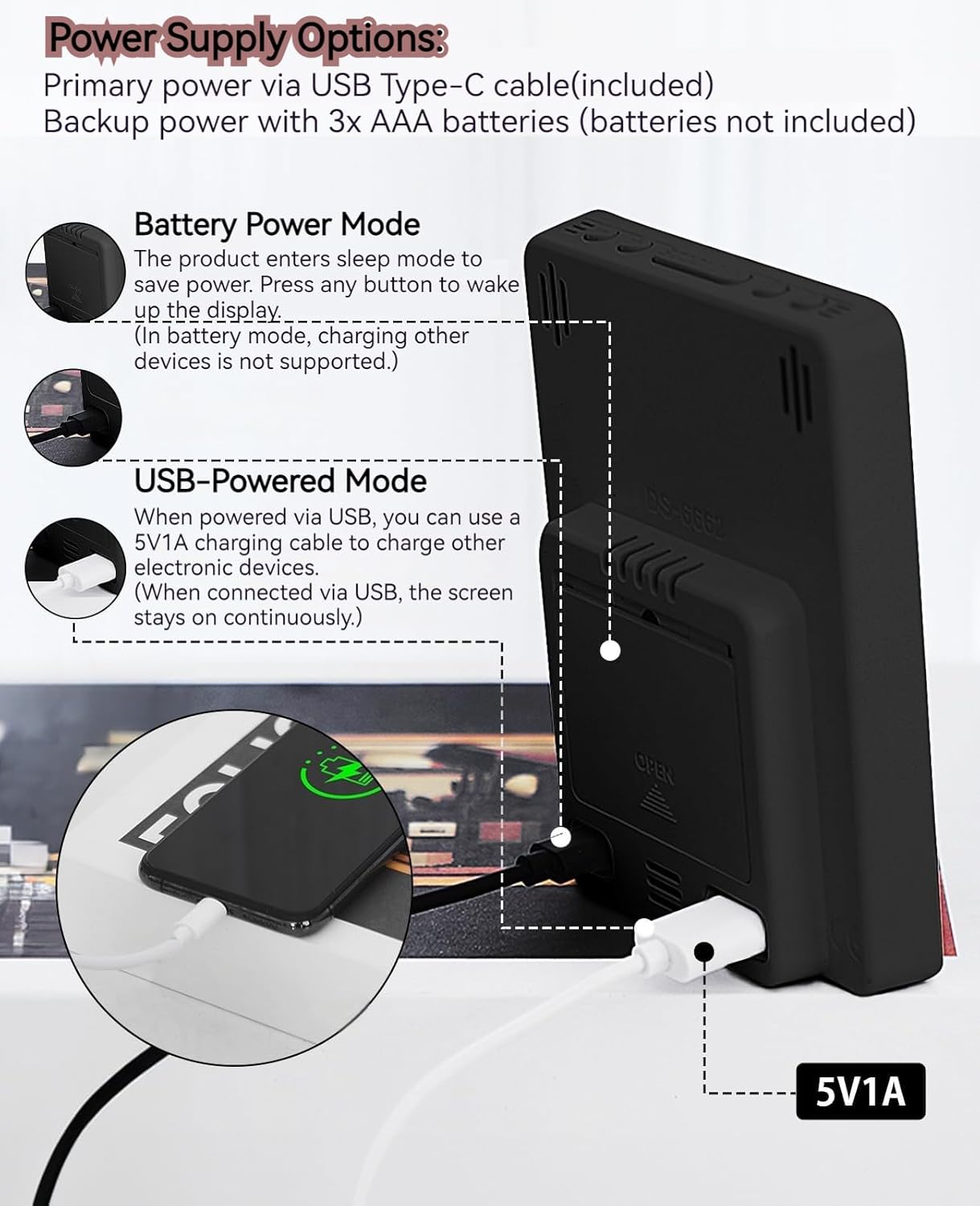
- Primary Power (USB Type-C): Connect the provided USB Type-C cable to the clock's input port and plug the other end into a 5V1A USB power adapter (not included). When powered via USB, the display will remain continuously on.
- Backup Power (3x AAA Batteries): Insert 3 AAA batteries (not included) into the battery compartment on the back of the clock. In battery-only mode, the display will enter sleep mode to conserve power. Press any button to temporarily activate the display. Note that the USB output for charging other devices is not supported when operating on battery power alone.
5.2 Začetna nastavitev časa in datuma
After connecting power, the clock will typically display a default time. To set the correct time and date:
- Pritisnite in držite NASTAVI 3 sekunde držite gumb , da vstopite v način nastavitve časa. Številke za ure bodo utripale.
- Uporabite GOR (+) or DOL (-) gumbi za nastavitev ure.
- Pritisnite NASTAVI ponovno pritisnite, da potrdite uro in se premaknete na nastavitev minut. Številke minut bodo utripale.
- Uporabite GOR (+) or DOL (-) gumbe za nastavitev minut.
- Nadaljujte s pritiskom NASTAVI to cycle through and set the Year, Month, and Day using the GOR (+) or DOL (-) gumbi za nastavitev.
- After setting the Day, press NASTAVI še zadnjič za izhod iz načina nastavitev.
6. Navodila za uporabo
6.1 Preklop 12/24-urnega formata
Pritisnite 12/24H za preklapljanje med 12-urnim (z indikatorjem AM/PM) in 24-urnim formatom časa.
This video demonstrates various features of the MLWSHR Digital LED Alarm Clock, including the time, temperature, humidity, weekday display, auto/manual brightness adjustment, 12/24 hour switch, and the easy-to-use buttons and USB-C input/USB-A output.
6.2 Nastavitev alarmov (Alarm 1 in Alarm 2)
The clock features two independent alarms. Each alarm can be set for specific days of the week (Monday-Friday, Monday-Saturday, or Monday-Sunday).

This image illustrates the dual alarm functionality, showing how each alarm can be customized to ring on specific days of the week: Monday to Friday, Monday to Saturday, or every day. It highlights the alarm icons and weekday indicators on the display.
- Pritisnite ALARM 1 or ALARM 2 button to select the desired alarm. The alarm icon will appear on the display.
- Pritisnite in držite izbrano ALARM 3 sekunde držite gumb, da vstopite v način nastavitve alarma. Številke za ure bodo utripale.
- Uporabite GOR (+) or DOL (-) gumbe za nastavitev ure budilke.
- Pritisnite ALARM ponovno pritisnite gumb , da potrdite uro in se premaknete na nastavitev minut.
- Uporabite GOR (+) or DOL (-) gumbe za nastavitev minut alarma.
- Pritisnite ALARM button again to set the alarm frequency (e.g., Mon-Fri, Mon-Sat, Mon-Sun). Use GOR (+) or DOL (-) izbrati.
- Pritisnite ALARM button one last time to exit alarm setting mode.
- To turn an alarm ON or OFF, simply press the corresponding ALARM 1 or ALARM 2 button briefly. The alarm icon will appear (ON) or disappear (OFF) from the display.
6.3 Funkcija dremeža
When an alarm sounds, you can activate the snooze function for a temporary delay.

This image shows the clock's snooze button and how it functions. When the alarm rings, a brief press of the snooze button will delay the alarm for 5 minutes. Holding the button for more than two seconds will turn off the alarm for that day.
- Ko zazvoni alarm, pritisnite SNOOZE / LUČ button briefly. The alarm will pause and ring again after 5 minutes.
- To turn off the alarm for the current day, press and hold the SNOOZE / LUČ button for more than 2 seconds, or press any other button (except SNOOZE / LUČ).
6.4 Prilagoditev svetlosti
The clock features an auto-dimmable display and three manual brightness levels.
- Samodejna zatemnitev: The built-in light sensor automatically adjusts the display brightness based on ambient light conditions. This is the default setting.
- Ročna svetlost: Na kratko pritisnite SNOOZE / LUČ button to cycle through 3 manual brightness levels (L-01, L-02, L-03).
- To return to auto-dimmable mode, continue pressing the SNOOZE / LUČ button until 'L-AU' appears on the display.
6.5 Thermometer & Hygrometer
The clock displays indoor temperature and humidity levels.

This image highlights the temperature and humidity readings on the clock's display. It also provides guidance on ideal humidity levels and suggests actions (humidifier/dehumidifier) if levels are too low or too high. The temperature detection range is 23°F to 122°F (-5°C to 50°C) with an error margin of ±2°F.
- Stikalo temperaturne enote: Pritisnite ° C / ° F button to switch between Celsius and Fahrenheit temperature display.
- The temperature range is 23°F to 122°F (-5°C to 50°C) with an error margin of ±2°F.
- The humidity measurement error is within ±5%.
6.6 USB Power Output (5V1A)
The clock features a USB-A output port (5V1A) that can be used to charge other electronic devices.

This image demonstrates the use of the clock's USB-A output port to charge a smartphone. The clock provides a 5V1A output, making it a convenient charging station. This feature is only available when the clock is powered via its USB Type-C input.
- Connect your device's charging cable to the USB-A output port on the back of the alarm clock.
- Ensure the alarm clock is powered via its USB Type-C input for this feature to function. The USB output is not active when the clock is running on battery power alone.
6.7 Poletni čas (DST)
The clock supports Daylight Saving Time adjustment.
- To activate or deactivate DST, press and hold the poletni čas button (if available, or refer to the SET button sequence for DST in specific models). The DST indicator will appear or disappear.
7. Vzdrževanje
- Uro očistite z mehko, suho krpo. Ne uporabljajte abrazivnih čistil ali topil.
- If the clock will not be used for an extended period, remove the AAA batteries to prevent leakage.
- Keep the USB ports free from dust and debris.
8. Odpravljanje težav
| Težava | Možen vzrok | rešitev |
|---|---|---|
| Display is off or intermittent. | Running on battery power in sleep mode, or no power. | Press any button to activate display in battery mode. Connect USB Type-C cable for continuous display. Check USB power source. |
| USB output not charging devices. | Clock is running on battery power, or USB cable is faulty. | Ensure the clock is connected to primary USB Type-C power. Try a different USB cable. |
| Alarm se ne oglasi. | Alarm ni aktiviran ali je napačno nastavljen. | Check if the alarm icon is displayed. Re-set the alarm time and frequency. |
| Odčitavanje temperature je netočno. | Environmental factors or sensor error. | Allow time for the sensor to stabilize. Ensure the clock is not near heat sources or vents. Note the ±2°F error margin. |
| Časa/datuma ni mogoče nastaviti. | Not in setting mode, or buttons are unresponsive. | Press and hold the SET button for 3 seconds. Ensure the clock has stable power. |
9. Specifikacije
- Znamka: MLWSHR
- Številka modela: 8808
- Vrsta zaslona: LED
- vir energije: USB Type-C (5V1A) / 3x AAA Batteries (backup)
- Dimenzije izdelka: 3.54 cm Š x 4.72 cm V
- Lastnosti: Dual Alarms, Snooze, Thermo-Hygrometer, Date & Year Display, 12/24 Hour Switch, Weekdays, DST, Auto Dimmable (3 levels), USB Output (5V1A)
- Material: Eco-friendly Plastic
- Notranja/zunanja uporaba: Notranja
10. Garancija in podpora
The MLWSHR Digital LED Alarm Clock Model 8808 comes with a 2-letna garancija od datuma nakupa. Ta garancija krije proizvodne napake in okvare pri normalni uporabi.
For technical support, warranty claims, or any questions regarding your product, please contact MLWSHR customer service through the retailer's platform or visit our official website for contact information. Please have your purchase receipt and model number ready when contacting support.