
Anderic RRTR214D
Anderic RRTR214D Ceiling Fan Remote Control
Navodila za uporabo
Model: RRTR214D | Brand: Anderic
1. Uvod
The Anderic RRTR214D (TR214D) Ceiling Fan Remote Control is engineered as a direct replacement for various Harbor Breeze remote models. This manual provides essential information for setting up, operating, and maintaining your new remote control, ensuring seamless integration and optimal performance with your compatible ceiling fan.
2. Združljivost
The Anderic RRTR214D remote control is designed to seamlessly replace the following Harbor Breeze remote models:
- A25-FA0138
- KUJCE10311
- TR214B
- KUJCE10712
- TR214A
- KUJCE10610
This remote is specifically designed for these models and cannot be paired with other ceiling fan receivers not originally supplied with these models. Please verify your existing remote's model number for compatibility.

Image: The Anderic RRTR214D remote control shown alongside a list of compatible Harbor Breeze ceiling fan models, emphasizing seamless integration.
3. Ključne značilnosti
- Neposredna zamenjava: Seamlessly replaces specified Harbor Breeze remote models.
- Enostavno združevanje: Designed for easy setup with your existing receiver.
- Celovit nadzor: Offers full control over fan speeds (high, medium, low, off) and light functions (on/off and dimming).
- Baterija: Operates on a single 23A 12-volt battery (not included).
- Convenient Wall Mount: Includes a wall mount for easy storage and accessibility.
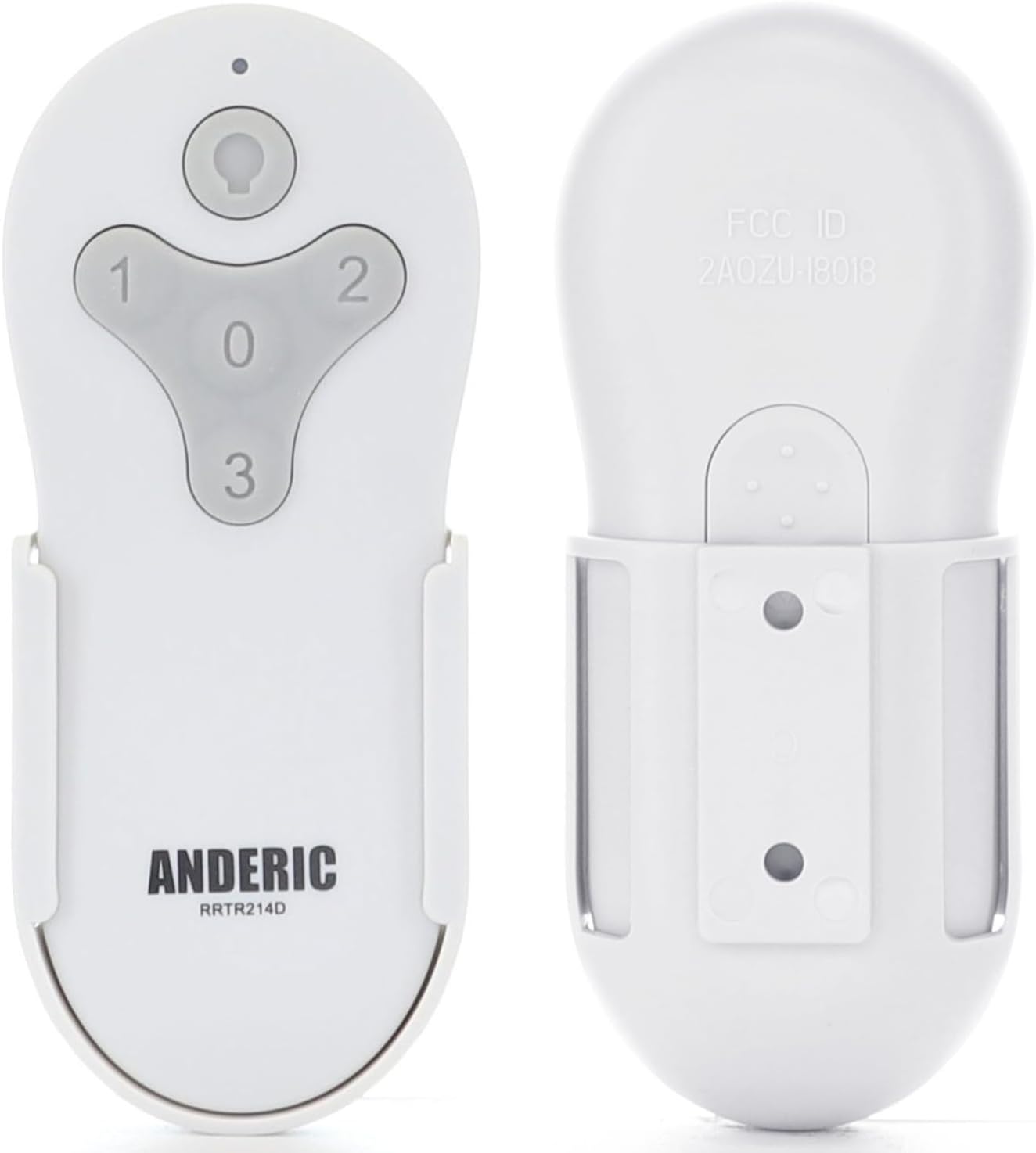
Slika: Jasna view of the Anderic RRTR214D remote control, showing both its front with control buttons and its back, along with the included wall mount for convenient storage.
4. Navodila za nastavitev
4.1. Namestitev baterije
The Anderic RRTR214D remote requires one 23A 12-volt battery (not included).
- Poiščite predal za baterije na zadnji strani daljinskega upravljalnika.
- Odprite pokrov baterije.
- Insert one 23A 12-volt battery, ensuring the correct polarity (+ and -) as indicated inside the compartment.
- Varno zaprite pokrov baterije.
4.2. Effortless Pairing
Follow these simple steps to pair your Anderic RRTR214D remote with your ceiling fan receiver:
- Cycle Power to the Fan: Turn off the power to your ceiling fan at the wall switch or circuit breaker, then turn it back on. This resets the receiver for pairing.
- Install Battery in the Remote: Ensure the 23A 12-volt battery is correctly installed in the remote control.
- Press and Hold the "0" Key: Within 30 seconds of restoring power to the fan, press and hold the "0" (fan off) button on the remote control for approximately five seconds. The fan light should blink or the fan should respond, indicating successful pairing.
If pairing is unsuccessful, repeat the steps. Ensure you are within close proximity to the fan during the pairing process.

Image: A visual guide illustrating how to install the 23A 12-volt battery into the remote and the three-step process for effortless pairing with a ceiling fan.
4.3. Namestitev stenskega nosilca
The included wall mount allows for convenient storage and quick access to your remote.
- Izberite primerno mesto na steni, stran od neposredne sončne svetlobe ali virov toplote.
- Use screws (not included) to secure the wall mount to the desired surface.
- Slide the remote control into the wall mount for secure storage.

Image: The Anderic RRTR214D remote's wall mount is highlighted, demonstrating how it can be installed on a wall for easy access and to prevent misplacement.
5. Navodila za uporabo
The Anderic RRTR214D remote provides comprehensive control over your ceiling fan's functions:
- Svetlobni gumb: Press to turn the light ON or OFF. Hold to dim or brighten the light (if your fan supports dimming).
- Gumbi za hitrost ventilatorja:
- 1: Fan speed LOW
- 2: Fan speed MEDIUM
- 3: Fan speed HIGH
- 0 (Fan Off) Button: Press to turn the fan OFF.

Image: A visual representation of the Anderic RRTR214D remote's buttons, detailing their functions for adjusting fan speeds (low, medium, high, off) and controlling light (on/off/dimming).
6. Vzdrževanje
Za zagotovitev dolge življenjske dobe in optimalnega delovanja daljinskega upravljalnika upoštevajte ta navodila za vzdrževanje:
- Zamenjava baterije: Replace the 23A 12-volt battery when the remote's range decreases or it becomes unresponsive. Always use a fresh battery of the specified type.
- Čiščenje: Wipe the remote with a soft, dry cloth. Do not use abrasive cleaners or immerse the remote in water.
- Shranjevanje: Store the remote in a cool, dry place when not in use for extended periods. Remove the battery if storing for several months to prevent leakage.
7. Odpravljanje težav
If you encounter issues with your Anderic RRTR214D remote control, refer to the following common problems and solutions:
- Daljinski upravljalnik se ne odziva:
- Check the battery. Ensure it is correctly installed and has sufficient charge. Replace if necessary.
- Ensure you are within the operating range of the ceiling fan receiver.
- Težave pri seznanjanju:
- Confirm that your ceiling fan receiver is one of the compatible models listed in Section 2.
- Repeat the pairing steps carefully (Section 4.2), ensuring you cycle power to the fan and press the "0" button within the specified timeframe.
- Ensure no other remote controls are interfering with the pairing process.
- Fan or Light Functions Not Working:
- Verify that the remote is successfully paired.
- Check the fan's pull chains (if applicable) to ensure the fan speed or light is set to the 'on' position for remote operation.
If problems persist after attempting these solutions, please contact Anderic customer support for further assistance.
8. Specifikacije
| Funkcija | Podrobnost |
|---|---|
| Številka modela | RRTR214D |
| Dimenzije izdelka | 1.7 x 3.9 x 0.9 palcev |
| Teža predmeta | 1.12 unč |
| Vrsta baterije | 1 x 23A 12-volt (not included) |
| barva | Bela |
| Posebna funkcija | Vnaprej programirano |
| Največje število podprtih naprav | 1 |
| Združljive naprave | ventilator |

Image: The Anderic RRTR214D remote control is displayed with its compact dimensions (5.5 inches length, 2 inches width, 0.9 inches thickness), highlighting its comfortable and easy-to-use design.
9. Garancija in podpora
For warranty information or technical support regarding your Anderic RRTR214D remote control, please refer to the product packaging or visit the official Anderic website. You may also contact Anderic customer service directly for assistance with troubleshooting, replacement parts, or any other inquiries.
Proizvajalec: Dan's Electronics Etc., Inc.
Ask a question about this manual
Ask about setup, troubleshooting, compatibility, parts, safety, or missing instructions. Manuals+ will review the question and use this page’s manual context to help answer it.