
1. Uvod
This manual provides detailed instructions for the safe and proper installation, operation, and maintenance of your MOUNTUP MU0057-L Full Motion TV Wall Mount. Please read all instructions carefully before installation to ensure correct setup and to prevent damage or injury. Keep this manual for future reference.
The MOUNTUP MU0057-L is designed to securely mount most 42-75 inch flat or curved screen televisions weighing up to 99 lbs (45 kg). It features a 30-inch extension arm, +/-90° swivel, +5°/-10° tilt, and +/-3° leveling for optimal viewfleksibilnost.
2. Varnostne informacije
WARNING: Failure to read and follow these instructions may result in serious personal injury, property damage, or voiding of warranty.
- Zmogljivost teže: Ne prekoračite največje dovoljene nosilnosti 45 kg (99 lbs). Ta nosilec je namenjen uporabi samo z navedenimi največjimi težami. Uporaba z izdelki, težjimi od navedenih največjih tež, lahko povzroči nestabilnost in morebitne poškodbe.
- Velikost televizorja: This mount is compatible with TVs from 42 to 75 inches.
- Združljivost z VESA: Ensure your TV's VESA pattern (mounting hole spacing) is within the range of 150x100mm to 600x400mm.
- Vrsta stene: This mount is designed for installation on solid concrete/brick walls or single wood studs. NE nameščajte samo v suhomontažne plošče.
- Profesionalna namestitev: If you have any doubts about your ability to safely install this mount, consult a qualified professional.
- Preverjanje komponent: Before installation, verify that all components are present and undamaged. Do not use damaged or defective parts.
- Orodja: Za namestitev uporabite ustrezna orodja.
3. Vsebina paketa
Please check the package to ensure all parts are included and undamaged. If any parts are missing or damaged, contact MOUNTUP customer service.
- Sestavljanje stenske plošče
- TV nosilci (2)
- Komplet montažne strojne opreme (različni vijaki, podložke, distančniki, sidra)
- Nivo mehurčkov
- Predloga za vrtanje
- Navodila za uporabo
4. Specifikacije
| Specifikacija | Vrednost |
|---|---|
| Model | MU0057-L |
| Združljivost velikosti televizorja | 42 - 75 palcev |
| Zmogljivost teže | Do 99 lbs (45 kg) |
| Združljivost VESA | 150x100 mm do 600x400 mm |
| Podaljšek od stene | 3 palca (zloženo) do 30 palca (izvlečeno) |
| Vrtljiv domet | +/-90° |
| Razpon nagiba | +5° / -10° |
| Prilagoditev ravni | +/-3° |
| Material | Kovina |
| barva | Črna |
| Teža predmeta | 13.77 funtov |
Opomba: The TV plate is offset approximately 8.5 inches (215mm) from the wall plate center. Consider this when positioning your TV on the wall.

Image: TV Plate Offset Diagram
5. Navodila za namestitev
5.1 Preverjanja pred namestitvijo
- Preverite združljivost televizorja: Check your TV's size, weight, and VESA mounting pattern. The VESA pattern refers to the four mounting holes on the back of your TV.
- Določite vrsto stene: Determine if your wall is solid concrete/brick or a single wood stud.
- Check TV Ports: Ensure the mount will not block any necessary ports on your TV.

Image: Available VESA Patterns and TV Mounting Holes

Image: Diverse Wall Compatibility

Image: Ensure Mount Won't Block Ports
5.2 Namestitev po korakih
The installation process involves three main steps:
- Mount Brackets to TV: Attach the TV brackets to the back of your television using the appropriate screws, washers, and spacers from the hardware kit. Ensure they are securely fastened.
- Namestite stensko ploščo: Using the provided drilling template and bubble level, mark and drill pilot holes in your wall. Secure the wall plate assembly to the wall with the appropriate anchors and lag bolts.
- Obesite televizor na stensko ploščo: Carefully lift your TV with the attached brackets and hook them onto the wall plate. Secure the TV to the wall plate using the safety screws or locking mechanisms.


Image: Easy & Quick 3-Step Installation Overview
6. Upravljanje in nastavitve
6.1 Izteg in umik
The mount allows your TV to extend up to 30 inches from the wall and retract to approximately 3 inches, providing flexibility for various viewing positions and saving space when not in use.
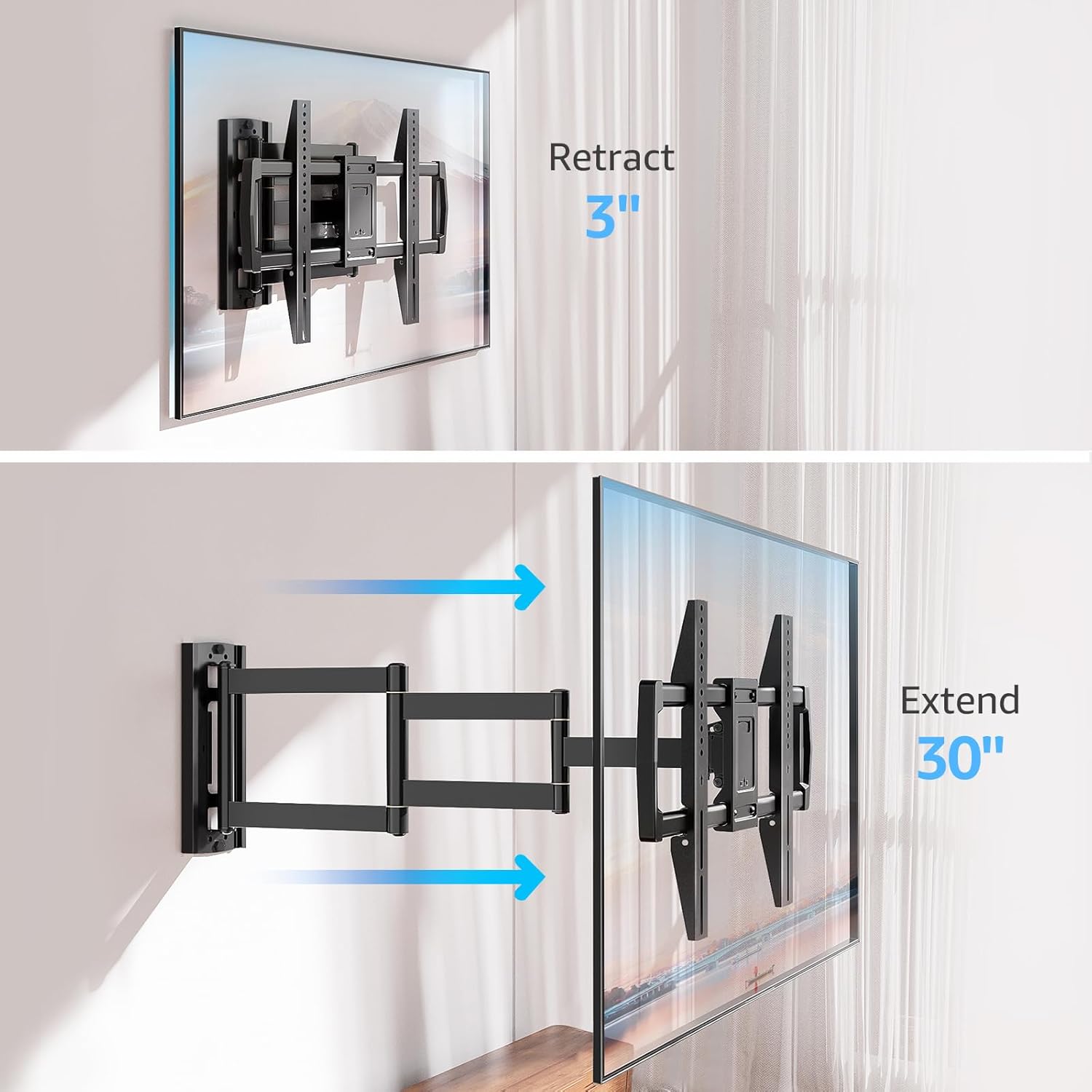
Image: Mount Extension and Retraction
6.2 Nastavitev vrtenja
The articulating arm allows for a smooth +/-90° swivel, enabling you to adjust the TV's angle to suit different viewing areas within a room, including corner mounting scenarios.
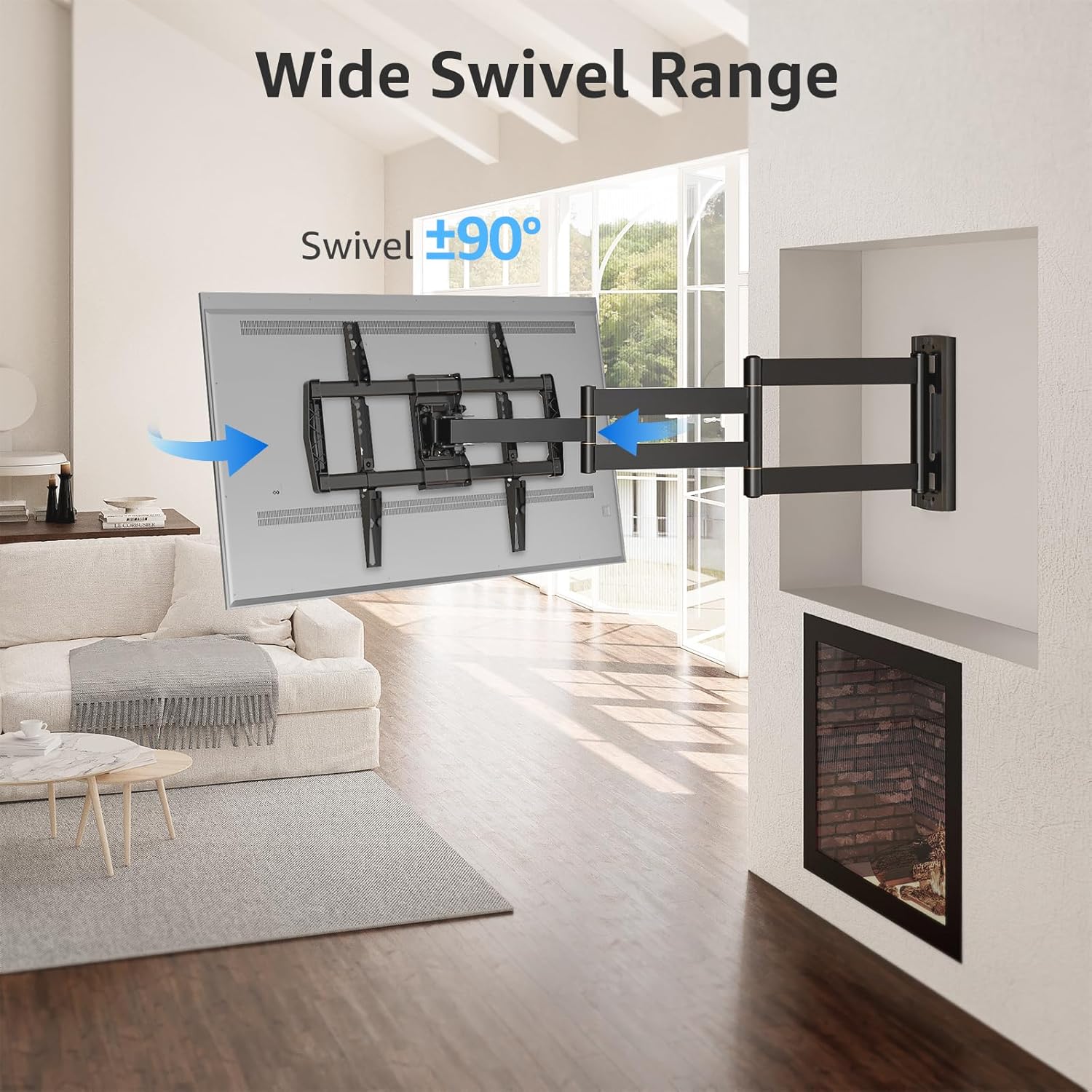
Image: Wide Swivel Range for Corner Mounting
6.3 Nastavitev nagiba
Adjust the TV's vertical angle with a +5°/-10° tilt range. This feature helps reduce glare from lights or windows and provides a comfortable viewvhodni kot.
6.4 Nastavitev nivelacije
After installation, you can make minor horizontal adjustments of +/-3° to ensure the TV is perfectly level.

Image: Level and Tilt Adjustments
7. Vzdrževanje
Redno vzdrževanje zagotavlja dolgo življenjsko dobo in varno delovanje vašega stenskega nosilca za televizor.
- Čiščenje: Nosilec obrišite z mehko, suho krpo. Izogibajte se abrazivnim čistilom ali topilom, ki bi lahko poškodovala površino.
- Preverjanje pritrdilnih elementov: Občasno preverite vse vijake in matico, da se prepričate, da so trdno priviti. Po potrebi jih ponovno privijte.
- Preverjanje gibanja: Test the mount's full range of motion (extension, retraction, swivel, tilt) occasionally to ensure smooth operation.
8. Odpravljanje težav
Če med namestitvijo ali po njej naletite na težave, si oglejte naslednje pogoste težave in rešitve:
- Televizor ni poravnan: Use the +/-3° post-installation leveling feature to adjust the TV's horizontal position.
- Nosilec se zdi ohlapen: Re-check all wall and TV fasteners to ensure they are securely tightened. Do not overtighten.
- Difficulty moving the arm: The mount's joints may be stiff initially. Apply gentle force. If persistent, ensure no cables are snagged.
- TV not fitting VESA pattern: Double-check your TV's VESA pattern against the mount's specifications (150x100mm to 600x400mm). If incompatible, the mount cannot be used.
9. Garancija in podpora
MOUNTUP is dedicated to providing quality products and customer satisfaction. While specific warranty details are not provided in this document, MOUNTUP offers comprehensive support.
If you have any questions, require assistance with installation, or need to report a missing/damaged part, please contact MOUNTUP customer service. Experts are available 7 days a week to provide support and advanced technology solutions.
For more information or to contact support, please visit the official MOUNTUP store or webmesto.