
1. Izdelek je končanview
The COUGAR FV150 RGB is a mid-tower gaming case designed for high-performance PC builds. It features a dual-chamber design, separating the main components from cables, storage drives, and the power supply unit (PSU) for a clean aesthetic and improved airflow. The case supports various motherboard form factors and offers extensive cooling options, including pre-installed ARGB fans.
Ključne značilnosti:
- Dvokomorna zasnova: Zagotavlja jasno view of your build through glass panels while concealing cables and other components.
- Podpora GPU: Accommodates graphics cards up to 400mm in length, with options for vertical GPU orientation.
- Združljivost matične plošče: Supports Mini-ITX, Micro-ATX, and ATX motherboards.
- Engineered Bottom Fan Bracket: Simplifies fan installation by allowing attachment prior to setup.
- Extensive Fan & Water Cooling Support: Multiple fan mounting points and radiator support up to 360mm.
- Seamless RGB Synchronization: Integrated universal fan hub for easy ARGB lighting control.
- Modern I/O Panel: Includes 2 x USB Type-A and 1 x USB 3.2 Type-C ports.
- Prilagodljivo shranjevanje: Supports combinations of 3.5" HDDs and 2.5" SSDs.
- Magnetni filtri za prah: Located on the top and right side for easy maintenance.

Slika 1.1: Pod kotom view of the COUGAR FV150 RGB case, highlighting its dual-chamber design and pre-installed ARGB fans.
2. Nastavitev in namestitev
Follow these steps for proper installation of your PC components into the COUGAR FV150 RGB case.
2.1 Razpakiranje in začetni pregled
- Previdno vzemite ohišje iz embalaže.
- Preverite ohišje glede morebitnih znakov poškodb med prevozom.
- Remove the tempered glass side panel by unscrewing the thumb screws, if present, or by releasing mehanizem zapaha.
2.2 Namestitev matične plošče
- Ensure the correct standoffs are installed for your motherboard form factor (Mini-ITX, Micro-ATX, or ATX).
- Place the I/O shield into the rear opening of the case.
- Carefully align your motherboard with the standoffs and I/O shield, then secure it with screws.
2.3 Namestitev napajalne enote (PSU).
- The FV150 RGB supports bottom-mount PSUs.
- Slide the PSU into its designated compartment in the secondary chamber from the rear of the case.
- Secure the PSU with screws from the exterior rear of the case.
2.4 Namestitev pogona za shranjevanje
- Locate the drive bays in the secondary chamber.
- For 3.5" HDDs, slide the drive into the appropriate tray and secure it.
- For 2.5" SSDs, mount them to the designated brackets or trays.
2.5 Namestitev grafične kartice (GPU)
- Odstranite potrebne pokrove razširitvenih rež na zadnji strani ohišja.
- Insert your GPU into the PCIe slot on the motherboard and secure it with screws.
- The case supports GPUs up to 400mm. For vertical GPU mounting, a separate riser cable and bracket (not included) are required.
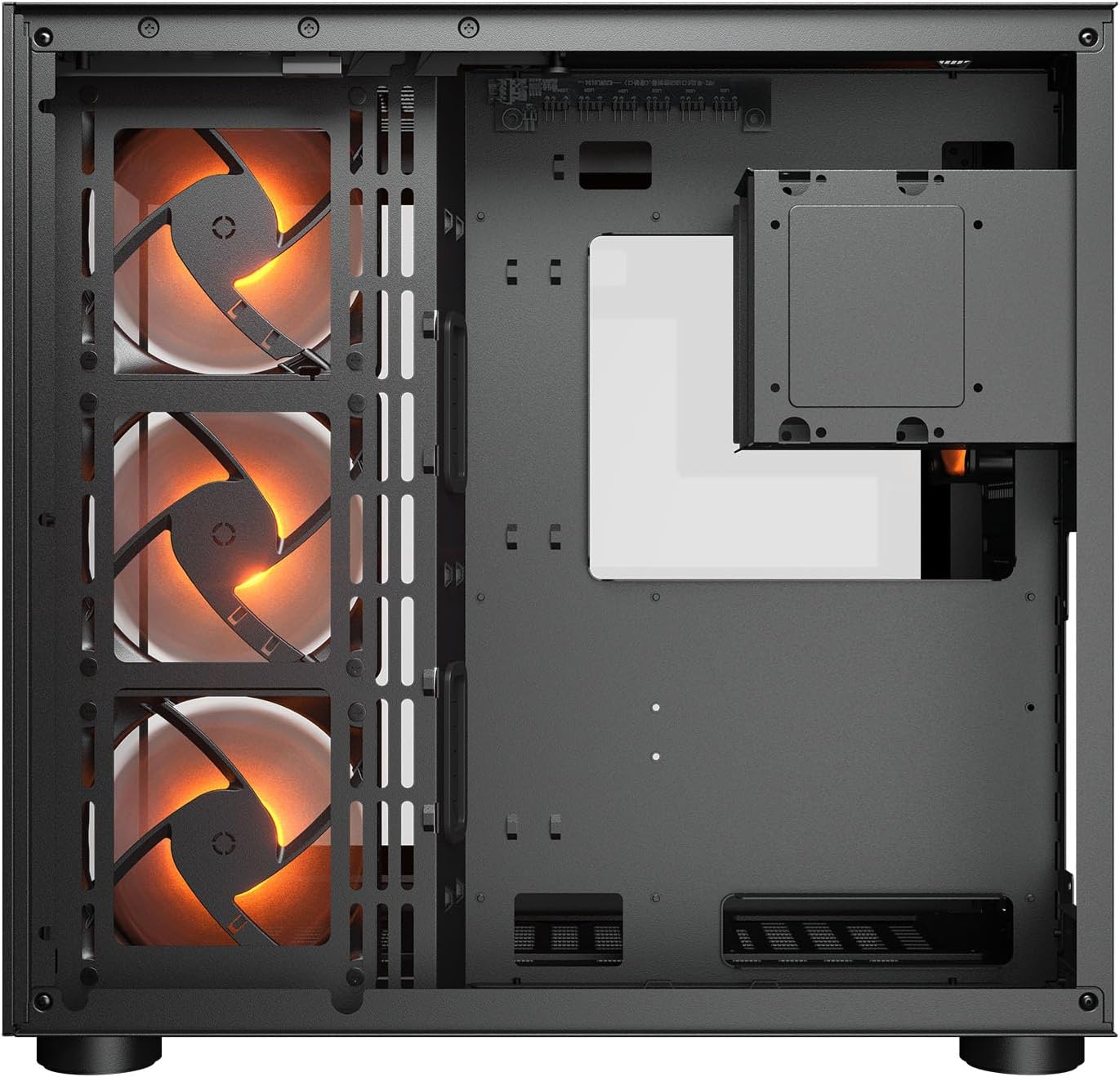
Slika 2.1: Notranje view illustrating the main chamber for motherboard and GPU installation, with pre-installed side fans.
2.6 Namestitev ventilatorja in radiatorja
- The case comes with 3 x 120mm ARGB side fans and 1 x 120mm ARGB rear fan pre-installed.
- Additional fans can be installed at the top (3 x 120mm or 2 x 140mm) and bottom (3 x 120mm or 2 x 140mm).
- Utilize the engineered bottom fan bracket for easier installation of bottom fans.
- For water cooling, radiators up to 360mm can be mounted on the top and 240mm on the side.

Image 2.2: Top internal view, showing potential mounting locations for additional cooling fans or radiators.
2.7 Upravljanje kablov
- Route all power and data cables through the cutouts to the secondary chamber.
- Uporabite ample space and tie-down points in the secondary chamber to organize cables for optimal airflow and a clean appearance.
2.8 Connecting Front I/O Panel
- Connect the front panel cables (USB 3.2 Type-C, USB Type-A, audio, power, reset, LED) to the corresponding headers on your motherboard.
3. Navodila za uporabo
Ko so vse komponente nameščene in povezane, lahko vklopite sistem.
3.1 Vklop
- Prepričajte se, da je stikalo napajalnika v položaju »VKLOP«.
- Press the power button on the front I/O panel of the case.
3.2 Nadzor osvetlitve RGB
- The integrated universal fan hub allows for easy synchronization of ARGB lighting.
- Connect the hub to your motherboard's ARGB header (5V 3-pin) to control lighting effects via motherboard software.
- Alternatively, use the dedicated RGB button on the front I/O panel to cycle through pre-set lighting modes if not connected to a motherboard header.
4. Vzdrževanje
Redno vzdrževanje pomaga zagotoviti optimalno delovanje in dolgo življenjsko dobo komponent vašega računalnika.
4.1 Čiščenje filtra za prah
- The COUGAR FV150 RGB features magnetic dust filters on the top and right side, along with a ventilated bottom cover.
- Gently remove the magnetic dust filters.
- Clean them using compressed air or by rinsing with water (ensure they are completely dry before reattaching).
- Periodically clean the ventilated bottom cover.
4.2 Generalno čiščenje
- Za brisanje zunanjih površin ohišja uporabite mehko, suho krpo.
- For tempered glass panels, use a glass cleaner and a microfiber cloth to avoid streaks.
- Izogibajte se uporabi močnih kemikalij ali abrazivnih materialov, ki bi lahko poškodovali zaključek.
5. Odpravljanje težav
V tem razdelku so rešitve za pogoste težave, na katere lahko naletite.
5.1 Sistem se ne vklopi
- Check PSU: Ensure the power supply unit is properly connected to the wall outlet and the PSU switch is in the 'ON' position.
- Priključki na sprednji plošči: Verify that the power button cable from the case is correctly connected to the motherboard's front panel header.
- Internal Power Cables: Confirm all necessary power cables (24-pin ATX, 8-pin CPU, PCIe for GPU) are securely connected to the motherboard and components.
5.2 Fans Not Spinning or RGB Not Working
- Priključki ventilatorjev: Ensure all fan power cables are securely connected to the fan hub or motherboard headers.
- RGB Connections: Verify the ARGB cables are correctly connected to the fan hub and the hub is connected to a 5V 3-pin ARGB header on the motherboard.
- Software/Button: If connected to the motherboard, check your motherboard's RGB control software. If not, try pressing the RGB button on the case's I/O panel to cycle modes.
5.3 Vrata USB ne delujejo
- Notranji USB priključki: Confirm that the USB 3.0 and USB Type-C cables from the front I/O panel are correctly plugged into the corresponding headers on your motherboard.
- Gonilniki matične plošče: Ensure you have installed the latest chipset and USB drivers for your motherboard.
6. Specifikacije
Detailed technical specifications for the COUGAR FV150 RGB Gaming Case.

Image 6.1: Case dimensions for planning your setup.
| Funkcija | Specifikacija |
|---|---|
| Ime izdelka | FV150 RGB |
| Faktor obrazca primera | Srednji stolp |
| Združljivost matične plošče | Mini-ITX, Micro-ATX, ATX |
| Dimenzije (Š x V x G) | 300 x 400 x 415 mm (11.8" x 15.7" x 16.3") |
| V/I plošča | USB 3.2 Gen 2 Type-C x 1, USB-A 3.0 x 2, 4 Pole Headset Audio Jack, RGB Button |
| 3.5" Drive Bay | 2 |
| 2.5" Drive Bay | 1+1 (converted from 3.5" drive bays) |
| Razširitvene reže | 7+3 |
| Podpora za vertikalni GPU | ja |
| Cooling Fan Support (Top) | 3 x 120 mm ali 2 x 140 mm |
| Cooling Fan Support (Bottom) | 3 x 120 mm ali 2 x 140 mm |
| Cooling Fan Support (Side) | 3 x 120 mm |
| Cooling Fan Support (Rear) | 1 x 120 mm |
| Pre-installed Fans (Side) | 3 x 120mm ARGB (Reversed) |
| Pre-installed Fans (Rear) | 1 x 120mm ARGB |
| Pre-installed Fan Speed | 1000 (± 10%) vrtljajev |
| Pre-installed Fan Connector | 5V 3 Pin (ARGB) / 3 Pin (Fan) |
| Največje število ventilatorjev | 10 |
| Water Cooling Support (Top) | 360mm / 280mm / 240mm |
| Water Cooling Support (Side) | 240 mm / 120 mm |
| Water Cooling Support (Rear) | 120 mm |
| RGB Hub Sync with M/B | ja |
| maks. Dolžina grafične kartice | 400 mm (15.7 in) |
| maks. Višina hladilnika CPU | 180 mm (7.1 in) |
| maks. Dolžina napajalnika | 210 mm (8.3 in) |
| Material | Kovina |
| Teža predmeta | 6.83 kilogramov |
7. Informacije o garanciji
COUGAR products are manufactured to the highest quality standards. This product is covered by a manufacturer's warranty against defects in materials and workmanship. The specific duration and terms of the warranty may vary by region and retailer. Please retain your proof of purchase for warranty claims.
For detailed warranty information, please refer to the official COUGAR webspletnega mesta ali se obrnite na lokalnega prodajalca.
8. Podpora
If you encounter any issues or have questions regarding your COUGAR FV150 RGB Gaming Case that are not covered in this manual, please contact COUGAR customer support.
- Obiščite uradno trgovino COUGAR webspletno mesto za pogosta vprašanja, prenose gonilnikov in kontaktne podatke za podporo.
- Contact your retailer for assistance with product returns or exchanges.