
1. Uvod
Welcome to the user manual for your Emerson CKSS7071 Sunrise Smartset Alarm Clock Radio. This device is designed to enhance your daily routine with its unique features, including a sunrise simulation, soothing sound options, Bluetooth connectivity, and an 8-color dimmable LED display. Please read this manual thoroughly to understand the full functionality and ensure proper use and care of your new alarm clock radio.
Posnetek 1: konecview of the Emerson CKSS7071 Sunrise Smartset Alarm Clock Radio. This video demonstrates the key features and design of the product.
2. Pomembne varnostne informacije
- Pred uporabo naprave preberite vsa navodila.
- Ta navodila shranite za prihodnjo uporabo.
- Te naprave ne uporabljajte v bližini vode.
- Čistite samo s suho krpo.
- Ne blokirajte prezračevalnih odprtin. Namestite v skladu z navodili proizvajalca.
- Ne nameščajte v bližini virov toplote, kot so radiatorji, grelniki, peči ali druge naprave (vključno z amplifiers), ki proizvajajo toploto.
- Zaščitite napajalni kabel, da se po njem ne pohodi ali stisne, zlasti pri vtičih, vtičnicah in na mestu, kjer izstopa iz naprave.
- Uporabljajte samo priključke/dodatke, ki jih je določil proizvajalec.
- Izklopite napravo med nevihtami ali ko je dlje časa ne uporabljate.
- Za vse servise se obrnite na usposobljeno servisno osebje. Servis je potreben, če je bil aparat kakor koli poškodovan, na primer poškodovan je napajalni kabel ali vtič, je bila polita tekočina ali so v aparat padli predmeti, je bil aparat izpostavljen dežju ali vlagi, ne deluje normalno , ali je bil opuščen.
3. Vsebina paketa
Po odprtju paketa preverite, ali so vsi elementi prisotni:
- Emerson CKSS7071 Sunrise Smartset Alarm Clock Radio
- AC napajalnik
- Uporabniški priročnik
4. Izdelek je končanview
4.1 Spredaj View

Slika 1: Spredaj view of the alarm clock, featuring the digital time display and the sunrise simulation light panel.
The front of the unit features the main 1.2-inch LED time display and the large circular light panel for sunrise simulation and ambient lighting. Indicators for AM/PM, Alarm 1/2, and Bluetooth status are also visible.
4.2 Stran View (Kontrole)
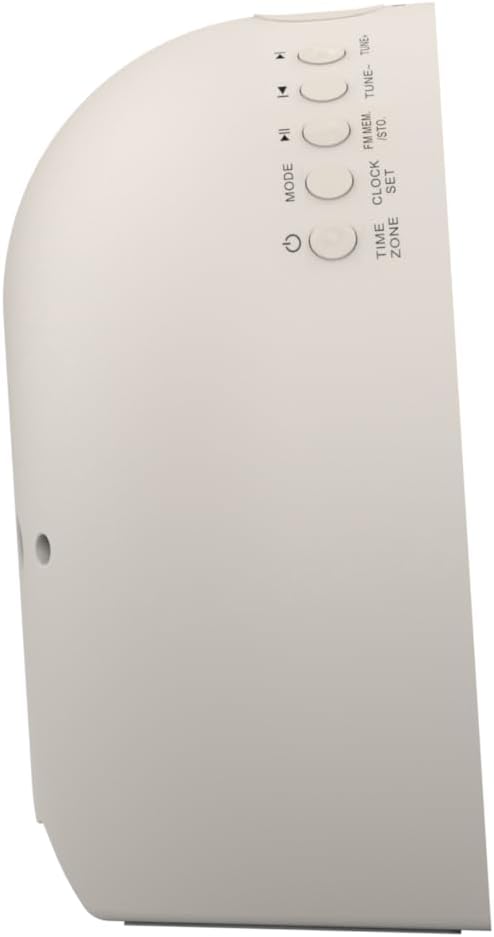
Slika 2: Stran view of the alarm clock, highlighting the control buttons for various functions.
The side panel houses the primary control buttons, including Power, Mode, Clock Set, Time Zone, Tune/Skip, and Volume controls. These buttons are used for setting time, alarms, and navigating audio functions.
4.3 zadaj View

Slika 3: Zadaj view of the alarm clock, showing the speaker grille and power connection port.
The rear of the unit features the main speaker grille and the power input port for connecting the AC adapter.
5. Nastavitev
5.1 Napajalni priključek
- Plug the AC power adapter into the DC IN jack located on the back of the unit.
- Plug the other end of the adapter into a standard wall outlet (AC 100-240V, 50/60Hz).
- Enota se bo samodejno vklopila.
5.2 SmartSet Automatic Time Setting
The SmartSet system automatically sets the correct time and date as soon as you plug in the unit. It also maintains time and alarm settings during power disruptions or outages, provided the button cell battery is installed.
5.3 Namestitev rezervnega napajanja z baterijo
A button cell battery (CR2032, included) is required for battery backup. This ensures that time and alarm settings are retained during a power outage.
- Poiščite predal za baterije na spodnji strani enote.
- Odprite pokrov prostora za baterije.
- Insert one CR2032 button cell battery, ensuring the correct polarity (+/-).
- Trdno zaprite pokrov prostora za baterije.
6. Navodila za uporabo
6.1 Ročna nastavitev ure
- Pritisnite in držite URA SET gumb. Številke ure bodo utripale.
- Uporabite TUNE -/+ gumbe za nastavitev ure. Pritisnite URA SET za potrditev.
- Številke minut bodo utripale. Uporabite TUNE -/+ gumbe za nastavitev minut. Pritisnite URA SET za potrditev.
- Continue this process to set the year, month, and day.
- Pritisnite URA SET ponovno za izhod iz načina nastavitve časa.
6.2 Nastavitev alarmov (Alarm 1 in Alarm 2)
The unit features dual alarms. Follow these steps for each alarm:
- Pritisnite in držite ALARM 1 or ALARM 2 gumb. Številke ure alarma bodo utripale.
- Uporabite TUNE -/+ gumbe za nastavitev ure budilke. Pritisnite ustrezno ALARM gumb za potrditev.
- Številke minut alarma bodo utripale. Uporabite TUNE -/+ buttons to adjust the alarm minutes. Press the respective ALARM gumb za potrditev.
- Select the alarm source (Buzzer, FM Radio, or Soothing Sound). Press the respective ALARM gumb za potrditev.
- Glasnost alarma prilagodite z GLASNOST -/+ buttons. Press the respective ALARM gumb za potrditev.
- The alarm is now set. The alarm indicator (AL1 or AL2) will appear on the display.
6.3 Simulacija sončnega vzhoda
The sunrise simulation feature gradually brightens the light panel before your set alarm time, mimicking a natural sunrise to gently wake you.
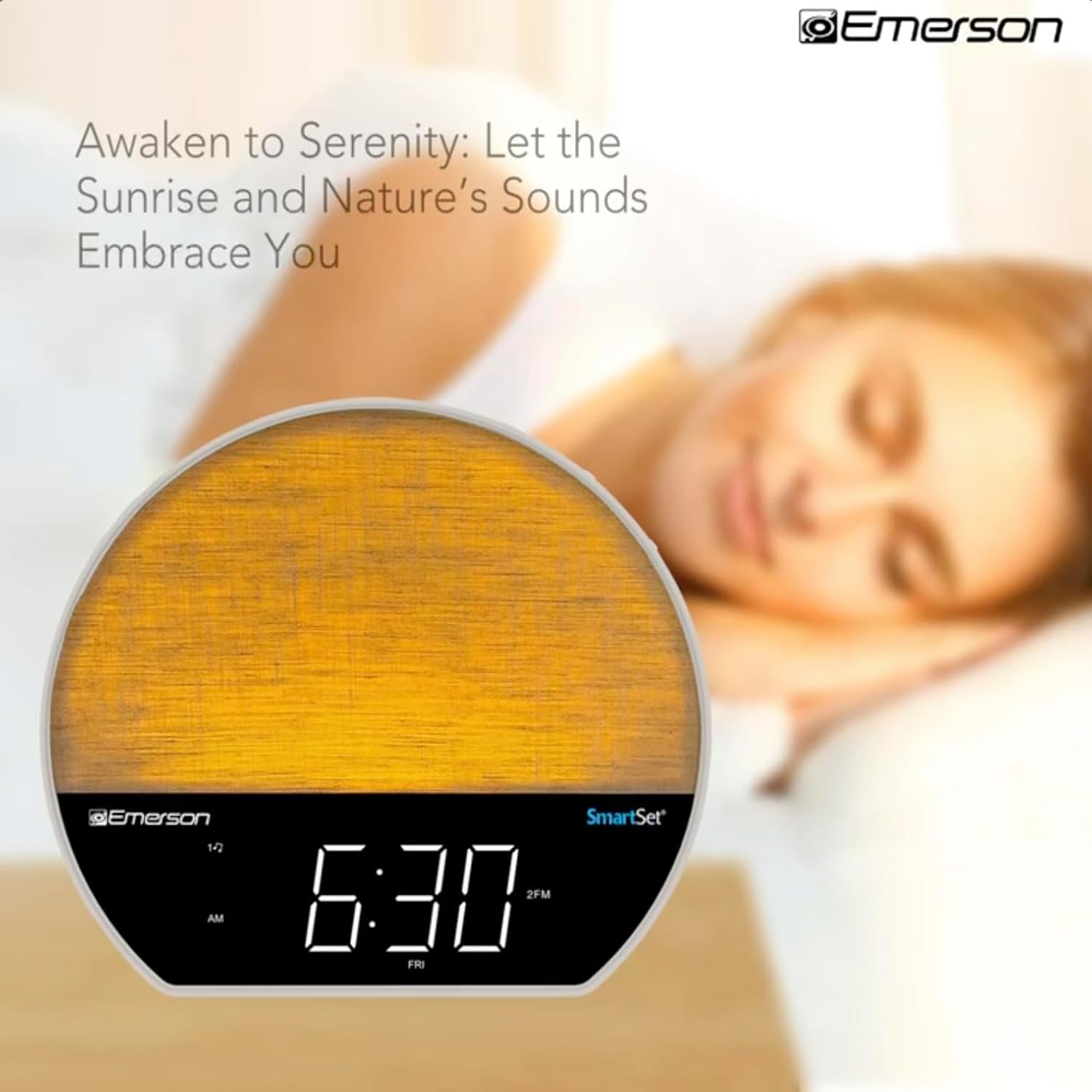
Slika 4: The alarm clock simulating a sunrise with a warm, increasing intenzivnost svetlobe.
To activate, ensure the sunrise option is selected during alarm setup. The light will begin to brighten 30 minutes before the alarm sounds.
6.4 Soothing Sounds and White Noise
The unit includes 6 soothing sounds and white noise to help with relaxation or waking up.
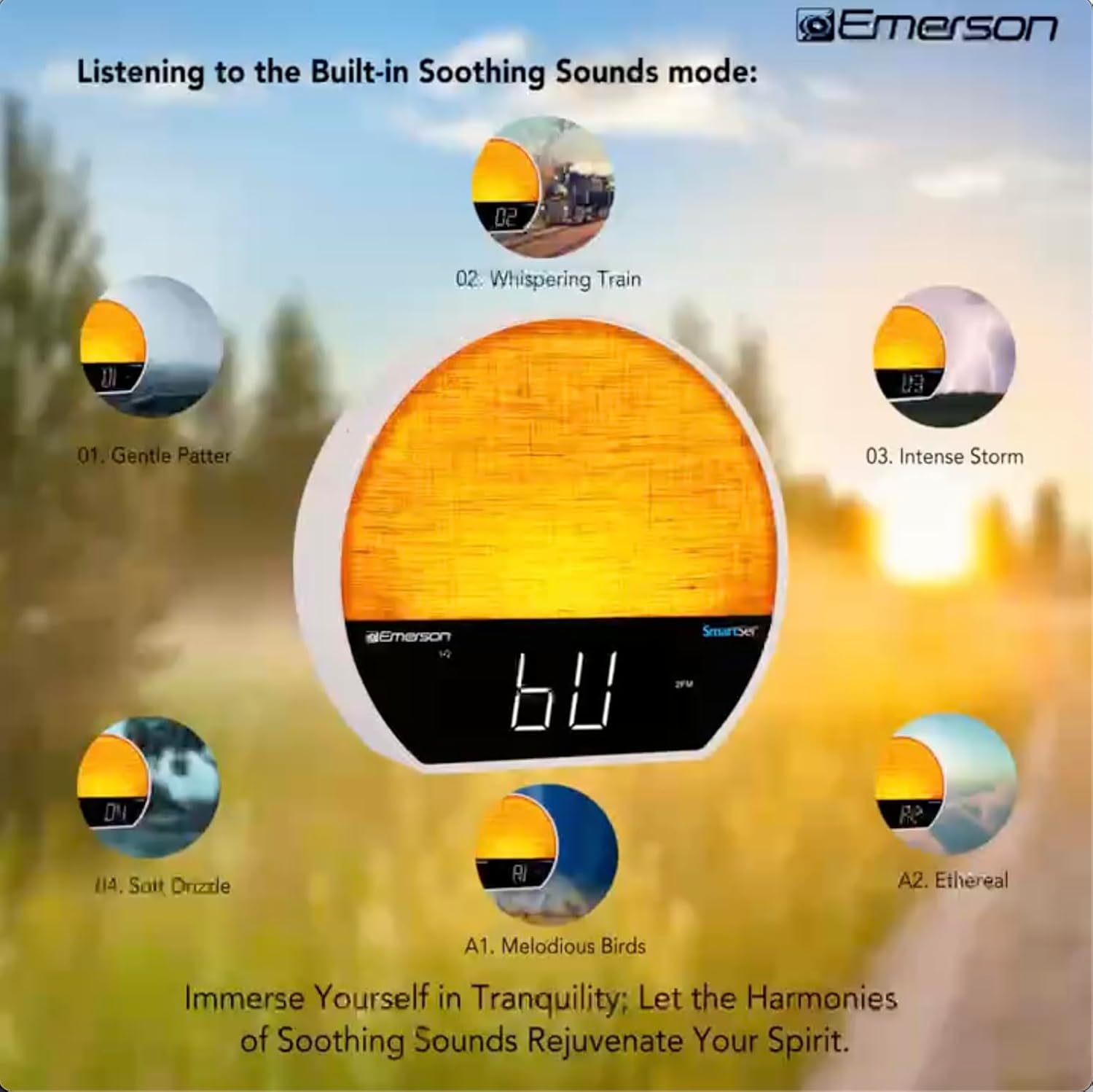
Slika 5: Visual representation of the six soothing sound modes available on the alarm clock.
- Pritisnite NAČIN button repeatedly until the Soothing Sound mode is selected.
- Uporabite TUNE -/+ buttons to cycle through the available sounds (e.g., Gentle Patter, Whispering Train, Intense Storm, Soft Drizzle, Melodious Birds, Ethereal, White Noise).
- Glasnost prilagodite s tipko GLASNOST -/+ gumbi.
6.5 Bluetooth funkcija zvočnika
Za brezžično pretakanje zvoka povežite pametni telefon ali drugo napravo s podporo za Bluetooth.

Slika 6: The alarm clock in Bluetooth mode, paired with a mobile device for audio streaming.
- Pritisnite NAČIN button until 'BT' appears on the display, indicating Bluetooth mode.
- On your device, enable Bluetooth and search for 'Emerson CKSS7071'.
- Select the device to pair. A confirmation tone will sound upon successful pairing.
- You can now play audio from your device through the alarm clock's speaker.
6.6 Delovanje FM-radia
Prisluhnite svojim najljubšim FM radijskim postajam.
- Pritisnite NAČIN button until 'FM' appears on the display.
- Pritisnite TUNE -/+ buttons briefly to manually tune to a station.
- Pritisnite in držite TUNE -/+ gumbe za samodejno iskanje naslednje razpoložljive postaje.
- Če želite shraniti postajo, pritisnite in držite FM POM dokler ne utripa prednastavljena številka. Uporabite TUNE -/+ , da izberete prednastavljeno številko, nato pritisnite FM POM spet shraniti.
6.7 LED Decor and Dimmer Control
Customize the ambient light with 8 different colors and adjust the brightness.

Slika 7: The alarm clock demonstrating its 8-color dimmable LED decor options.
- Pritisnite SVETLOBA button to cycle through the 8 available colors or turn the light off.
- To adjust the brightness of the LED decor light, press and hold the SVETLOBA button. The brightness will cycle through 5 levels. Release the button at your desired brightness.
6.8 Display Dimmer Control
Adjust the brightness of the 1.2-inch LED time display.

Slika 8: The alarm clock illustrating the five distinct levels of display luminescence.
Pritisnite DIMMER button (often combined with another function, refer to button labels) to cycle through 4 levels of display brightness (Bright, Moderate, Dim, Faint).
6.9 Časovnik za spanje
Set a timer for the audio to automatically turn off after a specified duration.

Slika 9: The alarm clock set for a sunset sleep timer, providing a harmonious end to the day.
- While audio is playing (FM or Soothing Sound), press the SPANJE gumb.
- Večkrat pritisnite SPANJE button to cycle through available sleep timer durations (e.g., 15, 30, 60, 90 minutes, or OFF).
- The audio will automatically turn off after the selected time.
6.10 Funkcija dremeža
Ko se oglasi alarm, pritisnite DREMEŽ button (usually a large button on top) to temporarily silence the alarm for a few minutes. The alarm will sound again after the snooze period.
7. Vzdrževanje
7.1 Čiščenje
- Pred čiščenjem enoto vedno izključite iz električne vtičnice.
- Za čiščenje zunanjih površin uporabite mehko, suho krpo.
- Ne uporabljajte tekočih čistil, abrazivnih čistil ali kemičnih razpršil, saj lahko poškodujejo premaz.
7.2 Zamenjava baterije
Če se nastavitve časa in alarma ne ohranijo med izpadom električne energijetage, the button cell backup battery may need to be replaced. Follow the instructions in section 5.3 to replace the CR2032 battery.
8. Odpravljanje težav
| Težava | Možen vzrok | rešitev |
|---|---|---|
| Enota se ne vklopi. | Napajalnik ni priključen ali je pokvarjen. | Prepričajte se, da je napajalnik varno priključen na enoto in delujočo stensko vtičnico. |
| Nastavitve časa/alarma so se po izpadu električne energije izgubiletage. | Rezervna baterija je prazna ali ni nameščena. | Install or replace the CR2032 button cell battery (see section 5.3). |
| Alarm se ne oglasi. | Alarm ni aktiviran ali pa je glasnost prenizka. | Ensure the alarm is set and activated (AL1/AL2 indicator on). Increase alarm volume. |
| Naprave Bluetooth ni mogoče seznaniti. | Unit not in Bluetooth mode or device too far. | Ensure the unit is in Bluetooth mode ('BT' displayed). Move your device closer to the unit. Try unpairing and re-pairing. |
| Slab sprejem FM radia. | Antena ni iztegnjena ali pa povzroča motnje. | Extend the FM wire antenna fully and reposition it for better reception. Avoid placing near other electronic devices. |
| Zaslon je presvetel/pretemn. | Display dimmer setting needs adjustment. | Pritisnite DIMMER button to cycle through brightness levels (see section 6.8). |
9. Specifikacije
| Funkcija | Podrobnost |
|---|---|
| Številka modela | CKSS7071 |
| Vir napajanja | AC 100–240 V, 50/60 Hz (prek napajalnika) |
| Rezervna baterija | 1 x CR2032 Button Cell Battery (included) |
| Vrsta zaslona | 1.2-palčni LED-zaslon |
| Različica Bluetooth | V5.4 |
| Pomirjujoči zvoki | 6 Nature Sounds + White Noise |
| LED Decor Colors | 8 Dimmable Colors |
| Dimenzije izdelka (Š x D x V) | 7.09 cm x 3.15 cm x 6.37 cm |
| Teža | Ni določeno |
10. Informacije o garanciji
Emerson products are manufactured to the highest quality standards. This product is covered by a limited warranty against defects in materials and workmanship for a period of one (1) year from the original date of purchase. This warranty does not cover damage caused by misuse, accident, unauthorized modification, or normal wear and tear. Proof of purchase is required for all warranty claims. Please retain your receipt.
11. Podpora strankam
If you have any questions, require assistance, or experience issues with your Emerson CKSS7071 Sunrise Smartset Alarm Clock Radio, please contact our customer support team.
- Webspletno mesto: Obiščite uradno trgovino Emerson webspletno mesto za pogosta vprašanja in vire za podporo.
- E-pošta: Glejte embalažo izdelka ali uradna navodila. webspletno mesto za stik s službo za stranke po e-pošti.
- telefon: Glejte embalažo izdelka ali uradna navodila. webspletno mesto za telefonske številke za pomoč strankam.
Please have your model number (CKSS7071) and proof of purchase ready when contacting support.