
1. Varnostne informacije
Please read and understand all safety instructions before using the Alonefire SV119 UV LED Flashlight. Failure to follow these instructions may result in injury or damage to the product.
- UV Radiation Exposure: This flashlight emits powerful 365nm UV light. Avoid direct exposure of UV light to eyes and skin. Prolonged exposure can be harmful.
- Nosite zaščitna očala: Always wear the provided UV protection glasses when operating the flashlight to shield your eyes from UV radiation.
- Vroča površina: The flashlight head may become hot during extended use. Avoid touching the hot surface directly.
- Varnost baterije: Use only the specified Lithium-ion battery. Do not attempt to disassemble, puncture, or expose the battery to extreme temperatures or fire.
- otroci: Svetilko hranite izven dosega otrok.
2. Vsebina paketa
Preverite, ali so v paketu prisotni vsi elementi:
- Alonefire SV119 UV LED Flashlight
- Polnilni kabel USB-C
- UV Protection Glasses
- Rechargeable Lithium-ion Battery (pre-installed or separate)

Image: Contents of the Alonefire SV119 package, including the flashlight, USB-C cable, and yellow UV protection glasses.
3. Izdelek je končanview
The Alonefire SV119 is a powerful 90W UV LED flashlight designed for various detection and curing applications. Its key features include:
- Visokokakovostna UV LED: Equipped with 9 pieces of 4-core 365nm UV LEDs, providing up to 90W power consumption and 10000mW light output.
- Black Filter Lens: Features a hardened black optical filter lens to filter out ambient visible light, ensuring a purer and more powerful UV output.
- Vzdržljiva konstrukcija: Made from high-quality aluminum alloy for enhanced heat dissipation and durability.
- USB-C za polnjenje: Convenient USB-C charging port for easy and versatile recharging.
- Digitalni LCD zaslon: An innovative LCD screen displays the battery power level numerically.
- Povratno polnjenje: Can function as a power bank to charge other devices via its USB-A output port.

Image: The Alonefire SV119 UV LED flashlight highlighting its 9-core 365nm UV LEDs and various detection and curing applications.

Image: A visual comparison demonstrating the effectiveness of 365nm UV light compared to 395nm UV light for mineral fluorescence.
4. Nastavitev
4.1 Namestitev baterije
- Odvijte zadnji pokrovček svetilke.
- If the battery is not pre-installed, insert the provided Lithium-ion battery with the positive (+) terminal facing towards the flashlight head.
- Pomembno: If there is a plastic insulating disc on the battery's positive or negative terminal, remove it before installation.
- Varno privijte zadnji pokrov.
4.2 Začetno polnjenje
Pred prvo uporabo popolnoma napolnite baterijo svetilke.
- Poiščite polnilni priključek USB-C na ohišju svetilke.
- Connect the provided USB-C cable to the flashlight and plug the other end into a compatible USB power adapter (not included) or a computer USB port.
- The LCD display will show the charging progress. A full charge is indicated by '100%' on the display.
- Čas polnjenja je približno 7 ure za popolno napolnitev.

Image: The Alonefire SV119 flashlight being charged via its USB-C port, with the LCD screen displaying the battery charge level.
5. Navodila za uporabo
5.1 Vklop/izklop in izbira načina
- Vklop: Press the power button located on the side of the flashlight.
- Izbira načina: The flashlight typically has two brightness modes (strong and medium). Press the power button repeatedly to cycle through these modes.
- Ugasniti: Press and hold the power button for a few seconds until the light turns off.
5.2 Razumevanje LCD-zaslona
The integrated LCD display provides real-time information about the battery status.
- When the flashlight is in use, the display shows the remaining battery percentage.
- During charging, it indicates the charging progress.
5.3 Funkcija povratnega polnjenja
The SV119 can act as a portable power bank to charge other USB-powered devices.
- Locate the USB-A output port on the flashlight.
- Connect your device's charging cable to the USB-A port on the flashlight.
- Svetilka bo začela polniti vašo napravo.
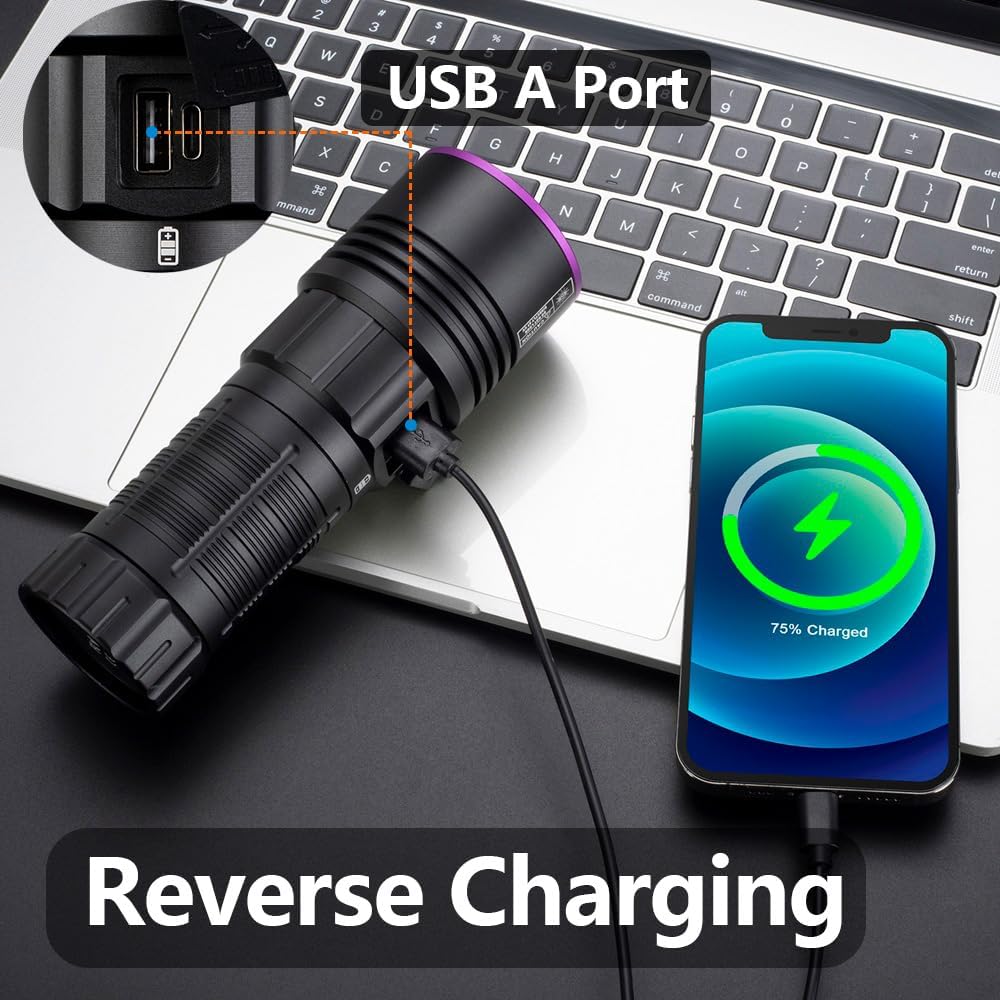
Image: The Alonefire SV119 flashlight demonstrating its reverse charging capability by powering a smartphone.
5.4 Aplikacije
The 365nm UV light is suitable for various applications:
- Zaznavanje madežev hišnih ljubljenčkov: Identify hidden pet urine, ringworm, and other biological stains on carpets, furniture, and floors.
- Zaznavanje škorpijona: Scorpions fluoresce under 365nm UV light, making them easier to spot in dark environments.
- Mineral and Amber Identification: Many minerals and amber exhibit fluorescence under UV light, aiding in identification.
- Currency and Document Authentication: Verify security features on banknotes, passports, and other official documents.
- Strjevanje smole: Accelerate the curing process of UV-sensitive resins.
- Odkrivanje puščanja: Detect leaks in HVAC systems or automotive fluids when used with UV-sensitive dyes.

Image: A demonstration of the UV flashlight's ability to reveal hidden pet urine stains on a carpet, showing a 'before' view under normal light and an 'after' view under UV light.
6. Vzdrževanje
6.1 Čiščenje
- Ohišje svetilke obrišite z mehko krpoamp krpo.
- Za lečo uporabite krpo za čiščenje leč in raztopino, da preprečite praske.
- Ne uporabljajte abrazivnih čistil ali topil.
6.2 Nega in shranjevanje baterije
- Recharge the battery regularly, even if not frequently used, to maintain its lifespan.
- Svetilko hranite na hladnem in suhem mestu, stran od neposredne sončne svetlobe in ekstremnih temperatur.
- Če baterijo shranjujete dlje časa, jo napolnite do približno 50 % zmogljivosti.
7. Odpravljanje težav
- Svetilka se ne vklopi:
- Prepričajte se, da je baterija pravilno nameščena in popolnoma napolnjena.
- Check if the plastic insulating disc has been removed from the battery terminals.
- Trdno privijte zadnji pokrovček.
- Baterija se ne polni:
- Preverite, ali je kabel USB-C pravilno priključen na svetilko in vir napajanja.
- Poskusite z drugim kablom USB-C ali napajalnikom.
- Prepričajte se, da je vir napajanja delujoč.
- Weak light output:
- Baterija je morda skoraj prazna; napolnite jo.
- Prepričajte se, da je leča čista in brez ovir.
- LCD display not working or inaccurate:
- Popolnoma napolnite baterijo.
- Če težave ne odpravite, se obrnite na podporo strankam.
8. Specifikacije
| Funkcija | Specifikacija |
|---|---|
| Znamka | Alonefire |
| Številka modela | SV119 |
| Vir svetlobe | 9x 4-core 365nm UV LED |
| Moč | 90 vatov |
| Svetlobni tok | 10000 milivatov |
| Material | Aluminijeva zlitina |
| Vrsta baterije | 1x Lithium-ion (included) |
| Vrata za polnjenje | USB-C |
| Posebne lastnosti | Rechargeable, Digital Display, Reverse Charging |
| Teža | 580 g |
| Dimenzije (paket) | 19.9 x 13.2 x 6.3 cm |
| Stopnja vodoodpornosti | Ni vodoodporen |
9. Garancija in podpora
9.1 Informacije o garanciji
Specific warranty details for the Alonefire SV119 are not provided in this manual. Please refer to the retailer or manufacturer's official webza najnovejšo garancijsko politiko.
9.2 Podpora strankam
For technical assistance, troubleshooting beyond this manual, or inquiries regarding your product, please contact Alonefire customer support through their official channels or the retailer where the product was purchased.