
1. Uvod
This manual provides comprehensive instructions for the installation, operation, maintenance, and troubleshooting of your Coleman-Mach 9420A382 12VDC Digital Wall Thermostat. Designed for recreational vehicles and specialty applications, this thermostat offers precise climate control with an easy-to-read digital display and multiple operating modes. Please read this manual thoroughly before installation and use to ensure proper function and longevity of your device.
2. Izdelek je končanview
The Coleman-Mach 9420A382 Digital Wall Thermostat is engineered to manage your RV's climate system efficiently. Key features include:
- Controls Coleman-Mach Air Conditioner, Heat Pump, and gas heating appliances.
- Includes a dedicated Dry Mode to reduce humidity and enhance interior comfort.
- Configurable via dip switches for various system setups: A/C cool only, A/C with heat pump, A/C with electric heat element, and additional heating systems.
- Operating modes: Auto, Fan Only, Cool, Heat, and Dry.
- Features an easy-to-read digital display for simple programming and operation.

Slika 2.1: Polno view of the Coleman-Mach 9420A382 Digital Wall Thermostat.
3. Nastavitev in namestitev
3.1 Varnostni ukrepi
- Always disconnect power to the HVAC system before beginning installation to prevent electrical shock.
- Prepričajte se, da so vse ožičene povezave varne in v skladu z lokalnimi električnimi predpisi.
- Če ste glede katerega koli dela postopka namestitve negotovi, se posvetujte s kvalificiranim tehnikom.
3.2 Kaj je vključeno
- Coleman-Mach 9420A382 Digital Wall Thermostat
- Montažna plošča
- Montažni vijaki
3.3 Ožičenje in montaža
The thermostat is designed for 12VDC wired connectivity. Installation typically involves connecting six wires. Refer to your RV's specific wiring diagram and the thermostat's included wiring instructions for detailed steps. The thermostat is designed for wall mount installation.
3.4 Konfiguracija DIP stikal
Located on the back of the thermostat, dip switches allow for configuration to match your specific HVAC system. These settings determine whether the thermostat manages A/C cool only, A/C with heat pump, A/C with electric heat element, or an additional heating system. Consult the detailed wiring diagram and configuration guide provided with your thermostat for correct dip switch settings.
4. Navodila za uporabo
4.1 Prikaz končanview
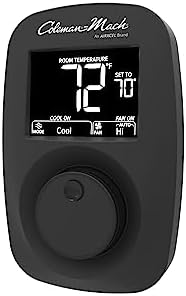
Slika 4.1: Bližnji posnetek view of the digital display showing room temperature and set temperature.
The digital display shows the current room temperature and the set temperature. Indicators for the active mode (Cool, Heat, Dry, Fan Only) and fan speed (Auto, Low, High) are also visible.
4.2 Izbira načina
Pritisnite NAČIN gumb za preklapljanje med razpoložljivimi načini delovanja:
- kul: Activates the air conditioning system to lower the room temperature.
- Toplota: Activates the heating system (furnace or heat pump) to raise the room temperature.
- Suho: Operates the air conditioning system to reduce humidity without significant temperature reduction.
- Samo ventilator: Kroži zrak brez ogrevanja ali hlajenja.
- Samodejno: Automatically switches between heating and cooling to maintain the set temperature (if configured).
4.3 Nastavitev temperature
Use the rotary dial or push buttons (depending on model variant) to increase or decrease the desired set temperature. The display will show the set temperature as you adjust it.
4.4 Nadzor hitrosti ventilatorja
Pritisnite FAN button to cycle through fan speed settings: Low, High, or Auto. In Auto mode, the fan speed adjusts automatically based on the system's needs.
5. Vzdrževanje
Regular maintenance ensures optimal performance and extends the lifespan of your thermostat.
- Čiščenje: Zunanjost termostata nežno obrišite z mehko krpoamp krpo. Izogibajte se abrazivnim čistilom ali topilom.
- Razdalja senzorja: Ensure the temperature sensor (small opening on the thermostat) is free from dust and obstructions for accurate readings.
- Preverjanje moči: Periodically verify the 12VDC power supply to the thermostat is stable.
6. Odpravljanje težav
Če imate težave s termostatom, si oglejte naslednje pogoste težave in rešitve:
| Težava | Možen vzrok | rešitev |
|---|---|---|
| Zaslon termostata je prazen. | No power or loose wiring. | Check 12VDC power supply and all wiring connections. Ensure fuses are intact. |
| Sistem ne ogreva/hlaji. | Incorrect mode selected, set temperature not reached, or system fault. | Verify correct mode (Cool/Heat) and set temperature. Check if HVAC unit is receiving power and functioning. Review dip switch settings. |
| Netočno odčitavanje temperature. | Obstructed sensor or thermostat location. | Ensure the thermostat's sensor is clear of dust and not exposed to direct sunlight or drafts. |
| Furnace not turning on (specific to some RVs). | voltage spikes from furnace control board. | An isolation relay may be required in line with the furnace control board. Consult an RV technician. |
7. Specifikacije
| Funkcija | Podrobnost |
|---|---|
| Znamka | MACH (Coleman-Mach) |
| Ime modela | 9420A382 |
| Vrsta krmilnika | Gumb / Dotik |
| Posebne lastnosti | Easy to read digital display, Multi-system compatibility, Dry Mode |
| barva | Črna |
| Posebne uporabe | RV Furnace, Air Conditioner, Heat Pump |
| Vrsta nadzora temperature | Heat / Cool |
| Tehnologija povezljivosti | Žično |
| Vir napajanja | 12 VDC |
| Vrsta zaslona | Digitalno |
| Vrsta namestitve | Stenski nosilec |
| Vključene komponente | Thermostat with mounting plate, screws |
| Številka dela proizvajalca | 9420A382 |
| UPC | 755790009244, 755790005598 |
8. Informacije o garanciji
The Coleman-Mach 9420A382 Digital Wall Thermostat comes with a 1-letna omejena garancija from the manufacturer. This warranty covers defects in materials and workmanship under normal use. Please retain your proof of purchase for warranty claims. For full details regarding warranty terms and conditions, refer to the documentation included with your product or contact Coleman-Mach customer support.
9. Podpora
For technical assistance, troubleshooting beyond this manual, or warranty inquiries, please contact Coleman-Mach customer support. Visit the official Coleman-Mach webspletno mesto za najnovejše kontaktne podatke in dodatne vire.