
Konec izdelkaview
The XO BE18 is a stereo audio wireless Bluetooth headset featuring RGB lighting. It is designed for immersive listening experiences and convenient communication, offering multiple playback modes including Bluetooth, AUX, TF card, and FM radio.
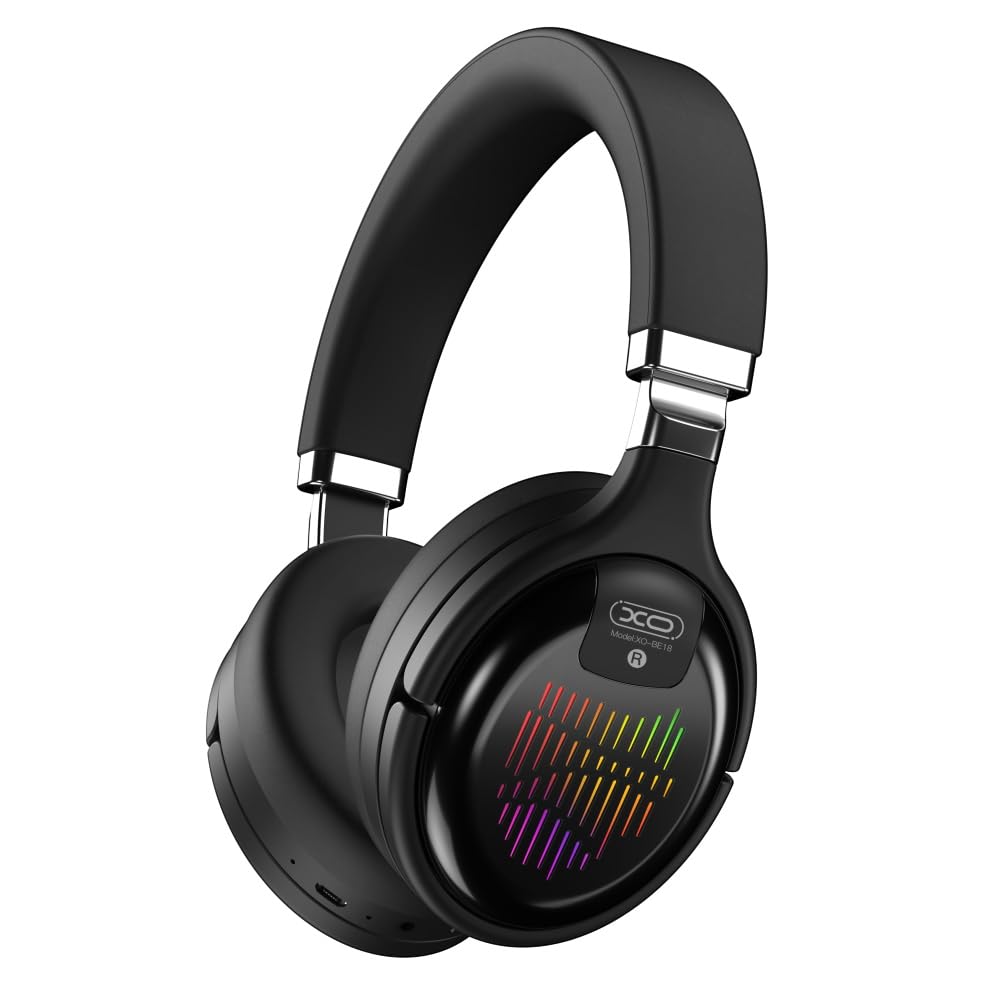
Image: The XO BE18 Wireless Bluetooth Headset, showcasing its over-ear design and integrated RGB lighting on the earcups.
Vsebina paketa
Prosimo, preverite, ali so v paketu prisotni vsi elementi:
- XO BE18 Wireless Bluetooth Headset
- Polnilni kabel
- Uporabniški priročnik (ta dokument)

Image: The XO BE18 headset shown within its retail packaging, indicating the included accessories.
Nastavitev
Polnjenje slušalk
- Poiščite vrata za polnjenje na slušalkah.
- Connect the provided charging cable to the headset and a compatible USB power source (e.g., computer USB port, USB wall adapter).
- The LED indicator on the headset will typically show a specific color (e.g., red) during charging and change (e.g., turn off or blue) when fully charged.
- Popolna napolnjenost traja približno 2.5 ure.
Vklop/izklop
- Za vklop: Press and hold the Power button for approximately 3-5 seconds until the LED indicator lights up and you hear an audible prompt.
- Za izklop: Pritisnite in držite gumb za vklop približno 3–5 sekund, dokler se LED indikator ne izklopi in ne zaslišite zvočnega opozorila.
Navodila za uporabo
Bluetooth združitev
- Prepričajte se, da so slušalke izključene.
- Press and hold the Power button for approximately 5-7 seconds until the LED indicator flashes rapidly (e.g., alternating blue and red), indicating pairing mode.
- V napravi (pametnem telefonu, tablici, računalniku) omogočite Bluetooth in poiščite razpoložljive naprave.
- Select "XO BE18" from the list of found devices.
- Once paired, the LED indicator will typically flash slowly or turn solid blue, and you will hear a confirmation tone.
Osnovne kontrole
The headset features various buttons for controlling audio playback and calls. Refer to the image below for button locations.

Slika: Bližnji posnetek view of the XO BE18 headset earcup, highlighting the control buttons and ports.
- Gumb za vklop: Pritisnite in držite za vklop/izklop. Kratek pritisk za predvajanje/začasno ustavitev glasbe ali sprejemanje/končanje klicev.
- Povečanje glasnosti (+): Kratek pritisk za povečanje glasnosti. Dolg pritisk za naslednjo skladbo.
- Znižaj glasnost (-): Kratek pritisk za zmanjšanje glasnosti. Dolg pritisk za prejšnjo skladbo.
- Gumb za način (M): Short press to switch between Bluetooth, AUX, TF card, and Radio modes.
RGB osvetlitev
The headset features integrated RGB lighting on the earcups. This lighting typically activates automatically when the headset is powered on. Specific controls for the RGB lighting (if any) may be integrated with the mode button or a dedicated button not explicitly detailed.

Image: The XO BE18 headset displaying its colorful RGB lighting on the earcups.
Uporaba mikrofona
The built-in microphone allows for hands-free calls. When a call comes in, press the Power button once to answer. Press again to end the call.
Način AUX
Connect an audio cable (not included) from your device's 3.5mm audio jack to the headset's AUX port to use it in wired mode. The headset does not require power in AUX mode.
Način kartice TF
Vstavite kartico TF (microSD) z zvokom files into the designated slot. Use the Mode button to switch to TF card mode.
Radijski način
Use the Mode button to switch to Radio mode. The headset will automatically scan for available FM radio stations.
Vzdrževanje
- Čiščenje: Za čiščenje slušalk uporabite mehko, suho krpo. Ne uporabljajte abrazivnih čistil ali topil.
- Shranjevanje: When not in use, store the headset in a cool, dry place. The headset features a portable folding design for compact storage.
- Vzdrževanje baterije: Da podaljšate življenjsko dobo baterije, se izogibajte pogostemu popolnemu praznjenju baterije. Slušalke redno polnite, tudi če jih ne uporabljate nenehno.
- Izpostavljenost vodi: Te slušalke niso vodoodporne. Izogibajte se izpostavljanju vodi ali prekomerni vlagi.

Image: The XO BE18 headset shown in its folded configuration, demonstrating its portable design.
Odpravljanje težav
| Težava | Možna rešitev |
|---|---|
| Slušalke se ne vklopijo. | Ensure the headset is fully charged. Connect to a power source and try again. |
| Seznanitev z napravo ni mogoča. |
|
| Ni zvoka ali nizka glasnost. |
|
| Mikrofon ne deluje. |
|
| RGB osvetlitev ne deluje. | Ensure the headset is powered on. If the issue persists, contact customer support. |
Specifikacije
| Funkcija | Podrobnost |
|---|---|
| Ime modela | BE18 |
| Povezljivost | Brezžično (Bluetooth V5.0) |
| Brezžično Domet | Približno 10 metrov |
| Avdio tehnologija | Hi-Fis Audio, Intelligent Noise Reduction |
| Namestitev ušesa | Na uho |
| Nadzor hrupa | Zvočna izolacija |
| Mikrofon | Vgradna |
| Kapaciteta baterije | 250 mAh |
| Čas predvajanja glasbe | Približno 4 ur |
| Čas klica | Približno 4 ur |
| Čas polnjenja | Približno 2.5 ur |
| Čas pripravljenosti | Long Standby Capability |
| Moč zvočnika | 3 mW |
| Občutljivost | 94 ± 3 dBm |
| Razmerje S/N | >=75dB |
| Delovna frekvenca | 20Hz-20KHz |
| Načini predvajanja | Bluetooth, AUX, TF Card, Radio |
| Protokoli Bluetooth | A2DP, HSP, HFP |
| Dimenzije (paket) | 195 x 195 x 80 mm |
| barva | Črna |

Image: A detailed table outlining the technical specifications and product information for the XO BE18 headset.
Garancija in podpora
This product comes with a standard manufacturer's warranty. For specific warranty terms and conditions, please refer to the warranty card included in your product packaging or contact the retailer where you purchased the product.
For technical support or further assistance, please contact your retailer or visit the official XO webspletno mesto (če je na voljo).