
1. Uvod
This manual provides essential instructions for setting up, operating, and maintaining your GOBOULT Mirage Smart Watch. Please read this manual thoroughly to ensure proper use and to maximize the features of your device.
2. Kaj je v škatli
- GOBOULT Mirage Smart Watch (Inox Steel)
- Polnilni kabel
- Uporabniški priročnik
- Garancijska kartica
3. Nastavitev
3.1 Začetno polnjenje
Before first use, fully charge your GOBOULT Mirage Smart Watch. Connect the provided charging cable to the charging port on the back of the watch and to a standard USB power adapter (not included).
3.2 Namestitev in seznanjanje aplikacij
- Scan the QR code in the user manual or search for the companion app (e.g., 'BoultFit' or similar, as per your watch's specific app) on your smartphone's app store (Android or iOS).
- Namestite in odprite aplikacijo.
- V pametnem telefonu omogočite Bluetooth.
- Follow the in-app instructions to search for and pair with your GOBOULT Mirage Smart Watch. Ensure the watch is powered on and discoverable.
3.3 Bluetooth Calling Setup
Če želite omogočiti funkcijo klicanja prek Bluetootha:
- After initial pairing, open your phone's Bluetooth settings.
- Look for a second Bluetooth device named 'GOBOULT Mirage_CALL' or similar and pair with it. This separate connection handles the call audio.
- Once connected, you can make and receive calls directly from your watch.

Image: The GOBOULT Mirage Smart Watch displaying an incoming call, highlighting its Bluetooth calling capabilities with a dedicated speaker and microphone.
4. Navodila za uporabo
4.1 Prikaz in navigacija
The GOBOULT Mirage features a 1.39-inch HD display with 360x360 pixel resolution and up to 500 nits brightness for clear visibility. Navigate the watch using the touchscreen and the digital crown.
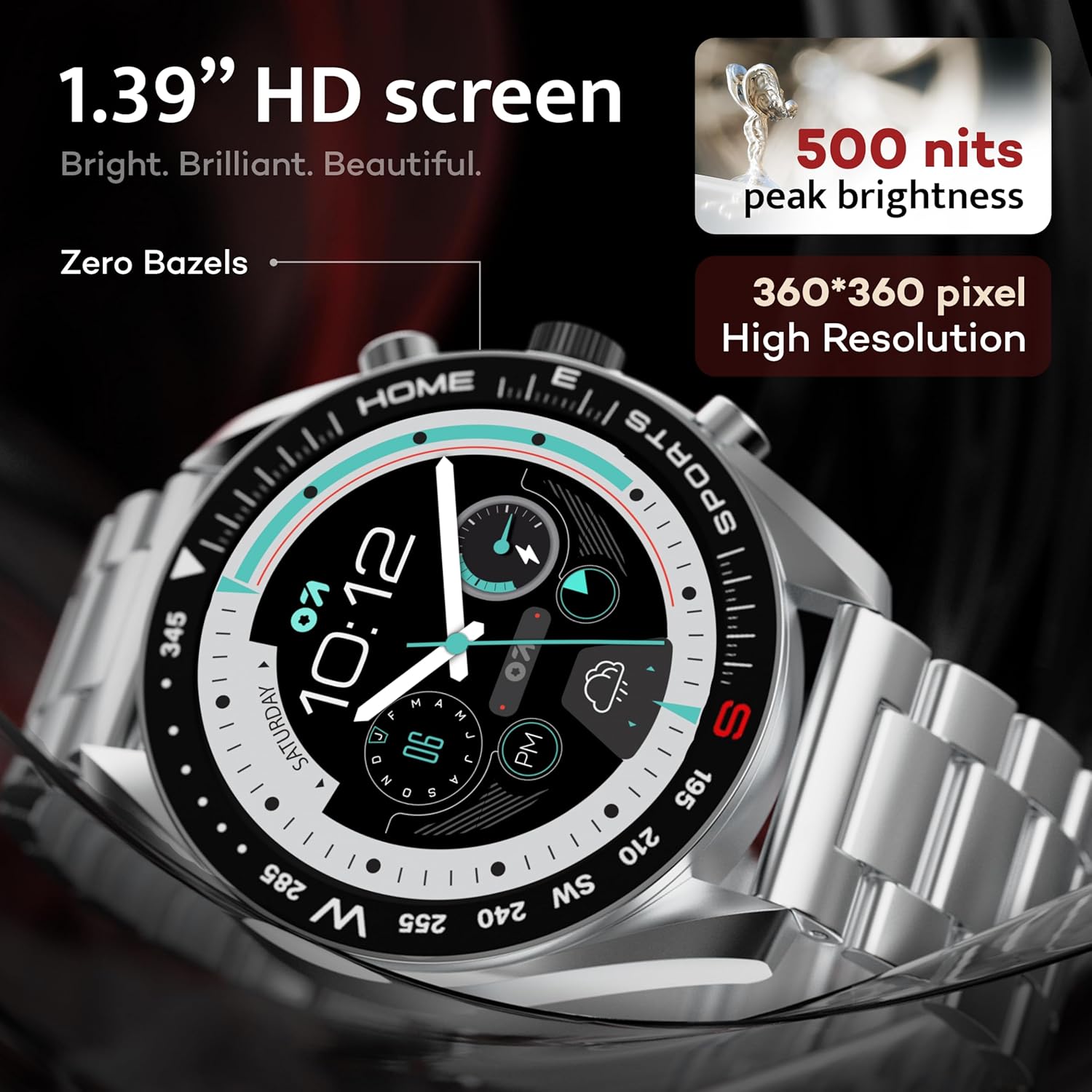
Image: Close-up of the GOBOULT Mirage Smart Watch display, showcasing its 1.39-inch HD screen with 500 nits peak brightness and 360x360 pixel resolution.
4.2 Digital Crown Functions
The digital crown provides intuitive control:
- Pritisnite in držite: Power On/Off, Sleep-wake.
- Zasukaj: Scroll through menus, adjust settings.
- Enkratni pritisk: Return to home screen, select items.
- Dvojni tisk: Switch UI or launch specific functions.

Image: The GOBOULT Mirage Smart Watch highlighting the digital crown and its associated functions like power control, voice assistant access, UI switching, and sports mode launch.
4.3 Številčnice
Customize your watch's appearance with over 300 cloud-based watch faces. Access and change watch faces through the companion app or directly on the watch by long-pressing the home screen.
4.4 športnih načinov
The watch supports over 120 sports modes to track various physical activities. Access sports modes from the main menu or via shortcut buttons for quick launch. Track metrics such as calories burned, distance, and heart rate during your workouts.

Image: The GOBOULT Mirage Smart Watch displaying various sports modes, including running, cycling, yoga, cricket, and badminton, indicating quick access via shortcut buttons.
4.5 Spremljanje zdravja
The GOBOULT Mirage Smart Watch offers comprehensive health tracking features:
- SpO2 Blood Oxygen Monitor: Meri raven kisika v krvi.
- Monitor srčnega utripa: 24/7 heart rate tracking.
- Monitor spanja: Spremlja vzorce in kakovost spanja.
- Merilnik krvnega tlaka: Zagotavlja odčitke krvnega tlaka.
- Breath Training Mode: Guides through breathing exercises.
- Opomnik za pitje vode: Spodbuja vas, da ostanete hidrirani.
- Sedeči opomnik: Alerts you after periods of inactivity.
- Sledenje dejavnosti: Beleži korake, razdaljo in porabljene kalorije.
- Sledenje menstrualnega ciklusa: Pomaga pri spremljanju menstrualnih ciklov.

Image: The back of the GOBOULT Mirage Smart Watch showing its sensors, alongside a list of health monitoring features including SpO2, heart rate, sleep, and activity tracking.
4.6 Pametna obvestila
Receive SMS and other smart notifications directly on your watch when connected to your smartphone. Manage notification settings through the companion app.
4.7 AI Voice Assistant & Find My Phone
- Glasovni pomočnik AI: Long press the side button to activate the intelligent AI voice assistant (compatible with Google Assistant and Siri) for hands-free control.
- Najdi moj telefon: If your paired phone is misplaced, use the 'Find Phone' feature on your watch. Navigate to the watch menu, select 'Find Phone', and your connected phone will ring or vibrate.

Image: The GOBOULT Mirage Smart Watch displaying the 'Find' screen, illustrating how to locate a connected smartphone by making it ring or vibrate.
4.8 Mini Games
The watch includes mini-games for entertainment. Access them through the watch's application menu.

Image: The GOBOULT Mirage Smart Watch displaying a selection of mini-games, including '2048', 'Battleship', 'Hamster', and 'Young Bird'.
5. Vzdrževanje
5.1 Vodoodpornost (IP67)
The GOBOULT Mirage Smart Watch is IP67 water-resistant, meaning it is protected against dust ingress and can withstand immersion in water up to 1 meter for 30 minutes. It is suitable for daily wear and activities like hand washing or light rain. Avoid prolonged immersion, hot water, or use during swimming/diving.

Image: The GOBOULT Mirage Smart Watch submerged in water, illustrating its IP67 water resistance for protection against water and dust.
5.2 Čiščenje
Uro in pašček redno obrišite z mehko, suho krpo. Za trdovratno umazanijo uporabite rahloamp krpo in nato temeljito posušite. Izogibajte se agresivnim kemikalijam ali abrazivnim materialom.
5.3 Nega traku
The watch comes with a stainless steel strap. Ensure the strap is clean and dry to prevent skin irritation. Use the provided metallic strap adjustment tool if you need to resize the strap.
6. Odpravljanje težav
- Ura se ne vklopi: Prepričajte se, da je ura popolnoma napolnjena.
- Seznanitev s telefonom ni mogoča: Ensure Bluetooth is enabled on both devices, the app is open, and the watch is discoverable. Try restarting both the watch and phone.
- Klicanje prek Bluetootha ne deluje: Confirm that both 'GOBOULT Mirage' and 'GOBOULT Mirage_CALL' (or similar) are paired in your phone's Bluetooth settings.
- Netočni zdravstveni podatki: Poskrbite, da bo ura tesno prilegala zapestju, ne pretesno ali preohlapno. Redno čistite senzorje.
- Kratka življenjska doba baterije: Zmanjšajte svetlost zaslona, onemogočite nepotrebna obvestila in omejite neprekinjeno spremljanje srčnega utripa, če ni potrebno.
7. Specifikacije
| Funkcija | Specifikacija |
|---|---|
| Ime modela | Mirage 8906133853457 |
| Zaslon | 1.39" HD Display, 360 x 360 Resolution, 500 Nits Brightness |
| Povezljivost | Bluetooth 5.3, App |
| Vodoodpornost | IP67 (Water Resistant up to 1 meter) |
| Material okvirja | Cinkova zlitina |
| Material traku | Nerjaveče jeklo |
| Vrsta baterije | Litijev polimer |
| Spremljanje zdravja | SpO2, Heart Rate, Sleep, Blood Pressure, Menstrual Cycle Tracking |
| Športni načini | 120+ (Badminton, Cricket, Cycling, Football, Running, etc.) |
| Glasovni pomočnik | AI Voice Assistant (Google Assistant, Siri) |
| Mere (D x Š x V) | 12 G x 28 Š x 46 V milimetrov |
| Teža predmeta | 106 gramov |
8. Garancija in podpora
8.1 Informacije o garanciji
Your GOBOULT Mirage Smart Watch comes with a 1-year manufacturer's warranty from the date of purchase. Please refer to the included Warranty Card for detailed terms and conditions.
8.2 Kontakt s proizvajalcem
For support, service, or warranty claims, please contact the manufacturer:
Exotic Mile Private Limited, Boult Audio
B-67 Wazirpur Industrial Area, New Delhi 110052