
1. Uvod
This manual provides detailed instructions for the FREEWOLF M68 60% Wireless Gaming Keyboard. Please read this manual carefully before using the product to ensure proper operation and longevity.

Figure 1: FREEWOLF M68 Wireless Gaming Keyboard (Shimmer color variant)
2. Izdelek je končanview
Ključne značilnosti:
- Tri-modalna povezljivost: Supports wired (USB-C), 2.4GHz wireless, and Bluetooth 5.0 connections.
- Združljivost z več napravami: Connects to Windows, Mac, Linux, PC, Laptop, iPad, iOS, and Android devices.
- Kompaktna 60-odstotna postavitev: Features 67 keys, optimizing desktop space.
- PBT tipkovnice: Durable Polybutylene Terephthalate keycaps with clear legends.
- Rainbow LED Backlighting: Offers constant and breathing modes with adjustable brightness and speed.
- Dolgotrajna baterija: Built-in 2000mAH battery provides extended usage.
- Ergonomska oblika: Double leg braces allow for three adjustable typing angles.
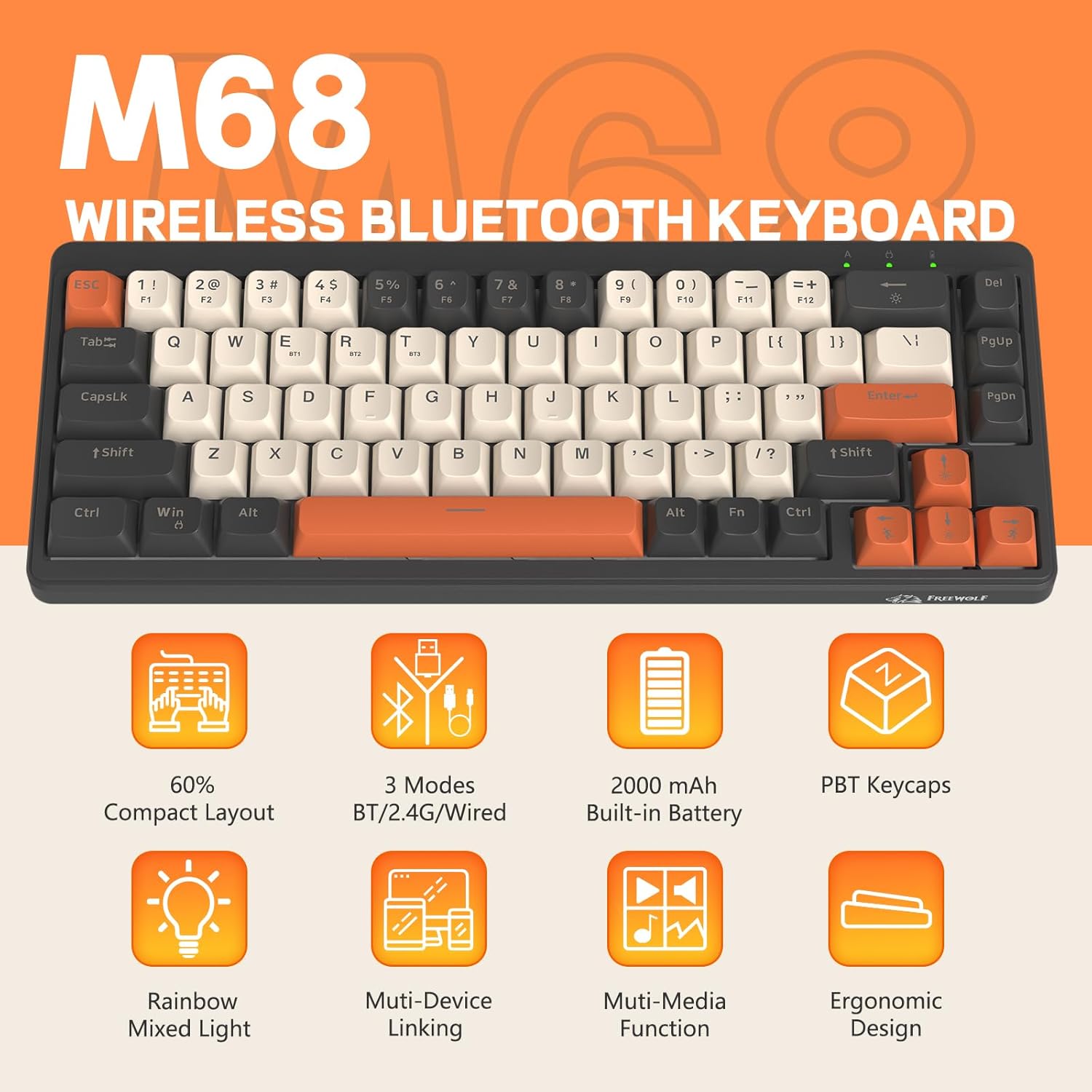
Slika 2: Konecview of FREEWOLF M68 key features.
3. Nastavitev in povezava
3.1. Tri-Mode Connection Overview
The M68 keyboard supports three connection methods: wired via USB-C, 2.4GHz wireless via a USB receiver, and Bluetooth 5.0. You can switch between these modes using the dedicated switch on the keyboard.

Slika 3: Podrobno view of the 3-mode connection options.
3.2. Žična povezava
- Poiščite vrata USB-C na tipkovnici.
- Priloženi kabel USB-C priključite na tipkovnico, drugi konec pa na vrata USB na računalniku.
- Ensure the mode switch on the keyboard is set to the wired (USB) position.
- Vaš sistem bo tipkovnico samodejno prepoznal.
3.3. Brezžična povezava 2.4 GHz
- Locate the 2.4GHz USB receiver (often stored in a compartment on the keyboard).
- USB-sprejemnik priključite v razpoložljiva vrata USB na vašem računalniku.
- Set the mode switch on the keyboard to the 2.4GHz wireless position.
- Tipkovnica bi se morala povezati samodejno. Če se ne, pritisnite FN + R za začetek seznanjanja.
3.4. Bluetooth povezava
The M68 can connect to up to three Bluetooth devices simultaneously.
- Set the mode switch on the keyboard to the Bluetooth position.
- To enter pairing mode for a specific channel (BT1, BT2, or BT3), press and hold FN + Q (za BT1), FN + W (za BT2) ali FN + E (for BT3) until the corresponding indicator light flashes rapidly.
- On your device (PC, laptop, tablet, phone), open Bluetooth settings and search for "FREEWOLF M68".
- Izberite tipkovnico za seznanjanje. Ko je povezava vzpostavljena, bo indikatorska lučka začela neprekinjeno svetiti.
- Za preklapljanje med seznanjenimi napravami Bluetooth pritisnite FN + Q/W/E na kratko.
4. Delovanje
4.1. Nadzor osvetlitve ozadja
The M68 features customizable rainbow LED backlighting.
- FN + Vračalka: Toggle backlight on/off or switch between constant and breathing modes.
- FN + puščica levo: Zmanjšajte hitrost osvetlitve ozadja.
- FN + puščica desno: Povečajte hitrost osvetlitve ozadja.
- FN + puščica gor: Povečajte svetlost osvetlitve ozadja.
- FN + puščica navzdol: Zmanjšajte svetlost osvetlitve ozadja.

Figure 4: Backlight adjustment key combinations.
4.2. Ergonomska prilagoditev
The keyboard includes double leg braces on the back to adjust the typing angle for comfort.
- Flip the keyboard over to access the leg braces.
- Prilagodite dva-stage leg braces to achieve your preferred typing angle (flat, one stage, or two stages).

Figure 5: Ergonomic angle adjustments.
4.3. Upravljanje baterije
The keyboard has a built-in 2000mAH rechargeable battery.
- Polnjenje: Connect the keyboard via the USB-C cable to a power source (computer USB port or wall adapter). The charging indicator will show status.
- Življenjska doba baterije: Up to 60 hours with backlight on, and up to 200 hours with backlight off.
- Varčevanje z energijo: The keyboard will enter sleep mode after a period of inactivity to conserve battery. Press any key to wake it up.

Figure 6: Battery capacity information.
5. Vzdrževanje
- Čiščenje: Use a soft, dry cloth to clean the keyboard surface. For keycaps, you may use a slightly damp krpo. Izogibajte se prekomerni vlagi.
- Odstranitev tipkovnice: If necessary, use a keycap puller to carefully remove PBT keycaps for deeper cleaning or replacement.
- Shranjevanje: Tipkovnico shranjujte na hladnem in suhem mestu, stran od neposredne sončne svetlobe in ekstremnih temperatur.
- Izogibajte se tekočinam: Do not expose the keyboard to liquids to prevent damage to internal components.
6. Odpravljanje težav
| Težava | Možen vzrok | rešitev |
|---|---|---|
| Tipkovnica se ne odziva (žična) | Ohlapna kabelska povezava, napačen način. | Ensure USB-C cable is securely connected. Check if the mode switch is set to wired. Try a different USB port. |
| Keyboard not responding (2.4GHz) | USB receiver not connected, incorrect mode, pairing issue. | Ensure USB receiver is plugged in. Set mode switch to 2.4GHz. Re-pair by pressing FN + R. Try a different USB port for the receiver. |
| Tipkovnica se ne odziva (Bluetooth) | Not paired, incorrect mode, device Bluetooth off. | Ensure device Bluetooth is on. Set mode switch to Bluetooth. Enter pairing mode (FN + Q/W/E) and re-pair. Forget the device on your system and re-pair. |
| Osvetlitev ozadja ne deluje ali je zataknjena | Backlight off, low battery, software glitch. | Pritisnite FN + vračalka to toggle. Charge the keyboard. Try resetting the keyboard (refer to advanced functions if available, or disconnect/reconnect). |
| Tipke se ne registrirajo ali tipkajo dvakrat | Dust/debris under keycap, switch issue. | Carefully remove keycap and clean. If issue persists, contact support. |
7. Specifikacije
| Model | M68 |
| Znamka | BREZPLAČNI VOLK |
| Povezljivost | Žično (USB-C), 2.4 GHz brezžično, Bluetooth 5.0 |
| Postavitev tipk | 60 % (67 tipk) |
| Material ključavnice | PBT (polibutilen tereftalat) |
| Osvetlitev ozadja | Rainbow LED (RGB) |
| Kapaciteta baterije | 2000 mAH |
| Združljive naprave | Laptop, PC, Tablet (Windows, Mac, Linux, iOS, Android) |
| Dimenzije izdelka | 32.51 x 12.5 x 3.99 cm |
| Teža | 600 g |
| Posebne lastnosti | Ergonomic (adjustable angles), Backlit |
8. Garancija in podpora
For warranty information, technical support, or customer service inquiries, please refer to the contact information provided with your purchase or visit the official FREEWOLF webmesto.
Prosimo, shranite dokazilo o nakupu za morebitne garancijske zahtevke.