
1. Uvod
This instruction manual provides essential information for the safe and effective use of your GT POWER AC Adapter, model 602. This power supply is designed to be compatible with the Verizon WNC-CR200A Gateway Router. Please read this manual thoroughly before use and retain it for future reference.
2. Varnostne informacije
OPOZORILO: Za zmanjšanje tveganja električnega udara, požara ali poškodb upoštevajte naslednje varnostne ukrepe:
- Ensure the power adapter is used with devices that match its voltage in trenutne specifikacije.
- Adapterja ne izpostavljajte vodi, dežju ali prekomerni vlagi.
- Ne razstavljajte ali spreminjajte adapterja. Vsa servisna dela prepustite usposobljenemu osebju.
- Avoid placing the adapter in areas with poor ventilation or near heat sources.
- Inspect the adapter and cable for damage before each use. Do not use if damaged.
- Hraniti izven dosega otrok.
- Ko adapterja dalj časa ne uporabljate, ga izključite iz električne vtičnice.
Ta adapter ima funkcijo Over Voltage Protection (OVP), Over Current Protection (OCP), and Short Circuit Protection (SCP) to ensure safe operation.
3. Vsebina paketa
- 1 x GT POWER AC Adapter (Model 602)
4. Izdelek je končanview
The GT POWER AC Adapter is a compact and reliable power supply designed for specific networking equipment. It converts standard AC wall power to the DC power required by your device.

Slika 4.1: Spredaj view of the GT POWER AC Adapter, showing the power prongs and the output cable.

Slika 4.2: Stran view of the GT POWER AC Adapter, highlighting the barrel connector at the end of the output cable.
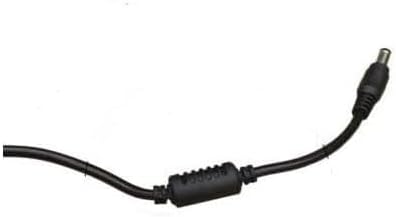
Slika 4.3: Od blizu view of the barrel connector, which plugs into the compatible device.
5. Nastavitev
Follow these steps to properly connect your GT POWER AC Adapter to your Verizon WNC-CR200A Gateway Router.
- Preverite združljivost naprave: Before connecting, ensure your device is a Verizon WNC-CR200A Gateway Router. The adapter is specifically designed for this model. You can often find the model number on a label at the bottom or back of your router.

Slika 5.1: Example of a Verizon WNC-CR200A Gateway Router's bottom label, indicating the model number for compatibility verification.
- Povežite se z napravo: Insert the barrel connector of the GT POWER AC Adapter firmly into the power input port of your Verizon WNC-CR200A Gateway Router.
- Priključite na električno vtičnico: Plug the AC prongs of the adapter into a standard 100-240V AC wall outlet.
- Vklop: Once connected, your Verizon WNC-CR200A Gateway Router should power on automatically or can be turned on using its power button, if available.
6. Delovanje
The GT POWER AC Adapter operates automatically once connected. It provides a stable power supply to your compatible device. No user interaction is required for its operation beyond initial connection.
- Ensure the adapter is always connected to a functioning power outlet.
- Avoid disconnecting the adapter during critical operations of your router to prevent data loss or system instability.
7. Vzdrževanje
Pravilno vzdrževanje zagotavlja dolgo življenjsko dobo in varno delovanje vašega napajalnika.
- Čiščenje: Pred čiščenjem izključite adapter iz električne vtičnice in naprave. Za brisanje zunanjosti uporabite mehko, suho krpo. Ne uporabljajte tekočih čistil ali topil.
- Shranjevanje: Ko adapterja ne uporabljate, ga shranjujte na hladnem in suhem mestu, stran od neposredne sončne svetlobe in ekstremnih temperatur. Da preprečite poškodbe, kabla ne zvijajte pretesno.
- Skrb za kabel: Kabla ne upogibajte, zvijajte ali vlecite prekomerno. Na kabel ne postavljajte težkih predmetov.
8. Odpravljanje težav
If you encounter issues with your GT POWER AC Adapter, refer to the following common problems and solutions:
| Težava | Možen vzrok | rešitev |
|---|---|---|
| Naprava se ne vklopi. |
|
|
| Adapter je nenavadno vroč. |
|
|
9. Specifikacije
| Funkcija | Podrobnost |
|---|---|
| Številka modela | 602 |
| Znamka | GT POWER |
| Vhodna voltage | AC 100-240 V (50/60 Hz) |
| Izhodna voltage | DC 12V |
| Izhodni tok | 3A |
| Wattage | 36 vatov |
| Vrsta priključka | Barrel |
| Dolžina kabla | 59 palcev (približno 1.5 metra) |
| Zaščitne funkcije | OVP (nad voltag(zaščita e), OCP (zaščita pred preobremenitvijo), SCP (zaščita pred kratkim stikom) |
| Združljive naprave | Verizon WNC-CR200A Gateway Router CR200A WiFi6 NKR-LV65C-T3 |
10. Garancija in podpora
This GT POWER AC Adapter comes with a Enoletna garancija od datuma nakupa. Poleg tega 30-dnevna garancija vračila denarja je ponujeno.
For technical support, warranty claims, or further assistance, please contact your retailer or the manufacturer directly. Please have your purchase information and product model number (602) available when contacting support.
For more information, you may refer to the seller's contact details provided at the point of purchase.