1. Uvod
This manual provides detailed instructions for the installation, operation, and maintenance of your 10.25 Inch Car Touchscreen Wireless CarPlay Android Auto multimedia receiver. This unit is designed to enhance your driving experience with advanced navigation, communication, and entertainment features.
2. Združljivost
This multimedia player is specifically designed for BMW X1 F48 models from 2017-2020 with an EVO ID6 system and a 6-pin LVDS plug. Before installation, it is crucial to confirm your vehicle's original system type to ensure proper compatibility.
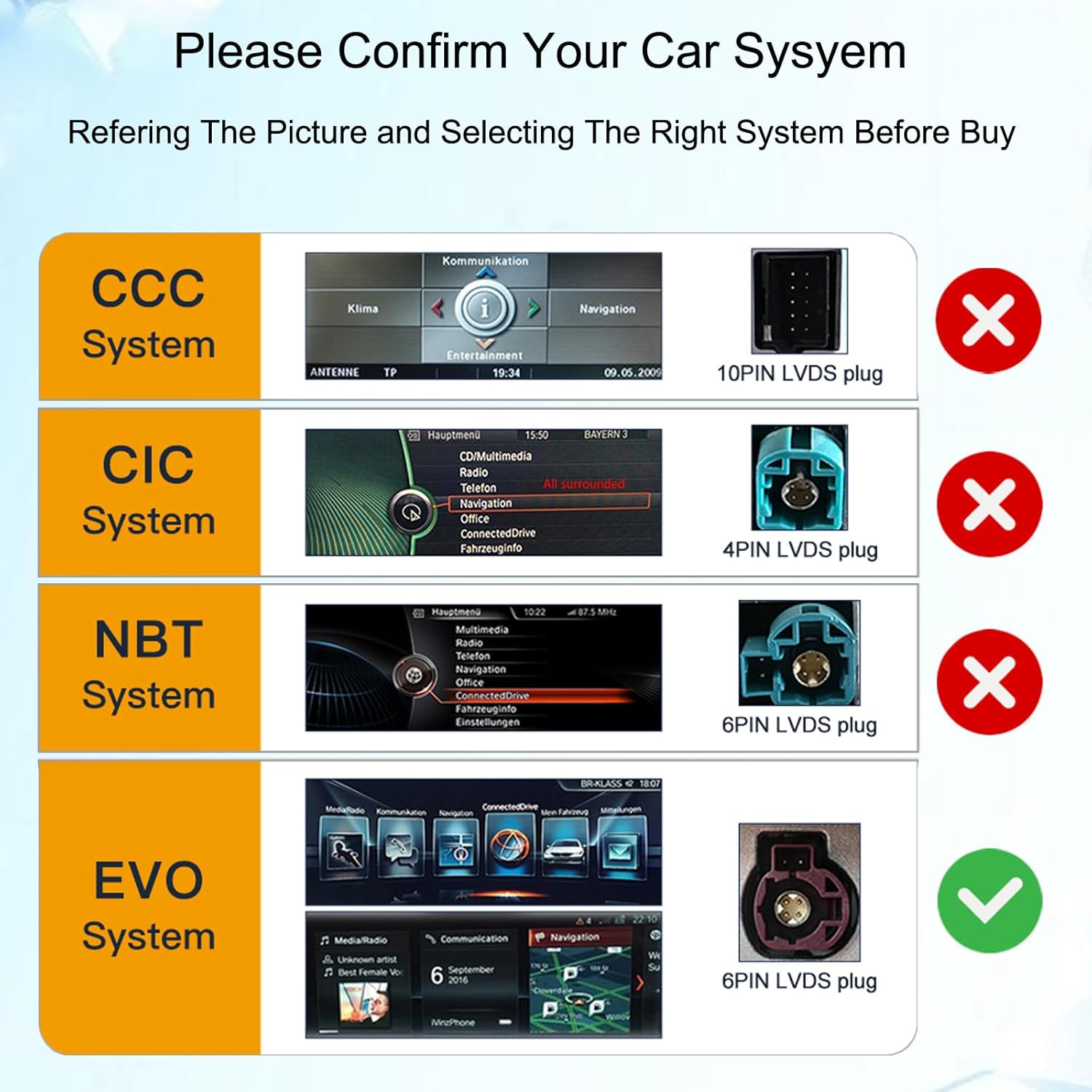
Image: Confirm your car's system type by referring to the provided diagram and LVDS plug configurations. Ensure your vehicle has an EVO system with a 6-pin LVDS plug.
3. Ključne značilnosti
- 10.25 Inch HD Touchscreen: Replaces the factory OEM screen with a high-definition capacitive full touch screen (1920x720 resolution).
- Brezžični Apple CarPlay in Android Auto: Brezhibna integracija s pametnim telefonom za navigacijo, klice, sporočila in glasbo.
- Operacijski sistem Android 14: Provides access to a wide range of applications via Google Play.
- Vgrajena GPS navigacija: Supports online and offline maps (e.g., Google Maps, Waze, iGO).
- Bluetooth povezljivost: For hands-free calls and wireless music streaming.
- HD Video Player: Supports various video formats for clear playback.
- Built-in DSP Processor: Enhances audio quality with multi-dimensional surround sound.
- Original System Functionality Retention: Maintains original car radio, amplifier, joystick control, and camera functions.
- Funkcionalnost razdeljenega zaslona: Allows simultaneous display of two applications.

Slika: Konecview of the product's main features, including wireless connectivity and core system specifications.

Image: Demonstrates advanced features such as split-screen display and compatibility with existing vehicle controls and cameras.
4. Vsebina paketa
Preverite, ali so v vašem paketu priloženi vsi spodaj navedeni elementi:
- 1 x Avtomobilski multimedijski predvajalnik
- 1 x Microphone (MIC)
- 1 x napajalni kabel
- 1 x 4G antena
- 1 x GPS antena
- 1 x USB kabel
- 1 x AUX kabel
- 1 x plastična podlaga
- 2 x Vijaki
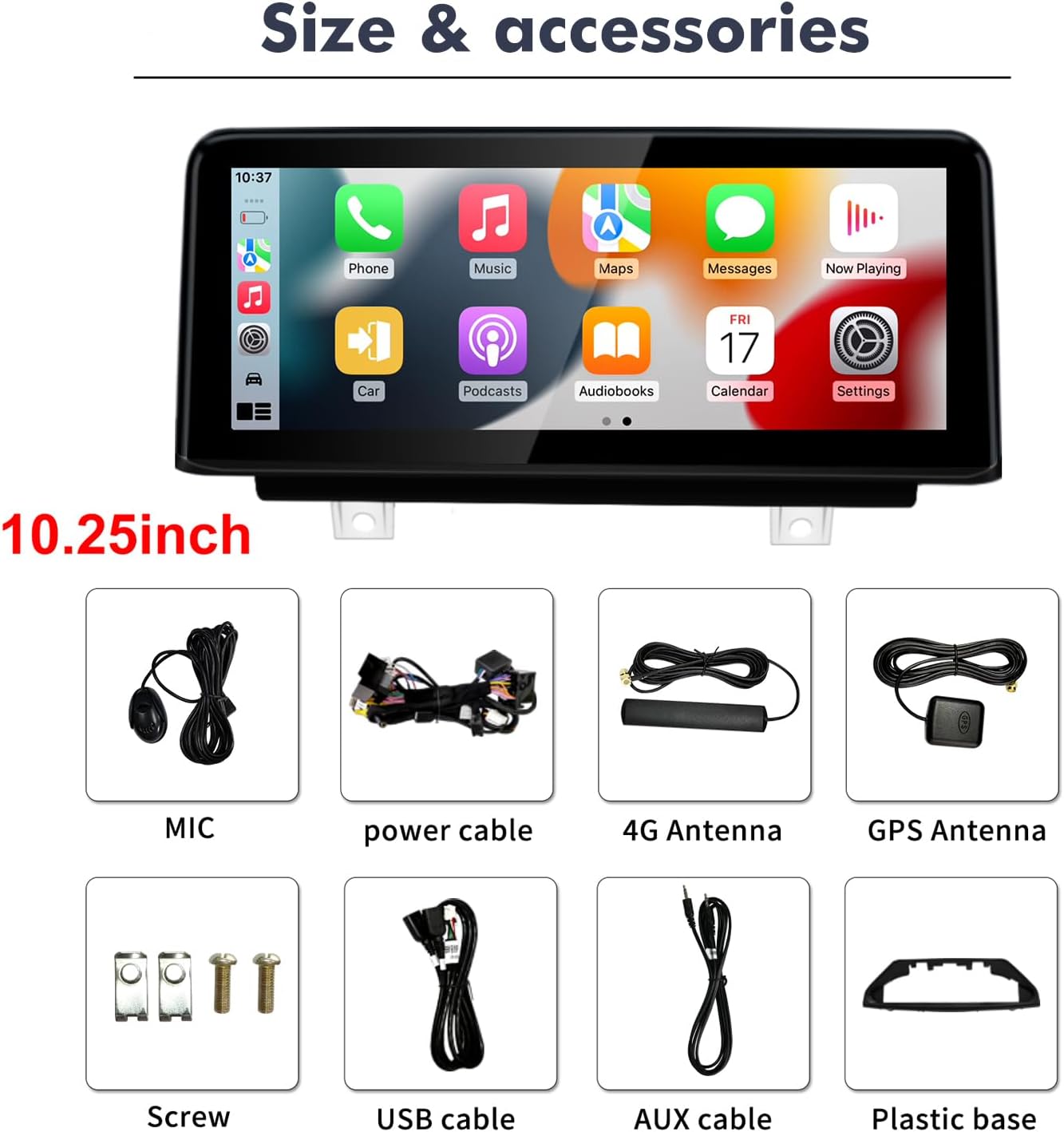
Slika: Vse komponente so vključene v paket izdelka.
5. Nastavitev in namestitev
Installation of this car multimedia player requires technical knowledge. It is recommended to seek professional installation to avoid damage to the unit or your vehicle. Ensure the vehicle's ignition is off and the battery is disconnected before beginning installation.
- Priprava: Confirm your car's system (EVO ID6 with 6-pin LVDS) matches the unit's compatibility. Gather necessary tools.
- Remove Original Screen: Carefully remove the existing car screen and trim panels as per your vehicle's service manual.
- Povežite ožičenje: Connect the provided power cable, LVDS cable, USB cable, AUX cable, 4G antenna, and GPS antenna to the new multimedia player and the vehicle's wiring harness. Ensure all connections are secure and correct.
- Montaža nove enote: Install the new 10.25-inch touchscreen unit into the dashboard opening, securing it with the provided screws and plastic base.
- Testna funkcionalnost: Before reassembling all trim panels, reconnect the battery and test all functions of the new unit, including power, touch response, audio, CarPlay/Android Auto, GPS, and original system functions.
- Ponovno sestavite: Once all functions are confirmed, carefully reassemble all removed trim panels.

Image: Visual comparison of the dashboard before and after the multimedia player installation.
6. Navodila za uporabo
6.1 Brezžični CarPlay / Android Auto
- Prepričajte se, da sta Bluetooth in Wi-Fi na vašem pametnem telefonu omogočena.
- On the car unit, navigate to the CarPlay or Android Auto application.
- Follow the on-screen prompts to pair your phone. Once paired, your phone's interface will be mirrored on the car screen, allowing access to navigation, calls, messages, and music.
6.2. GPS navigacija
- Access the Navigation app from the main menu.
- You can use pre-installed maps or download additional navigation apps from the Google Play Store.
- For offline navigation, download map data to the unit's storage in advance.
6.3. Bluetooth Calls and Music
- Pojdite v nastavitve Bluetooth na enoti.
- Omogočite Bluetooth in poiščite razpoložljive naprave.
- Select your phone from the list and pair it.
- Once connected, you can make/receive calls using the external microphone and stream audio from your phone.
6.4. Predvajanje večpredstavnostnih vsebin
- The unit supports various audio and video formats.
- Play media from USB drives, internal storage, or streaming apps.
- Use the built-in DSP for audio adjustments to optimize sound quality.
7. Specifikacije
| Funkcija | Specifikacija |
|---|---|
| Operacijski sistem | Android 14 |
| Velikost zaslona | 10.25 palcev |
| Ločljivost zaslona | 1920*720 |
| Pomnilnik (RAM+ROM) | 8 GB RAM + 64 GB ROM |
| Povezljivost | Bluetooth, Wi-Fi, 4G (prek antene) |
| Posebne lastnosti | Built-In Bluetooth, Touchscreen, Wireless CarPlay, Android Auto, GPS, DSP |
| Združljive naprave | Pametni telefon |
| Nadzorna metoda | Dotik |
| Številka modela | 8581 8+64GB |
8. Odpravljanje težav
- Brez napajanja: Check all power cable connections. Ensure the vehicle's ignition is on. Verify the fuse.
- Ni zvoka: Check speaker connections. Ensure the volume is not muted or set too low. Verify audio output settings. If using original amplifier, ensure it's properly integrated.
- CarPlay/Android Auto se ne povezuje: Ensure Bluetooth and Wi-Fi are enabled on your phone and the unit. Try restarting both devices. Confirm your phone's operating system is up to date.
- Izgubljen GPS signal: Prepričajte se, da je antena GPS pravilno nameščena in ima jasen view of the sky. Check GPS settings on the unit.
- Zaslon na dotik se ne odziva: Try restarting the unit. If the issue persists, contact support.
- Original Functions Not Working: Double-check all LVDS and CANBUS connections. Ensure the unit is correctly configured to retain original car functions.
9. Vzdrževanje
- Čiščenje: Za čiščenje zaslona in enote uporabite mehko, suho krpo. Izogibajte se abrazivnim čistilom ali topilom.
- Posodobitve programske opreme: Redno preverjajte posodobitve programske opreme, da zagotovite optimalno delovanje in dostop do novih funkcij.
- Okoljski pogoji: Izogibajte se izpostavljanju enote ekstremnim temperaturam, neposredni sončni svetlobi dlje časa ali prekomerni vlagi.
10. Garancija in podpora
This product comes with a 30-day Money-Back guarantee, 12-month Replacement warranty, and Lifetime Technical Support. Most issues can be resolved through correct cable connection and settings. If you encounter any problems during installation or use, please contact customer support for assistance. We aim to respond within 24 hours to help resolve your issue.


