
1. Uvod
Thank you for choosing the Mesqool CR1025 Clock Radio. This device combines an alarm clock, Bluetooth speaker, FM radio, night light, and phone charger into one compact unit. This manual provides detailed instructions for setup, operation, and maintenance to ensure optimal performance and user experience.

Figure 1: Mesqool CR1025 Clock Radio
2. Izdelek je končanview
2.1 Ključne lastnosti
- Večnamenska zasnova: Alarm Clock, Bluetooth Speaker, FM Radio, Night Light, and Phone Charger.
- Bluetooth 5.0: For stable and quick wireless audio streaming.
- FM radio: 87.5MHz-108.0MHz frequency range with 20 preset stations.
- Nastavljiva svetlost: 5 levels for the LED display.
- Nastavljiva glasnost: 16 levels (45dB to 116dB).
- Časovnik spanja: Allows automatic shutdown of audio playback.
- Funkcija dremeža: 9-minute delay for alarms.
- Varnostno kopiranje baterije: Retains time and alarm settings during power outages.
- Dvojna vrata USB za polnjenje: Type-C and USB-A for device charging.
- Format časa: 12-hour and 24-hour display options.
- Poletni čas (DST): Quick adjustment feature.

Slika 2: Funkcionalnost 5-v-1
2.2 Vsebina paketa
- Mesqool CR1025 Clock Radio
- Napajalni adapter
- USB kabel
- CR2032 Lithium Battery (pre-installed or separate for backup)
- Uporabniški priročnik (ta dokument)

Slika 3: Vsebina paketa
3. Krmilniki in zaslon
Familiarize yourself with the buttons and ports on your Mesqool CR1025 Clock Radio.
3.1 Kontrolniki na zgornji plošči
- Sleep Timer Knob: Rotate to set sleep timer duration. Press to confirm.
- Alarmni gumb: Pritisnite za nastavitev ali vklop/izklop alarmov.
- Time/12/24 Button: Press to set time. Hold to switch between 12/24-hour format.
- Dimmer/DST Button: Press to adjust display brightness. Hold to activate/deactivate Daylight Saving Time.
- Gumb DREMEST/LUČKA: Press to snooze alarm or turn night light on/off.
- Preset/Pair Button: Press to cycle through FM presets. Hold to enter Bluetooth pairing mode.
- Play/Mode Button: Press to play/pause in Bluetooth mode. Hold to switch between FM/Bluetooth modes.
- Power/Scan Knob: Rotate to adjust volume. Press to power on/off. Hold to auto-scan FM stations.
3.2 Priključki na zadnji plošči
- DC IN: Vhod za napajanje.
- Izhod USB-A: Za polnjenje zunanjih naprav.
- Izhod tipa C: Za polnjenje zunanjih naprav.
4. Nastavitev
4.1 Napajalni priključek
- Priključite napajalnik v vrata DC IN na zadnji strani radio ure.
- Priključite napajalnik v standardno stensko vtičnico. Zaslon se bo prižgal.

Slika 4: Napajalni priključek
4.2 Rezervna baterija
The CR2032 battery provides backup for time and alarm settings during a power outage. The display will not show time, and alarms will not sound until power is restored.
- Ensure the battery insulator tab is removed if the battery was pre-installed.
- If replacing, open the battery compartment on the bottom and insert a new CR2032 battery with the correct polarity.
4.3 Nastavitev časa
- Pritisnite in držite Time/12/24 gumb, dokler ne utripajo številke za uro.
- Zavrtite Napajanje/Skeniranje gumb za nastavitev ure.
- Pritisnite Time/12/24 button again to confirm the hour, and the minute digits will flash.
- Zavrtite Napajanje/Skeniranje gumb za nastavitev minut.
- Pritisnite Time/12/24 button to save the time setting.
4.4 12/24-urni format
Za preklop med 12-urnim in 24-urnim formatom časa pritisnite Time/12/24 medtem ko je prikazan čas, na kratko pritisnite gumb .

Figure 5: 12H/24H and DST Display
4.5 Poletni čas (DST)
To activate or deactivate DST, press and hold the Dimmer/DST button. The 'DST' indicator will appear or disappear on the display.
5. Navodila za uporabo
5.1 Nastavitev alarma
- Pritisnite in držite Alarm gumb, dokler ne utripajo številke ure budilke.
- Zavrtite Napajanje/Skeniranje gumb za nastavitev ure budilke.
- Pritisnite Alarm button again to confirm the hour, and the minute digits will flash.
- Zavrtite Napajanje/Skeniranje gumb za nastavitev minut alarma.
- Pritisnite Alarm gumb za shranjevanje časa alarma.
- Za vklop/izklop alarma pritisnite Alarm na kratko pritisnite gumb. Na zaslonu se bo prikazala/izginila ikona alarma.
5.2 Funkcija dremeža
Ko se oglasi alarm, pritisnite tipko SNOOZE / LUČ button to activate the 9-minute snooze function. The alarm will sound again after 9 minutes. This can be repeated up to 9 times. To stop the alarm completely, press the Alarm gumb.

Slika 6: Funkcija dremeža
5.3 Delovanje FM-radia
- Pritisnite Play/Mode gumb za preklop v način FM radia.
- Samodejno skeniranje: Pritisnite in držite Napajanje/Skeniranje knob to automatically scan and save available FM stations (up to 20 presets).
- Ročna nastavitev: Briefly rotate the Napajanje/Skeniranje knob to fine-tune the frequency.
- Izberite prednastavitve: Pritisnite Preset/Pair za preklapljanje med shranjenimi postajami.
- Prilagoditev glasnosti: Zavrtite Napajanje/Skeniranje knob to adjust the volume (16 levels).

Figure 7: FM Radio Features
5.4 Delovanje Bluetooth zvočnika
- Pritisnite Play/Mode button to switch to Bluetooth mode. The 'BT' icon will flash on the display.
- On your mobile device, enable Bluetooth and search for 'CR1025'.
- Select 'CR1025' to pair. Once connected, the 'BT' icon will stop flashing.
- Play audio from your device. Use the Play/Mode gumb za predvajanje / premor.
- Prilagoditev glasnosti: Zavrtite Napajanje/Skeniranje gumb za nastavitev glasnosti.

Slika 8: Povezljivost Bluetooth 5.0
5.5 Delovanje nočne lučke
Pritisnite SNOOZE / LUČ button to turn the night light on or off. The night light provides a soft, warm glow.

Figure 9: Warm Night Light
5.6 Prilagoditev svetlosti zaslona
Pritisnite Dimmer/DST button repeatedly to cycle through 5 levels of display brightness, from off to brightest.
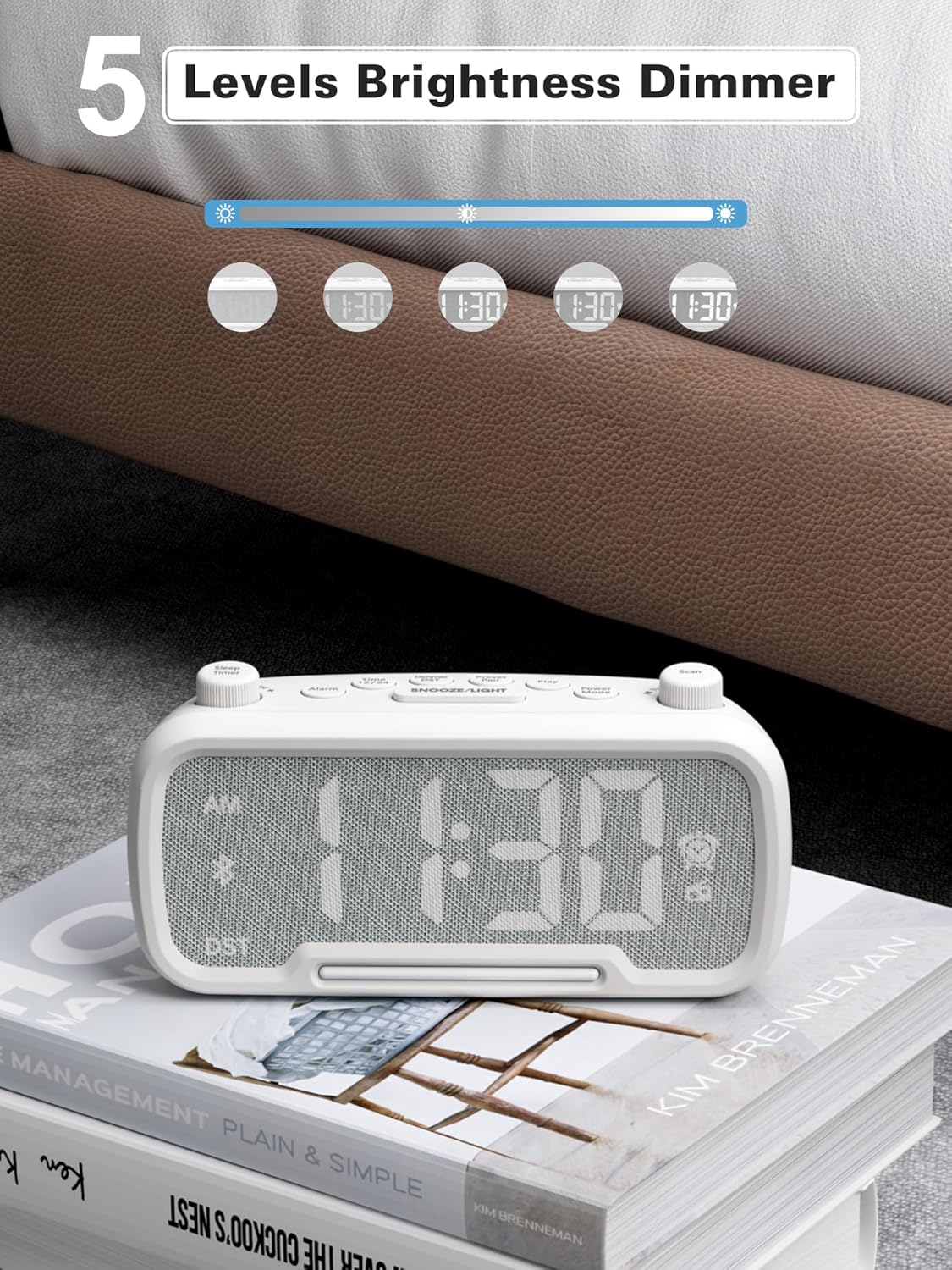
Figure 10: 5 Levels Brightness Dimmer
5.7 Časovnik za spanje
The sleep timer allows you to set a duration after which the radio or Bluetooth audio will automatically turn off.
- While playing FM radio or Bluetooth audio, rotate the Časovnik za izklop knob to select the desired sleep duration (e.g., 15, 30, 60, 90 minutes).
- The display will show the remaining sleep time. The audio will turn off automatically when the timer expires.
5.8 Polnjenje telefona
The clock radio features two USB charging ports (Type-C and USB-A) for convenient charging of your mobile devices.
- Connect your device's charging cable to either the USB-A or Type-C port on the back of the clock radio.
- Drugi konec kabla priključite na mobilno napravo. Polnjenje se bo začelo samodejno.

Figure 11: Dual USB Charging Ports
6. Vzdrževanje
- Napravo očistite z mehko, suho krpo. Ne uporabljajte abrazivnih čistil ali topil.
- Napravo hranite stran od neposredne sončne svetlobe, virov toplote in vlage.
- Zagotovite ustrezno prezračevanje okoli enote.
- Če enote ne boste uporabljali dlje časa, jo izključite iz električne vtičnice.
7. Odpravljanje težav
| Težava | Možen vzrok | rešitev |
|---|---|---|
| Ni napajanja/zaslon izklopljen | Napajalnik ni priključen ali je pokvarjen. | Ensure power adapter is securely plugged into the unit and wall outlet. Check outlet functionality. |
| Alarm se ne oglasi | Alarm ni aktiviran ali je napačno nastavljen. | Verify alarm time is set and the alarm icon is visible on the display. Check alarm volume. |
| Slab FM radijski sprejem | Šibek signal ali motnje. | Adjust the unit's position. Try auto-scanning again. |
| Bluetooth se ne seznani | Device not in pairing mode or too far. | Ensure the clock radio is in Bluetooth mode (BT icon flashing). Move device closer. Forget device on phone and re-pair. |
| USB polnjenje ne deluje | Cable faulty or device incompatible. | Try a different USB cable. Ensure the clock radio is powered on. |
8. Specifikacije
- Model: CR1025
- Vhodna moč: AC 100-240V, 50/60Hz
- Varnostno kopiranje baterije: 1 x CR2032 (priložen)
- FM frekvenca: 87.5 - 108.0 MHz
- Različica Bluetooth: 5.0
- USB izhod: USB-A, Type-C (Charging only)
- Svetlost zaslona: 5 ravni
- Stopnje glasnosti: 16 stopenj (45 dB - 116 dB)
- Dimenzije: 5.9 x 3.81 x 8.4 cm (2.32 x 1.5 x 3.31 palca)
- Teža: 216 g (0.48 lbs)
Slika 12: Dimenzije izdelka
9. Garancija in podpora
Mesqool products are designed and manufactured to the highest quality standards. For warranty information, technical support, or customer service inquiries, please refer to the contact information provided on the product packaging or visit the official Mesqool webmesto.
Webspletno mesto: Mesqool Official Store