
1. Uvod
This manual provides essential instructions for the safe and efficient use of your DALI IO-8 Wireless/Wired Hi-Fi Headphones. Please read this manual thoroughly before using the product and retain it for future reference. The DALI IO-8 headphones are designed to deliver a high-fidelity audio experience with advanced features such as Active Noise Cancellation (ANC), Bluetooth AptX Adaptive connectivity, and a long-lasting battery.
2. Izdelek je končanview
Seznanite se s komponentami in upravljalnimi elementi slušalk DALI IO-8.

Slika 2.1: Spredaj view of the DALI IO-8 headphones, showcasing the caramel and white color scheme and overall design.

Slika 2.2: Od zgoraj navzdol view of the DALI IO-8 headphones, highlighting the earcups and visible control buttons on the side.
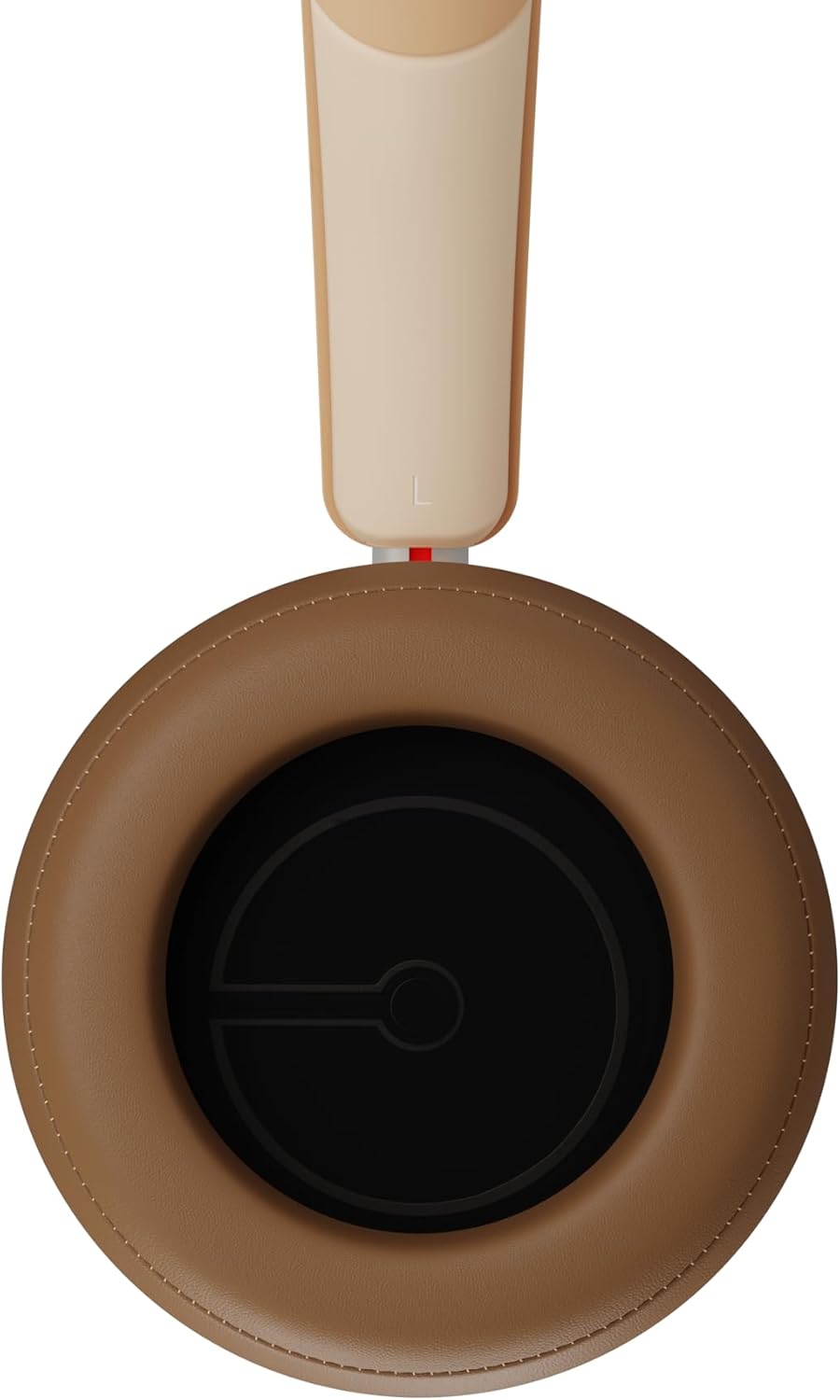
Slika 2.3: Notranjost view of a DALI IO-8 earcup, showing the soft padding and driver grille, designed for comfort and sound delivery.

Slika 2.4: Od blizu view of the DALI IO-8 earcup, showing the USB-C charging port and other control buttons.
2.1 Vsebina paketa
- Slušalke DALI IO-8
- Polnilni kabel USB-C
- 3.5 mm avdio kabel
- Travel Case (if included)
- Uporabniški priročnik (ta dokument)
2.2 Komponente slušalk

Slika 2.5: Eksplodiral view illustrating the internal components of the DALI IO-8 headphones, including the 50mm driver, circuitry, and earcup structure.
- Headband (Adjustable)
- Earcups (Over-ear design with genuine leather)
- 50mm Driver (SMC Driver Technology)
- Control Buttons (Power, Volume, ANC, Multifunction)
- USB-C Port (Charging and Wired Audio)
- 3.5mm Audio Jack (Wired Audio)
- Microphones (for ANC and calls)
3. Nastavitev
3.1 Polnjenje slušalk
Before initial use, fully charge your DALI IO-8 headphones.
- Connect the supplied USB-C cable to the USB-C port on the headphone earcup.
- Drugi konec kabla USB-C priključite na združljiv vir napajanja USB (npr. vrata USB računalnika, stenski adapter USB).
- LED indikator bo prikazoval stanje polnjenja. Popolnoma napolnjena naprava omogoča do 35 ur predvajanja z omogočenim ANC.
- Ko je baterija popolnoma napolnjena, odklopite kabel.
3.2 Vklop/izklop
- Za vklop: Press and hold the Power button for approximately 2 seconds until the LED indicator illuminates.
- Za izklop: Pritisnite in držite gumb za vklop približno 3 sekunde, dokler se LED indikator ne izklopi.
3.3 Bluetooth seznanjanje
The DALI IO-8 supports Bluetooth AptX Adaptive for high-quality wireless audio.
- Prepričajte se, da so slušalke izklopljene.
- Press and hold the Power button for approximately 5 seconds until the LED indicator flashes blue rapidly. This indicates pairing mode.
- Na zvočni napravi (pametnem telefonu, tablici, računalniku) omogočite Bluetooth in poiščite razpoložljive naprave.
- Na seznamu najdenih naprav izberite »DALI IO-8«.
- Once paired, the LED indicator will glow solid blue or flash slowly.
- Slušalke se bodo ob vklopu samodejno poskušale ponovno povezati z zadnjo seznanjeno napravo.
3.4 žična povezava
The DALI IO-8 can be used with a wired connection via the 3.5mm audio jack or USB-C.
- 3.5 mm avdio kabel: Connect one end of the supplied 3.5mm audio cable to the headphone's 3.5mm jack and the other end to your audio source's headphone output. The headphones can be used passively in this mode, or actively with ANC and amplification if powered on.
- Zvok USB-C: Connect the supplied USB-C cable to the headphone's USB-C port and the other end to a compatible USB audio output on your computer or device. This mode allows for digital audio transmission and charging simultaneously.
4. Upravljanje slušalk
4.1 Aktivno odpravljanje hrupa (ANC)
The DALI IO-8 features three distinct ANC modes and wind noise suppression.
- Press the dedicated ANC button to cycle through the available modes:
- ANC vklopljen: Največje odpravljanje hrupa.
- Način preglednosti: Allows ambient sounds to pass through for situational awareness.
- ANC izklopljen: Active noise cancellation is disabled.
- Wind noise suppression is automatically engaged in ANC modes to reduce interference from wind.
4.2 zvočni načini
Customize your listening experience with two sound profiles.
- Press the Sound Mode button (if available, or refer to specific button on device) to switch between:
- Hi-Fi način: Delivers a balanced and neutral sound signature.
- Način nizkih tonov: Enhances low-frequency response for a more impactful bass.
4.3 Playback and Volume Control
Use the control buttons on the earcup for media playback and volume adjustments.
- Povečaj glasnost: Pritisnite gumb '+'.
- Znižaj glasnost: Pritisnite gumb '-'.
- Predvajanje/pavza: Enkrat pritisnite večnamenski gumb.
- Naslednja skladba: Double-press the Multifunction button.
- Prejšnja skladba: Triple-press the Multifunction button.
4.4 Upravljanje klicev
Manage phone calls when connected via Bluetooth.
- Sprejmi/končaj klic: Enkrat pritisnite večnamenski gumb.
- Zavrni klic: Pritisnite in držite večnamenski gumb 2 sekundi.
- Aktiviranje glasovnega pomočnika: Press and hold the Multifunction button for 2 seconds (when not on a call).
5. Vzdrževanje
5.1 Čiščenje
- Slušalke obrišite z mehko, suho krpo, ki ne pušča vlaken.
- Ne uporabljajte abrazivnih čistil, topil ali kemičnih razpršil.
- Za ušesne školjke nežno obrišite z rahlo damp po potrebi obrišite s krpo, nato pa takoj posušite.
- Pazite, da v odprtine ali priključke ne vdre vlaga.
5.2 Shranjevanje
- When not in use, store the headphones in their protective travel case to prevent damage.
- Slušalk ne izpostavljajte ekstremnim temperaturam, vlagi ali neposredni sončni svetlobi.
6. Odpravljanje težav
| Težava | Možen vzrok | rešitev |
|---|---|---|
| Brez moči | Baterija je prazna. | Slušalke napolnite s priloženim kablom USB-C. |
| Seznanitev prek Bluetootha ni mogoča | Slušalke niso v načinu seznanjanja; Bluetooth naprave izklopljen; preveč oddaljeno od naprave. | Ensure headphones are in pairing mode (rapid blue LED flash). Turn on Bluetooth on your device. Move headphones closer to the device. Forget "DALI IO-8" on your device and re-pair. |
| Brez zvoka | Volume too low; incorrect input source; headphones not connected. | Increase volume on headphones and source device. Check Bluetooth connection or wired cable. Ensure the correct audio output is selected on your device. |
| ANC ne deluje učinkovito | ANC mode off; poor earcup seal. | Ensure ANC is enabled. Adjust headphones for a proper seal around your ears. |
7. Specifikacije
| Funkcija | Podrobnost |
|---|---|
| Ime modela | DALI IO-8 |
| Znamka | DALI |
| Tehnologija povezljivosti | Žično, brezžično (Bluetooth) |
| Brezžična komunikacijska tehnologija | Bluetooth (AptX Adaptive) |
| Odpravljanje hrupa | Active Noise Suppression (ANC) with Wind Noise Suppression |
| Namestitev ušesa | Nad ušesi |
| Velikost gonilnika | 50mm (SMC Driver Technology) |
| Impedanca | 25 ohme |
| Priključek za slušalke | 3.5 mm |
| Življenjska doba baterije | Do 35 ur (z ANC) |
| Materiali | Genuine Leather (earcups) |
8. Varnostne informacije
Please observe the following safety guidelines to ensure safe operation and prevent damage to your headphones or injury to yourself.
- Do not expose the headphones to water, rain, or moisture.
- Izogibajte se ekstremnim temperaturam.
- Do not disassemble, repair, or modify the headphones. This voids the warranty.
- Poslušajte pri zmerni glasnosti, da preprečite poškodbe sluha.
- Hraniti izven dosega otrok.
- Izdelek zavrzite odgovorno v skladu z lokalnimi predpisi.
9. Garancija in podpora
DALI products are manufactured to high standards and are covered by a limited warranty. For specific warranty terms and conditions, please refer to the warranty card included with your product or visit the official DALI website. For technical support, troubleshooting assistance, or service inquiries, please contact your authorized DALI dealer or DALI customer support.

Slika 9.1: A person wearing the DALI IO-8 headphones, demonstrating their comfortable fit and use in a real-world environment.