
Edifier NeoBuds Plus
Uporabniški priročnik za Edifier NeoBuds Plus
Model: NeoBuds Plus
Uvod
This manual provides detailed instructions for the setup, operation, maintenance, and troubleshooting of your Edifier NeoBuds Plus active noise cancelling earbuds. Please read this manual thoroughly before using the product to ensure optimal performance and longevity.
Kaj je v škatli
- Edifier NeoBuds Plus Earbuds (1 pair)
- Polnilna torbica (1)
- Ear Tips (7 sets: XXS/XS/S/M/L/XL/XXL)
- Polnilni kabel (1)
- Torbica (1)
- Uporabniški priročnik (ta dokument)

Image: The Edifier NeoBuds Plus earbuds are shown inside their open charging case, with one earbud also displayed separately. The black earbuds and case have a sleek, modern design.
Konec izdelkaview
The Edifier NeoBuds Plus feature a compact design with advanced audio components. Each earbud is equipped with a 10mm dynamic driver and a Knowles balanced armature driver for a balanced sound profile. The charging case provides extended battery life and supports wireless charging.

Image: A cutaway diagram illustrates the internal structure of an Edifier NeoBuds Plus earbud, highlighting the 10mm Dynamic Driver and the Balanced Armature Driver, which work together to produce high-quality audio.
Nastavitev
1. Začetno polnjenje
Before first use, fully charge the NeoBuds Plus and their charging case. Connect the charging cable to the USB-C port on the case, or place the case on a compatible wireless charging pad. A 15-minute charge provides approximately 4 hours of playtime.

Image: The Edifier NeoBuds Plus charging case is shown resting on a wireless charging pad, indicating its wireless charging capability. The earbuds are inside the open case, and text highlights the 47-hour total battery life with ANC off.
2. Seznanjanje
The NeoBuds Plus support Bluetooth 5.4 for stable connections and Google Fast Pair for quick setup with Android devices. They also feature multipoint connection, allowing simultaneous connection to two devices.
- Odprite polnilno ohišje. Slušalke bodo samodejno prešle v način seznanjanja.
- On your device (smartphone, laptop, tablet), enable Bluetooth and select "Edifier NeoBuds Plus" from the list of available devices.
- For Google Fast Pair, simply open the case near a compatible Android device and follow the on-screen prompts.

Image: A smartphone displaying the Edifier Connect app and a laptop showing activity data are positioned next to the open Edifier NeoBuds Plus charging case, illustrating the multipoint connection and Google Fast Pair features.
3. Izbira ušesnih konic
Choose the ear tips that provide the best seal and comfort for your ears. A proper fit is crucial for optimal sound quality and noise cancellation. Seven different sizes (XXS to XXL) are included to ensure a secure and comfortable fit.
Navodila za uporabo
Kontrole
The NeoBuds Plus can be controlled via the Edifier Connect App, push buttons on the earbuds, or voice commands. The push buttons offer customizable functions for playback, call management, and noise control.
- Enkratni dotik: Typically for play/pause.
- Dvojni dotik: Customizable (e.g., next track, answer/end call).
- Trojni dotik: Customizable (e.g., previous track, activate voice assistant).
- Tapnite in zadržite: Customizable (e.g., switch ANC modes).
Refer to the Edifier Connect App for full customization options and detailed control settings.
Prekinitev aktivnega hrupa (ANC)
The NeoBuds Plus feature hybrid ANC with up to -48dB noise reduction. Various modes are available to adapt to your environment:
- Visoko odpravljanje šumov: For maximum noise reduction in very noisy environments (e.g., airplanes, trains).
- Medium Noise Cancellation: Suitable for moderately noisy environments (e.g., offices, cafes).
- Nizko odpravljanje šumov: For subtle noise reduction.
- Način zvoka okolice: Omogoča vam, da slišite okolico, ne da bi morali sneti slušalke.
- Zmanjšanje vetra: Zmanjšuje hrup vetra med aktivnostmi na prostem.

Image: A woman is depicted using her smartphone while wearing Edifier NeoBuds Plus earbuds, with an overlay illustrating the -48dB noise cancellation capability. Icons below depict various noise cancellation modes: High, Low, Medium, Wind Reduction, and Ambient Sound, demonstrating adaptability to different environments.
Zvok visoke ločljivosti
Experience superior sound quality with Hi-Res Audio Wireless certification. The NeoBuds Plus support LHDC5.0, LDAC, and AAC codecs, delivering near-lossless 24bit/192kHz audio at up to 990kbps for exceptional detail and clarity.

Image: A woman is shown wearing the Edifier NeoBuds Plus earbuds, with visual cues indicating immersive high-resolution sound. Logos for Hi-Res Audio Wireless, LDAC, LHDC192, and LHDCX are displayed, signifying support for advanced audio codecs.
Klicne funkcije
Each earbud is equipped with three microphones and AI voice pickup technology, totaling six microphones for clear hands-free calls. This system ensures your voice is transmitted clearly, even in challenging conditions like winds up to 25km/h.
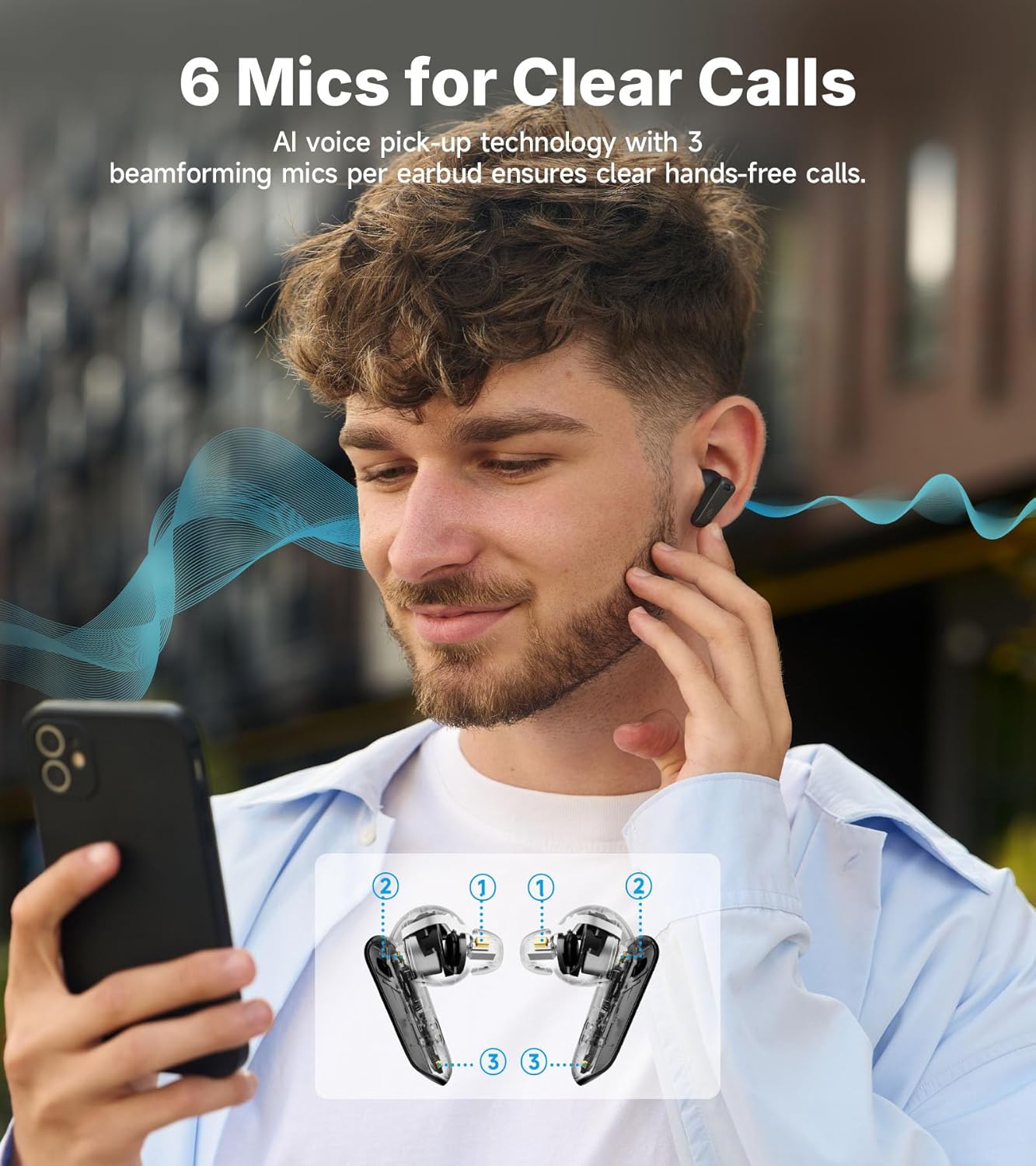
Image: A man is depicted using his smartphone while wearing Edifier NeoBuds Plus earbuds. An inset diagram highlights the location of the six microphones (three per earbud) used for AI voice pickup, ensuring clear call quality.
Intelligent Start-Stop
The earbuds feature wear sensors that automatically pause audio when removed from your ears and resume playback when reinserted, ensuring you never miss a beat.
Vzdrževanje
Čiščenje
Regularly clean your earbuds and charging case with a soft, dry cloth. For ear tips, remove them from the earbuds and clean with mild soap and water, then dry thoroughly before reattaching. Avoid using harsh chemicals or abrasive materials.
Življenjska doba baterije in polnjenje
The NeoBuds Plus offer up to 47 hours of total playtime with ANC off (earbuds + charging case). With ANC on, you can expect up to 34 hours. The case supports both USB-C wired charging and convenient wireless charging.
Vodoodpornost
The earbuds are rated IP54 for dust and water resistance, making them suitable for light splashes and sweat. They are not designed for submersion in water.
Odpravljanje težav
| Težava | Možen vzrok | rešitev |
|---|---|---|
| Slušalke se ne vklopijo. | Nizka baterija. | Slušalke postavite v polnilno ohišje in jih popolnoma napolnite. |
| Seznanitev z napravo ni mogoča. | Slušalke niso v načinu seznanjanja; Bluetooth na napravi izklopljen; naprava je predaleč. | Open case to enter pairing mode. Ensure device Bluetooth is on. Move device closer to earbuds. |
| Ni zvoka ali nizka glasnost. | Prenizka glasnost; nepravilno prileganje ušesnega nastavka; zamašena slušalka. | Adjust volume on device. Ensure ear tips provide a good seal. Clean earbud mesh if obstructed. |
| ANC ni učinkovit. | Improper ear tip fit; incorrect ANC mode selected. | Ensure ear tips provide a tight seal. Switch to High Noise Cancellation mode via the app or earbud controls. |
| Kakovost klicev je slaba. | Oviranje mikrofona; hrup iz okolja. | Ensure microphones are not covered. Move to a quieter environment if possible. |
Specifikacije
- Ime modela: NeoBuds Plus
- Tehnologija povezljivosti: Brezžično (Bluetooth 5.4)
- Vrsta zvočnega gonilnika: Hybrid Driver (Knowles balanced armature + 10mm dynamic)
- Nadzor hrupa: Aktivno odpravljanje šumov (-48 dB hibridni ANC)
- Življenjska doba baterije: Up to 47 hours (ANC off with case)
- Čas polnjenja: 15 minut za 4 uri igranja
- Mikrofoni: 6 (3 per earbud with AI voice pickup)
- Vodoodpornost: IP54
- Podprti avdio kodeki: LHDC5.0, LDAC, AAC
- Obseg Bluetooth: 10 metrov
- Nadzorna metoda: Aplikacija, gumb, glas
- Frekvenčno območje: 20 Hz - 40 kHz
- Teža artikla: 10.8 unč
Uradni videoposnetek izdelka
Video: Uradni videoposnetek izdelka s predstavitve Edifierasing the key features and design of the NeoBuds Plus earbuds, including their active noise cancellation, sound quality, and battery life.
Garancija in podpora
Edifier products are designed and manufactured to the highest quality standards. For warranty information, technical support, or service inquiries, please visit the official Edifier webspletno mesto ali se obrnite neposredno na njihovo podporo strankam. Račun shranite kot dokazilo o nakupu za uveljavljanje garancije.
Uradna trgovina Edifier: Trgovina Edifier na Amazonu
Ask a question about this manual
Ask about setup, troubleshooting, compatibility, parts, safety, or missing instructions. Manuals+ will review the question and use this page’s manual context to help answer it.