
Uvod
Thank you for choosing the SZELAM 16.7" Atomic Digital Wall Clock. This clock is designed to provide accurate time, date, indoor temperature, and humidity readings. Featuring automatic time synchronization via WWVB radio broadcast and a large, easy-to-read display, it is suitable for various indoor environments. This manual provides detailed instructions for setup, operation, and maintenance to ensure optimal performance.
Vsebina paketa
Ob razpakiranju se prepričajte, da so vsi spodaj navedeni predmeti prisotni in v dobrem stanju:
- 1 x SZELAM 16.7" Atomic Digital Wall Clock
- 1 x uporabniški priročnik
- Installation Package (Nails and Wall Plugs)

Image: The SZELAM 16.7" Atomic Digital Wall Clock, user manual, and installation hardware.
Lastnosti izdelka
- Atomska časovna sinhronizacija: Automatically synchronizes with WWVB radio broadcast for precise timekeeping.
- Velik zaslon: 16.7-inch screen with large numbers for easy readability from a distance.
- Večnamenski zaslon: Shows time (12/24 hour format), date, day of week, indoor temperature (°C/°F), and humidity.
- Samodejni poletni čas: Automatically adjusts for Daylight Saving Time.
- Napajanje na baterije: Requires 3 x AA batteries (not included), offering flexible placement without wires.
- Indikator prazne baterije: Opozori, ko je potrebna zamenjava baterije.
- Vsestranska postavitev: Designed for both wall mounting and tabletop use with a fold-out stand.

Image: The SZELAM Atomic Digital Wall Clock showcasing its large display and multiple data points.
Nastavitev
1. Namestitev baterije
The clock requires 3 x AA batteries (not included) for operation. Ensure correct polarity when inserting the batteries.
- Poiščite predal za baterije na zadnji strani ure.
- Odprite pokrov prostora za baterije.
- Insert 3 new AA batteries, matching the + and - terminals as indicated.
- Trdno zaprite pokrov prostora za baterije.
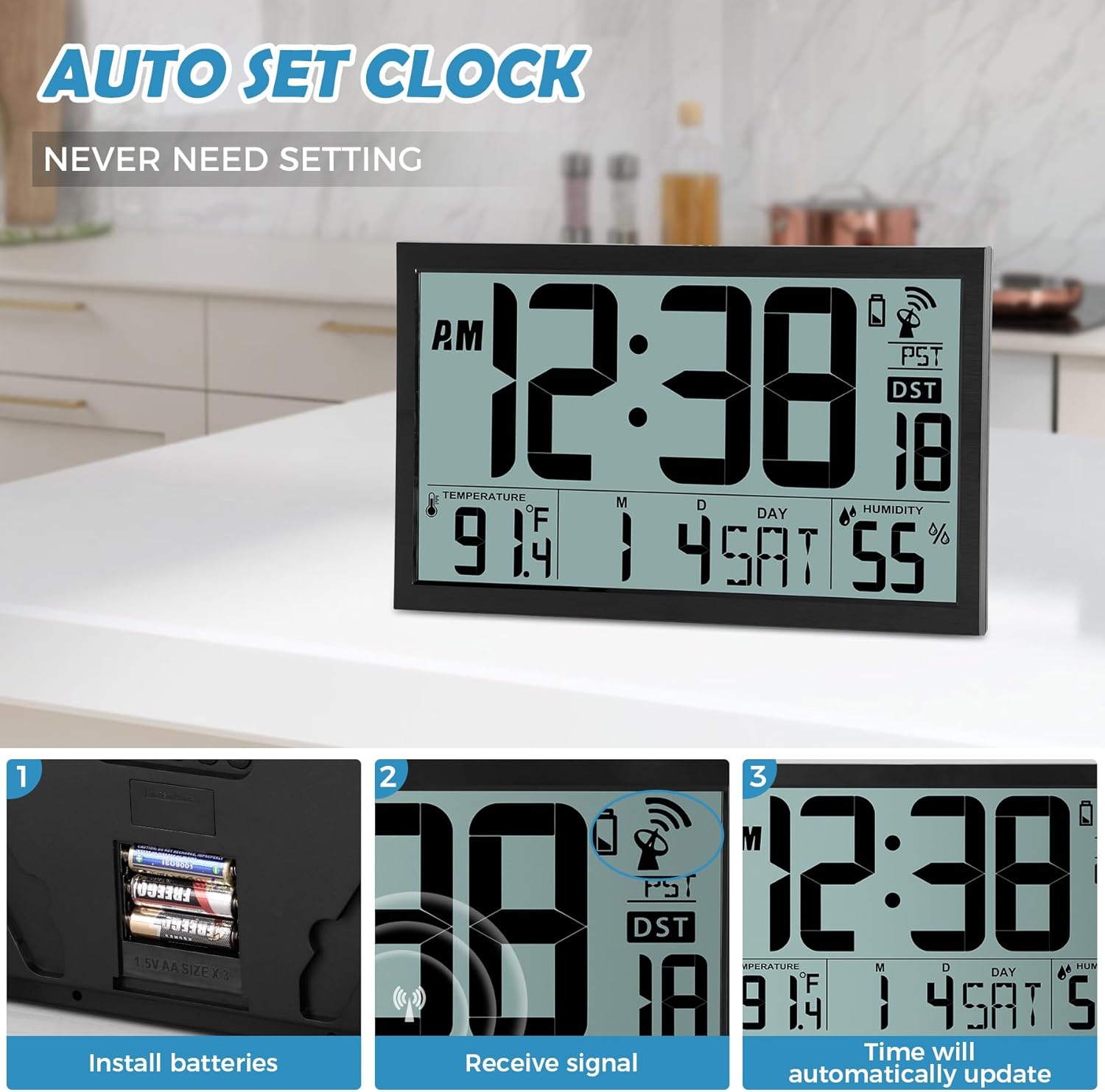
Image: Battery installation process, showing the battery compartment and inserted AA batteries.
2. Možnosti namestitve
The clock offers two convenient placement methods:
- Stenski nosilec: Use the two keyhole slots on the back of the clock. Drill two holes in your wall, insert the provided wall plugs, and then screw in the nails, leaving a small portion exposed for the clock to hang.
- Postavitev na mizo: Utilize the integrated fold-out stand on the back of the clock to place it on any flat surface.
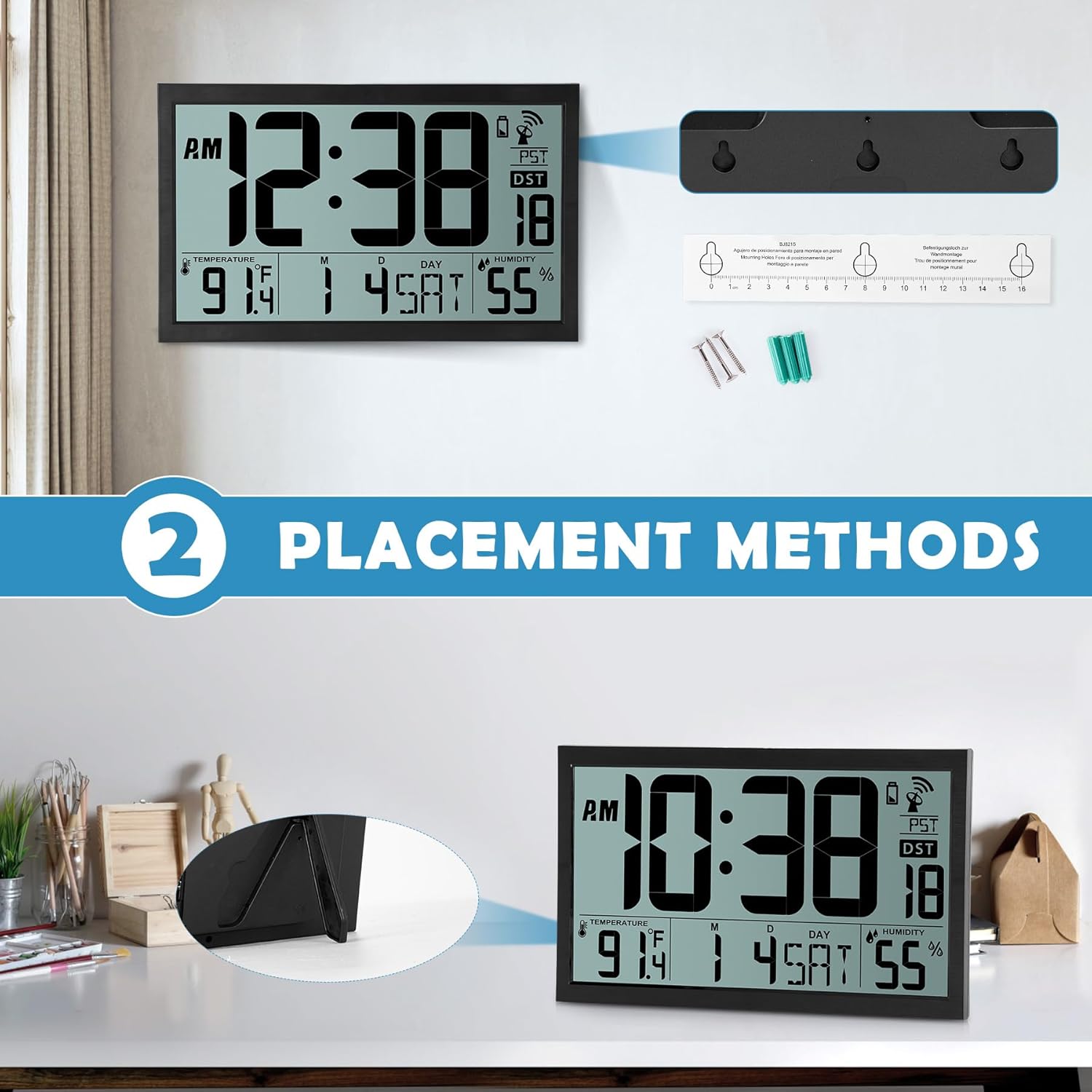
Image: Visual representation of the two placement methods: wall-mounted and tabletop.
Navodila za uporabo
1. Automatic Time Synchronization (Atomic Clock)
After battery installation, the clock will automatically attempt to receive the WWVB radio signal. This process can take up to 7 minutes. Once synchronized, the clock will automatically set the correct time and date and update itself every midnight. The time is always accurate to the second.
The clock supports four time zones: EST, PST, MST, CST. You can cycle through these time zones using the 'WAVE' button on the back of the clock.

Image: The clock receiving an atomic signal, with a map illustrating time zones.
2. Manual Time and Date Setting
If automatic synchronization is not desired or unavailable, you can manually set the time and date:
- Press the 'TIME' button on the back of the clock.
- Use the 'UP' and 'DOWN' buttons to adjust the year, then press 'TIME' to confirm.
- Repeat this process for month, date, hour, and minute.
- Once all settings are confirmed, the clock will display the manually set time.
3. Nastavitev alarma
Za nastavitev alarma:
- Press the 'SET' button (alarm icon) on the back of the clock.
- Use the 'UP' and 'DOWN' buttons to adjust the alarm hour, then press 'SET' to confirm.
- Use the 'UP' and 'DOWN' buttons to adjust the alarm minute, then press 'SET' to confirm.
- To activate or deactivate the alarm, press the 'ON/OFF' button (alarm icon). An alarm icon will appear on the display when activated.
4. Prikaz temperature in vlažnosti
The clock displays indoor temperature in either Celsius (°C) or Fahrenheit (°F) and humidity in percentage (%). You can switch between °C and °F using a dedicated button or by cycling through display modes if available (refer to specific button labels on your device).
5. Poletni čas (DST)
The clock features an automatic changeover from standard time to Daylight Saving Time and vice-versa. The 'AUTO DST' indicator will be visible on the display when this feature is active.
Video: A detailed demonstration of unboxing, battery installation, and setting the time, date, and alarm on the SZELAM Atomic Digital Wall Clock.
Vzdrževanje
- Čiščenje: Wipe the clock's surface with a soft, dry cloth. Avoid using abrasive cleaners or solvents.
- Zamenjava baterije: Ko se na zaslonu prikaže indikator nizke napolnjenosti baterij, zamenjajte baterije, da zagotovite neprekinjeno in natančno delovanje.
- Okolje: Place the clock in a dry environment, away from direct sunlight, extreme temperatures, and strong electromagnetic fields to prevent damage and ensure optimal signal reception.
Odpravljanje težav
| Težava | Možen vzrok | rešitev |
|---|---|---|
| Clock not displaying time/date | No batteries or incorrect battery polarity. | Vstavite 3 x AA bateriji s pravilno polarnostjo. |
| Čas/datum je napačen | Atomic signal not received or weak signal. | Place the clock near a window or in an open area. Allow up to 24 hours for signal reception. Manually set time if necessary. |
| Alarm se ne oglasi | Alarm ni aktiviran ali je napačno nastavljen. | Ensure the alarm is turned 'ON' (alarm icon visible) and the alarm time is set correctly. |
| Odčitki temperature/vlažnosti se zdijo netočni | Clock placed near heat/cold sources or in a high humidity area. | Relocate the clock to a stable indoor environment, away from direct sunlight, vents, or excessive moisture. |
Specifikacije
| Funkcija | Podrobnost |
|---|---|
| Znamka | SZELAM |
| Številka modela | BJ8215 |
| Vrsta zaslona | Digitalno |
| Velikost zaslona | 16.7 palcev |
| Dimenzije izdelka | 14.3 cm Š x 9 cm V |
| Vir napajanja | Na baterije (potrebne so 3 x AA baterije, niso priložene) |
| Vrsta namestitve | Stenski nosilec, namizni |
| Posebne lastnosti | Atomic Time, Calendar Display, Humidity Display, Large Display, Battery Indicator, Alarm Clock, Auto DST |
| Vrsta materiala | Plastika |
| Teža predmeta | 1.67 kilogramov |
Garancija in podpora
For warranty information or technical support, please refer to the contact details provided with your purchase or visit the official SZELAM webspletnega mesta. Račun shranite kot dokazilo o nakupu za morebitne garancijske zahtevke.