
1. Uvod
This manual provides essential information for the proper use and maintenance of your EBTOOLS 8-Inch 2-in-1 Pocket PC Computer. Please read this guide thoroughly before operating the device to ensure optimal performance and longevity. This compact and versatile device features an 8-inch touchscreen, a 360-degree rotating design, and runs on Windows 11 Pro.

Image: The EBTOOLS 8-Inch 2-in-1 Pocket PC shown in its tablet configuration, with a scenic road displayed on the screen.
2. Vsebina paketa
Preverite, ali so v paketu izdelka priloženi vsi spodaj navedeni elementi:
- 1 x EBTOOLS 8-Inch 2-in-1 Laptop
- 1 x napajalni kabel
- 1 x napajalnik (ameriški vtič)
- 2 x User Manuals (this document is one of them)

Image: The EBTOOLS 8-Inch 2-in-1 Pocket PC, its power supply cord, and the US plug adapter, laid out as they would appear in the package.
3. Izdelek je končanview
The EBTOOLS 8-Inch 2-in-1 Pocket PC is designed for portability and versatility. It features a compact form factor and a 360-degree rotating display, allowing it to function as both a laptop and a tablet.
Ključne značilnosti:
- Procesor: N100 CPU, capable of up to 3.4GHz frequency.
- Pomnilnik: 12 GB RAM-a LPDDR5.
- Shranjevanje: 512GB M.2 SSD, expandable up to 2TB.
- Zaslon: 8-inch touchscreen with 360-degree rotation.
- Povezljivost: WiFi6 (2.4G/5G band) and Bluetooth 5.2.
- Kamera: 2MP 30 Frame HD built-in front camera for video calls.
- Tipkovnica: Edge-less full-size QWERTY keyboard with integrated touchpad.
- Baterija: Built-in 5000mAh polymer lithium battery, providing 4-6 hours of use.
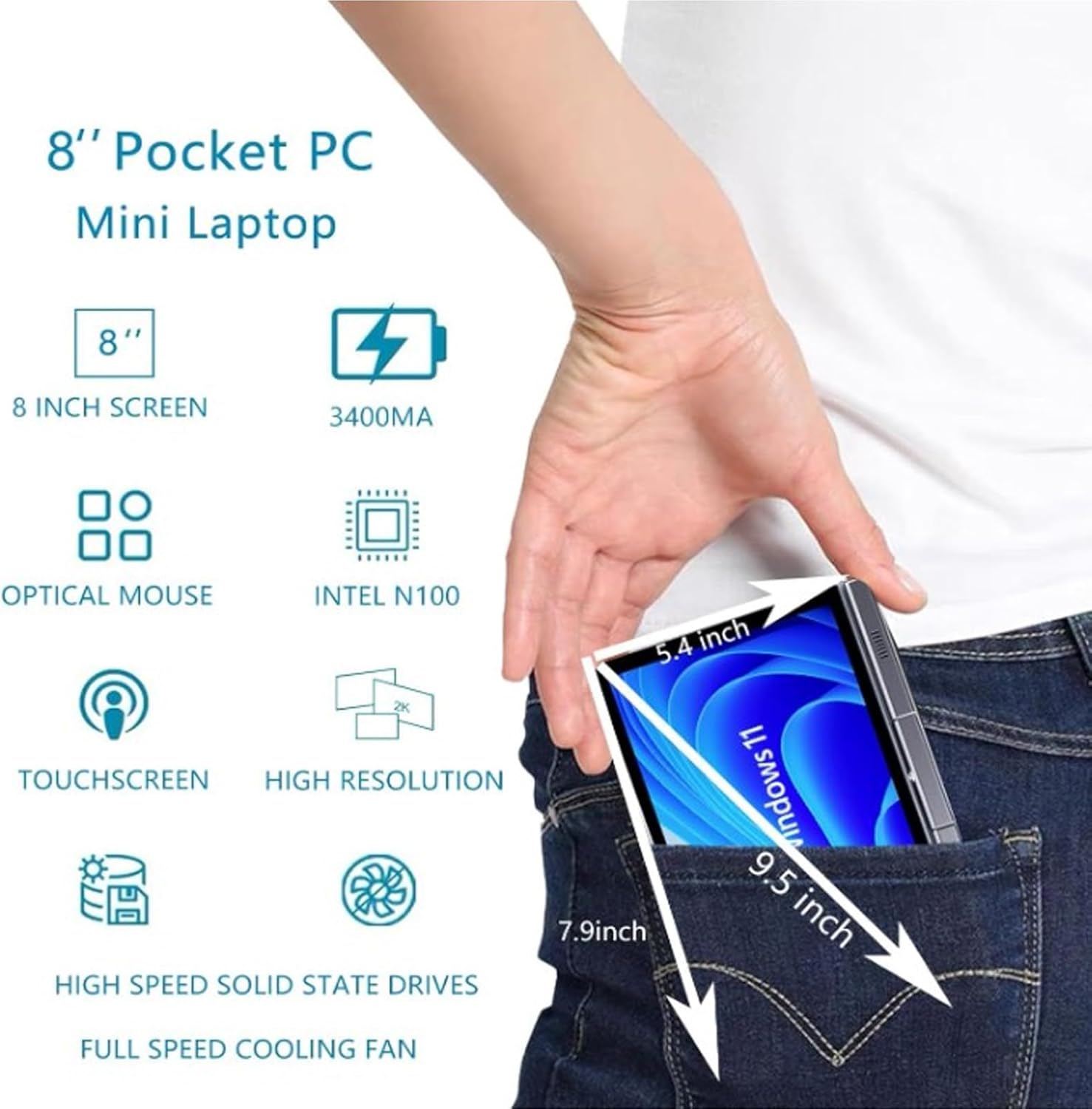
Image: A visual representation of the 8-inch Pocket PC's compact dimensions, demonstrating its portability by showing it fitting into a standard pocket.

Image: A labeled diagram highlighting the various ports (USB 3.0, Type-C, Audio, RJ45) and keyboard components (Front Camera, Speaker, Power Light, Power Button, Left/Right/Middle Mouse Buttons) of the EBTOOLS 8-Inch 2-in-1 Pocket PC.
4. Nastavitev
4.1 Začetni vklop in polnjenje
- Napolnite napravo: Before first use, connect the power adapter to the Type-C port on the device and plug it into a power outlet. Allow the device to charge fully. The power light indicator will show charging status.
- Vklop: Press and hold the Power Button located on the keyboard deck until the screen illuminates.
- Začetna nastavitev: Follow the on-screen instructions to complete the Windows 11 Pro setup process, including language selection, network connection, and user account creation.
The device is designed for immediate use upon completion of the initial Windows setup.
5. Navodila za uporabo
5.1 Tipkovnica in sledilna ploščica
- The device features an edge-less full-size QWERTY keyboard for typing.
- The integrated touchpad supports standard mouse functions, including moving the pointer, scrolling, and left/right clicks. The left, right, and middle mouse buttons are clearly indicated on the diagram.
5.2 Upravljanje zaslona na dotik
- The 8-inch display is a multi-touch screen. Use gestures such as tap, swipe, pinch-to-zoom, and rotate for navigation and interaction with applications.
5.3 Vrtenje za 360 stopinj
- The display can be rotated 360 degrees to switch between laptop mode (traditional clamshell) and tablet mode (screen folded back against the base).
- When in tablet mode, the keyboard is automatically disabled to prevent accidental input.
5.4 Priključitev zunanjih naprav
- USB 3.0: Connect external devices such as USB drives, mice, or keyboards to the USB 3.0 port.
- Tip C: Uporablja se za polnjenje in prenos podatkov.
- High Definition Multimedia Interface (HDMI): Connect an external monitor or projector using an HDMI cable for extended display.
- 3.5 mm standardni priključek za slušalke: Priključite slušalke ali zunanje zvočnike.
- Omrežna vrata RJ45: Za žično internetno povezavo priključite ethernetni kabel.
5.5 Brezžična povezljivost
- WiFi6: Access wireless networks (2.4G and 5G bands) for internet connectivity. Enable Wi-Fi through Windows settings.
- Bluetooth 5.2: Pair with Bluetooth-enabled devices such as headphones, speakers, or other peripherals. Enable Bluetooth through Windows settings.
6. Vzdrževanje
6.1 Čiščenje
- Za čiščenje zaslona in zunanjih površin uporabite mehko krpo, ki ne pušča vlaken. Za trdovratne madeže rahlo obrišiteampkrpo obrišite z vodo ali raztopino za čiščenje zaslona.
- Izogibajte se uporabi agresivnih kemikalij, abrazivnih čistil ali aerosolnih razpršil neposredno na napravi.
- Pred čiščenjem se prepričajte, da je naprava izklopljena in izklopljena.
6.2 Shranjevanje
- Napravo shranjujte na hladnem in suhem mestu, stran od neposredne sončne svetlobe in ekstremnih temperatur.
- If storing for an extended period, ensure the battery is charged to approximately 50% to preserve battery health.
7. Odpravljanje težav
This section addresses common issues you might encounter with your EBTOOLS 8-Inch 2-in-1 Pocket PC.
7.1 Naprava se ne vklopi
- Ensure the device is fully charged. Connect the power adapter and wait a few minutes before attempting to power on again.
- Verify the power adapter and cable are securely connected and the power outlet is functional.
- Za izvedbo trde ponastavitve poskusite držati gumb za vklop 10-15 sekund.
7.2 Težave s povezljivostjo Wi-Fi ali Bluetooth
- Preverite, ali je v nastavitvah sistema Windows omogočen Wi-Fi ali Bluetooth.
- Restart the device and your wireless router/Bluetooth device.
- Prepričajte se, da ste v dosegu omrežja Wi-Fi ali naprave Bluetooth.
- Update wireless drivers if available.
7.3 Zaslon na dotik se ne odziva
- Ponovno zaženite napravo.
- Prepričajte se, da je zaslon čist in brez umazanije.
- Check for any system updates that might include touchscreen driver fixes.
7.4 Kratka življenjska doba baterije
- Prilagodite nastavitve napajanja v sistemu Windows, da optimizirate porabo baterije.
- Zaprite nepotrebne aplikacije, ki se izvajajo v ozadju.
- Zmanjšajte svetlost zaslona.
- Ensure the device is not running resource-intensive tasks continuously.
8. Specifikacije
| Funkcija | Specifikacija |
|---|---|
| Operacijski sistem | Windows 11 Pro |
| Velikost zaslona | 8 palcev |
| Procesor | N100 CPU (up to 3.4GHz) |
| RAM | 12 GB LPDDR5 |
| Shranjevanje | 512GB M.2 SSD (supports up to 2TB) |
| Sprednja kamera | 2MP 30 Frame HD Built-In Camera |
| Bluetooth | BT 5.2 |
| Wireless Fidelity Type | 2.4G / 5G Band (WiFi6) |
| Vmesniki | 1 x USB3.0, 1 x 3.5mm Standard Headphone Jack, 1 x High Definition Multimedia Interface Port, 1 x Type-C, 1 x RJ45 Network Port |
| Vrsta baterije | Vgrajena 5000mAh polimerna litijeva baterija |
| Življenjska doba baterije | 4-6 hours (typical use) |
| Teža predmeta | 2.68 funta (približno 1.22 kg) |
| Dimenzije paketa | 9.45 x 7.09 x 2.36 palcev |
9. Garancija in podpora
9.1 Garancija izdelka
Specific warranty details for your EBTOOLS 8-Inch 2-in-1 Pocket PC are typically provided with your purchase documentation or on the manufacturer's official webZa informacije o garancijskem kritju, trajanju in pogojih glejte te vire.
9.2 Podpora strankam
For technical assistance, troubleshooting beyond this manual, or warranty claims, please contact EBTOOLS customer support. Contact information can usually be found on the product packaging, the manufacturer's webspletnem mestu ali prek vašega prodajalca.
When contacting support, please have your product model number (EBTOOLS9pxf4058ch-12) and purchase information readily available.