
1. Izdelek je končanview
The Riokko YM119 OBD2 Scanner is a diagnostic tool designed for car owners to easily read and clear engine fault codes. It provides real-time data, freeze frame information, and supports various diagnostic functions for OBDII/EOBD compliant vehicles manufactured since 1996. Its intuitive interface and compact design make it suitable for both professional technicians and home users.

Figure 1.1: Riokko YM119 OBD2 Scanner. This image shows the main diagnostic tool with its color screen, control buttons, and the attached OBDII connector cable.
2. Nastavitev in prva uporaba
2.1 Vsebina paketa
- Riokko YM119 OBD2 Scanner Unit
- Uporabniški priročnik (ta dokument)
2.2 Priključitev skenerja
- Poiščite priključek za podatkovno povezavo (DLC) vozila. Običajno se nahaja pod armaturno ploščo na voznikovi strani.
- Ensure the vehicle's ignition is turned ON (engine can be off or running, depending on the test).
- Plug the OBDII connector of the YM119 scanner firmly into the vehicle's DLC. The scanner will power on automatically.
2.3 Izbira jezika
The YM119 supports 13 national languages. To change the language:
- From the main menu, navigate to "Setting" using the arrow keys.
- Pritisnite OK button to enter the Setting menu.
- Izberite »Jezik« in s seznama izberite želeni jezik.
- Pritisnite OK da potrdite svojo izbiro.
3. Upravljanje skenerja
3.1 Gumbi za krmarjenje
- IZHOD: Returns to the previous screen or main menu.
- Puščici GOR/DOL: Krmarjenje po možnostih menija.
- Puščici LEVO/DESNO: Navigate through data screens or adjust settings.
- V REDU: Potrdi izbiro ali odpre podmeni.
- BAT: Initiates the battery voltage test.

Figure 3.1: Main Menu and Professional Functions. This image illustrates the scanner's main menu interface and highlights its key diagnostic capabilities such as Engine Fault Diagnostics, Quick Clear Fault Code, Real-time Data Stream, and Battery Life Test.
3.2 Diagnostične funkcije
From the main menu, select "Diagnosis" to access the primary diagnostic functions.

Figure 3.2: OBD II Diagnostic Test Items. This image shows the comprehensive list of diagnostic tests available on the scanner, from reading and erasing codes to advanced sensor and component tests.
3.2.1 Preberite kode
Ta funkcija pridobi diagnostične kode težav (DTC) iz računalnika vozila. Te kode označujejo specifične težave, ki jih je zaznal vgrajeni diagnostični sistem vozila.
- Select "Read Codes" from the Diagnosis menu.
- The scanner will display any stored, pending, or permanent DTCs.
- Uporabite GOR/DOL arrows to scroll through the codes.
- For detailed information on a specific code, use the "DTC Lib" function or refer to a reliable automotive repair database.
3.2.2 Jasne kode
This function erases DTCs from the vehicle's computer and turns off the Malfunction Indicator Lamp (MIL), znana tudi kot lučka za preverjanje motorja. Note: Clearing codes does not fix the underlying problem. The MIL will illuminate again if the fault persists.

Figure 3.3: Check and Turn Off Engine Light. This image demonstrates the scanner's ability to diagnose and clear engine fault codes, effectively turning off the Check Engine Light on the vehicle's dashboard.
- Select "Erase Codes" from the Diagnosis menu.
- Potrdite dejanje, ko ste pozvani.
- The MIL should turn off.
3.2.3 Real-time Data (Live Data Stream)
View real-time sensor data from the vehicle's engine control unit (ECU). This data can be displayed in text or graphical format, allowing for dynamic monitoring of vehicle performance.
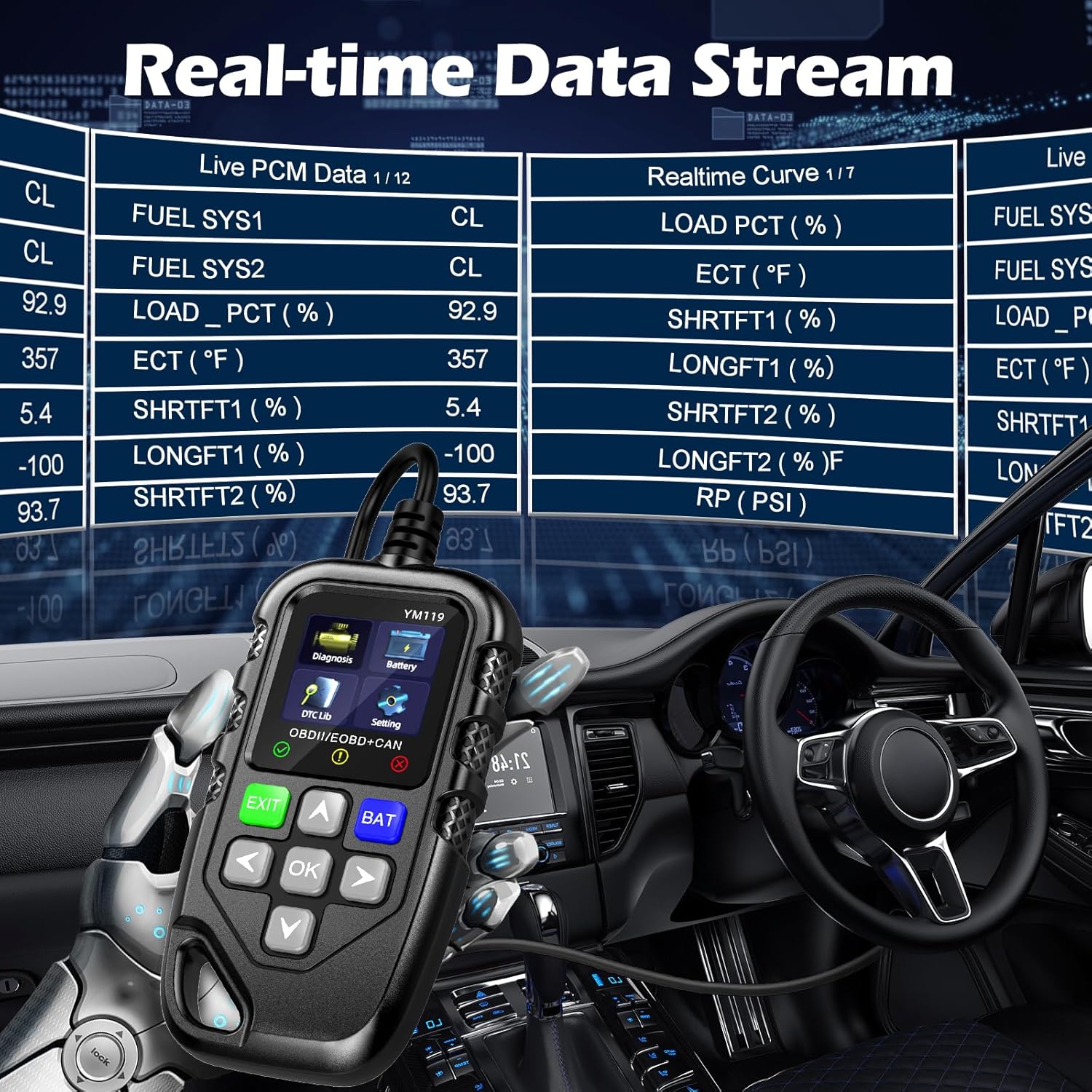
Figure 3.4: Real-time Data Stream. This image shows the scanner's capability to display live engine data, including various sensor readings and their corresponding real-time curves, aiding in dynamic vehicle diagnostics.
- Select "Live Data" or "Realtime Curve" from the Diagnosis menu.
- Uporabite GOR/DOL arrows to scroll through different data parameters.
- Uporabite LEVO/DESNO arrows to switch between text and graph views (if available for the parameter).
3.2.4 Zamrznjeni podatki
When an emission-related fault occurs, the vehicle's computer records a snapshot of operating conditions at the time of the fault. This "freeze frame" data helps in diagnosing intermittent problems.
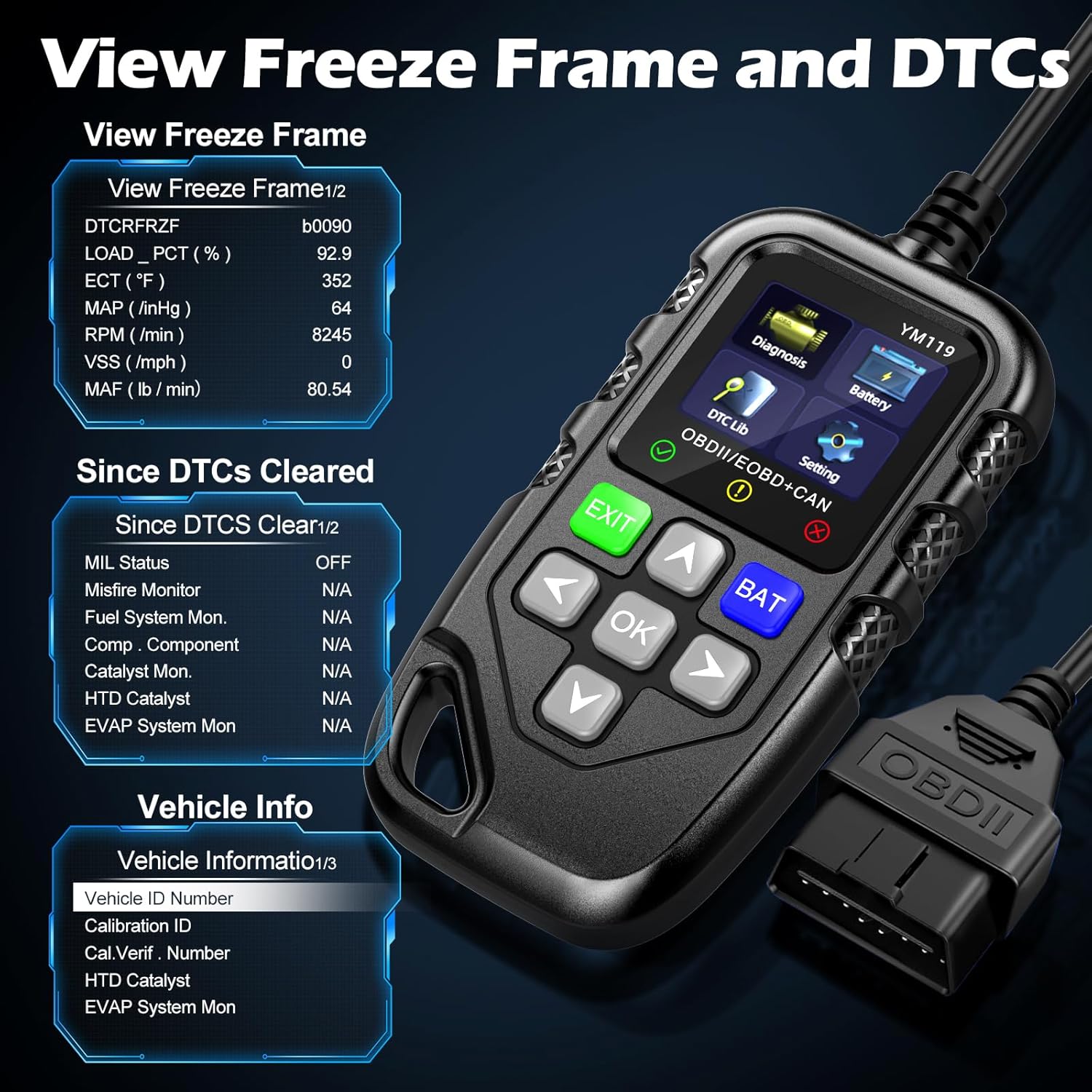
Slika 3.5: View Freeze Frame and DTCs. This image displays the scanner's ability to capture and show freeze frame data, which provides a snapshot of engine conditions at the moment a fault code was set, aiding in diagnosis.
- Izberite "View Freeze Frame" from the Diagnosis menu.
- Review the recorded parameters.
3.2.5 DTC Query (DTC Lib)
The built-in DTC Library allows you to look up definitions for generic (P0, P2, P34, B0, C0, U0) and manufacturer-specific (P1, P30-P33, B1, C1, U1) codes.
- From the main menu, select "DTC Lib".
- Vnesite kodo DTC s puščičnimi tipkami in OK gumb.
- Skener bo prikazal definicijo kode.
3.2.6 I / M pripravljenost
This function checks the readiness of the emission-related monitoring systems on the vehicle. It's useful for determining if the vehicle is ready for an emissions test.
- Select "I/M Readiness" from the Diagnosis menu.
- The scanner will display the status of various monitors (e.g., Misfire Monitor, Fuel System Monitor). "OK" indicates the monitor has completed its test, "INC" indicates incomplete, and "N/A" indicates not applicable.
3.2.7 Baterija Voltage Preizkusite
The YM119 can perform a basic battery voltage test to assess the vehicle's battery health.

Figure 3.6: Estimate Battery Life Test. This image shows the scanner's dedicated function for monitoring and assessing the vehicle's battery voltage and overall health.
- From the main menu, select "Battery" or press the BAT gumb.
- Skener bo prikazal trenutno napolnjenost baterijetage.
3.2.8 Informacije o vozilu
This function retrieves the Vehicle Identification Number (VIN), Calibration ID (CALID), and Calibration Verification Number (CVN) of the vehicle.
- Select "Vehicle Info" from the Diagnosis menu.
- Skener bo prikazal razpoložljive podatke o vozilu.
4. Vzdrževanje
4.1 Čiščenje naprave
To maintain the scanner's performance and appearance:
- Enoto obrišite z mehko, damp krpo.
- Ne uporabljajte abrazivnih čistil ali topil.
- Ensure the device is dry before storage.
4.2 Shranjevanje
Store the scanner in a clean, dry environment away from extreme temperatures and direct sunlight. Keep the OBDII connector free from dust and debris.
5. Odpravljanje težav
| Težava | Možen vzrok | rešitev |
|---|---|---|
| Skener se ne vklopi. |
|
|
| Sporočilo »Napaka povezave« ali »Napaka v komunikaciji«. |
|
|
| Engine light reappears after clearing codes. | Underlying fault has not been repaired. | Clearing codes only turns off the light; it does not fix the problem. Diagnose and repair the underlying issue before clearing codes again. |
| Inaccurate or missing data readings. |
|
|
6. Specifikacije
| Funkcija | Podrobnost |
|---|---|
| Številka modela | AE0004L (YM119) |
| Znamka | Riokko |
| Velikost zaslona | 2.8 palcev |
| Podprti protokoli | Nine standard OBDII/EOBD protocols |
| Podprti jeziki | 13 nacionalnih jezikov |
| Teža predmeta | 7.8 unč (približno 221 gramov) |
| Dimenzije paketa | 8.11 x 5.35 x 1.14 palca (približno 20.6 x 13.6 x 2.9 cm) |
| Prvi razpoložljivi datum | 16. oktober 2024 |
7. Garancija in podpora
7.1 Informacije o garanciji
The Riokko YM119 OBD2 Scanner comes with a 3-letna garancija od datuma nakupa. Ta garancija pokriva napake v materialu in izdelavi pri normalni uporabi.
7.2 Politika vračila
A 30-day no-questions-asked return policy is offered for your purchase. Please refer to your retailer's specific return instructions.
7.3 Podpora strankam
For technical assistance, warranty claims, or any other inquiries, please contact Riokko customer service. 24/7 služba za stranke vam je na voljo za pomoč.
Please visit the official Riokko webNajnovejše kontaktne podatke najdete na spletni strani ali na embalaži izdelka.